
Mortis
-
Posts
111 -
Joined
-
Last visited
Content Type
Profiles
Warranty Claims
Downloads
Forums
Store
Services
Downloads Plus Support
DOWNLOADS EXTRA
Reels
Everything posted by Mortis
-
Hi, Would it be possible to add an optional inactivity/skill decay system to Skill Tree? What I have in mind is progression gradually decreasing when a player does not log in for a configurable number of days. For example: Grace period: 3 days offline Decay: 1% of total XP/progression per additional inactive day Maximum decay: configurable, e.g. 35% Minimum protected level: configurable, e.g. level 10 Prestige should optionally be excluded from decay Decay would be applied when the player next logs in Ideally, if XP decay causes the player to lose levels, the corresponding level-earned skill points/skills would also be adjusted safely so the player cannot keep more skill points than their reduced level allows. A few possible config options could be: "Enable inactivity decay": true "Grace period in days": 3 "Decay per inactive day": 0.01 "Maximum inactivity decay": 0.35 "Minimum protected level": 10 "Decay prestige": false Skill Tree already stores the player's logged_off time for Rested XP, so I was wondering whether that existing system could also be used for inactivity decay. The idea is to make long-term persistent progression a little more dynamic on PvE servers without completely wiping players who take a break. Would something like this be possible to add, or is there already an API-supported way for another plugin to safely reduce XP across multiple levels and adjust the associated skill points? Thanks!
-
 np
np -
No, i mean when the server wipes the fuse dont seem to also wipe. Could be a glitch on my side tho, just wanted to let you know.
- 16 comments
-
- 1
-

-
- #powergrid
- #power
- (and 15 more)
-
Great plugin for my Onegrid which is too small to contain the power plant. Just one thing tho, testing the plugin it does not seem to wipe the fuses? I could be wrong testing the server for hours now and not being clear because of it. Thanx for the plugin.
-
 I would love to see an option for dynamic pricing on individual shop items instead of only globally. For example, being able to enable dynamic pricing for resources such as Metal Fragments, Low Grade Fuel, Sulfur, etc., while keeping weapons, clothing, custom items and other shop entries at fixed prices. Something like an individual item option: "Use Dynamic Pricing?": true/false This would make it much easier to balance the economy and prevent bulk-selling or recycler exploits without making the entire shop fluctuate. An option like this would be really nice :)))
 -
Hi, I noticed a few issues with the API hooks in the current Checkpoint Event version: OnCheckpointEventCompleted does not always fire when the event is successfully completed. OnCheckpointEventStopped does not seem to fire when an individual event ends/gets cleaned up normally. Great plugin!
-
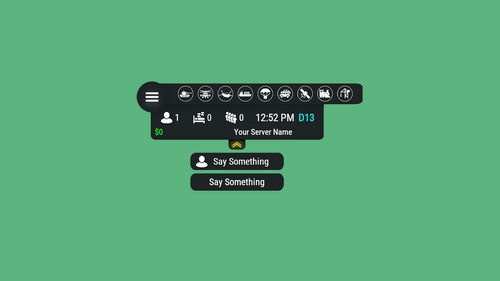 Is there any way to get the satellite crash into the HUD when it's crashing?
 -
Images are not available when you click the link, so I think that is the problem. I guess use a different image host. I use https://images.mapstr.gg/ for my images, no problem with it.
-
.thumb.png.869cef4c06723841adb05a43027fe8f0.png) Last update sweet! Maybe add a possibility to make the tiered events selectable in an event manager per command For now it selects the tiers randomly with one command. subwayevent start. But it would be great if the event manager can call the evnets per tier: subwayevent start easy subwayevent start hard subwayevent start nightmare etc This would be helpfull to manage progression on a weekly server that the event manager can call easy in the first two days, then normal on the 3rd and 4th day and so on and the subwayevent start for random events. Keep up the good work !
Last update sweet! Maybe add a possibility to make the tiered events selectable in an event manager per command For now it selects the tiers randomly with one command. subwayevent start. But it would be great if the event manager can call the evnets per tier: subwayevent start easy subwayevent start hard subwayevent start nightmare etc This would be helpfull to manage progression on a weekly server that the event manager can call easy in the first two days, then normal on the 3rd and 4th day and so on and the subwayevent start for random events. Keep up the good work ! -
Hey, nice plugin! Just asking if you have plans to add hooks so I can use it with the Server HUD plugin: Also, a console command would be nice instead of only a chat command for the event managers
-
get the error: Error while compiling PlayerStatTags: There is no argument given that corresponds to the required parameter 'destination' of 'MemoryExtensions.ToLower(ReadOnlySpan<char>, Span<char>, CultureInfo)' | Line: 898, Pos: 21
-
gives error: Error while compiling ExtractionRareMinerals: Argument 1: cannot convert from 'Facepunch.StringView' to 'string' | Line: 800, Pos: 42
-
get folloowing error: Error while compiling MonumentLock: Argument 3: cannot convert from 'Facepunch.StringView' to 'string' | Line: 452, Pos: 43
-
Get the error: Error while compiling NewsBroadcaster: Operator '??' cannot be applied to operands of type 'StringView' and 'string' | Line: 760, Pos: 34
-
 You might want look into this. Sometimes the heli, if the players drop the Bradley at excavator, it gets stuck..
 -
Is it me, or is the giveXP command not working, or is the command changed? Have XP bundels in my Mevent shop, but it does not seem to give anything anymore when buying a bundle...
-
 Is it me, or is the giveXP command not working, or is the command changed? Have XP bundels in my Mevent shop, but it does not seem to give anything anymore when buying a bundle...
 -
The plugin does not compile after april's update Error while compiling PunishAttacker: The type or namespace name 'UiFramework' does not exist in the namespace 'Oxide.Ext' (are you missing an assembly reference?) | Line: 10, Pos: 17
-
Get compiling error: Error while compiling F15CrashEvent: 'BasePlayer' does not contain a definition for 'fallingVelocity' and no accessible extension method 'fallingVelocity' accepting a first argument of type 'BasePlayer' could be found (are you missing a using directive or an assembly reference?) | Line: 780, Pos: 17
-
So I am wondering if it is possible to use custom items as items that should be collected. I see that the plugion can give custom item rewards (with the skinID) but I dont see it for the items collected. In the editor i see: Target: specify ShortName, SkinID, or select using the button next to it. But I don't know how to use it. Do I use the shortname plus skinID, or only the SkinID? The server gives weed-flowers with about 5% of alle the hemp plants when picked up. I have a quest where you need to harvest 100 hempflowers (shortname: sticks SkinID: 3599034897) where it gives a reward 2 refined gold bars (custom item). "QuestID": 48108, "QuestDisplayName": "The supply of weed flowers is depleted", "QuestDisplayNameMultiLanguage": "", "QuestDescription": "People love their weed—it helps them forget their troubles… and apparently everything else too. Unfortunately, the stock has run out, and now everyone remembers their problems again.\n\nThat’s where you come in.\n\nCollect 100 hemp flowers and bring them to me before the entire city loses its mind.\n\nDo that, and I’ll reward you generously… and maybe restore some peace and quiet around here.", "QuestDescriptionMultiLanguage": "", "QuestMissions": "Grow 100 of hemp plants and hand them over to me", "QuestMissionsMultiLanguage": "", "QuestPermission": "", "QuestType": 16, "Target": "sticks, 3599034897", "IsReturnItemsRequired": true, "IsMultiLanguage": false, "ActionCount": 1, "IsRepeatable": false, "Cooldown": 0, "PrizeList": [ { "PrizeName": "", "PrizeType": 2, "ItemShortName": "metal.refined", "ItemAmount": 2, "CustomItemName": "Refined Gold", "ItemSkinID": 3651922720, "PrizeCommand": "", "CommandImageUrl": "", "IsHidden": false } ] } Is it possible to make that happen?
-
 Same thing: Error while compiling ATMSystem: 'Pool' does not contain a definition for 'GetList' | Line: 271, Pos: 40 I use oxide
 -
plugin does not load and the following message is in the log: Error while compiling ATMSystem: 'Pool' does not contain a definition for 'GetList' | Line: 271, Pos: 40 Just letting you know..
-
Yeah, figured it out. I put the custom item in the loot crates, i like the visual part of it, openin gup a crate and seeing it, it adds to the excitement i think. But I'm sure I have some other uses for it in the future! thanks!
-
The issue wasn't the "economics not found", I dont use economics for BradleyDrop but a custom 'cash' item in the loottable i've put in with LootTable & Stacksize manager. The Scrap issue was a skinID for scrap that was placed in the BradleyDrop config that was set to 123456789. Don't know if I'd put it there as a placeholder or not, but it was giving the Scrap with the skinID loading arrows in the icon, which would not load because obvious reasons. Sometimes when you own multiple servers, it all gets a bit confusing i guess Still great plugins that people really enjoy on my server!
-
I think I have found the problem. You can delete this post.. Sorry..