

-
Posts
342 -
Joined
-
Last visited
-
Days Won
4
Content Type
Profiles
Warranty Claims
Downloads
Forums
Store
Services
Downloads Plus Support
DOWNLOADS EXTRA
Reels
Everything posted by FoxMods
-

Chat anouncements Broke After Trainyard Update
FoxMods replied to DaBoiJason's Support Report in Support
Do you have the notify plugin from codefling installed ? -
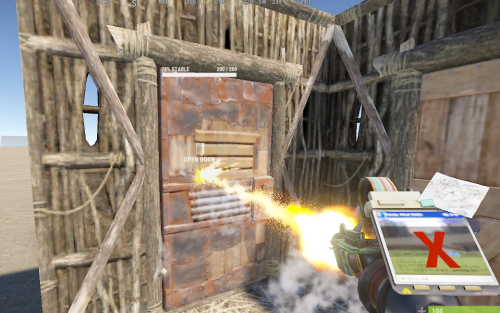
Version 1.0.2
656 downloads
Allows players to upgrade doors to the next tier without having to take the doors off. Activate with the /dup command, and then hit with the building hammer to go to the next grade. Pay Options: Players must have the required resources on them to upgrade, and know the blueprint. These can be set in the config. Blocking Options: Recent Damage Raid Block Building Block Blueprint Block Config: { "Chat command": "dup", "Disable when item is switch from allowed tool": true, "Player must pay upgrade costs": true, "Player must have required blueprint unlocked": true, "Blocked upgrade when recently damaged": true, "Blocked upgrade when building blocked": true, "Blocked upgrade when raid blocked": true } Lang: { "Prefix": "<color=#90fce7>Door Upgrade</color>: ", "MissingBlueprintReq": "missing blueprint requirement.", "MissingIngredientReq": "missing upgrade items.\n{0}", "BuildingBlocked": "you are currently building blocked.", "NoEscapeBlocked": "you are currently raid/combat blocked.", "AlreadyTopTier": "door is currently top tier.", "UpgradeToggle": "was {0}.", "Enabled": "<color=#affc62>Enabled</color>", "Disable": "<color=#fc3d3d>Disabled</color>", "AttackBlocked": "unable to upgrade, upgradable in: <color=#90fce7>{0}</color>s." }Free -
Changed Status from Work in Progress to Closed
-
Issues should now be resolved thank you for the report.
-
Changed Status from Pending to Work in Progress
-
Thank you for the report will look into this for you.
-
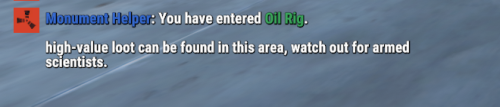 Are you using a custom map by any chance? Do you get double entered or just leave? To check if you have duplicate profabs on a map you need to open the map with Rust Edit and use the remove duplicates option.
 -
Have you tried restarting the server? looks like you might have double prefabs.
-
Changed Status from Pending to Closed
-
Known compatability problem, have contacted the developer. we will work on trying to get compatability for this thank you for the report.
-
do you have notify plugin installed? it might be that you have toggled the option for notify plugin but it is not installed.
-
Thank you for the report will look into this for you.
-
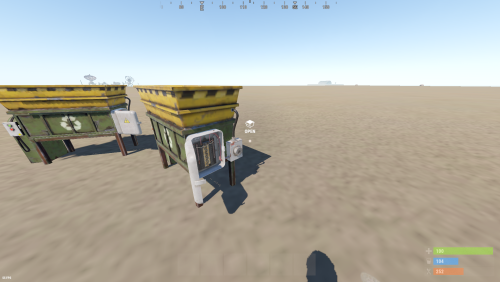 Not a feature i thought of adding as it never really made sense for moument placed recyclers, but will coonsider this in a future update.
 -
Version 1.0.8
1,148 downloads
About: Recyclers will now require players to insert a fuses to toggle on the recycler. Config: { "Enable player placed only recyclers": false, "Fuse durability per recycle": 10.0 } Lang: { "NoFuse": "Please insert a fuse to toggle on the recycler." }Free -
Version 1.0.4
711 downloads
About: Displays custom messages with informative information for players when entering or leaving monuments. Full customizable bounds, display names and messages. More feature planned: Display recent combat history ex: death and players nearby count. Custom loot spawns. Permission: monumenthelper.use Chat Command: Toggle on/off notifications. /mh Lang: { "Prefix": "<color=#3669CF>Monument Helper</color>: ", "MonumentEnter": "You have entered <color=#3BA55C>{0}</color>.\n\n{1}", "MonumentLeave": "You left <color=#ED4245>{0}</color>", "ToggleEnabled": "<color=#3BA55C>Enabled</color>", "ToggleDisable": "<color=#ED4245>Disabled</color>", "Toggled": "was {0}" } Config: { "Chat command": "mh", "Display message prefix": true, "Display message when players enter a monument": true, "Display message when players a leave monument": true, "Wipe player toggles on new map save": true, "Monuments": { "Satellite Dish": { "DisplayName": "Satellite Dish", "Description": "A useful monument for loot, key cards and recycling items.", "Enabled": true, "Center": { "x": 8.0, "y": 1.0, "z": 8.0 }, "Bounds": { "x": 150.0, "y": 150.0, "z": 150.0 } }, "Oil Rig": { "DisplayName": "Oil Rig", "Description": "High-value loot can be found in this area. Watch out for armed scientists.", "Enabled": true, "Center": { "x": 25.0, "y": 0.0, "z": 0.0 }, "Bounds": { "x": 140.0, "y": 100.0, "z": 140.0 } }, "Mining Outpost": { "DisplayName": "Mining Outpost", "Description": "Low-value loot and a recycler can be found here.", "Enabled": true, "Center": { "x": 0.0, "y": 0.0, "z": 0.0 }, "Bounds": { "x": 50.0, "y": 50.0, "z": 50.0 } } } }Free- 6 comments
-
- 1
-

-
- #monument
- #announcment
- (and 2 more)
-
Changed Status from Pending to Closed
-
Nothing to worry about will push an update in a moment.
-
 that is correct open the ui select the bank you created then close the ui, you will then be able to edit the guards for that bank event. just to make sure you have set the permission to announce message for player correct?
 -
thanks for the feedback, will take a look at this for you please revert yo using chat messages for now.
-
Changed Status from Pending to Closed
-
messaged the owner of the Personal Vault Door plugin, will be working with him to make his plugin more compatible with Bank Heist, his plugin overrides all vault doors currently.
-
are you using any loot multiplier plugin? for the notifications are you using the notity plugin or just basic messages
-
yeah that is a known issue with Personal Vault Door plugin, will contact the developer in the monring and see if it can be solved.
-
If you have any other plugins that use AI could you list them for me could possibly be one conflicting. Make sure AI and Nav Mesh is enabled. Remove worker permission from all players that are not working for the bank. Check console for Nav Mesh errors could indicate the prefab being used is not usable by the AI
-
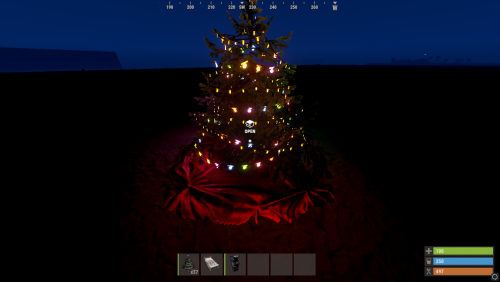 Developer has still not accepted the patch, only option that might be left is to add it as a new feature to the current plugin this weekend.
