

BlueDev
-
Posts
41 -
Joined
-
Last visited
Content Type
Profiles
Warranty Claims
Downloads
Forums
Store
Services
Downloads Plus Support
DOWNLOADS EXTRA
Everything posted by BlueDev
-
.thumb.gif.f32a2f182ff8c24af53b7c58d4ef9e8a.gif) I just sent you a PM No ^^
I just sent you a PM No ^^ -
The bug is fixed in version 1.0.5
-

Version 1.0.4
28 downloads
OffPlugin simplifies plugin management on your Rust server by providing absolute control right from the start. Auto unload plugin on server loading. With intuitive "add," "remove," and "list" commands, server administrators can effortlessly customize their gaming environment. Efficient Automation: Avoid unnecessary overload by automatically excluding plugins on startup, thanks to straightforward commands. Console Commands OffPlugin add (pluginname) : Instantly add a plugin to the exclusion list, preventing its automatic loading on the next startup. Exemple : OffPlugin add test OffPlugin remove (pluginname) : Easily remove a plugin from the exclusion list, allowing its automatic loading on the next startup. Exemple : OffPlugin remove test OffPlugin list : Quickly get the list of excluded plugins, simplifying your configuration management.$9.99 -
 hello, link dead
 -
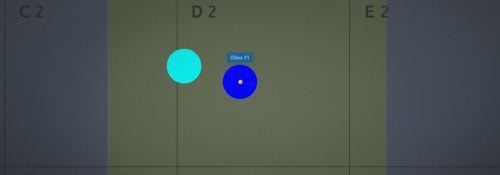 To display a text when hovering over the vending machine icon, you must set true
 -
Hello, yes it is possible what is the command you are trying?
-
Version 4.0.1
725 downloads
Allows to place markers on in-game map for admins or plugins Permissions This plugin uses the permission system. To assign a permission, use oxide.grant <user or group> <name or steam id> <permission>. To remove a permission, use oxide.revoke <user or group> <name or steam id> <permission>. markermanager.use -- Allows player to use the /marker chat commands Chat Commands add marker on map /marker add name(code name) duration(seconds, 0 to permanent) refreshRate(5) radius(0.3) displayName (on map) colorInline (HEX) colorOutline (HEX) alpha (0.75) icon (false) remove marker from map /marker remove name (code name, only for custom markers) Examples /marker add test1 0 3 0.4 "Test Marker" 00ffff 00ffff 0.75 false /marker remove test1 Console Commands add marker on map MarkerManager add name(code name) duration(seconds, 0 to permanent) refreshRate(5) radius(0.3) displayName (on map) colorInline (HEX) colorOutline (HEX) alpha (0.75) icon (false) position ("1443.841 26.45667 -1011.512") remove marker from map MarkerManager remove name (code name, only for custom markers) Examples MarkerManager add test1 0 3 0.4 "Test Marker" 00ffff 00ffff 0.75 false "1443.841 26.45667 -1011.512" MarkerManager remove test1 For Developers Adding markers on positions private void CreateMarker(Vector3 position, string name, int duration = 0, float refreshRate = 3f,float radius = 0.4f, string displayName = "Marker", string colorMarker = "00FFFF",string colorOutline = "00FFFFFF", float alpha = 0.75f, bool icon = true) { Interface.CallHook("API_CreateMarker", position, name,duration, refreshRate, radius, displayName, colorMarker, colorOutline, alpha, icon); } Adding markers attached to entities private void CreateMarker(BaseEntity entity, string name, int duration = 0, float refreshRate = 3f,float radius = 0.4f, string displayName = "Marker", string colorMarker = "00FFFF",string colorOutline = "00FFFFFF", float alpha = 0.75f, bool icon = true) { Interface.CallHook("API_CreateMarker", entity, name,duration, refreshRate, radius, displayName, colorMarker, colorOutline, alpha, icon); } Removing marker by name private void RemoveMarker(string name) { Interface.CallHook("API_RemoveMarker", name); } Credits Flames , for helping to implement transparencyFree -
Version 1.1.0
285 downloads
This plugin automatically displays active PVP zones on your server map in real-time. Perfect for enhancing your players' gaming experience during airdrops and special events. Key Features Automatic PVP zone display Markers appear instantly during events Perfect synchronization with airdrops and events Automatic marker removal when events end Performance and simplicity Lightweight plugin that doesn't impact server performance No configuration needed - works immediately Compatible with your existing plugins Benefits for your players Clear visibility of active combat zones Better strategic planning for PVP actions Reduced frustration from invisible zones More professional and modern interface Requirements This plugin requires the following dependencies to work: Marker Manager Modified : https://codefling.com/plugins/marker-manager-modified Zone Manager : https://umod.org/plugins/zone-manager Dynamic PVP : https://umod.org/plugins/dynamic-pvp Console Commands The plugin provides two console commands for administrators: ampz.reload Reloads the plugin configuration without restarting the server. Description: Allows you to apply configuration changes in real-time ampz.status Displays current plugin statistics. Information displayed: Active zone markers count Cached zones count Timer interval OnlyDynamicPvp mode status Installation Installation is simple: download the plugin and place it in your plugins folder. It works automatically without additional configuration. Important: Don't forget to properly configure Dynamic PVP so that zones are detected and displayed on the map.$11.99