-
Posts
2,179 -
Joined
-
Last visited
-
Days Won
25
Content Type
Profiles
Warranty Claims
Downloads
Forums
Store
Services
Downloads Plus Support
DOWNLOADS EXTRA
Reels
Everything posted by Scalbox
-
Changed Status from Fixed to Work in Progress
-
I'll send you the modified plugin privately. For plants, if you don't want them to produce resources but simply want them to be harvestable and then place them elsewhere, you must also set this property: "Disable resource production, for example for entities of type Resource/Nature": true Now you can harvest farmable entities without a hammer. Let me know if everything works.
-
Changed Status from No Response to Fixed
-
You haven't enabled any groups, so you haven't enabled permissions either. Remove all permissions from ultimateindustrialfarm. Open the configuration file, go to the default group, and configure the farm as you wish, for example: "1393130608": { "Name": "Chicken Coop", "Limit. (-1 no limit) (0 disable entity). Default 0": 15, "Enable Chicken Auto Pet. Default False": true, "Enable Artificial Sunlight. Default False": true, "Artificial Sunlight Value, from 0 to 100. Default 0.0": 100.0, "Enable Eggs Auto Hatching. Default False": true, "No Food and Water required. Default False ": false, "Eggs Production. Minimum minutes between production. Default 10": 10.0, "Eggs Production. Maximum minutes between production. Default 50": 50.0, "Disable food spoilage in the container. Default false": true }, Start the plugin and assign the ultimateindustrialfarm.default permission
-
It's not a bug; if you water them more, it's normal for them to go beyond the optimal level. The optimal level isn't the one you specified. Different-sized planters have different optimal levels; the plugin already calculates them automatically when you set the water to 100%.
-
use this file, there was an error in the json I sent you: SpawnEverything.json fixed json { "Enabled": true, "DisplayName": "Spawn Home 1", "Description": "Spawn Home 1", "Item name (That will be used to spawn the entity. Default grenade.flashbang)": "grenade.flashbang", "Spawn PrefabName": "", "SkinID": 3419609271, "Item can be stacked? FALSE, the entity will be respawned in the same condition it was in when picked. TRUE, the entity will always be respawned as new. Default: FALSE": true, "Spawn Cooldown (seconds)": 0, "Usage Cooldown. Cooldown for reuse (seconds) (0 no cooldown)": 0, "Entity Category Type. Default Rust": "Custom", "Align the entity with the player's direction. Default false": false, "Force persistence. Set to TRUE if the spawned entity disappears after a server restart. Default false": false, "Can Pick Up Entity. Default false": false, "Spawn Position Offset": { "Right": 0.0, "Forward": 0.0, "Up": 0.0 }, "Spawn Rotation Offset": { "X": 0.0, "Y": 0.0, "Z": 0.0 }, "Custom Radius Check": 0.0, "Execute Player Commands": [ "chat.say \"/paste my_baseone auth true autoheight true position %%spawnCoordinateX%%,%%spawnCoordinateY%%,%%spawnCoordinateZ%%\"" ], "Execute Player Commands As Admin": true, "Execute Server Commands": [], "Allow spawning entity only where you have Building Privilege. (Default: False)": false, "Requires Building Privilege or zones without TC to Spawn Entity. (Default: TRUE)": true, "Minimum spawn distance from any Tool Cupboard (TC). [0 = Disabled] (Default: 0)": 100, "Allow Spawn in Monuments. (Default: FALSE)": false, "Disable Spawn in Monuments and Monuments radius. (Default: FALSE)": false, "Disable Spawn On Road/Rails. (Default: FALSE)": true, "Minimum spawn distance from Road/Rails. (Default: 0)": 20, "Spawn Only Outside": true, "Dont Spawn In Water": true, "Requires Water": false, "Minimum Water Depth": 0.0, "No Damage": false, "No Damage - Allow Decay Damage": false },
-
Hi, send me the plugin configuration and the special seeds configuration. The new feature should be released this week.
-
Changed Status from Pending to Work in Progress
-
send configuration file
-
Changed Status from Pending to Not a Bug
-
I'm glad everything works and the issues have been resolved. And most importantly, that you like the plugin. For any other issues, please open a ticket. If you like, please leave a review. Thanks
-
works?
-
Various customizations take a while to display, to improve the plugin's performance. There's a timer, so the next run depends on the timer setting. A fix is planned to improve this when customizations are applied for the first time. The same goes for spoiling food; can you see if it's back to full health?
-
The configuration I gave you for the chicken coop is correct and works; I've tested it. These are its settings (IN THE DEFAULT GROUP). "1393130608": { "Name": "Chicken Coop", "Limit. (-1 no limit) (0 disable entity). Default 0": -1, "Enable Chicken Auto Pet. Default False": true, "Enable Artificial Sunlight. Default False": true, "Artificial Sunlight Value, from 0 to 100. Default 0.0": 100.0, "Enable Eggs Auto Hatching. Default False": true, "No Food and Water required. Default False ": false, "Eggs Production. Minimum minutes between production. Default 10": 10.0, "Eggs Production. Maximum minutes between production. Default 50": 50.0, "Disable food spoilage in the container. Default false": true }, Remove all permissions from the ultimateindustrialfarm plugin and keep only the following permissions: ultimateindustrialfarm.use ultimateindustrialfarm.default Once done, remove the automation from the chicken coop and re-enable it. Automatic hatching works; you just need to give it a time to run. For other configurations (PlanterBox, Beehive, choose the settings you want, always in the default group) And you need to assign them to the default group, not to the player. I tested the configuration I sent you, and everything works without problems. UltimateIndustrialFarm.json
-
You assigned yourself the VIP1 permission! which has a higher priority and is not configured; only the default group is configured! You must remove permission: ultimateindustrialfarm.vip1 Or configure the vip1 group as you did for the default group and assign the permission: ultimateindustrialfarm.vip1.

-
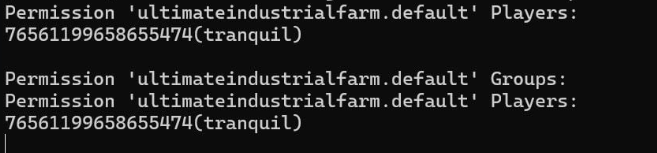
this is not possible "I added the 2 commands and the message came back as "Permission default already exists"" from your output there is no permission in the default group, but only for the player! run this commands and send me the console output: oxide.show perm ultimateindustrialfarm.vip1 oxide.show perm ultimateindustrialfarm.vip2 oxide.show perm ultimateindustrialfarm.vip3 oxide.show perm ultimateindustrialfarm.default
-
.
-
Changed Status from Pending to No Response
-
Changed Status from Pending to Not a Bug
-
Assign permission to the default group: oxide.grant group default ultimateindustrialfarm.use oxide.grant group default ultimateindustrialfarm.default
-
I will do some tests as soon as possible, the plugin has never been used to generate berries, corn, and potatoes, so I will do some tests to see how to adapt it
-
The reset doesn't mean anything; it's a message that prints when you reload the plugin. I gave you the correct configuration for the default group! Open the chicken coop and click on information (top right button), and send me a screenshot Also run this command and send me the console output: oxide.show perm ultimateindustrialfarm.default Don't wait days before you get back to me!
-
Everything is correct, you need to change this line "Execute Commands": [ "chat.say \"/paste <BASE NAME> auth true autoheight true position %%spawnCoordinateX%%,%%spawnCoordinateY%%,%%spawnCoordinateZ%%\"" ], and change base name to the name of the base you want to generate, for example "Execute Commands": [ "chat.say \"/paste my_base auth true autoheight true position %%spawnCoordinateX%%,%%spawnCoordinateY%%,%%spawnCoordinateZ%%\"" ], after, you can generate the item using the skinID you chose: se 3419609271 1