
-
Posts
65 -
Joined
-
Days Won
1
Content Type
Profiles
Warranty Claims
Downloads
Forums
Store
Services
Downloads Plus Support
DOWNLOADS EXTRA
Everything posted by zeppelino
-
.thumb.png.13356b229c8a06e7b923e110db8cbb40.png) perfect thanks a lot!
perfect thanks a lot! -
ill have it running on my servers without any problems. you have any error in your console or log files? what is the disconnect message?
-
Added in 2.2.0 ^^
-
Not at the moment. I'll get right on it and post an update today. ^^
- 19 comments
-
- 1
-

-
- #announcement plugin
- #announce
- (and 3 more)
-
Could you clarify what you mean by 'so big'? Maybe attach a screenshot
-
Version 1.5.1
92 downloads
ServerBridge makes it quick and easy for players to join other Rust servers using an intuitive in-game UI. Players can use a server list that is customizable by the admin. Due to Rust's own Nexus system, players can be connected smoothly to the server they want without having to disconnect and connect manually. Player Command: /servers — opens the server list Admin Command: /serverbridge — opens the admin panel • ServerBridge.use – access the server list • ServerBridge.admin – manage servers via admin panel All edits of this file can be done with the /serverbridge Admin Panel { "Server with Domain & no Port": { "Name": "Server with Domain & no Port", "IP": "mycool-rustserver.com", "Port": null, "Description": "I disabled the Port with -1 in the Port field!", "ImageUrl": "" }, "Server with IP Address & Port": { "Name": "Server with IP Address & Port", "IP": "192.168.2.1", "Port": 28015, "Description": "This is my cool Rust Server!", "ImageUrl": "" } } { "ui.serverlist.title": "SERVER LIST", "ui.admin.title": "SERVER MANAGEMENT", "ui.addserver.title": "ADD NEW SERVER", "ui.editserver.title": "EDIT SERVER", "ui.button.connect": "CONNECT", "ui.button.add": "ADD", "ui.button.save": "SAVE", "ui.button.addserver": "ADD NEW SERVER", "ui.form.servername": "SERVER NAME", "ui.form.ipaddress": "IP ADDRESS OR DOMAIN", "ui.form.port": "PORT", "ui.form.description": "DESCRIPTION", "ui.table.server": "SERVER", "ui.table.address": "ADDRESS", "ui.table.actions": "ACTIONS", "msg.noperm.serverlist": "You don't have permission to open the server list.", "msg.noperm.admin": "You don't have permission for this command.", "msg.server.notfound": "Server '{0}' not found.", "msg.server.redirect": "You are being redirected to server '{0}'...", "msg.server.noname": "No server name specified.", "msg.server.deleted": "Server '{0}' has been deleted.", "msg.server.fillfields": "Please fill in all required fields.", "msg.server.exists": "A server with the name '{0}' already exists.", "msg.server.invalidport": "Invalid port. Please enter a number between 1 and 65535.", "msg.server.added": "Server '{0}' has been added.", "msg.server.updated": "Server '{0}' has been updated.", "msg.connection.redirect": "Connecting to {0} - Have fun!", "ui.button.nextpage": "NEXT →", "ui.button.prevpage": "← PREV", "ui.pagination.info": "PAGE {0} OF {1}" }$7.99- 1 comment
- 1 review
-
- 4
-
-
- #serverswitch
- #serverportal
- (and 11 more)
-
 Yeah sure I’ll write it to my list
 -
 You need the SkillTreeXPEvent.use permission to see the box and use the event
 -
Top Left: "UI anchor settings": { "anchor_min": "0 1", "anchor_max": "0 1", "offset_min": "3.5 -48", "offset_max": "164 -4" } Edit: These Numbers are not from me. There are from VoodooLights
- 43 comments
-
- 2
-

-
- #skilltree
- #event
- (and 4 more)
-
i have a program to make ui`s. write me on discord a private message and send me a screenshot oh what position you need the ui i make the points ready for you DC: eliias69
- 43 comments
-
- 1
-
-
- #skilltree
- #event
- (and 4 more)
-
At the bottom of the config file you have to change the values of the anchor points and stuff. here is a quick example: "UI anchor settings": { "anchor_min": "0.6958333 0.02081362", "anchor_max": "0.8333333 0.1069063", "offset_min": "0 0", "offset_max": "0 0" }
- 43 comments
-
- 1
-
-
- #skilltree
- #event
- (and 4 more)
-
It is a really great plugin! It encourages players to complete tasks that they otherwise wouldn't do. The config offers many options for customization. A well written plugin, nice work.
- 43 comments
-
- 1
-
-
- #skilltree
- #event
- (and 4 more)
-
You can move it with Anchor Points in the Config
-
No, logically thats not what iam asking ^^. I guess PVEMode offers the possibility to set the event owner of the mentioned events via its own API. example from the description: void SetEventOwner(string shortname, ulong owner) Sets the current Event Owner shortname – name of event owner – SteamID of the player My programming knowledge is just not sufficient for this
-
Hey, I need a Plugin which let me set the Event Owner (PVE Mode Plugin) for Events like Convoy, Harbor Event, Water Event…. Maybe something like /seteventowner Eventname Playername
-
 It seems like the Plugin just connect you to the server. (like connect to a server via the main menu)
 -
yeah try that. i'm trying to replicate that error, but on my test server it works fine. If removing the config dont work can you try the filed attached?
-
Ur using Oxide or Carbon?
-
okok ty ill give it a look give me a moment
- 19 comments
-
- 1
-
-
- #announcement plugin
- #announce
- (and 3 more)
-
 The plugin does what it's supposed to. Quick and easy to install. Great job!
 -
Just rename the Plugin file to "NoTorchDamage.cs" there is a "n" too much in the file name
-
Version 1.1.2
24 downloads
Container Item Block prevents players from storing certain items inside the Tool Cupboard, Small & Large Wooden Box. { "Tool Cupboard Settings": { "Enabled": true, "Blocked Items": [ "wood", "stones", "metal.ore", "skull.wolf", "targeting.computer", "battery.small", "fertilizer", "lowgradefuel", "researchpaper", "can.beans.empty", "diesel_barrel", "hq.metal.ore", "metal.refined", "charcoal", "bone.fragments", "can.tuna.empty", "skull.human", "metal.fragments", "gunpowder", "leather", "cloth", "scrap", "paper", "coal", "cctv.camera", "explosives", "horsedung", "sulfur", "sulfur.ore", "fat.animal" ] }, "Small Box Settings": { "Enabled": false, "Blocked Items": [ "explosives", "gunpowder" ] }, "Large Box Settings": { "Enabled": false, "Blocked Items": [ "explosives", "gunpowder" ] }, "Block Message": "You can't place {0} in this container. It will be moved back to your inventory." }$4.99- 2 comments
-
- 1
-
-
- #toolcupboard
- #rust
- (and 6 more)
-
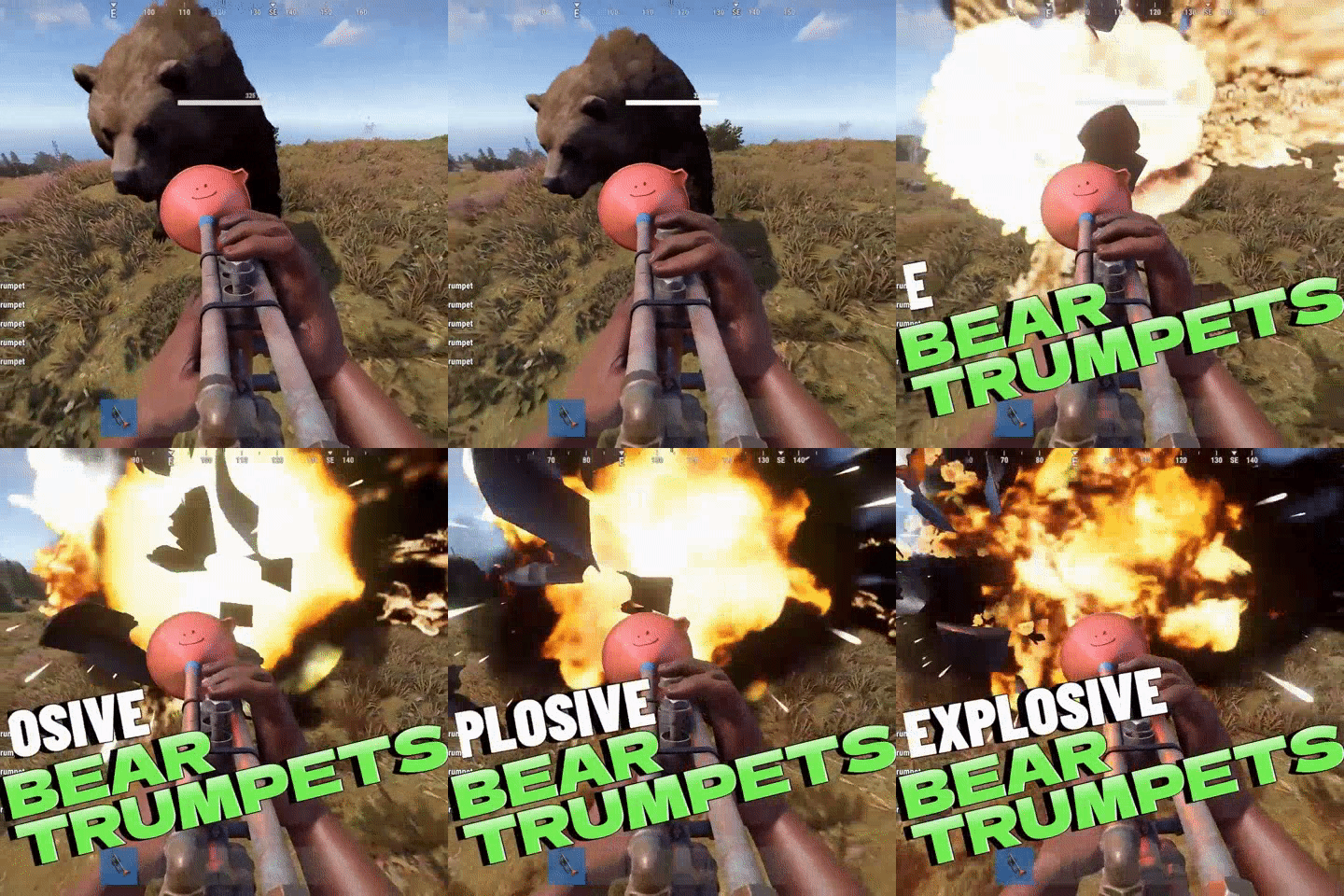
Version 1.0.0
203 downloads
You're musically talented and always on the go with your trumpet? This plugin allows you to blow bears into the air with your music! Take your trumpet and press and hold the right mouse buttonFree -
Added in 2.0.0
- 19 comments
-
- 2
-
-
-
- #announcement plugin
- #announce
- (and 3 more)