
-
Posts
223 -
Joined
-
Last visited
-
Days Won
1
Content Type
Profiles
Warranty Claims
Downloads
Forums
Store
Services
Downloads Plus Support
DOWNLOADS EXTRA
Everything posted by Duff
-
 Yes i will do it 2morrow
 -
.thumb.png.ea65ff8e49c4dd80e502f21067718fa2.png) Glad you like it!. i hope it provides you with everything you need! also for more direct contact with me feel free to join my discord
Glad you like it!. i hope it provides you with everything you need! also for more direct contact with me feel free to join my discord -
In the config you need to enable the Custom Mount Logic then you just go near a Mountable Deployable and click E and you mount it
- 36 comments
-
- 1
-

-
- #placement
- #options
- (and 6 more)
-
I can look into it but cannot make any promises
-
Changed Status from Pending to Not a Bug
-
dont be sorry, its okay with me that it was brought up here. Yes im full aware Rust be having its own life some time X)!: Im glad your players love it! thats all that matters to me my friend
-
Yeah idk whats causing this but its not PlaceryExtended
-
Both plugins Utilizes the same Right click that is correct, but i think the culprit is Objectstacks because PlaceryExtended do not allow based on your current config to even validate a vendingmachine as a valid placement and if Placery says place isnt valid then the custom code to place the box down will not even run so im pretty sure the issue lies with ObjectStacks I dont own Objectstacks but can you try on your server maybe Remove ObjectStacks permissions from yourself and then with Placery see if you can right click place a box on a vending machine? if you cant then try Remove Placery Perms from yourself and add the ObjectStacks perms to yourself and see if its getting placed or not? if it dosnt get placed try have PlaceryExtended and ObjectStacks Perm Enabled on yourself and then try to place a box on the Vending, if this now happends then it sure is some kind of Conflict between theese 2
-
Neither should vending machine be allowed with the plugin, your Placement section for the plugin is the only valid surfaces the box can be placed on. do you have any other plugins that might allow something like this? did he place it with right click from PlaceryExtended or was it with left click if its with Right Click i will deff look into this because it should not be possible with the current code
-
Yeah your config dosnt allow PlaceryExtended to place deployables on the ToolCupboard
-
Can you provide me the current config your using or maybe reach out to me on discord if it is im currently suspecting it to be because you allowed Deployables to stack on other deployables in the config placement section, and with PlaceryExtended originally it wasnt intended to be used for stacking deployables on other deployables so if this is the case the reason. Is it the Box Itself that have despawned or is it just the loot inside that have Despawned? i suspect also maybe that the LootContainer have not been correctly setup when placed on a deployable that it initializes as it should
-
Changed Status from Fixed to Closed
-
Changed Status from Pending to Fixed Changed Fixed In to 1.2.3
-
 I corrected some things in the latest update - unintentionally i might have done something so this happend. i will make a Config Line for Disabling RaidableBases Raids I apologise
 -
Raidable bases should not trigger a raid warning so the discord notifications shouldnt mention anything about RaidAbleBases
-
Your interrested in if its possible to make it so only discord notifications for global notifications to trigger for raidable bases?
-
This have not been a issue for a while
-
Version 1.0.4
30 downloads
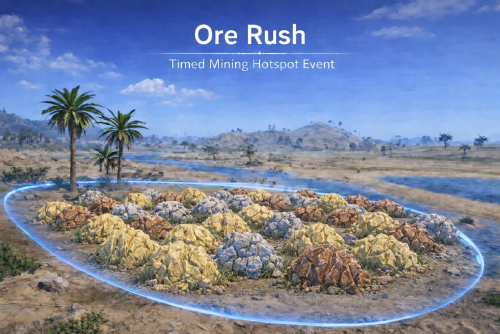
OreRush – Competitive Mining Hotspot Event Turn mining into a real PvP objective. OreRush creates a timed, visible dome event that spawns dense ore nodes inside a glowing sphere. Players rush the zone, compete for control, fight for dominance — and now earn persistent rewards. This is not a global gather boost. This is a physical, competitive event zone players can see, contest, and dominate. What OreRush Does: Spawns a glowing dome at a valid map location Places a radius marker + named map icon Spawns configurable Stone / Metal / Sulfur nodes Optional gather multiplier inside dome Optional unlimited arena mode Optional leaderboard tracking Optional clan integration Optional persistent winner rewards Optional Discord webhook integration Cleans up dome, UI, markers and nodes safely Designed to create instant PvP attraction points. Media: Core Systems: Dome System: Selectable dome color (Blue / Green / Red / Purple) Configurable radius Smooth animated expansion Adjustable visual scale Smart Location Validation: Scheduled mode or command-only mode Minimum players required Optional monument / road / rail avoidance Configurable monument distance Terrain sampling prevents bad spawn areas Ensures playable event locations Node Spawning: Separate counts for Stone / Metal / Sulfur Minimum spacing control Optional water prevention Optional threshold repopulation Optional node cleanup on event end Built for real hotspot gameplay. Competitive Systems: Optional Gather Multiplier (Standard Mode): Separate multipliers per resource Optional UI display Optional start announcement Custom formatting tokens Only active when Unlimited Mode is OFF Adds controlled bonus farming inside the hotspot. Optional Unlimited Mode Turn the dome into a controlled farming arena: Nodes do not break Configurable min/max rewards Separate HQ Metal configuration Optional charcoal bonus Custom FX on reward Perfect for competitive farming events. Optional Leaderboard: Tracks: Stone Metal HQ Metal Sulfur Configurable top count Live updating UI Adjustable anchors & font size Turn farming into competition. Claimable Winner Rewards: Fully optional competitive reward system. Reward Top Farmer Reward Top Clan Leader Optional clan-leader redirection Store pending claims in persistent data Claim via configurable command Optional notify on player join Full item configuration (shortname / skin / amount) Inventory validation before delivery Supports multiple reward items per winner Turn OreRush into a repeatable competitive event framework. Optional Clan Integration: Automatically detects Clans plugin Safe fallback if Clans not installed Player → Clan runtime caching Clan leader reward resolution Clan disband/unload cleanup handling No hard dependency required Perfect for clan-based competition servers. Optional Discord Webhook Integration: Separate announce settings per event phase Embed or plain message mode Custom embed title + color Resource breakdown tokens Optional clan + member breakdown Per-announce webhook URL Clean token formatting (grid / center / radius / duration / totals) Keep your Discord informed automatically. Advanced Custom CUI System (Optional): Modular, fully positionable event display system. Toggleable Custom CUI Direct image URL OR ImageLibrary support Independent anchor positioning per element Independent pixel offsets Full RGBA control Optional background box per element Font size & color control Custom format tokens ({time}, {count}, {rate}, {total}, {name}, {clan}) Fully modular – enable/disable elements individually Available CUI Elements: Players Inside Counter Clans Inside Counter Countdown Timer Gather Rate Display Total Farmed Live Top Player Live Top Clan Complete layout freedom. Announcement System: Standard broadcast system Advanced Announcement Option 2 Dual pipeline support (simple + detailed) Tokenized formatting Optional start sound Separate start/end formatting Performance Optimized • High-frequency hooks dynamically subscribe/unsubscribe • No idle gather/melee overhead when event inactive • Tight early-return gating • Dependency runtime cache handling • Safe cleanup logic Optimized for high-pop servers. Admin Controls: Chat: /orerush start /orerush starthere /orerush stop /orerush add <name> /orerush delete <name> /orerush list /orerush clear Console: OreRush.start OreRush.stop OreRush.list Configurable reward claim command (default: /claimrewards) Config Example { "Chat": { "Use Prefix": true, "Prefix": "<color=#89CFF0>[OreRush Event]</color> ", "Channel (0=Global)": 0, "Icon SteamId": 76561198888888888 }, "Event": { "Only Command Start Event": false, "Minimum Players to Start Event": 1, "Event Minimum Interval (seconds)": 3600, "Event Maximum Interval (seconds)": 7200, "Event Duration Seconds": 30, "Allow Event To Spawn Near Monuments/Roads/Rails": false, "Minimum Distance From Monuments (meters) used When AllowEventToSpawnNearMonumentsRoadsRails = false": 250.0 }, "Announcements": { "Broadcast Start/End Messages": true, "Event Start Message": "<color=#ffd479>Ore Rush Event</color> <color=white>has started! Check your map.</color>", "Event End Message": "<color=#ffd479>Ore Rush Event</color> <color=white>has ended.</color>", "Play Start Notification Sound": true, "Start Sound FX #1 (empty = disabled)": "assets/bundled/prefabs/fx/invite_notice.prefab", "Start Sound FX #2 (empty = disabled)": "assets/bundled/prefabs/fx/item_unlock.prefab" }, "Announcement Option 2": { "Enabled (Announcement Option 2)": false, "Warn When X Minutes Left (0 = disabled)": 10, "Show End Summary": true, "Show Clan Winner": true, "Show Clan Member Breakdown": true, "Max Clan Member Lines": 8, "Start Message (RichText)": "<color=#ffd479>Ore Rush</color> started! Check your map.", "Warning Message (use {minutes})": "<color=#ffd479>Ore Rush</color>: <color=white>{minutes} minutes left!</color>", "End Message Header (RichText)": "<color=#ffd479>Ore Rush</color> ended! Results:\n", "Total Line Format (use {total})": "<color=#ffd479>• Total Farmed</color>: <color=#ffffff>{total}</color>", "End Total Line (use {total},{st},{m},{hq},{su})": "<color=#ffd479>• Breakdown</color>: <color=#ffffff>{total}</color> \n<color=#ffd479>[</color><color=#cfcfcf>Stone</color> <color=#ffffff>{st}</color> <color=#cfcfcf>Metal</color> <color=#ffffff>{m}</color> <color=#cfcfcf>HQM</color> <color=#ffffff>{hq}</color> <color=#cfcfcf>Sulfur</color> <color=#ffffff>{su}</color><color=#ffd479>]</color>\n", "End Top Player Line (use {name},{total},{st},{m},{hq},{su})": "<color=#ffd479>• Top Player</color>: <color=#ffffff>{name}</color> <color=#ffd479>(</color><color=#ffffff>{total}</color><color=#ffd479>)</color> \n<color=#cfcfcf>[Stone {st} | Metal {m} | HQM {hq} | Sulfur {su}]</color>\n", "Top Clan Line Format (use {clan},{total},{st},{m},{hq},{su})": "<color=white>Top Clan:</color> <color=#ffd479>{clan}</color> (<color=#ffd479>{total}</color>) \n[Stone {st} | Metal {m} | HQM {hq} | Sulfur {su}]", "Clan Members Header Line": "<color=#ffd479>• Clan Members</color>:", "Clan Member Line Format (use {name},{total},{st},{m},{hq},{su})": " <color=#cfcfcf>-</color> <color=#ffffff>{name}</color> <color=#ffd479>{total}</color> <color=#cfcfcf>[Stone {st} | Metal {m} | HQM {hq} | Sulfur {su}]</color>", "Play Start Notification Sound": true, "Start Sound FX #1 (empty = disabled)": "assets/bundled/prefabs/fx/invite_notice.prefab", "Start Sound FX #2 (empty = disabled)": "assets/bundled/prefabs/fx/item_unlock.prefab" }, "Discord Announcements": { "Event Start Announce": { "Enable": true, "Use Embed": true, "Use Embed Fields": true, "Embed Title": "OreRush Event", "Embed Color (Hex)": "#ffd479", "Include Resource Breakdown": true, "Include Clan Member Breakdown": true, "Max Clan Member Lines (Embed)": 8, "Footer Server Name (optional)": "", "Discord Webhook": "" }, "Event Stop Announce": { "Enable": false, "Use Embed": true, "Use Embed Fields": true, "Embed Title": "OreRush Event", "Embed Color (Hex)": "#ffd479", "Include Resource Breakdown": true, "Include Clan Member Breakdown": true, "Max Clan Member Lines (Embed)": 8, "Footer Server Name (optional)": "", "Discord Webhook": "" }, "Event Winner Announce": { "Enable": true, "Use Embed": true, "Use Embed Fields": true, "Embed Title": "OreRush Event", "Embed Color (Hex)": "#ffd479", "Include Resource Breakdown": true, "Include Clan Member Breakdown": true, "Max Clan Member Lines (Embed)": 8, "Footer Server Name (optional)": "", "Discord Webhook": "" } }, "UI": { "Show UI": false, "UI Update Interval Seconds": 1.0, "UI Title Text (RichText)": "<color=#ffd479>Ore Rush Event</color>", "UI Anchor X": 0.37, "UI Anchor Y": 0.98, "UI Use Handwriting Font": true, "UI Proximity Mode (only show when near dome)": true, "UI Proximity Range (meters)": 350.0, "Enable Stats Tracking (Top Leaderboard)": false, "Stats: Show Top Farmers Count": 5, "Leaderboard Anchor Min (x y)": "0.18 0.68", "Leaderboard Anchor Max (x y)": "0.42 0.97", "Leaderboard Font Size": 12, "Show Time In UI": true, "UI Time Format (use {time})": "Time Left: <color=#ffd479>{time}</color>", "UI Show Players Inside Line": true, "UI Players Inside Text (RichText)": "Players Inside: <color=#ffd479>{0}</color>" }, "Custom CUI - Use Only If You Understand How To Position Elements Correctly with Anchor's": { "Enable": true, "Image URL (direct .png/.jpg/.webp)": "", "Use ImageLibrary if available": true, "Anchor Min (x y)": "0.2 0.75", "Anchor Max (x y)": "0.8 0.92", "Offset Min (px px)": "0 0", "Offset Max (px px)": "0 0", "Color (r g b a)": "1 1 1 1", "Players Inside Count": { "Enable": true, "Show Background Box": true, "Background Color (r g b a)": "1 0 0 0.25", "Anchor Min (x y)": "0.152 0.18", "Anchor Max (x y)": "0.268 0.62", "Offset Min (px px)": "0 0", "Offset Max (px px)": "0 0", "Font Size": 36, "Color (r g b a)": "1 1 1 1" }, "Clans Inside Count": { "Enable": true, "Show Background Box": true, "Background Color (r g b a)": "1 0 0 0.25", "Anchor Min (x y)": "0.72 0.18", "Anchor Max (x y)": "0.88 0.62", "Offset Min (px px)": "0 0", "Offset Max (px px)": "0 0", "Font Size": 36, "Color (r g b a)": "1 1 1 1", "Format (use {count})": "{count}" }, "Countdown Timer": { "Enable": true, "Show Background Box": true, "Background Color (r g b a)": "1 0 0 0.25", "Anchor Min (x y)": "0.35 0.35", "Anchor Max (x y)": "0.65 0.65", "Offset Min (px px)": "0 0", "Offset Max (px px)": "0 0", "Font Size": 36, "Color (r g b a)": "1 1 1 1", "Format (use {time})": "{time}" }, "Gather Rate": { "Enable": true, "Show Background Box": true, "Background Color (r g b a)": "1 0 0 0.25", "Anchor Min (x y)": "0.72 0.02", "Anchor Max (x y)": "0.88 0.12", "Offset Min (px px)": "0 0", "Offset Max (px px)": "0 0", "Font Size": 36, "Color (r g b a)": "1 1 1 1", "Format (use {rate})": "{rate}" }, "Total Farmed (Inside Event)": { "Enable": true, "Show Background Box": true, "Background Color (r g b a)": "1 0 0 0.25", "Anchor Min (x y)": "0.35 0.08", "Anchor Max (x y)": "0.65 0.16", "Offset Min (px px)": "0 0", "Offset Max (px px)": "0 0", "Font Size": 36, "Color (r g b a)": "1 1 1 1", "Format (use {total})": "{total}" }, "Top Player (Inside Event)": { "Enable": true, "Show Background Box": true, "Background Color (r g b a)": "1 0 0 0.25", "Anchor Min (x y)": "0.35 0.16", "Anchor Max (x y)": "0.65 0.22", "Offset Min (px px)": "0 0", "Offset Max (px px)": "0 0", "Font Size": 22, "Color (r g b a)": "1 1 1 1", "Format (use {name})": "{name}" }, "Top Clan (Inside Event)": { "Enable": true, "Show Background Box": true, "Background Color (r g b a)": "1 0 0 0.25", "Anchor Min (x y)": "0.35 0.22", "Anchor Max (x y)": "0.65 0.30", "Offset Min (px px)": "0 0", "Offset Max (px px)": "0 0", "Font Size": 22, "Color (r g b a)": "1 1 1 1", "Format (use {clan})": "{clan}" } }, "Map Marker": { "Map Marker Enabled": true, "Map Marker Message": "ORE RUSH EVENT", "Map Marker Radius (0.05 - 1.0)": 0.25, "Map Marker Alpha (0-1)": 0.7, "Map Marker Colour 1 (hex)": "#050505", "Map Marker Colour 2 (hex)": "#e5ff00" }, "Zone Sphere": { "Sphere Colour (blue/green/red/purple)": "blue", "Sphere Radius (yards)": 70.0, "Sphere Visual Scale Multiplier (2.0 = matches radius)": 2.0, "Sphere Lerp Speed": 60.0 }, "Nodes": { "Stone Nodes to Spawn Inside Dome": 20, "Metal Nodes to Spawn Inside Dome": 20, "Sulfur Nodes to Spawn Inside Dome": 20, "Minimum node spacing (meters)": 1.0, "Prevent nodes spawning on water": true, "Delete Nodes at Event End": true, "Make Nodes 'Unlimited' (prevent breaking + custom rewards)": false }, "GatherMultiplier": { "Enable Node Gather Multiplier (Only when Make Nodes 'Unlimited' = false)": false, "Show Multiplier In UI": false, "Announce Multiplier On Start": false, "UI Prefix (RichText)": "<color=#ffd479>Gather Bonus:</color>", "UI Separator": " | ", "UI Label Stone": "Stone", "UI Label Metal": "Metal", "UI Label HQ": "HQ", "UI Label Sulfur": "Sulfur", "UI Multiplier Prefix": "x", "UI Hide Resource If Multiplier <= 1": true, "UI Show When No Bonus": false, "UI No Bonus Text (RichText)": "<color=#ffd479>Gather Bonus:</color> <color=white>None</color>", "Stone Gather Multiplier": 2.0, "Metal Gather Multiplier": 2.0, "HQ Metal Gather Multiplier": 2.0, "Sulfur Gather Multiplier": 2.0 }, "Threshold Repopulate": { "Enable Threshold Repopulate": false, "Threshold Check Interval Seconds": 30.0, "Stone Threshold (respawn when below)": 10, "Metal Threshold (respawn when below)": 10, "Sulfur Threshold (respawn when below)": 10 }, "Rewards When Unlimited Node Mode Is Enabled": { "Reward: Stone Ore Min": 3, "Reward: Stone Ore Max": 8, "Reward: Metal Ore Min": 3, "Reward: Metal Ore Max": 8, "Reward: HQ Metal Ore Min": 1, "Reward: HQ Metal Ore Max": 1, "Reward: Sulfur Ore Min": 3, "Reward: Sulfur Ore Max": 8, "Reward: Charcoal Min": 1, "Reward: Charcoal Max": 3 }, "Top Farmer Rewards": { "Reward Top Farmer Player (claimable)": false, "Reward Top Clan Leader (top farmer's clan) (claimable)": false, "Claim Command": "claimrewards", "Notify On Join If Unclaimed": true, "Notify Message (RichText)": "<color=#ffd479>[OreRush]</color> You have <color=#55ff55>{0}</color> unclaimed rewards. Type <color=#ffd479>/{1}</color> to claim.", "Granted Message (RichText)": "<color=#ffd479>[OreRush]</color> You earned a reward claim! Type <color=#ffd479>/{0}</color> to claim.", "Rewards": [ { "Item Shortname": "ammo.rocket.basic", "Skin ID (0 = default)": 0, "Amount": 10 }, { "Item Shortname": "ammo.rocket.mlrs", "Skin ID (0 = default)": 0, "Amount": 10 } ] }, "Debug": { "Enabled": false } } Ideal For PvP servers Wipe-day events Clan competition servers Weekly resource wars High population servers Competitive seasonal events Why OreRush? Most mining plugins: Modify global gather rates Spawn a single special node OreRush creates: A visible PvP hotspot A timed objective A competitive farming arena A reward-driven event system A clan-aware competitive framework Plugins By Duff https://discord.gg/2KBPH7hXb7$14.99