Jump to content

Sheo

Creator Pro
  • Posts

    1,311
  • Joined

  • Last visited

  • Days Won

    18

Everything posted by Sheo

  1. Sheo

    Raid Time Manager

    Sorry, but I still can't understand you, what exactly do you want my plugin to do in conjunction with TruePVE?
  2. Sheo

    Plugin unloading by itself

    Changed Status from Pending to Closed
  3. Send me the plugin and a screenshot of the error (if any) on discord, if the plugin is not complete crap (although this is likely, since I have already dealt with plugins from it), then I will fix it
  4. Sheo

    Team Info

    yes
  5. What exactly and where do you need to fix?
  6. Sheo

    Team Info

    This plugin shows all your allies that are in the team. If your plugin for clans adds players to the team, then yes
  7. Changed Status from Pending to Closed
  8. Hello. After first install of plugin reload him. After this all will be fine
  9. Sheo

    The 2 small arrows,

    Hello, thanks for the feedback. I tried to replicate this problem, but did not find it. Can you give me a video with this bug please?

  10. Sheo

    Team Info

    Are you set Store avatars to true and api key inf ImageLibrary Config?
  11. Sheo

    Immortal boars and poop

    Hello. Sorry for not answering, I didn't see it (If I don't answer Support for a long time, write to me in DM, sometimes notifications don't come). I will update the plugin in a few days
  12. Sheo

    Team Info

    I will update the plugin soon.
  13. Sheo

    Raid Time Manager

    You can set the raid/safe time in two ways. 1) By days of the week - the set time by day of the week is used as standard, that is, if you do as I said earlier, then this time will work for any Monday - Tuesday 2) The second way is to assign a specific date - in this case, instead of the time for a given day of the week, what you set will be used
  14. Sheo

    Raid Time Manager

    You can do like this: For example, on Monday, set from 23:00 to 24:00 and on Tuesday from 00:00 to 08:00
  15. Version 1.4.4

    2,373 downloads

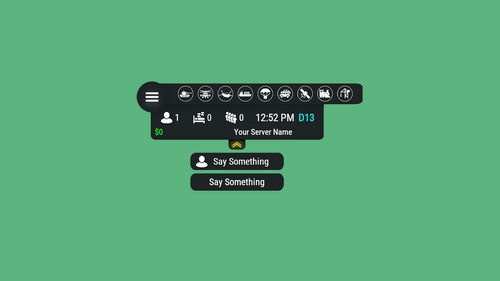
    Raid Time Manager · Rust · Oxide · Carbon Your best players get raided at 4am and never log in again You set the hours raiding is open. Outside them the damage, the ladder stacks, the ceiling drops and the turret placements all stop — and everyone can see the schedule on screen. A full week is configured out of the box, and every hour of it is editable from a calendar in game. The HUD Six layouts, one of them fits your screen Switched live from the settings screen — every player's HUD is redrawn on the spot. How it goes From install to the night before wipe MINUTE ONE It works before you open the config Raid time is set to 18:00–22:00 Monday to Friday, 10:00–22:00 Saturday, 08:00–22:00 Sunday. Every hour outside that is safe time, and the restrictions are already on. Your timezone, by offset or by name, daylight saving included Several raid windows in one day, or none at all for a full safe day Nothing to fill in first — edit the week later, or never EVERY DAY Nobody has to ask when raid time is A HUD shows today's windows as a bar, a marker for where the clock sits inside them, and a green or red dot for whether raiding is open right now. Six positions, switched live. Players can hide it, and it hides itself on cameras and drones Every player reads it in their own language, on a 12- or 24-hour clock An alert on screen the moment raid time opens, and again when it closes An optional Discord webhook warns your players a set time before it opens WHEN THEY TRY Blocking damage alone does not stop a raid Someone who cannot blow a wall will stack ladders, drop a ceiling inside your compound, or park a turret on your door instead. Thirteen switches, so you block what matters on your server and leave the rest alone. Damage. Other people's buildings, your own, twig, boats, tugboats, fire Raids with no player behind them. Patrol helicopter, MLRS, SAM sites and auto turrets, each its own toggle Building tricks. Ladders and ceilings inside someone else's privilege, cupboards and turrets placed next to one They are told why. A blocked shot or placement puts the reason on the player's screen Your own exceptions. A prefab list that stays damageable whatever the clock says, and a separate switch for other people's sleeping bags WIPE DAY The exceptions are where a schedule earns its keep A fixed week is fine until wipe day, a holiday, or the first complaint about being raided ten minutes after joining. All four of those are settings. Set hours for one specific date from the calendar — it beats the weekly rule Safe days after a wipe, written into the schedule for you New players protected for a few hours, if you want them to be Or block offline raids only, with a shorter grace period for your donators Alongside the rest It fits what you already run All optional, all off until you point at them. ✓ TruePVE — its ruleset is switched with the schedule, so the two never disagree ✓ ZoneManager — confine the whole thing to listed zones, or apply it everywhere except them ✓ Raidable Bases — event bases stay raidable around the clock, safe time never locks players out ✓ Your own commands — run any server command the moment raid time opens, and again when it closes Reference One command, and it is yours to rename Everything else is a screen you click through in game. Chat /rtm Open the raid calendar. Admins also get a settings button on it. Chat /rtm hud Hide the HUD, or bring it back Perm rtm.vip Shorter offline grace period. Rename it or add more groups. Straight answers Asked before every purchase Do I need TruePVE? No, it blocks the damage itself. TruePVE is optional and only makes the two systems agree if you already run it. Can I still raid people who are online? Turn on offline-only mode and safe time protects a base only while the owner and their whole team are away. Do I have to edit config files? Not for the schedule. The calendar and settings screens change the hours, the toggles and the HUD position from in game. Is it English only? No. Days, months, AM/PM and every message are language file entries, so you translate once and each player sees their own. What about NPCs and scripted raids? One switch lets non-player raiders through at any hour, and the prefab list covers anything that must always stay damageable. Will the HUD annoy my players? Six positions including a compact one, they can dismiss it themselves, and you can switch it off server-wide. 13 actions you can block 6 HUD layouts 3 integrations — TruePVE, ZoneManager, Raidable Bases 1 dependency — ImageLibrary
    $14.99
  16. Yes, you can buy it after approval. Wait some days
  17. Sheo

    Server Hud

    Thanks for the comment. Unfortunately, this is not a Hud problem, this is how Rust works, I have no way to fix it
  18. I will publish a similar plugin in the near future, I saw many who asked to make this plugin

About Us

Codefling is the largest marketplace for plugins, maps, tools, and more, making it easy for customers to discover new content and for creators to monetize their work.

Downloads
3.1m
Total downloads
Customers
12.1k
Customers served
Files Sold
171.4k
Total sales
Payments
3.7m
Processed total
×
×
  • Create New...

Important Information

We have placed cookies on your device to help make this website better. You can adjust your cookie settings, otherwise we'll assume you're okay to continue.