
-
Posts
450 -
Joined
-
Last visited
-
Days Won
26
Content Type
Profiles
Warranty Claims
Downloads
Forums
Store
Services
Downloads Plus Support
DOWNLOADS EXTRA
Everything posted by UserLeftRust
-
If you have installed oxide on your server. access the file system and you will see an oxide folder. Inside this folder you will have the following folders" Plugins < where you place your .cs files Data < where plugins store data Config < where the plugin saves its configuration Logs < where oxide and some plugins store logs Lang < where some plugins store their language files Placing a plugin in the plugins folder will cause oxide to compile and load the code.. this will usually populate a config file too
-
It was a private UI made by Waggy.. although we think there was a clone of it on CodeXive however they are down again. https://codexive.org/threads/info-panel.16/
-
It kind of already exists. Steamgroup on umod.. however leaving the group doesn't work on that version... I have a modified one if you want to give me a shout.
-
 This version is just one button... will dig out the code for the double button at some point and fix it :P
 -
Exactly... Unfortunately thats how the rust cui is you can only go by what the most common screen would be
-
yeah FP doesnt like you button binding from plugs anymore and when you look at the achors.... (although its different between screens, so may look correct on yours and not on others) Min and Max it bottom left to top right
-
Version 1.0.3
504 downloads
STFU is a simple player voice muting system (that doesn't interfere with game chat or running commands like some others do) STFU handles times as Seconds, Minutes, Hours, Days, or perm mutes. Optional output to discord via webhook (Requires DiscordMessages by Slut on uMod) Permissions STFU.user << required to use in-game commands In-Game Commands To mute: /STFU <target> <duration> "reason" Reasons for multiple words must be contained in quotations E.g. /STFU Death 2d "Shouting reeee continuously." for perm mutes, just use the word "perm." E.g /STFU Death Perm "Reee'd again." To Unmute: /UnShut <target> E.g /UnShut Death Console Commands same as above but without the slash To Mute: STFU <Target> <Duration> "reason" To Unmute: UnShut <Target> Console all so has the command. STFULookUp Which will print all current bans to console Configuration The configuration is only needed if you wish to output to discord via DiscordMessages { "Report to Discord": false, "Discord Webhook": "DiscordWebhook URL" }Free- 7 comments
-
- 3
-

-
- #admin tool
- #mute
- (and 8 more)
-
 You need to report this in the support tab so that the author gets a notification.. you also need to provide more context... are you receiving errors in rcon? what happens when you run the command? etc..
 -
 Doing something similar now
 -
yeah.. i fat fingered it... one sec
-
 Je peux l'ajouter mais VL fait apparaître le véhicule sur la tête du PNJ, donc je dois trouver une alternative
 -
J'ai ajouté HumanNPC pour tester, mais cela ne fonctionne pas, les véhicules apparaissent sur la tête du PNJ et le tue Je vais jouer un peu plus!
-
RustyBangers n'a pas cette fonctionnalité. ils doivent utiliser une version personnalisée de HumanNPC ou similaire. Il y aura bientôt une mise à jour peut-être que je pourrai ajouter la fonctionnalité HumanNPC alors.
-
https://discord.gg/FbC36Ta Click that to join codeflings discord and I'll catch you there
-
You click share link.. then it should change to copy link... Which then shows the link at the bottom of the page.. Are you on discord at all?
-
feel free to bug me if you need anything else
-
bit of a silent movie.... I hope... otherwise its the wife in the background bipping shit but.. the process you'll see 1. Upload to to drop box, 2. create and copy link, 3. change dl=0 to dl=1, 4. go to GD and click config files, and edit start.bat, 5. in custom command add +levelurl "Dropboxlinkwithdl=1" 6. save and start server etc etc.... i pressed cancel because.... its not my server
-
Fantastic.. if you can wait a little bit.. got school run to do.. but I'll make a vid to show you how..
-
Start at the begining... Who are you hosting with?
-
I will have a look, but in future could you please post support queries in the support tab otherwise we don't get a ping to inform us that there is an issue.
-
There is a version.. but it's private haha
- 1 reply
-
- 1
-
-
Version 1.0.0
654 downloads
ComTimer is a plugin that runs console commands after an amount of time. Good for automating events quickly and easily Set the commands you want to run into the config list. Set a timer upper limit and a timer lower limit and the plugin will pick a number between and countdown... on completion it will run a command from the list and start the whole process over again. any command that you can run in rcon you can run with this. Configuration Default configuration is as follows: { "Command List": [], "Upper Time In Seconds": 500.0, "Lower Time In Seconds": 200.0 } Setting a single command: { "Command List": ["say Welcome to the server"], "Upper Time In Seconds": 500.0, "Lower Time In Seconds": 200.0 } Setting more then one command: { "Command List": ["say Welcome to the server","callheli","giveall scrap 1"], "Upper Time In Seconds": 500.0, "Lower Time In Seconds": 200.0 } Works well with plugins like CustomHeliTiers if the plugin doesn't have its own spawn timer: { "Command List": ["callheli 1","callheli 2","callheli 3","callheli 4","callheli 5","callheli 6"], "Upper Time In Seconds": 500.0, "Lower Time In Seconds": 200.0 }Free -
yeah this was a quick plug creation on request... i'll add more functionality over the next few days... add color to the config and if it should be open by default of closed by default etc... Glad your enjoying it
-

Version 1.0.1
619 downloads
NameCheck checks a players name to see if it contains part of the config list and then kicks the player with a custom message. Prevent players advertising on your server with their display name. Configuration Default config looks like this { "Names": [], "Kick Message": "Change your name to enter this server" } For a single entry input it in quotations like this { "Names": [".com"], "Kick Message": "Change your name to enter this server" } For multiple entries enter them separated with a comma { "Names": [".com",".gg","skins"], "Kick Message": "Change your name to enter this server" } Just enter values, reload and forget about it. Make sure all entries are in Lower Case.Free -
Version 1.0.8
2,796 downloads
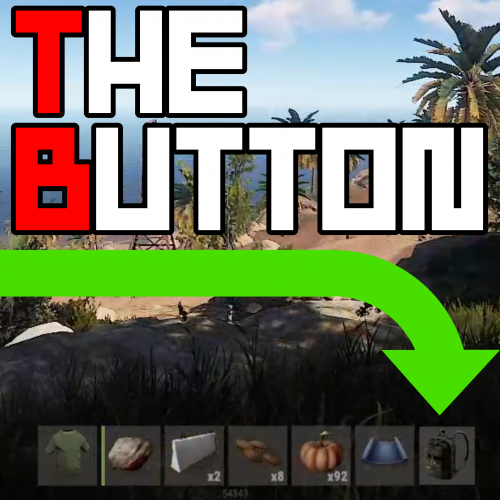
Customizable 7th Button. Easy to setup, Default is a backpack image and command Use any command that would usually require a slash e.g. "/Backpack" becomes "Backpack" in the config Permissions TheButton.use << Required to use The Button Command /button << toggles button on or off. Configuration { "GlobalSettings": { "Image Url for The Button": "https://i.imgur.com/7L1uDrs.png", "Command For The Button": "backpack", "Background color of Button RGBA format": "0.3 0.3 0.3 0.8", "Open By Default true/false": true }, "AlignmentSettings": { "AnchorMin": "0.645 0.023", "AnchorMax": "0.688 0.095" } } AnchorMin And Max are set roughly to the position right of the hot-bar but can appear slightly different depending on the players resolution. The default value in the Config is for 16:10.... theres 16:9: AnchorMin": "0.645 0.029", AnchorMax": "0.691 0.104" theres also to the left 16:9: AnchorMin": "0.295 0.029", AnchorMax": "0.341 0.104", Color Examples blackSolid black. RGBA is (0 0 0 1). blueSolid blue. RGBA is (0 0 1 1). clearCompletely transparent. RGBA is (0 0 0 0). cyanCyan. RGBA is (0 1 1 1). grayGray. RGBA is (0.5 0.5 0.5 1). greenSolid green. RGBA is (0 1 0 1). greyEnglish spelling for grey. RGBA is the same (0.5 0.5 0.5 1). magentaMagenta. RGBA is (1 0 1 1). redSolid red. RGBA is (1 0 0 1). whiteSolid white. RGBA is (1 1 1 1). The Last digit dictates Alpha channel... so for an opaque appearance select a value below 1 E.g. 0.7 Updates 1.0.2 Added background color to config, added open or close by default to config, fixed errors on server load, added hook to hide button if using furnace splitter. 1.0.3 Removed Debug message and fixed force load on default being true 1.0.4 error on server load fixed.... for real this time 1.0.5 Loosing the will to live.... Changed red text stuff again, changed methods that call the ui, simplified code, expanded brackets, drank coffee.. if its still broken after this i'm removing the plug and stating again! 1.0.6 Not given up on life yet.. another possible fix for red text spamage. 1.0.7 I just broke everything 1.0.8 Set the permission to the GUI... if the player doesnt have the perm they dont see the buttonFree