
Jump to content

The_Kiiiing

Creator
  • Posts

    2,507
  • Joined

  • Last visited

  • Days Won

    30

Everything posted by The_Kiiiing

  1. There was a bug in the previous version where junk pile decorations have not been destroyed properly on plugin unload. This was probably causing the lag.
  2. Thank you for the numerous feedback on v2, I've adjusted my roadmap for v2 accordingly. Please be patient as I implement these changes and other fixes, this is not the only plugin I am working on at the moment so it may take some time. The roadmap is as follows: Bring back configuration options for furnaces, airdrops and smelting speed Add automatic loot refresh to hopefully eliminate the problem of loot configs "not working" Import function for custom items from v1 Item search Fix issues with stack size controller and configuration import After these changes have been implemented and potential bugs have been fixed, I plan to discountinue support for v1 with the next wipe.
  3. I really appreciate your honest and constructive feedback. I can totally understand your concerns, but I also want you to understand my point of view: The main reason why I wrote the plugin from scratch again is that it became almost impossible to maintain. This plugin was originally created for my own server in 2021 when I had just started developing rust plugins. It has since evolved a lot, features have been added, tons of fixes have been made, the code has become more and more messed up. At one point it was very hard and time consuming to maintain so I decided to create a new plugin that would be more advanced and easier to maintain. I originally intended to upload v2 as a separate plugin, but it got rejected by the admins, so I had to upload it as an update instead. 1. There has never been a search functionality for loot tables. I think what you mean is the item search functionality, which is already on my road map and will be added back with one of the next updates. 2. The reason for removing furnace, recycler and airdrop configurations is to improve maintainability. I don't have as much time as I used to have for developing and maintaining plugins, and these configurations caused a lot of problems in the past so I made the decision to remove them. 3. There is an import functionality for stack sizes as well. There have been no issues during beta testing with this. 4. I agree with you on this one, I could have solved this better, but it is a one-time action and therefore not a big deal in my opinion. 5. Version 2 was neither unannounced, nor sudden. It was first announced some time in May and there has also been a public beta testing phase during the last 3 weeks. Moreover I updated v1 as well so anyone that does not want to switch or is having problems with v2 can switch back. 6. I don't see why the new UI would highlight additional paid plugins. There is just an option for other plugins to register their own loot profiles via the Loot Api allowing users to edit loot configurations for other plugins directly in the Loottable UI instead of a config file. The Loot Api is open source just like the Custom Item Api and can be implemented by any plugin developer. 7. I've been trying my best to make the transition as smooth as possible, however it is impossible for me to test every use case scenario upfront. These issues will be fixed eventually and in the mean time you still have the option to use v1. 8. The data files were never intended to be edited by a user. This has caused several problems in the past. Protobuf is also more efficient than JSON as it only takes a fraction of the disk space of a json file. 9. I've received a lot of feedback during the beta testing phase and also in the last few days most of which was positive or just users that didn't properly read the description. I am always open to feedback, especially constructive feedback like yours which is pretty rare unfortunately. I have implemented most ideas and suggestions in the past and will continue to do so in the future. 10. While the documentation also contains older parts that clearly marked as such, it has been updated with additional information about v2. Regarding refunds, if you want to request one, you have reach out to the admins since there is no option for me as a creator to issue a refund. Furthermore I don't see a reason that would justify a refund after you've been using this plugin for years. Lastly I want to thank you again for your constructive and objective feedback. Something like this is really rare in the landscape of rust.
  4. Are you using the default graveyard or a custom one?
  5. There should still be the data folder from v1 if you didn't delete anything by yourself. You can try deleting the Loottable2 folder WHILE THE PLUGIN IS UNLOADED and then reload the plugin
  6. In version 2 you can refresh the loot with the command loottable refresh There will be no more support for v1 in the future, I just updated it to ensure everyone can make a smooth transition to v2 with the option to roll back in case of problems. I am currently working on several bugfixes in v2
  7. Every developer can add their plugin to Loottable. They only have to implement the Loot Api. Currently only two of my plugins, FlyingCargoShip and Halloween, support the Loot Api, but I am sure there will be more plugins supporting the Loot Api in the future.
  8. I do not plan to add these features back as they caused a lot of problems in the past.
  9. Did you reload your config after you made these changes? Refer to the FAQ for more information
  10. The new data files are ProtoBuf files. They are more efficient than json files and can not be edited.
  11. All configurations from v1 will be automatically imported when the new version is loaded. The profiles may show up as vanilla but the content is still there.
  12. Version 1.0.17

    714 downloads

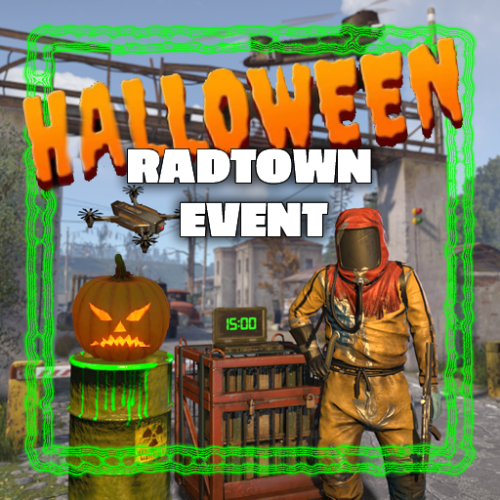
    This plugin adds a high-risk, high-reward element to the newly introduced Radtown Monument. This dynamic event spawns a hazardous shipping container filled with valuable loot but surrounded by dangerous radioactive material. The challenge is twofold: not only must players manage the intense radiation levels, but they must also defend the container from relentless attack drones that aim to destroy it. Key Features: Valuable Loot: The container holds rare and powerful resources, making it a highly coveted prize. Multiple drone attack waves: Drones attack in mul Intense Radiation: High levels of radiation require careful planning and protective gear to approach safely. Drone Defense: As players attempt to claim the loot, AI-controlled drones will attack the container. Players must defend it until the crate unlocks. Catastrophic Explosion: If players fail to protect the container or take too long, it will trigger a massive explosion, devastating the area and killing any nearby players. Configuration options: Drone wave count, drone count per wave Drone health and damage Container health Crate Loot and much more ... This plugin enhances the Radtown Monument with intense, timed gameplay, rewarding those who can outlast both the environment and the drones—but punishing failure with explosive consequences! Permissions: radtownevent.admin - Required to run admin commands Commands: radtown start - Start the event radtown stop - Stop the event Developer Api: void OnRadtownEventContainerDelivered() // Called when the container has been delivered and the event is ready to start void OnRadtownEventStart() // Called when the locked crate inside the container has been hacked void OnRadtownEventWin(ulong steamId) // Called when the event was successfully completed by a player void OnRadtownEventEnd(bool success) // Called when the event is over. Success is false when the container exploded Configuration: { "Time between events (minutes)": 60, "Crate hack time (seconds; drone waves will spawn until the crate is fully hacked)": 600, "Container health": 8000, "Time before despawn after event has been completed (seconds)": 300, "Time before despawn if event is not started (minutes)": 30, "Make event zone visible": false, "Drone wave configuration": [ { "Wave number": 1, "Preparation time before drones spawn (seconds)": 5, "Maximum number of concurrent drones": 3, "Explosive drone configuration": { "Number of attack drones to spawn (0 to disable)": 20, "Drone health": 100, "Damage per shell": 40, "Target players": false }, "Kamikaze drone configuration": { "Number of kamikaze drones to spawn (0 to disable)": 0, "Drone health": 100, "Damage on explosion": 60, "Target players": false } }, { "Wave number": 2, "Preparation time before drones spawn (seconds)": 20, "Maximum number of concurrent drones": 4, "Explosive drone configuration": { "Number of attack drones to spawn (0 to disable)": 20, "Drone health": 150, "Damage per shell": 50, "Target players": false }, "Kamikaze drone configuration": { "Number of kamikaze drones to spawn (0 to disable)": 30, "Drone health": 150, "Damage on explosion": 60, "Target players": false } }, { "Wave number": 3, "Preparation time before drones spawn (seconds)": 20, "Maximum number of concurrent drones": 5, "Explosive drone configuration": { "Number of attack drones to spawn (0 to disable)": 40, "Drone health": 200, "Damage per shell": 40, "Target players": true }, "Kamikaze drone configuration": { "Number of kamikaze drones to spawn (0 to disable)": 40, "Drone health": 200, "Damage on explosion": 60, "Target players": false } }, { "Wave number": 4, "Preparation time before drones spawn (seconds)": 20, "Maximum number of concurrent drones": 8, "Explosive drone configuration": { "Number of attack drones to spawn (0 to disable)": 40, "Drone health": 250, "Damage per shell": 70, "Target players": true }, "Kamikaze drone configuration": { "Number of kamikaze drones to spawn (0 to disable)": 40, "Drone health": 250, "Damage on explosion": 80, "Target players": true } }, { "Wave number": 5, "Preparation time before drones spawn (seconds)": 20, "Maximum number of concurrent drones": 8, "Explosive drone configuration": { "Number of attack drones to spawn (0 to disable)": 40, "Drone health": 250, "Damage per shell": 70, "Target players": true }, "Kamikaze drone configuration": { "Number of kamikaze drones to spawn (0 to disable)": 40, "Drone health": 250, "Damage on explosion": 80, "Target players": true } } ], "Locked crate loot table": { "Enabled": false, "Minimum items": 4, "Maximum items": 8, "Item list": [ { "Short name": "scrap", "Min amount": 12, "Max amount": 48, "Chance (1 = 100%)": 1.0, "Skin id": 0, "Custom name": "" } ] } } NEW: Halloween Update The Halloween update adds pumpkin drones and spooky decorations to the container
    $24.00
  13. I am currently investigating this issue. Not sure if it is related to this plugin. Edit: seems like it is actually caused by this plugin, but I am currently unable to reproduce the error

About Us

Codefling is the largest marketplace for plugins, maps, tools, and more, making it easy for customers to discover new content and for creators to monetize their work.

Downloads
2.4m
Total downloads
Customers
10.7k
Customers served
Files Sold
155.1k
Marketplace sales
Payments
3.3m
Processed total
×
×
  • Create New...

Important Information

We have placed cookies on your device to help make this website better. You can adjust your cookie settings, otherwise we'll assume you're okay to continue.