About ZHitbar
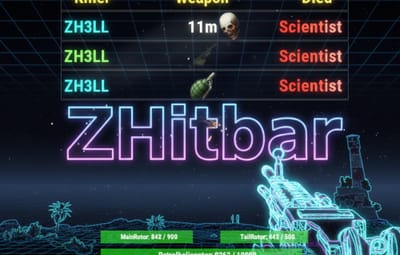
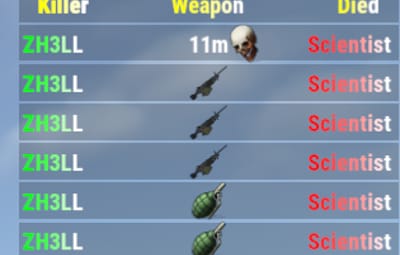
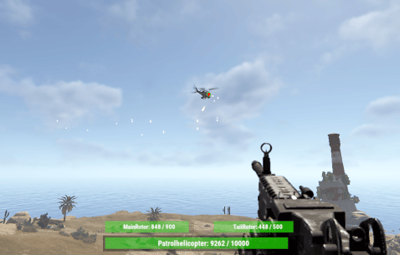
ZHitbar is an Oxide/uMod plugin for Rust servers designed to enhance the combat experience with two core features: Hitbar System: When you deal damage to an entity (player, animal, vehicle, or building block), a visual health bar appears on your screen showing the target's current and maximum health. Notably, it can also display the health of specific weak spots (rotors) for the Patrol Helicopter. Death Log: A sleek, customizable death message feed at the top of the screen. It displays the attacker, the victim, the weapon icon, and the kill distance.
Detailed Configuration Description
The configuration is divided into two primary sections: Death Messages and the Hitbar.
1. Death Messages (Top Screen Log)
- This section controls the kill feed appearing at the top of the player's screen.
- Enable Death messages in top of screen?: Globally toggles the death message display.
- Show Weapon icon?: If set to true, displays the icon of the item used for the kill.
- Maximum number of rows to display: Limits the number of simultaneous messages shown (default: 10).
- How long to show in seconds?: Sets the visibility duration for each message (default: 15s).
- Minimum Kill distance to appear in lines: Distance in meters above which the range is displayed; set to 0 to disable.
- Filtering Options: Toggle notifications for specific death types, including Animals, Tanks (Bradley), Patrol Helicopters, Traps, Drones, and Vehicles.
Colors & Text:
- Attacker name HEX color: The color of the killer's name (e.g., #00ff00 for green).
- Sacrifice name HEX color: The color of the victim's name (e.g., #ff0000 for red).
- Text size: Adjusts the font size of the log entries.
2. Hitbar (Health Indicator)
- This section defines how and when the health bar is displayed upon dealing damage.
- Enable hitbar?: Globally toggles the health bar feature.
- Enable hitbar if player's owned entity get damage?: If false, the bar won't show when hitting your own structures or items.
- Entity Type Filters: Choose whether to show the bar when attacking Building Blocks, Animals, Traps, or other Players.
- Show attacked Entity name in bar?: Displays the name of the target (e.g., "Bear" or "Part of base") above the health bar.
- String HEX start color: Sets the starting color for the entity name's gradient.
- How long to show in seconds?: Duration the bar remains visible after the last hit (default: 10s).
3. UI Positioning
- Both modules allow for precise screen placement using X and Y offset coordinates.
- MessagesPosition: Determines the location of the kill feed (typically top-right).
- HitbarPosition: Determines the location of the health bar (typically bottom-center).
Required Permissions
To use these features, players or groups must be granted the following Oxide permissions:
PermissionDescription
ZHitbar.Message.Enable -> Allows the player to see the death messages feed.
ZHitbar.HitBar.Enable -> Allows the player to see the health bar when dealing damage.
I guarantee the functionality of the plugin as described. However, I cannot take responsibility for conflicts or issues arising from incompatibility with third-party plugins or themes. Please take this into account before purchasing. I will list all known compatibility details in the product description.