
About ZTcUpgrade
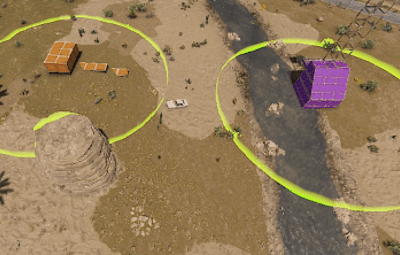
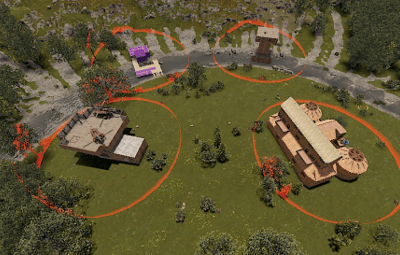
Creating a Tool cupboard zone within which entity limits can be easily configured and keep players away. Great for PVE and PVP servers.
Tc Upgrade
- Easy to use in-game with /ztc command
- The entities that can be freely placed outside the zone can be configured, and they can be limited inside the zone
- Entity limits can be configured based on permissions
- The permissions within this limits depend on the owner of the Tool Cupboard
- The zone can be turned off and on in the TC (only the owner)
- If the zone is active, only authorized players can enter! (if there is no authorized player, anyone can enter)
- Zone color / size can be configured
- The zone also disappears when the TC is destroyed
- It is not possible to build beyond the boundary of the zone, only if it has been built in advance (you can see it in the YouTube video)
- The /ztc command can be used if you (with ztc.admin privileges) are viewing the object
- Entities can be grouped in the config for limiting
- RaidableBase skipping option
Config
{
"TC zone radius": 15.0, zone size
"TC zone color (0 None, 1 Blue, 2 Cyan, 3 Green, 4 Purple, 5 Magenta, 6 Red, 7 Yellow)": 7, zone color
"TC zone dome darkness (0 =disabled || max 15)": 10,
"[RaidableBases] Radius in RaidableBases for Skip / Disable plugin (0 = disable)": 100.0,
"Enable players to enter TC ZONE where not authorized in TC?": false,
"Kill entitys near TC border after spawned?": false, if true entityes will destroy if tc placed
"Destroy all limited entity in zone after TC destroyed?": true, if true all limited entitys will destroy with TC (It is important that the limits cannot be avoided)
"Can turn on off in TC the zone colored border?": true, if false then all tc get zone || if true set the permission group in next config line, zone create if owner turn off
"Zone border color ON/OFF group list (only this groups can use)": [ groups can turn on off zones in tc if 'Can turn off in TC' config true
"Vip"
],
"Permissions": {
"Default": {
"buildingprivlidge": 3,
"PlanterBox": 4,
"hitchtrough.deployed": 5
},
"Vip": {
"buildingprivlidge": 5,
"PlanterBox": 8,
"hitchtrough.deployed": 10
}
},
"Free build entity out of zone ( no need TC zone)": [ list all entity what can build out of zone. If entity set here the limits will off if configured same entity in permissions
"sleepingbag_leather_deployed",
"gates.external.high.stone",
"wall.external.high.wood",
"wall.external.high.stone",
"graveyardfence",
"gates.external.high.wood",
"wall.external.high.ice",
"icewall",
"wall",
"vendingmachine.deployed",
"floor",
"block.stair.ushape",
"door.hinged.wood",
"ramp",
"roof"
],
"Prefab Groups": { Limit groups
"buildingprivlidge": [
"cupboard.tool.shockbyte.deployed",
"cupboard.tool.deployed",
"cupboard.tool.retro.deployed"
],
"PlanterBox": [
"planter.large.deployed",
"planter.small.deployed",
"minecart.planter.deployed",
"railroadplanter.deployed",
"bathtub.planter.deployed"
]
}
}
Chat command
/zct can use if have ZTcUpgrade.Admin permission
/ztc add (look entity) Add entity to Free build entity out of zone ( no need TC zone) LIST
/ztc del (look entity) Delete entity from Free build entity out of zone ( no need TC zone) LIST
/ztc (groupname) (limit) (look entity) Ecample: /ztc Vip 10 = add to Vip group with 10 limit || if limit = -1 -> delete entity limit from group
match upper and lower case in config permissions groupname
Language: 31 file
Permissions
ZTcUpgrade.Admin
+ configured permnission groupnames example Default Vip
I guarantee the functionality of the plugin as described. However, I cannot take responsibility for conflicts or issues arising from incompatibility with third-party plugins or themes. Please take this into account before purchasing. I will list all known compatibility details in the product description.