About Z Automated Teleport Gates
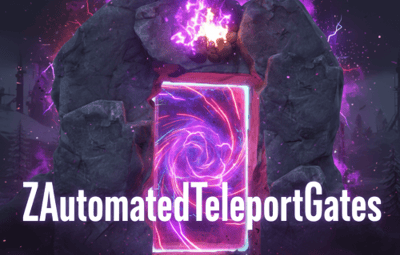
ZAutomatedTeleportGates - Detailed Plugin Description
The ZAutomatedTeleportGates is a versatile Rust plugin that adds a new dimension to server navigation and travel. It enables players to move quickly and efficiently across the map using predefined teleport gates (or a modern UI), employing various cost models. Whether you're looking for fast travel between monuments or connections between custom locations, this plugin provides the solution.
Key Features:
Flexible Operation Modes:
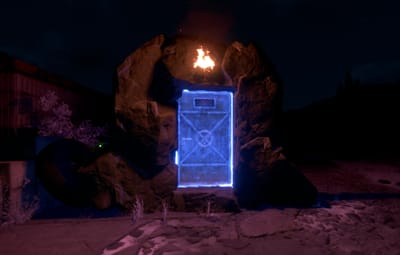
- Physical Gates: Place actual, interactive gates in the world through which players can enter the teleportation system. Ideal for servers with a unique atmosphere.
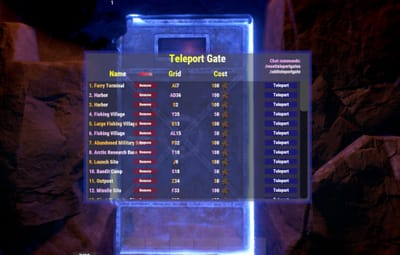
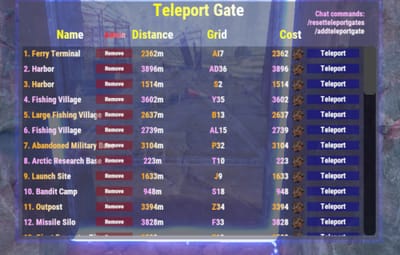
- UI-based Teleportation: If you prefer not to use physical gates, players can simply type a chat command to access an intuitive user interface to select their destination.
Customizable Cost System:
Selectable Currencies:
- Scrap: The default setting, a cornerstone of the Rust economy.
- ServerRewards (RP): Compatible with the popular ServerRewards plugin, allowing players to use in-game points.
- Economics ($): Integration with the Economics plugin if your server uses a more realistic monetary system.
- Distance-Based Pricing: You can configure the teleportation cost to increase proportionally with the distance traveled (e.g., X Scrap per 100 meters).
Easy Administration and Management:
- Simple Gate Addition: Admins can easily place new gates on the map, assigning a name and cost to them.
- Overwrite/Update Gates: If a gate name already exists, the admin command automatically updates its data (primarily the cost), eliminating the need for manual configuration editing.
- Full Reset: With a single command, all placed (or configured) gates can be deleted and regenerated based on the default monument settings.
- Individual Gate Removal: Specific gates can be removed by their index.
Automatic Monument Support:
The plugin can be pre-configured to provide default teleport gates for popular Rust monuments, with custom enabling and cost settings.
Installation and Setup:
Place the ZAutomatedTeleportGates.cs file into your /oxide/plugins folder.
Restart your server or load the plugin (o.load ZAutomatedTeleportGates). This will generate the ZAutomatedTeleportGates.json configuration file in the /oxide/config folder.
Edit the configuration file according to your needs (e.g., Mode, Cost Settings, TeleportDistance).
Grant permissions to players as required (see below).
Commands:
/gate - Configurable -> Description: Opens the teleportation user interface.
Permission: ZAutomatedTeleportGates.Use (or admin privileges)
Example: /gate
/addteleportgate {Name} {Cost}
Description: Adds a new teleport gate at the current admin's position. If the Name already exists in the configuration, its data (primarily the Cost) will be updated.
Permission: ZAutomatedTeleportGates.Admin
Example: /addteleportgate "MyCustomTeleport" 250
Important: If the name contains spaces, enclose it in quotes (e.g., /addteleportgate "Secret Base" 100).
/resetteleportgates
Description: Deletes all placed (or configured) gates and regenerates them based on the monument settings defined in the configuration.
Permission: ZAutomatedTeleportGates.Admin
Example: /resetteleportgates
ZAutomatedTeleportGatesAdminRemove {index} (Console command)
Description: Removes a specific gate based on its index. The index is typically shown when listing gates.
Permission: No permission required when run from console; player requires admin privileges.
Example: ZAutomatedTeleportGatesAdminRemove 5 (removes the gate with index 5)
Permissions:
ZAutomatedTeleportGates.Admin: Required to use the /addteleportgate, /resetteleportgates, and ZAutomatedTeleportGatesAdminRemove commands.
Granting: oxide.grant user <steamid> ZAutomatedTeleportGates.Admin
ZAutomatedTeleportGates.Use: Required to use the /gate command and to teleport through physical gates.
Granting: oxide.grant user <steamid> ZAutomatedTeleportGates.Use
ZAutomatedTeleportGates.FreeUse: Players with this permission can teleport for free, with no cost deducted.
Granting: oxide.grant user <steamid> ZAutomatedTeleportGates.FreeUse
Configuration (ZAutomatedTeleportGates.json):
{
  "Mode": false, // true = UI only (chat command), false = physical gates also spawn
  "Player Teleport Height (next to gate)": 2.0,
  "2 Way Player Teleport? (Both Side?)": false,
  "Chat Command": "gate", // The chat command that opens the UI
  "Cost Settings": {
    "CostType": 0, // 0 = Custom Item, 1 = ServerRewards, 2 = Economics
    "Custom Item Shortname": "scrap" // Only relevant if Custom Item (CostType: 0) is selected
  },
  "TeleportDistance": 0, // If > 0, cost will be distance-based (X cost / 100m)
  "AutomatedGates": { // Settings for monuments and custom gates
    "Abandoned Military Base": {
      "Enabled": true,
      "Cost": 100
    },
    "Abandoned Supermarket": {
      "Enabled": true,
      "Cost": 50
    },
    // ... additional monuments and custom gates (added via /addteleportgate command)
    "MyCustomTeleport": {
      "Enabled": true,
      "Cost": 250
    }
  }
}
I guarantee the functionality of the plugin as described. However, I cannot take responsibility for conflicts or issues arising from incompatibility with third-party plugins or themes. Please take this into account before purchasing. I will list all known compatibility details in the product description.