
About Super Hammer
 Super Hammer enhances the building hammer with powerful features for managing, upgrading, and manipulating building structures. Perfect for builders, admins, and creative servers that want expanded hammer functionality.
 Features
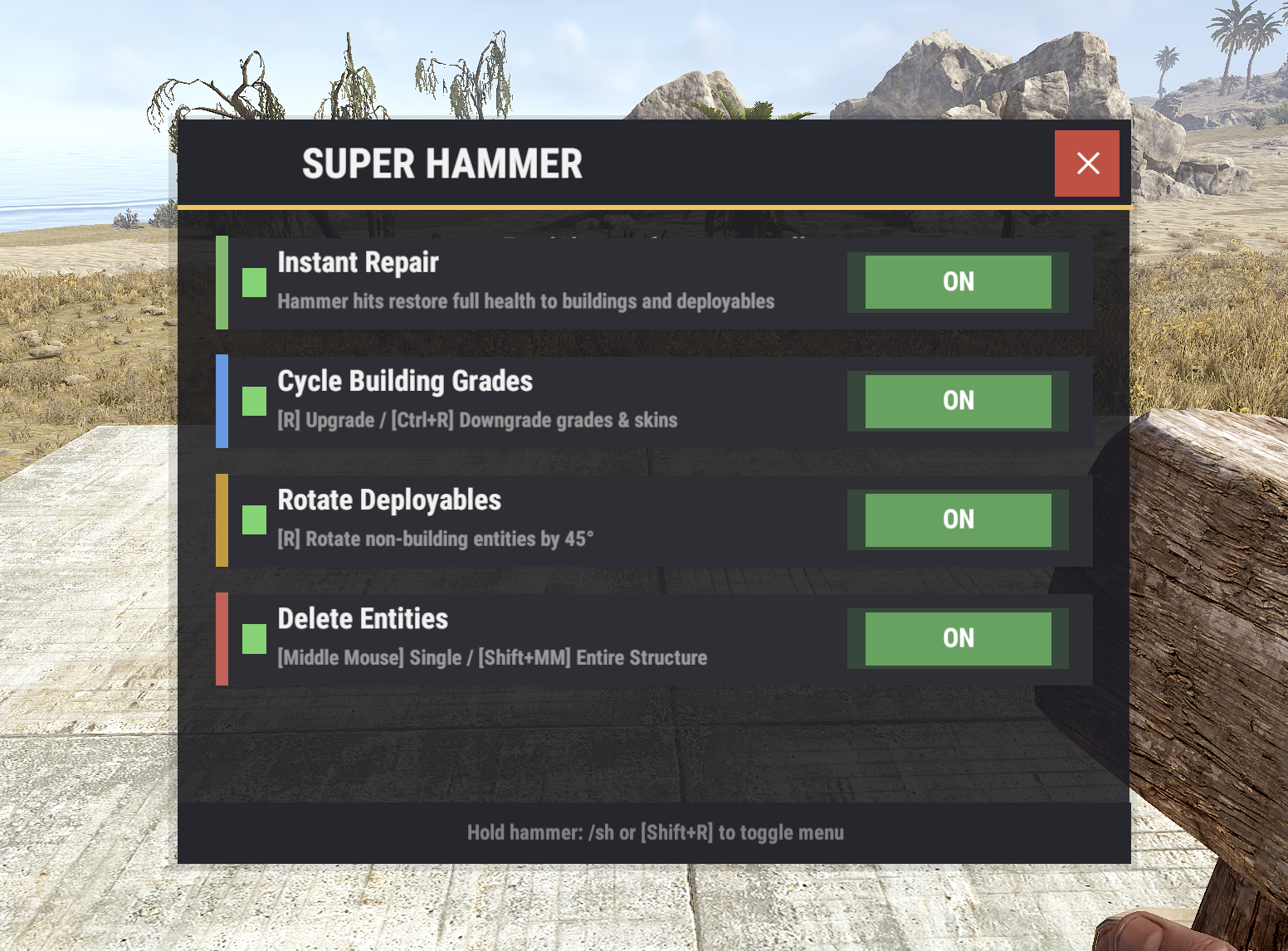
- Instant Repair - Automatically repair building blocks to full health on hit
- Building Grade Cycling - Upgrade/downgrade building blocks through all tiers and skins with R key or entire structure at once!
- Skin Support - Cycles through Frontier, Gingerbread, Adobe, Brick, Concrete, Jungle, and Container skins
- Rotate Deployables - Rotate any deployable entity by 45° increments
- Quick Delete - Middle mouse to delete single entities, Shift+Middle Mouse for entire structures
- Modern UI Interface - Toggle features on/off with a sleek dark-themed GUI
- HUD Indicator - Shows active features below the hotbar when holding hammer
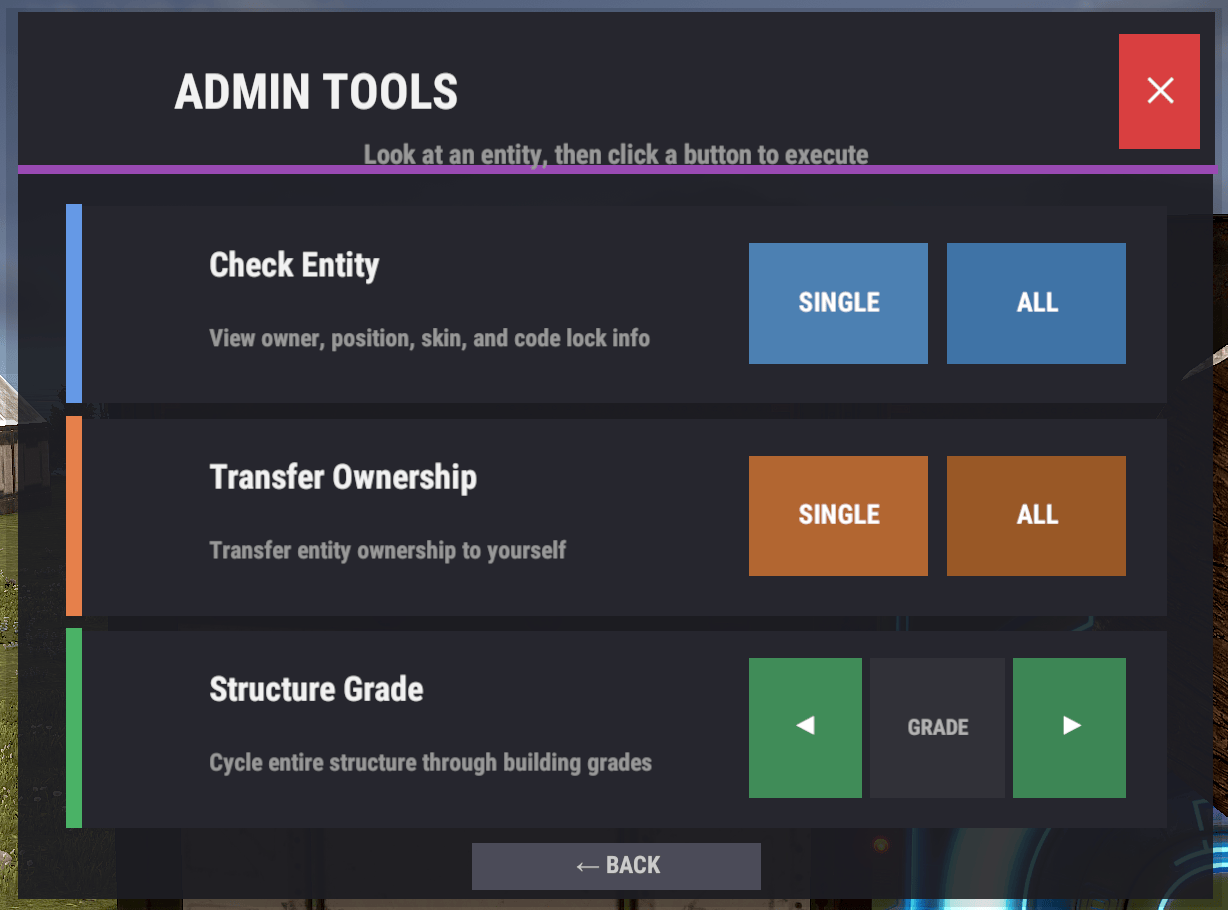
- Admin Tools - Check entity info, view code locks, transfer ownership
- Structure Analysis - View ownership distribution across connected structures
- TC Authorization Checks - Respects building privilege for non-admin users
- Per-feature Permissions - Granular control over which features players can access
- Persistent Settings - Player preferences saved between sessions
 Permissions
superhammer.adminmenu | Access to admin menu (check entities, transfer ownership, bypass ownership checks)
superhammer.repair | Allows use of instant repair feature
superhammer.upgrade | Allows use of building grade upgrade/downgrade feature
superhammer.rotate | Allows use of deployable rotation feature
superhammer.delete | Allows use of entity deletion feature
superhammer.check | Allows use of entity check commands
superhammer.own | Allows use of ownership transfer commands
 Commands
/sh | Opens the Super Hammer GUI menu
/sh.check | View detailed info about the entity you're looking at
/sh.checkall | Analyze ownership distribution of connected structure
/sh.own [player] | Transfer ownership of single entity (to self or specified player)
/sh.ownall [player] | Transfer ownership of all connected entities
/sh.removeall | Delete all connected entities you own
Keyboard Shortcuts (While Holding Hammer)
Shift + R | Open Super Hammer menu
R | Upgrade building block / Rotate deployable
Ctrl + R | Downgrade building block
Middle Mouse | Delete single entity
Shift + Middle Mouse` | Delete entire connected structure
 Caveats and Disclaimers
- Admin permissions are powerful - The `superhammer.adminmenu` permission bypasses ownership checks. Only grant to trusted staff.
- Ownership transfer is permanent - Use `/sh.ownall` carefully as it will transfer ALL connected entities.
- Structure deletion is irreversible - Deleted structures cannot be recovered. Confirmation dialogs are shown for mass deletions.
- UberTool compatibility - Super Hammer automatically disables when UberTool is detected to prevent conflicts.
 Localization
{
  "BuildingBlocked": "<color=#ffc34d>Super Hammer</color>: Cannot use in a building blocked area.",
  "Permission": "<color=#ffc34d>Super Hammer</color>: You don't have permission to use a building hammer.",
  "HoldingHammer": "<color=#ffc34d>Super Hammer</color>: You must be holding a hammer.",
  "Enabled": "<color=#ffc34d>Super Hammer</color>: <color=#b0fa66>Enabled</color>.",
  "Disabled": "<color=#ffc34d>Super Hammer</color>: <color=#ff6666>Disabled</color>.",
  "EntityOwner": "<color=#ffc34d>Super Hammer</color>: You do not own this entity.",
  "TakeOwnership": "Took ownership of {0} entities.",
  "WallpaperRemoved": "Removed {0} wallpapers from your building blocks.",
  "CodeLock": "<color=#66ccff>Code</color>: "
}
 Support
Join the Dark Side Development for support!
 Ko-Fi
Ko-Fi
Like what we do? Support us over at Ko-Fi
 Legal
Legal
Copyright © 2026 Lincoln
This plugin, Super Hammer, is the intellectual property of Lincoln. The plugin may not be copied, modified, merged, published, or redistributed without the explicit permission of the creator, Lincoln.
Permission is granted solely for personal use on a Rust server that you own or manage. Commercial use, sharing with third parties, or distribution on multiple servers is strictly prohibited without prior consent from the creator.
Disclaimer of Warranty and Liability:
This plugin is provided "as is" without any express or implied warranties. The creator disclaims any liability for damages, including but not limited to server malfunctions, data loss, or other issues arising from the use of this software. Use of the plugin is at your own risk.



.thumb.png.004cf43ff02f9b581d47466f055e4ef4.png)




.thumb.png.eb55448673a74111f4a1e2df19a8bb8a.png)