Jump to content

9 Screenshots

  • 7.1k
  • 50
  • 307.03 kB
  • Update details
    v1.1.2
    Released
    Download size 307.03 kB
    Total versions 12
    Typical update pace About every 19 days
    Freshness Updated 19 days ago

This area is for discussion and questions. Please use the support area for reporting issues or getting help.

Recommended Comments

BetterDeadThanZed

Posted

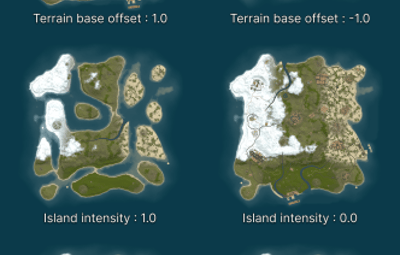
If I understand this right, you select a seed and size, for example from rustmaps.com, and then this plugin makes those adjustments as described in the Description page?

ninco90

Posted

I've been working on and experimenting with something similar, trying to create a custom map generator that would allow me to add custom radars in predetermined positions on the map, among other things.

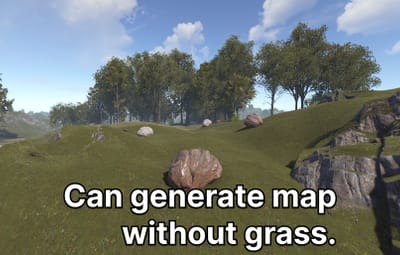
I also tried removing the grass, but during a real wipe, when we tested it, we discovered that it generated a lot more stone/metal/sulfur ore compared to a normal map, so it's a problem if you don't modify it in other ways. I don't know if you've tested this and found a solution.

FourTeen.

Posted

My maps with and without grass is no different except that there is no grass on it.

40 minutes ago, ninco90 said:

I've been working on and experimenting with something similar, trying to create a custom map generator that would allow me to add custom radars in predetermined positions on the map, among other things.

I also tried removing the grass, but during a real wipe, when we tested it, we discovered that it generated a lot more stone/metal/sulfur ore compared to a normal map, so it's a problem if you don't modify it in other ways. I don't know if you've tested this and found a solution.


URNS

Posted

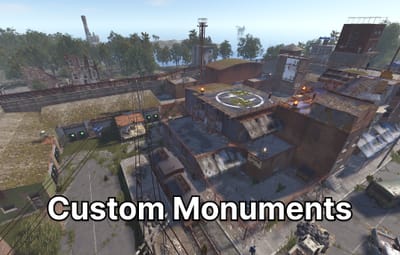
When you say custom monuments, you mean like additions to existing ones? for example I CAN'T make a complete custom monuments and name it trainyard_1 and that would REPLACE the actual train yard?

Its only adding prefabs on existing monuments right?

FourTeen.

Posted

22 minutes ago, Friendly Factions said:

When you say custom monuments, you mean like additions to existing ones? for example I CAN'T make a complete custom monuments and name it trainyard_1 and that would REPLACE the actual train yard?

Its only adding prefabs on existing monuments right?

possible to supplement existing monuments in the game, as well as generate your own prefab monuments made in RustEdit. Later, I will redo the description and make some kind of reminder.

  • Like 1
Friwen

Posted

Hi! I'm thinking of buying Custom Generation for my Carbon server 

  1. I own the RustEdit prefab "Combined Outpost & Bandit Camp V4" from Codefling. It is an overlay meant to be placed on top of the vanilla Outpost (it adds Bandit Camp style shops, an air vehicle vendor, a wheel, a helipad and buildings). Can I use it with ReplaceMonument, with "Keep original monument" and "Use original rotation" enabled, so it lands on the vanilla Outpost on every new map?

  2. Is there an X/Z offset for ReplaceMonument (not only height offset)? The prefab's origin is a few metres off the Outpost's origin, so I may need to shift it.

  3. Are NPC shopkeepers, vending machine presets, IO connections and building blocks from the prefab carried over correctly to each generated map?

  4. Can I keep large vanilla monuments (Launch Site, Airfield, Excavator) far apart from each other using the PlaceMonuments distance settings (MinDistanceDifferentType / Max mode)?

Thanks a lot!

FourTeen.

Posted

2 hours ago, Friwen said:

Hi! I'm thinking of buying Custom Generation for my Carbon server 

  1. I own the RustEdit prefab "Combined Outpost & Bandit Camp V4" from Codefling. It is an overlay meant to be placed on top of the vanilla Outpost (it adds Bandit Camp style shops, an air vehicle vendor, a wheel, a helipad and buildings). Can I use it with ReplaceMonument, with "Keep original monument" and "Use original rotation" enabled, so it lands on the vanilla Outpost on every new map?

  2. Is there an X/Z offset for ReplaceMonument (not only height offset)? The prefab's origin is a few metres off the Outpost's origin, so I may need to shift it.

  3. Are NPC shopkeepers, vending machine presets, IO connections and building blocks from the prefab carried over correctly to each generated map?

  4. Can I keep large vanilla monuments (Launch Site, Airfield, Excavator) far apart from each other using the PlaceMonuments distance settings (MinDistanceDifferentType / Max mode)?

Thanks a lot!

Hi! If you have a .map where V4 is already aligned with the vanilla Outpost (compound.prefab), save it as carbon/data/FCustomGeneration/Monuments/compound.map. On each fresh wipe, Custom Generation will put the V4 additions in the same positions relative to wherever Outpost spawns. You can leave ReplaceMonument disabled. The alignment you saved in RustEdit handles the X/Z offset.

If you only have the V4 .prefab, open a blank map in RustEdit, place the vanilla Outpost, line up V4 over it, and save the result as compound.map in that folder.

  • Like 1
FourTeen.

Posted

19 hours ago, Friwen said:

Hi! I'm thinking of buying Custom Generation for my Carbon server 

  1. I own the RustEdit prefab "Combined Outpost & Bandit Camp V4" from Codefling. It is an overlay meant to be placed on top of the vanilla Outpost (it adds Bandit Camp style shops, an air vehicle vendor, a wheel, a helipad and buildings). Can I use it with ReplaceMonument, with "Keep original monument" and "Use original rotation" enabled, so it lands on the vanilla Outpost on every new map?

  2. Is there an X/Z offset for ReplaceMonument (not only height offset)? The prefab's origin is a few metres off the Outpost's origin, so I may need to shift it.

  3. Are NPC shopkeepers, vending machine presets, IO connections and building blocks from the prefab carried over correctly to each generated map?

  4. Can I keep large vanilla monuments (Launch Site, Airfield, Excavator) far apart from each other using the PlaceMonuments distance settings (MinDistanceDifferentType / Max mode)?

Thanks a lot!

Sorry, I missed your last two questions

Shops, IO and building blocks. The NPC shopkeepers and Airwolf vendor are imported as prefabs, and Custom Generation restores the IO connections saved by RustEdit. Vending presets embedded in the .map are loaded automatically. If you have separate .vprof files, put them in carbon/data/FCustomGeneration/CustomMonuments/_Presets/VendingPresets/. Building pieces saved as regular prefabs are carried over with the .map overlay.

Monument spacing. In FCustomGeneration.json, go to Generation Settings → Generation components settings → Main Monuments (PlaceMonuments) and set Apply values? to true. Under Values, set DistanceSameType and DistanceDifferentType to "Max" to favor placements farther apart. You can also raise MinDistanceSameType and MinDistanceDifferentType. These settings apply to the whole Main Monuments group. On a 3500 map, Rust can relax the minimum distances during generation, so the final spacing and whether Launch Site, Airfield and Excavator all fit depend on the seed.

Create an account or sign in to comment

You need to be a member in order to leave a comment

Create an account

Sign up for a new account in our community. It's easy!

Register a new account

Sign in

Already have an account? Sign in here.

Sign In Now
  • Love 1

FourTeen.
FourTeen.'s Collection
Explore more files from this creator.

User Feedback

About Us

Codefling is the largest marketplace for plugins, maps, tools, and more, making it easy for customers to discover new content and for creators to monetize their work.

Downloads
3.3m
Total downloads
Customers
12.4k
Customers served
Files Sold
176.3k
Total sales
Payments
3.9m
Processed total
×
×
  • Create New...

Important Information

We have placed cookies on your device to help make this website better. You can adjust your cookie settings, otherwise we'll assume you're okay to continue.