

About Custom Generation
- Add a prefab container together with its layers to the required category.
- Start the server. A separate configuration file will be created for the container.
- Stop the server and configure its placement.
- On the next wipe, start the server normally. No additional action is required.
All generation changes are applied only when a new map is created during a wipe. Reloading the plugin or restarting the server does not modify an existing map. A new wipe is required for changes to placement, terrain, WorldConfig or generation components to take effect.
If you plan to use the full feature set, it is strongly recommended to configure and verify the map on a separate test server first. Placement, terrain and component settings may require several test wipes to get right.
Be aware that Facepunch may ban the server IP address for frequent wipes. Use a local server for testing or be prepared for this risk.
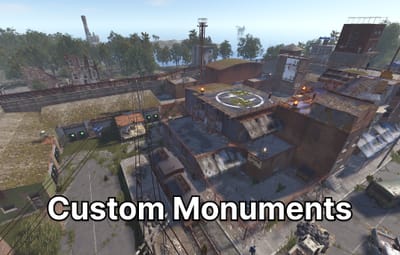
Custom structures are added to /data/FCustomGeneration/CustomMonuments/. Place the .prefab file and the layers saved with it in the appropriate folder:
| Category | Placement |
|---|---|
| Monument | Ground |
| Island | Island with its own terrain |
| Water | Water surface |
| Underwater | Seabed |
| FlyingIsland | Specified altitude |
| Roadside | Beside a road |
| ReplaceMonument | In place of a standard monument |
The category provides the initial configuration values. After the file is created, the placement type and all other parameters can be changed manually. Additional subfolders are also read, but they do not receive a special preset. For example, a Rail folder is used only for organisation and receives the regular ground settings.
The /data/FCustomGeneration/Monuments/ folder accepts .map files used to extend standard monuments. The .map filename must match the root prefab name of the standard monument. That prefab must also be present inside the map: the plugin uses it as the origin, rotation and scale reference, then copies the remaining objects and paths onto every instance created by the server.
This method does not create a new monument and has no separate placement configuration. It modifies the matching standard monument while the map is being created. A wipe is required for changes to appear.
A prefab container does not have to be a full monument. It can contain a small shed with a recycler and a few crates, a single object, flat terrain or a prepared building area, an island, a group of structures or an entire city.
| Setting | Effect |
|---|---|
| Enabled | Includes the structure in generation |
| Target count | Number of copies the plugin will attempt to place |
| World size count multiplier | Adjusts the count for different world sizes. The final count is the target count multiplied by the curve value |
| Minimum world size | The structure is not generated on smaller maps |
| Attempts per structure | Number of positions checked for each copy. A larger value helps with strict filters but increases generation time |
| Minimum same type distance | Spacing between copies of this container |
| Minimum different type distance | Spacing from other monuments |
| Same prefab distance mode | Any, Min or Max for copies of this container |
| Other prefab distance mode | Any, Min or Max for other monuments |
The world size count multiplier contains a list of points:
| Field | Meaning |
|---|---|
| Points | Set of world sizes and their multipliers |
| World size | World size associated with the multiplier |
| Multiplier | Amount by which the target count is multiplied |
The multiplier is interpolated linearly between points. Outside the defined range, the nearest end point is used.
Distance mode is configured separately for the same prefab and for other prefabs. Both fields accept these values:
| Mode | Result |
|---|---|
| Any | First valid position |
| Min | Position closer to other objects while respecting the minimum spacing |
| Max | Most distant valid position |
Larger counts, structure bounds, spacing values and filter sets reduce the chance that every requested copy can be placed.
| Setting | Check performed |
|---|---|
| Splat layers | Ground surface type |
| Biomes | Arid, Temperate, Tundra, Arctic, Jungle |
| Topology any | At least one listed topology must match |
| All topologies | The area must contain every listed topology |
| Topology not | Areas containing the listed topologies are excluded |
| Topology check radius | Size of the checked area around the position |
| Minimum distance to forbidden topology | Additional spacing from roads, rivers, shores and other excluded areas |
| Check placement map | Prevents use of an area already occupied by the map generator |
The meaning of -1 and 0 depends on the field:
| Value | Use in | Result |
|---|---|---|
| -1 | Splat layers, Biomes, Topology any | Any value is allowed |
| 0 | All topologies, Topology not | The requirement or exclusion is disabled |
Do not use 0 for Splat layers, Biomes or Topology any. The server reports that mask as invalid. In the current version it effectively applies no restriction, but -1 is the supported value for "any". An empty string in All topologies or Topology not has the same effect as 0.
For a large structure, do not check only its centre. Increase the topology radius and leave enough clearance from forbidden areas. A wide radius combined with a long exclusion list can remove almost every available position.
Search area mode accepts one of three values:
| Mode | Search region |
|---|---|
| Terrain | Inside the main map |
| ExtendedTerrain | Inside and outside the main map |
| OutsideTerrain | Outside the map boundary only |
Additional settings:
| Setting | Effect |
|---|---|
| Extra bounds | Search distance beyond the main map |
| Min distance outside terrain | Minimum outward distance from the map edge |
| Max distance outside terrain | Maximum outward distance. A value of 0 removes the limit |
| Min terrain edge distance | Prevents placement directly against the map boundary |
| Extra terrain edge padding | Adds clearance for the structure bounds |
| Use terrain filters outside map | Applies splat, biome, topology and placement-map checks outside the main area |
| Clamp height/water checks to map edge | Uses the nearest available edge sample for positions outside the map |
For an offshore structure outside the playable island, OutsideTerrain usually needs a minimum outward distance and a maximum distance limit. Without an upper limit, the structure may be placed far from the island.
For ExtendedTerrain and OutsideTerrain, set Extra bounds or a positive maximum distance outside terrain. If both are 0, the search area does not extend beyond the map and OutsideTerrain cannot find a position. When terrain filters outside the map are disabled, splat, biome, topology and the placement map are skipped there; height, water, terrain difference and monument distances are still checked.
| Value | Behaviour |
|---|---|
| Ground | Placement on terrain |
| Water | Placement at ocean level |
| Underwater | Underwater placement with seabed checks |
| Flying | Placement at a specified altitude |
| Roadside | Finds a side road and aligns the structure to its direction |
Roadside requires a correctly prepared road or trail inside the container. The first such path is used for alignment; rail paths are skipped. Direction and height come from the selected server road segment, so height mode, random yaw and a fixed map point do not apply to Roadside.
| Value | Height source |
|---|---|
| Auto | Ground uses terrain, Water uses ocean level, Underwater uses the seabed, and Flying uses absolute height |
| Terrain | Terrain surface or seabed |
| Water | Ocean level |
| Absolute | World zero height |
Height offset is applied after the base height is calculated. A positive value raises the structure and a negative value lowers it.
Terrain height sample mode accepts one of four values:
| Value | Calculation |
|---|---|
| Center | Height at the centre |
| Average | Average height across the structure area |
| Min | Lowest sampled point |
| Max | Highest sampled point |
Terrain height sample radius multiplier changes the sampled area. A value of 1 uses the regular structure bounds. A value that is too large may include a nearby slope.
Max terrain height difference rejects uneven areas. A small value produces flatter placement but reduces the number of available positions. A larger value makes placement easier but increases the chance that an edge will be above ground or inside a slope.
The maximum terrain difference check applies only to Ground placement. When terrain layers are disabled, a height layer stored in the container is not used for height selection or terrain difference checks.
Minimum water depth rejects shallow water. Maximum water depth prevents placement in excessively deep water. A value of 0 disables the upper limit.
The full structure area is checked, so a large platform or island needs sufficient depth at its edges as well.
When Apply terrain layers is enabled, the container supplies:
- terrain shape;
- surface textures;
- terrain transparency;
- biome data;
- topology data.
Smoothing joins the new terrain to the map:
| Setting | Effect |
|---|---|
| Height smoothing passes | More passes soften the transition more strongly |
| Height smoothing outside distance | Width of the transition around the structure |
| Height smoothing inside distance | Smoothing inside the structure bounds. A value of 0 disables the inset; a large value changes the prepared centre area |
| Height smoothing strength | Smoothing intensity from 0 to 1 |
Increase the outside distance to correct a sharp edge. If the centre is being deformed, reduce the inside distance and smoothing strength.
If a container or shop uses a custom RustEdit preset, copy the preset file into the plugin folder:
| File | Folder |
|---|---|
| .lprof | /data/FCustomGeneration/CustomMonuments/_Presets/LootPresets |
| .vprof | /data/FCustomGeneration/CustomMonuments/_Presets/VendingPresets |
For loot containers, the plugin uses the preset item list, minimum and maximum item count, blueprint chance and refresh time. NPC vending machines receive the sell orders from the vending preset.
Loaded presets are stored inside the generated map file. The map can then be moved to another server without separate .lprof and .vprof files, but FCustomGeneration must be installed. The version embedded in the map takes priority. Generate the map again after changing a preset, otherwise the map will continue using the older embedded version.
The map also stores entities added by the plugin, building blocks, IO connections and the required topology data. FCustomGeneration restores them on the destination server.
The plugin transfers every path from the prefab container. A single structure can contain multiple roads, trails and railway paths at the same time.
The connection type is selected automatically: Rail for a path with railway topology, Trail for a trail and Road for a regular road. Every detected path receives its own entry in the custom structure configuration, where the first and last ends can be enabled independently. A road and a railway path inside the same prefab container can therefore use different settings.
When the configuration is first created, it uses the values stored in the prefab container. If RustEdit saved both ends of a railway path as disabled, enable the required ends in the configuration and wipe the server so the railway generator can use the structure on the new map.
The path direction inside the container determines which side connects to the external path. Roadside placement also requires enough free road length and no nearby intersection.
Use map point enables a fixed map region. When disabled, the plugin searches the complete selected search area.
The map is divided into nine regions from left to right: 1-3 are at the top, 4-6 in the middle and 7-9 at the bottom. 5 is the centre. Map point offset X and Map point offset Z move the position within the selected region.
Water depth, terrain, topology and distance rules are still checked. If the selected point does not satisfy them, the plugin searches for another valid position.
With a map point enabled, no more than one copy is created regardless of Target count. The fixed Yaw value is used; Random yaw does not apply in this mode.
- Yaw sets a fixed rotation.
- Random yaw selects the angle automatically. It is normally disabled for roads, entrances and bridges.
- Scale changes the model size, bounds, paths, check radius and required free area.
- Create Monument topology marks the occupied area as a monument.
- Clear topologies after spawn removes selected topology types inside the structure area.
- Map marker text creates a map label. An empty value disables it.
After increasing the scale, you may also need more spacing from other objects, the map boundary and the shore.
| Setting | Behaviour |
|---|---|
| Enabled | Enables replacement |
| Original monuments | List of matches against standard object paths |
| Replace chance percent | 100 replaces every matching object; 0 disables replacement |
| Keep original monument | Keeps the standard object together with the custom structure |
| Use original rotation | Copies the orientation of the replaced monument |
Replacement count is determined by the number of matching standard monuments and the replacement chance. Target count, attempts, filters, distances and map point are not used for replacement. Minimum world size still applies. Height offset, scale, layers, paths, topology and the map marker are applied to every completed replacement.
Use a sufficiently specific part of the original path. A short generic match can affect several different objects. Keeping both the original and custom structures is suitable only for an overlay prepared for that monument.
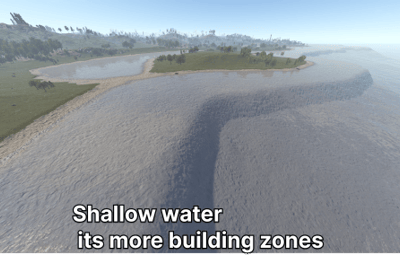
This section raises and smooths the seabed within the selected depth range.
| Setting | Effect |
|---|---|
| Enabled | Enables shallow water processing |
| Beach depth | Target depth of the processed area |
| Depth limit | Range of seabed depths included in processing |
| Edge smooth radius | Width of the transition |
| Lerp power | Smoothness of the transition |
| Max rise | Maximum amount by which the seabed can be raised above the target |
A wider depth range and smoothing radius produce a larger shallow-water area and a more visible change to the shore.
| Setting | Effect |
|---|---|
| Server browser map name | Replaces the displayed map name. An empty value keeps the standard name |
| Prefab blacklist | Removes standard objects by a match in their name |
| Log custom monument spawn results | Records the requested and actual count after generation |
| Existing prefabs on map points | Places existing game objects in one of the nine map regions |
Use precise entries in the prefab blacklist. A generic word may remove several unrelated groups of decoration.
This blacklist operates independently from WorldConfig. Inside WorldConfig, its blacklist is checked before its whitelist. A whitelist entry does not restore an object that has already been blocked by the blacklist.
Each map-point prefab entry contains:
| Setting | Effect |
|---|---|
| Enabled | Enables the entry |
| Prefab path | Standard game object to create |
| Category | Generation group to which the object is added |
| Replace original prefab | Removes regular procedural copies of this object |
| Map point | Region from 1 to 9 |
| Offset X | Horizontal offset on the X axis |
| Offset Z | Horizontal offset on the Z axis |
| Height offset | Raises or lowers the object |
| Yaw | Object orientation |
| Scale | Object size |
| Setting | Effect |
|---|---|
| Unlock map size limit | Allows world sizes above the standard limit |
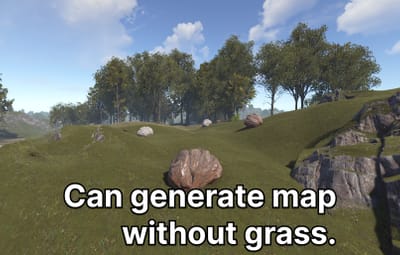
| Remove grass on map | Removes grass and bushes across the map |
| Allow building on roads | Removes the building restriction from road topology |
| Disable subway/tunnel generation | Removes the underground railway and its entrances |
| Monument priority | Gives selected standard monuments an earlier placement position |
A larger map requires more memory and more generation time. When road building is enabled, players can block traffic. A long monument priority list leaves less space for other objects.
Use WorldConfig replaces the standard world settings with values from this section.
| Setting | Effect |
|---|---|
| JSON string | Internal WorldConfig string. Leave it empty; the separate fields below are used instead |
| Tier 0 fraction | Share of areas with entry-level loot |
| Tier 1 fraction | Share of areas with mid-level loot |
| Tier 2 fraction | Share of areas with high-level loot |
| Arid fraction | Share of the desert biome |
| Temperate fraction | Share of the temperate biome |
| Tundra fraction | Share of the tundra biome |
| Arctic fraction | Share of the arctic biome |
| Jungle fraction | Share of the jungle biome |
| Main roads | Enables or disables main roads |
| Side roads | Enables or disables side roads |
| Trails | Enables or disables trails |
| Rivers | Enables or disables rivers |
| Power lines | Enables or disables power lines |
| Above-ground railway | Enables or disables the surface railway |
| Underground railway | Enables or disables the underground railway |
| Underwater laboratories | Enables or disables underwater laboratories |
| WorldConfig blacklist | Standard prefabs that cannot be generated |
| WorldConfig whitelist | When not empty, only matching prefabs are generated |
Tier 0 to Tier 2 values are normalised against their total. Arid, Temperate, Tundra and Arctic are normalised in the same way; Jungle is handled separately. Setting all four main biome values to zero produces a fully temperate distribution. A very small biome share reduces the available space for monuments restricted to that biome.
The list comes from the current server build and is written to the configuration when the server starts. The section may be empty before the first start. Once the list appears, stop the server, change the required values and create a new map on the next wipe. These changes are not applied to an existing map.
Component names are not translated in the configuration. Use the exact English name.
| Entry setting | Effect |
|---|---|
| Name : Название | Exact component name |
| Enabled? : Включен? | Whether the component runs |
| Apply values? : Применять значения? | Applies parameters from the Values section |
| Values : Значения | Component parameters available for editing |
If an entry only contains Enabled, that component can only be enabled or disabled. Apply values and Values only appear for components with available parameters. Components without Values are therefore not listed separately in this guide.
PlaceMonuments components commonly expose:
| Setting | Effect |
|---|---|
| TargetCount | Maximum number of different prefabs the component will attempt to place |
| TargetCountWorldSizeMultiplier | Adjusts the limit according to world size |
| MinWorldSize | Skips the component on smaller maps |
| MinDistanceSameType | Spacing between monuments from the same set |
| MinDistanceDifferentType | Spacing from other monuments |
| DistanceSameType and DistanceDifferentType | Any, Min or Max position selection |
| Filter | Allowed biomes, surface and topology |
TargetCount does not create multiple copies of the same standard prefab. If a set contains three eligible variants, a value of 1000 still places no more than three. This applies to sets such as Desert Military (PlaceMonuments), Fishing Villages (PlaceMonuments), Oasis (PlaceMonuments), Lakes (PlaceMonuments), Caves (PlaceMonuments) and Underwater Labs (PlaceMonuments).
For PlaceMonuments, TargetCount 0 means no overall limit; it does not disable the component. Use Enabled to disable it. This differs from Target count in a custom monument configuration, where 0 prevents the structure from being created.
Main Monuments (PlaceMonuments) is a set of different main monuments. Increasing TargetCount above the number of available prefabs adds nothing, while lowering it limits how many different monuments can be selected from the set. The final count also depends on world size, each prefab's minimum world size, filters and available space.
Road, trail and river components may expose Width, TerrainOffset, length and count limits, selection mode and smoothing. A MaxPathCount below 0 keeps the standard number of paths, 0 removes all paths and a positive value sets the maximum.
Underwater Labs (GenerateDungeonBase) exposes segment count, budget and floor limits for the initial section, start extension, end extension and open-socket filling stages.
Only change fields added by the plugin to the Values section of that component. Disabling an early stage affects later stages. Without the road topology pass there is no road texture, road mesh or roadside decoration. Without a river there is nothing for later river stages to process.
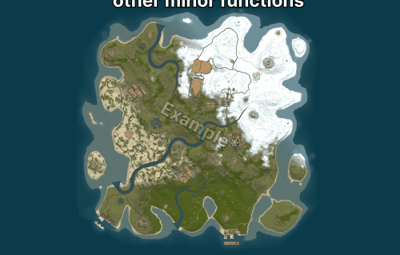
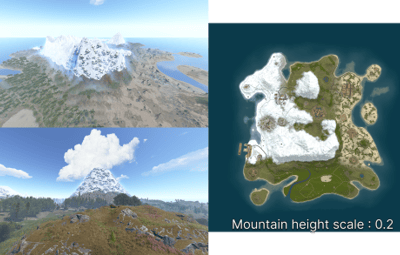
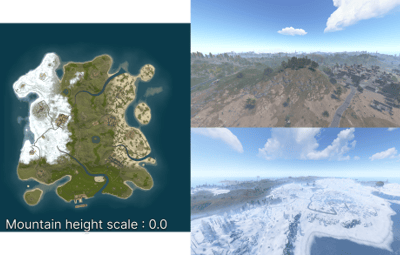
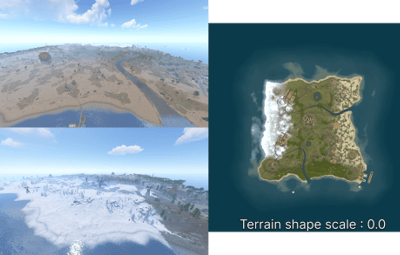
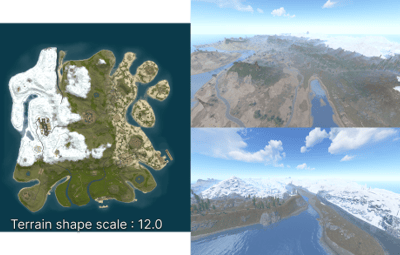
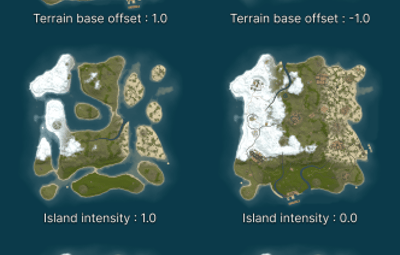
This experimental section changes the shape of the procedural map. When it is disabled, the server uses standard terrain generation.
| Setting | Standard value | Effect |
|---|---|---|
| Enabled | false | Applies the values from this section |
| Island intensity | 0.1 | Strength of the island shape and balance between land and water; range 0 to 1 |
| Terrain blend scale | 1 | Scale of the transition between the main terrain forms |
| Terrain shape scale | 4 | Size and strength of large terrain forms |
| Terrain base offset | -0.4 | Moves the base shape up or down |
| Terrain sample step | 0.05 | Sampling step for large terrain detail |
| Terrain detail sample step | 0.05 | Sampling step for fine terrain detail |
| Terrain blend half | 0.5 | Centre of the transition between terrain forms |
| Terrain blend start | 0.25 | Point at which blending starts |
| Terrain blend end | 0.75 | Point at which blending ends |
| Terrain height range multiplier | 2.75 | Overall difference between lowlands and peaks |
| Terrain world size scale | 800 | Size of terrain features relative to the map |
| Terrain noise frequency A | 0.0002 | Frequency of large shape changes |
| Terrain noise frequency B | 0.0009 | Frequency of additional shape changes |
| Terrain height bias | -0.1 | Additional offset applied to calculated height |
| Terrain angle degrees | 180 | Angular range used to build the terrain shape |
| Ridge height offset | -0.15 | Vertical position of ridges |
| Ridge noise blend | 0.3 | Amount by which ridges blend with the main terrain |
| Ridge noise offset | -0.02 | Threshold at which ridges appear |
| Ridge noise scale | 0.025 | Size of the primary ridge form |
| Ridge noise scale secondary | 0.03 | Size of the secondary ridge form |
| Mountain detail height scale | 0.04 | Amplitude of fine mountain detail |
| Mountain height scale | 0.07 | Overall mountain height; range 0 to 0.3 |
| Mountain noise offset | -0.01 | Threshold at which mountain areas appear |
| Mountain noise scale | 0.035 | Size of mountain forms |
| Lowland height scale | 0.002 | Strength of detail in lowlands |
| Base noise octaves | 6 | Complexity of large forms; range 1 to 16 |
| Detail noise octaves | 8 | Amount of fine detail; range 1 to 16 |
Terrain blend start must be below terrain blend half, and terrain blend half must be below terrain blend end. Both offsets affect the final height. A higher frequency produces smaller features. More octaves add detail and increase processing time.
Check the following in order:
- The structure is enabled, target count is above zero, and world size is not below the configured minimum.
- Biome, surface and topology settings do not conflict.
- Distance values and check radius are not excessive.
- The permitted terrain height difference is not too small.
- Water is deep enough across the complete structure area.
- Search area matches the selected placement type.
- Attempts per structure is sufficient for the selected restrictions.
| Problem | Adjustment |
|---|---|
| Fewer copies were placed | Reduce spacing or the number of filters, or increase attempts |
| Object is inside the terrain | Raise height offset or select Average or Max |
| Object is above the terrain | Lower height offset or select Average or Min |
| A hill or depression appears around the object | Check terrain layer transfer, then reduce smoothing inside distance and strength |
| A water object was placed close to shore | Increase minimum water depth and distance from shore topology |
| Selected map point was not used | Relax its filters or adjust offset X and Z |
| Changes are not visible on the current map | Generation settings take effect on the next wipe |

.thumb.png.6cf5386e634d5a0bbd18a9a148406f1b.png)