


About Airdrop Speed Control
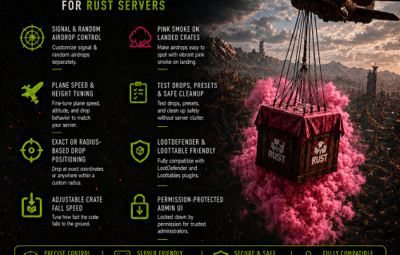
AirdropSpeedControl is an Oxide/uMod plugin for Rust servers that gives administrators direct control over supply signal airdrops and random server airdrops.
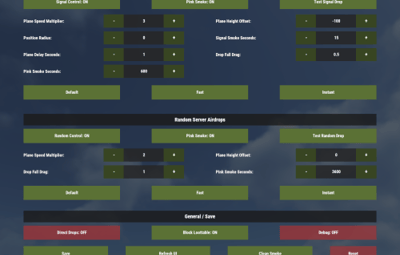
The plugin includes a permission-protected in-game UI, configurable airdrop speed settings, drop positioning, fall speed control, pink supply-drop smoke, test-drop buttons, preset buttons, and safe cleanup tools.
It is designed to work as a standalone airdrop controller while staying friendly with LootDefender and Loottable setups.
Main Features
Permission-Protected Admin UI
The plugin provides an in-game UI that can be opened with:
/dropspeed
Only players with the required permission can open and use the UI:
airdropspeedcontrol.use
The UI allows admins to change airdrop behavior without editing the config manually every time.
Signal Airdrop Control
The plugin can control airdrops triggered by supply signals.Configurable signal airdrop options include:
Enable or disable signal airdrop control
Plane speed multiplier
Plane height offset
Drop position radius
Supply signal smoke duration
Plane spawn delay after signal throw
Supply drop fall drag
Pink smoke on supply drop
Pink smoke duration
The position radius controls how accurately the drop lands near the supply signal.
0 = exact supply signal position
Higher value = random position within that radius in meters
Random Server Airdrop Control
The plugin can also control normal random server airdrops.
Configurable random airdrop options include:
Enable or disable random airdrop control
Plane speed multiplier
Plane height offset
Supply drop fall drag
Pink smoke on supply drop
Pink smoke duration
Optional direct supply drop handling
Random server airdrops do not use position radius because they are meant to remain random by nature.
Plane Speed Control
Plane speed can be adjusted separately for:
Signal airdrops
Random server airdrops
This is controlled by a multiplier.
Example:
1 = default speed
2 = twice as fast
5 = much faster
Plane Height Offset
The plane height can be adjusted with a height offset.
Example:
0 = default height
-100 = lower plane path
100 = higher plane path
This can be useful if you want faster, more direct-looking drops.
Supply Drop Fall Drag
The plugin can control how fast the crate itself falls.
Lower drag means the crate falls faster.
Example:
0.6 = normal/default style
0.2 = faster falling crate
0.05 = very fast / near instant style
Pink Supply Drop Smoke
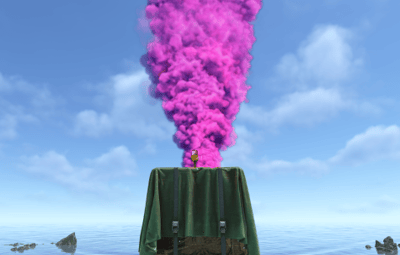
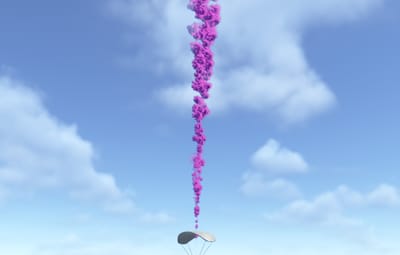
The plugin can add pink smoke to supply drops.
The smoke uses the Rust supply signal smoke effect and is attached to a helper entity created by the plugin.
This allows the smoke to:
Follow the crate
Stay upright
Be timed
Be removed when the crate is looted/destroyed
Be cleaned manually if needed
Pink smoke duration behavior:
0 = smoke stays until the crate is looted/destroyed
1-3600 = smoke stays until the timer ends or the crate is looted/destroyed
The maximum pink smoke duration is:
3600 seconds / 1 hour
Supply Signal Smoke Duration
The thrown supply signal smoke can also be controlled.
This is separate from the pink crate smoke.
Supply Signal Smoke Duration Seconds
This controls how long the original thrown supply signal keeps smoking.
Test Drop Buttons
The UI includes test buttons:
Test Signal Drop
Test Random Drop
These allow admins to test settings quickly without waiting for natural airdrops.
The signal test drop spawns a supply signal at the admin’s current position.
The random test drop calls a random managed airdrop using the random airdrop settings.
Presets
The UI includes presets for both sections:
Signal presets
Random presets
Available presets:
Default
Fast
Instant
Presets do not immediately apply permanently. They load values into the UI, and you must press Save to apply and store them.
Session Reset
The UI includes a reset button.
This resets unsaved UI changes back to the last saved config values.
It does not wipe the full config. It only resets the current editing session.
Manual Smoke Cleanup
The plugin includes a safe smoke cleanup command:
/dropspeedcleansmoke
This command is protected by the same permission:
airdropspeedcontrol.use
It only removes smoke helper entities created and marked by this plugin.
It does not remove normal spheres, drones, or other plugin entities.
The UI also includes a Clean Smoke button that performs the same safe cleanup.
LootDefender-Friendly Behavior
The plugin detects if LootDefender is loaded.
It can preserve LootDefender-related ownership and skin information on supply drops.
Relevant option:
Preserve LootDefender OwnerID And SkinID
This helps avoid breaking LootDefender protection/locking behavior.
Loottable Compatibility
The plugin detects if Loottable is loaded.
It can block Loottable from also handling supply signals so both plugins do not fight over the same airdrop.
Relevant option:
Block Loottable From Handling Supply Signals
Permission
Grant access with:
oxide.grant user <steamid> airdropspeedcontrol.use
or for a group:
oxide.grant group admin airdropspeedcontrol.use
Commands
Chat Commands
/dropspeed
Opens the AirdropSpeedControl UI.
Requires:
airdropspeedcontrol.use
/dropspeedcleansmoke
Cleans up marked pink smoke helper entities created by this plugin.
Requires:
airdropspeedcontrol.use
Config File
Config path:
oxide/config/AirdropSpeedControl.json
Example config:
{
"Signal Airdrops": {
"Enabled": true,
"Plane Speed Multiplier": 3.0,
"Plane Height Offset": 0.0,
"Drop Position Radius Meters (0 = exact signal position)": 0.0,
"Supply Signal Smoke Duration Seconds": 30.0,
"Plane Spawn Delay Seconds After Signal Throw": 3.3,
"Supply Drop Fall Drag (lower = faster)": 0.6,
"Pink Smoke On SupplyDrop": true,
"Pink Smoke Duration Seconds (0 = until looted)": 60.0
},
"Random Server Airdrops": {
"Enabled": true,
"Plane Speed Multiplier": 2.0,
"Plane Height Offset": 0.0,
"Supply Drop Fall Drag (lower = faster)": 0.6,
"Pink Smoke On SupplyDrop": true,
"Pink Smoke Duration Seconds (0 = until looted)": 60.0,
"Apply To Directly Spawned SupplyDrops Without Plane": false
},
"Compatibility": {
"Preserve LootDefender OwnerID And SkinID": true,
"Block Loottable From Handling Supply Signals": true,
"Cleanup Smoke Helpers On Reload": false,
"Debug To Console": false
},
"UI": {
"Main Background Color": "0.08 0.08 0.08 0.94",
"Header Color": "0.361 0.443 0.212 1",
"Header Text Color": "1 1 1 1",
"Footer Color": "0.361 0.443 0.212 1",
"Footer Text Color": "1 1 1 1",
"Section Background Color": "0.12 0.12 0.12 0.95",
"Label Text Color": "1 1 1 1",
"Input Background Color": "0.15 0.15 0.15 0.95",
"Input Text Color": "1 1 1 1",
"Button Color": "0.361 0.443 0.212 1",
"Button Text Color": "1 1 1 1",
"Small Adjust Button Color": "0.22 0.27 0.13 1",
"Small Adjust Button Text Color": "1 1 1 1",
"Toggle Enabled Color": "0.361 0.443 0.212 1",
"Toggle Disabled Color": "0.60 0.20 0.20 0.85",
"Danger Button Color": "0.60 0.20 0.20 0.85",
"Tip Text Color": "1 1 1 1"
}
}
Config Options Explained
Signal Airdrops
Enabled
"Enabled": true
Enables or disables plugin control for supply signal airdrops.
Plane Speed Multiplier
"Plane Speed Multiplier": 3.0
Controls how fast the cargo plane flies for supply signal drops.
1 = normal speed
Higher = faster plane
Plane Height Offset
"Plane Height Offset": 0.0
Adjusts the cargo plane height.
0 = normal height
Negative = lower
Positive = higher
Drop Position Radius
"Drop Position Radius Meters (0 = exact signal position)": 0.0
Controls how accurate the supply signal drop position is.
0 = exact position
100 = random position within 100 meters
Supply Signal Smoke Duration Seconds
"Supply Signal Smoke Duration Seconds": 30.0
Controls how long the original thrown supply signal smoke lasts.
Plane Spawn Delay Seconds After Signal Throw
"Plane Spawn Delay Seconds After Signal Throw": 3.3
Delay between throwing a supply signal and spawning the cargo plane.
Supply Drop Fall Drag
"Supply Drop Fall Drag (lower = faster)": 0.6
Controls how quickly the crate falls.
Lower = faster
Higher = slower
Pink Smoke On SupplyDrop
"Pink Smoke On SupplyDrop": true
Enables pink smoke on the supply drop crate.
Pink Smoke Duration Seconds
"Pink Smoke Duration Seconds (0 = until looted)": 60.0
Controls how long the pink crate smoke stays.
0 = until crate is looted/destroyed
1-3600 = seconds
Random Server Airdrops
Enabled
"Enabled": true
Enables or disables plugin control for random server airdrops.
Plane Speed Multiplier
"Plane Speed Multiplier": 2.0
Controls random airdrop cargo plane speed.
Plane Height Offset
"Plane Height Offset": 0.0
Adjusts random airdrop cargo plane height.
Supply Drop Fall Drag
"Supply Drop Fall Drag (lower = faster)": 0.6
Controls random drop crate fall speed.
Pink Smoke On SupplyDrop
"Pink Smoke On SupplyDrop": true
Enables pink smoke for random airdrop crates.
Pink Smoke Duration Seconds
"Pink Smoke Duration Seconds (0 = until looted)": 60.0
Controls random drop pink smoke duration.
0 = until looted/destroyed
1-3600 = seconds
Apply To Directly Spawned SupplyDrops Without Plane
"Apply To Directly Spawned SupplyDrops Without Plane": false
Controls whether the plugin should also apply random drop settings to supply drops that spawn directly without a cargo plane.
Usually leave this disabled unless another plugin spawns direct supply drops and you want AirdropSpeedControl to affect them.
Compatibility
Preserve LootDefender OwnerID And SkinID
"Preserve LootDefender OwnerID And SkinID": true
Keeps LootDefender-related ownership/skin behavior intact where possible.
Recommended:
true
Block Loottable From Handling Supply Signals
"Block Loottable From Handling Supply Signals": true
Prevents Loottable from also controlling supply signal airdrops when AirdropSpeedControl is handling them.
Recommended if you want this plugin to control supply signal drops.
Cleanup Smoke Helpers On Reload
"Cleanup Smoke Helpers On Reload": false
Controls automatic smoke helper cleanup on plugin reload/load.
Recommended:
false
Manual cleanup is safer with:
/dropspeedcleansmoke
or the Clean Smoke button in the UI.
Debug To Console
"Debug To Console": false
Enables debug messages in the server console.
Useful for testing, but normally leave disabled.
UI Color Options
All UI colors use Rust CUI color format:
R G B A
Example:
"Button Color": "0.361 0.443 0.212 1"
Where:
R = red
G = green
B = blue
A = alpha / transparency
Values usually range from:
0.0 to 1.0
UI color options include:
Main Background Color
Header Color
Header Text Color
Footer Color
Footer Text Color
Section Background Color
Label Text Color
Input Background Color
Input Text Color
Button Color
Button Text Color
Small Adjust Button Color
Small Adjust Button Text Color
Toggle Enabled Color
Toggle Disabled Color
Danger Button Color
Tip Text Color
Notes
The manual smoke cleanup only removes helpers created and marked by AirdropSpeedControl.
It does not remove normal server spheres, drone spheres, admin-placed spheres, or other plugin entities.
The plugin uses a marker skin ID internally to identify its own smoke helpers safely.
