
Vinni_TV_'s Wishlist
-
$9.99
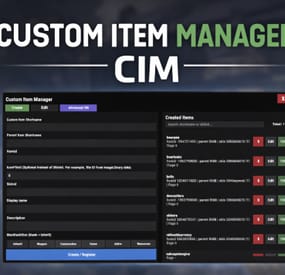
Custom Item Manager
Custom Item Manager is an in-game admin UI for creating true custom Rust items by registering brand-new ItemDefinitions, leveraging the CustomItemDefinitions* framework. Unlike traditional “skinned item” approaches, this plugin adds items directly into the game’s item manifest, allowing them to be spawned, stored, traded, and in many cases interacted with exactly like vanilla items.
Because these items exist as real ItemDefinitions, they can have their own unique itemID, shortname, display names, meaningful descriptions, icons, categories, flags, and blueprint rules**. This solves one of the biggest limitations of skin-based custom items: skinned items can only reuse the original item’s shortname, description and behavior, while CustomItemManager allows you to define entirely new identity and metadata for each item.
All item creation and editing is done through an in-game UI. Items can be created, edited, unregistered, and re-registered instantly without editing code or restarting the server. Created items are stored persistently and automatically re-registered on server start. A searchable list andone-click give buttons makes testing fast and convenient.
In short, CustomItemManager provides a clean workflow for adding more vanilla-like custom items to Rust servers, not just reskinned vanilla items.
Why use this instead of skinned existing items?
Skinned vanilla items:
Share the original item’s behavior Cannot change the description meaningfully Are limited to cosmetic differences Custom Item Manager items:
Exist as unique ItemDefinitions Have their own display name and custom description, in place of the ownership label, as well as additional customizable labels. Can have different rules, eg can/can't be dropped, configurable category (e.g. for sorting). Integrate cleanly with most Rust plugins that give or require specific item shortnames. RECYCLABLE - setting the Craftable value to True, and setting Blueprint Ingredients, will allow the item to be recycled. CRAFTABLE- by giving players a blueprint for the custom item, it can be crafted using the industrial workbench
If you want items to feel like true, purpose-built content instead of cosmetic overrides, this plugin is the better approach, and will save you a lot of time chasing down skinIDs when configuring other plugins.
Data and Persistence
All created items are stored in the plugin data file
Items are automatically re-registered on server start and plugin reload
It is safe to reload the plugin without losing definitions
On unload, all existing items will appear as a fallback item, and be restored to their original condition upon plugin load.
Permissions
customitemmanager.admin - required to use the utility
Commands
/cim - opens the CIM UI
Recommendations
Ensure you have the latest version of Custom Item Definitions framework
For non-usable items (eg custom craft components, quest items), use RHIB as the parent item. It has a blank description to avoid confusion.
When using the items in other plugins, you do not need to specify the SkinID again, only the shortname (skinID should be 0)
If the items are already in player containers, prefer editing and re-registering over deleting.
Text of the first, Green label on the item is configured in the lang file for Custom Item Definitions.
All Display Names and Descriptions will be available in the lang file for Custom Item Manager, allowing you to easily translate the items.
Custom Labels Example:
The green label text is configured in the Custom Item Definitions lang file. The text when hovering over it, is the item description configured via my plugin.
The blue and orange labels, can also be created via my plugin, with or without additional text when hovering over it.
SPECIAL ITEM=|QUEST ITEM=
After = you would enter the text you wish to display when hovering over the additional label. It's up to you to experiment and adapt it for your own needs.
* This plugin is a UI utility to easily create and manage custom items, based on the required dependency - Custom Item Definitions framework developed by 0xF
** The plugin allows specifying whether the item can have a blueprint as well as the required components to craft, which allows the custom item to be recycled. The blueprint itself can be given to players and learned, however it will not appear in the vanilla crafting menu. It can however be crafted with an industrial crafter,
-
$20.00
Capture The Flag
Overview
Capture The Flag is a competitive event plugin for Rust servers that transforms team-based gameplay into an intense, objective-driven experience. The plugin features randomly spawned flags that must be captured and extracted to a designated monument-based extraction zone. With full clan integration, real-time progress tracking, and customizable rewards, CTF creates high-stakes moments where every second counts and teamwork determines victory.
When a flag is successfully extracted to the capture zone and held for the required time, the carrying clan claims victory and receives substantial rewards. The dynamic capture mechanic includes contested zone penalties, ally-based capture rate bonuses, and real-time progress UI to keep players engaged throughout the event.
Preview: https://youtu.be/etyPaY0AKP0
Key Features
Flag & Extraction System: Flags spawn at random locations far from extraction zones, requiring teams to transport them across the map while defending against enemies
Monument-Based Extraction Zones: Dynamically created extraction zones at configurable Rust monuments with radius-based detection
Dynamic Capture Mechanics:
Configurable capture time requirements (default: 300 seconds) Base capture rate with bonuses for team size (up to configurable maximum) Contested zone detection - capture progress decays when enemies are present Real-time capture progress tracking and UI display Clan Integration: Full support for the Clans plugin with clan-based capture completion and win detection
Comprehensive Reward System:
Item-based rewards Economics plugin integration for currency rewards ServerRewards points distribution Multiple reward types can be enabled Visual & Audio Feedback:
Live tracking map markers for flag and extraction zone locations Visual sphere indicators for extraction zone boundaries Real-time capture progress UI with percentage and time remaining Customizable colored markers with configurable alpha and radius Gameplay Restrictions: Block specific commands (teleport, home, shop) while flag is being carried to prevent exploit usage
Admin Controls: Commands to start/stop events, retrieve monument offsets, and manage active sessions
Example Configuration
{ "Gameplay Settings": { "Use Clans Plugin": true, "Blocked Commands While Carrying Flag": [ "home", "tp", "tpr", "clanhome", "outpost", "trade", "shop" ], "Mark Flag Carrier as hostile (Prevents walking into Safe Zones)": true, "Drop Flag On Disconnect": true, "Drop Flag On Death": true, "Block Mounting While Carrying Flag": true }, "Capture Settings": { "Capture Check Interval (seconds)": 1.0, "Required Capture Time (seconds)": 300.0, "Base Capture Rate Per Second": 1.0, "Additional Rate Per Extra Team Member": 0.5, "Maximum Capture Rate Multiplier": 3.0, "Decay Rate When Contested (per second)": 2.0, "Show Progress UI": true, "Progress UI Update Interval (seconds)": 2.0 }, "Flag Settings": { "Display Name": "Capture The Flag", "Item Shortname": "twitchrivalsflag", "Skin ID": 0, "Use Custom Flag Spots": false, "Custom Flag Spots": [ { "x": 106.16, "y": 9.12, "z": -46.94 } ] }, "Extraction Zone Settings": { "Zone Radius": 25.0, "Use Custom Extraction Spots": false, "Custom Extraction Spots": [ { "x": 157.48, "y": 13.42, "z": 46.42 } ], "Allowed Monuments": [ "xlarge/launch_site_1.prefab", "medium/nuclear_missile_silo.prefab", "large/military_tunnel_1.prefab", "large/airfield_1.prefab", "small/sphere_tank.prefab", "assets/bundled/prefabs/autospawn/monument/military_bases/desert_military_base_d.prefab", "assets/bundled/prefabs/autospawn/monument/small/satellite_dish.prefab" ], "Show Zone Marker": true, "Show Visual Sphere": true, "Monument Spawn Offsets": { "xlarge/launch_site_1.prefab": { "x": 86.53, "y": 3.03, "z": 0.07 }, "medium/nuclear_missile_silo.prefab": { "x": 53.3, "y": -13.2, "z": 1.1 }, "large/military_tunnel_1.prefab": { "x": -0.5, "y": 18.35, "z": 25.0 }, "large/airfield_1.prefab": { "x": 20.0, "y": 0.5, "z": -27.5 }, "small/sphere_tank.prefab": { "x": 0.18, "y": 71.8, "z": -0.39 }, "assets/bundled/prefabs/autospawn/monument/military_bases/desert_military_base_d.prefab": { "x": -44.77, "y": 0.64, "z": 25.46 }, "assets/bundled/prefabs/autospawn/monument/small/satellite_dish.prefab": { "x": -30.53, "y": 0.15, "z": 16.04 } } }, "Marker Settings": { "Update Interval (seconds)": 5.0, "Flag Marker": { "Alpha": 0.85, "Color1": "#00FFFF", "Color2": "#0000FF", "Radius": 0.4 }, "Extraction Zone Marker": { "Alpha": 0.75, "Color1": "#00FF00", "Color2": "#FFFF00", "Radius": 0.3 } }, "Reward Settings": { "Enable Rewards": true, "Use Items": true, "Use Economics": false, "Use ServerRewards": false, "Item Rewards": [ { "Shortname": "ammo.rocket.hv", "Amount": 1, "SkinID": 0 }, { "Shortname": "explosive.timed", "Amount": 1, "SkinID": 0 }, { "Shortname": "explosive.satchel", "Amount": 1, "SkinID": 0 } ], "Economics Amount": 5000.0, "ServerRewards Points": 1000 }, "Announcement Settings": { "Message Prefix": "<color=#00FFFF>[CTF]</color>", "Global progress announcements every (percent) % (0 to disable)": 10 } } Commands
Admin Commands
/ctf start - Launch a new Capture The Flag event with random flag spawn and extraction zone /ctf stop or /ctf end - Immediately end the active event /ctf offset - Get the monument offset at your current position (useful for configuration)
Requirements
Clans Plugin (Optional) - Recommended for clan-based gameplay; plugin will say player names instead of clans if not loaded. Economics Plugin (Optional) - Required only if using economics-based rewards ServerRewards Plugin (Optional) - Required only if using ServerRewards points
Permissions
ctf.admin - Required to execute admin commands and manage events
Support & Customization
For support, feature requests, custom modifications, or help with advanced setup, feel free to contact via private message.
- #capture the flag
- #pvp
- (and 1 more)
-
$29.99$14.99Armed Deployment Event
By Code Brothers in Plugins
Bring Rust monuments to life with cinematic, high-intensity combat events. Armed Deployment dynamically delivers a Bradley APC, heavy scientists, and a hackable locked crate to any location you choose, all inserted by an immersive Chinook deployment sequence.
Watch as a Chinook approaches the target zone, descends, deploys hostile forces, and extracts — creating a truly memorable server event that feels built into the game rather than scripted. Players must eliminate all threats and destroy the Bradley APC before they can claim the locked crate and its rewards.
Features
• Spawn deployments anywhere on the map
• Cinematic Chinook delivery and extraction
• Heavy Scientists with controlled roaming
• Bradley APC with movement blocking
• Hackable Locked Crate rewards
• Dynamic deployment radius and map marker
• Server-side UI progress tracking
• Automatic cleanup and despawn timers
• Admin-controlled start and cancellation
• Automated deployments with configurable intervals
• Fully configurable values
Chat Commands (Admin Only)
/adpanel
Toggles the Armed Deployment admin UI panel
Permissions
ArmedDeployment.admin
Required to start, cancel, or automate Armed Deployments
Configuration
{ "Auto": false, "AutoMin": 60, "RandMon": true, "ManLoc": { "X": 0, "Y": 0, "Z": 0 }, "Mons": { "airfield": true, "trainyard": true, "powerplant": true, "military_tunnel": true, "launch_site": true, "water_treatment": true, "dome": true, "satellite": true, "junkyard": true, "excavator": false, "harbor": true, "arctic_base": true, "lighthouse": false, "gas_station": false, "supermarket": false, "mining_outpost": false, "sewer_branch": false, "oil_rig_small": false, "oil_rig_large": false }, "SciCnt": 12, "BradCnt": 1, "EvtRad": 150, "MaxAttempts": 10, "ChApproachH": 80, "ChApproachD": 400, "ChSpeed": 25, "ChHoverH": 15, "ChDescentH": 50, "ChExitD": 500, "MinClearH": 40, "ObstacleRad": 30, "MonSearchRad": 80 } Default values are optimized for performance and cinematic impact.
Notes
This plugin is designed to feel vanilla-friendly, cinematic, and performance-aware. It works especially well on servers that want high-risk, high-reward PvP encounters without relying on random world events.
Feedback, suggestions, and feature requests are always welcome.
Created by CodeBrothers
Check out our other work on Codefling
-
$19.99$9.99Excavator Event
By Code Brothers in Plugins
Transform the Giant Excavator monument into a high-risk, high-reward dynamic hotspot, without replacing or disrupting vanilla gameplay.
When the excavator is fueled or activated, resource-rich ore nodes spawn around the monument and hostile scientists roam the area to secure it. Players must push through NPC resistance while competing with others, naturally encouraging PvP, counter-play, and contested control of the site.
Rather than turning Excavator into a scripted event, this plugin reacts directly to existing excavator usage, making the monument feel alive, volatile, and worth fighting over.
Designed to feel fully integrated with Rust’s systems, Excavator Event automatically starts and stops with the excavator itself and cleans up when activity ends.
Features
• Automatic activation when the excavator starts
• Enhances (does not replace) vanilla excavator behavior
• Resource-rich ore node spawns (metal, sulfur, stone)
• Hostile scientist NPCs with controlled roaming
• Configurable spawn radius and density
• Periodic node respawning while active
• Clean despawn when the excavator shuts down
• Modern in-game admin control panel
• Server-wide event alerts and UI notifications
• Performance-aware spawning logic
• Fully configurable values
Chat Commands (Admin Only)
/excavator
Opens the Excavator Event control panel
Permissions
excavatorevent.admin
Required to start, stop, or configure the Excavator Event
Configuration
{ "NodeCount": 30, "NPCCount": 50, "EventRadius": 80, "MinNodeDistance": 5, "NodeRespawnTime": 300, "NodeSpawnDelay": 0.15, "NodeRiseTime": 1.5, "NPCSpawnDelay": 0.2, "NPCRiseTime": 2 } Default values are tuned for balanced risk, server performance, and rewarding gameplay.
Notes
Excavator Event is built to enhance vanilla Rust, not override it.
The monument functions exactly as expected — this plugin simply raises the tension, increases contesting, and makes excavator runs more meaningful.
Ideal for PvP-focused servers, progression-based gameplay loops, and servers looking to make monuments feel more alive without immersion-breaking mechanics.
Created by CodeBrothers
Check out our other work on Codefling
-
$40.00
BotReSpawn
By Steenamaroo in Plugins
Spawns set numbers of customised npcs at monuments,
various events, supply drops, biomes, custom locations, and 'toplayer'.
Plugin Description.
Highly customisable and intuitive npc plugin, setup exclusively via UI.
See images for an overview of the available options globally, and per npc profile.
Every option in the UI is clickable, showing a detailed description of its use.
Optional dependencies -
Kits (free at uMod.org) CustomLoot
Permissions.
botrespawn.allowed - Required for non-admin use
Chat commands.
/botrespawn - Opens UI. /botrespawn add *profilename* - Adds a custom profile then opens UI. (please don't use spaces or hyphens) /botrespawn remove *profilename* - Removes a custom profile. /botrespawn info - Tells you about the npc you're looking at. Console commands.
bot.count - Gives total number of spawned npcs. bots.count - Gives a breakdown of spawned npcs per profile. botrespawn toplayer NameOrId ProfileName amount(optional) botrespawn enable/disable "Profile name here" botrespawn tempspawn "Profile name here" - Spawns npcs from a profile at random points around that profile's location addspawn - Enabled via UI, in Edit Spawnpoints menu - for keybinding. botrespawn showspawns - Added for binding convenience. botrespawn checknav - Added for binding convenience. * Note = addspawn and showspawns commands require the user to select "Edit with console commands" first, from a profile's spawnpoints menu.
Default locations.
All major monuments are automatically included, plus profiles for the four biomes.
The following events also have default profiles
Airdrop (supply grenade optional) Locked Crate Spawn Locked Crate Hack Start APC Kill PatrolHeli Kill CH47 Kill
Configurable via json, per profile.
BotNames BotNamePrefix Announcement_Text Instant_Death_From_Headshot_Allowed_Weapons (accepts item shortnames) See note at end for weapon list formatting.
Everything else is configurable via UI - All options have a description in UI, accessible by clicking the name/label.
Kits.
Kits are managed, per profile, in UI.
As with BotSpawn, kit probability can be balanced by assigning a number to a kit.
When selecting multiple kits, increasing a kit's number increases its chances of being picked.
Only kits with weapons in the belt are shown in UI.
Most weapons are supported for npc use, including normal bullet and melee weapons,
rocket launchers, bows, crossbows, MGLs, nailguns, flamethrowers, etc.
Throwable explosives can be used but throwable melee (like spears) can be used but will not be thrown.
Spawnpoints.
Adding and managing spawnpoints is done, per profile, in UI,
or by enabling 'add by command' in spawnpoints menu, then using 'addspawn' console command.
You can bind this command for your convenience.
When opting to use the 'addspawn' command, a button will show in UI main page, allowing you to quickly return to the profile you were editing.
A new feature is that each spawn point can have overrides, forcing that specific npc to have different values to the rest of the profile's npcs.
At present you can override
Stationary Kits Health RoamRange
If you choose to use Parent_Monument, you can select it via UI, but do so before you add custom spawn points (if applicable).
Parent_Monument ensures that your profile and its spawn points will relocate after a map change,
so that they are in the same place, relative to that chosen monument.
If a profile uses custom spawn points, but does not have enough custom spawn points to cover the whole population,
it will spawn randomly placed npcs to make up the numbers, in accordance with the profile "Radius" setting.
EG :
Day_Time_Spawn_Amount 10
Number of custom spawn points 5
Result : 5 npcs on custom spawn points, and 5 randomly placed around the area, within the specified radius.
Murderer
Murderer true/false is no longer an option.
Instead, the AI will respond differently based on the weapons you give it.
If you want the AI to run directly at victims and attack, give it melee weapons only.
I believe you can still make murderer-style kits, although you also have Frankenstein clothing options built into the the UI options now.
Peacekeeper
Peacekeeper is now based on whether or not players are marked hostile.
An additional option 'Peacekeeper_Uses_Damage' restores the old behaviour,
where peacekeeper npcs will completely ignore players until attacked by them.
Configuration.
"DataPrefix": "default", (tells BotReSpawn which data files to load),
Allow_Parented_HackedCrates Allow_HackableCrates_With_OwnerID Allow_HackableCrates_From_CH47 Allow_HackableCrates_At_Oilrig Allow_All_Other_HackedCrates
Disable_WaterWells Disable_Substations Disable_UndergroundCaves Disable_UnderwaterLabs
"UseServerTime": Uses server IsNight check, instead of manual day/hour settings, "Show_Profiles_Seconds": 10, "DayStartHour": 8, "NightStartHour": 20, "SuicideBoom": true, (toggles explosion sound for suicide npcs), "Animal_Safe": true, "Supply_Enabled": false, (spawn 'airdrop' bots for user-called supplys), "Ignore_Skinned_Supply_Grenades": true, "Remove_BackPacks_Percent": 100 is always : 0 is never, "Remove_KeyCard": true, (any keycards in bot default loot will be destroyed), "Remove_Frankenstein_Parts": true, (any frankenstein parts in bot default loot will be destroyed), "Ignore_Sleepers": true/false, "Pve_Safe": true, (bots will not be injured by fire/barbs, etc.), "Max_Chute_Fall_Speed": 100, "Chute_Speed_Variation": 100, "Staggered_Despawn": false, "Disable_Non_Parented_Custom_Profiles_After_Wipe": false "Announce_Toplayer": false "RustRewards_Whole_Numbers": true "XPerience_Whole_Numbers: true "NPCs_Damage_Armour": true "Limit_ShortRange_Weapon_Use": false "Allow_Ai_Dormant": false "Prevent_Biome_Ai_Dormant": false "Scale_Meds_To_Health": false (increases npc heal amount relative to npc's max health. "Ignore_Factions": false - Makes all profiles fight all profiles if true. "Reduce_Damage_Over_Distance: false "Deaggro_Memory_Duration: 20 - Number of seconds it takes an npc to forget you outside deaggro range/line of sight. "Ignore_HackableCrates_With_OwnerID" - Makes hackable crate profiles only respond to crates with OwnerID 0 (server spawned) "NPCs_Assist_NPCs" - true/false. When a botrespawn npc is attacked, nearby botrespawn npcs will also respond and defend. "Enable_Targeting_Hook": false "Allow_AlphaLoot": true Can be used to prevent AlphaLoot from giving loot to BotReSpawn npcs. "Parachute_From_Height": 200 "Smooth_Damage_Scale": false "Allow_Oilrigs": false - NPCs here must be custom spawn point and stationary true. "Show_Spawns_Duration": 20, These values are adjustable and described in detail in in-game UI, with the exception of DataPrefix.
Profile values.
Each profile value and description is not listed here, but all (apart from text strings) are now configurable via UI,
and have sensible default values.
Every option has a full in-game description, accessible by clicking an option's name/label.
If any specific setting/value is unclear, please just ask in CF discord, my discord, or the support section here.
Notes :
Durations which used to be in seconds are now in minutes.
"Type" is an internal use variable - Users should not change this option.
Profile copy/paste does not include location, Parent_Monument, or custom spawnpoints.
BotNames, and Headshot weapons should be formatted as follows:
["name1"], for single or ["name1", "name2", "name3"], for many.
["rifle.lr300"], for single or [ "rifle.lr300", "pistol.m92" ], for many.
Faction and Subfaction of 0 means this profile will not fight any other, and will not be attacked by any other.
Faction and Subfaction settings greater than 1 are used for configuring which profiles should be allies / enemies.
API :
string[] AddGroupSpawn(Vector3 location, string profileName, string group, int quantity) string[] RemoveGroupSpawn(string group) string NPCProfile(NPCPlayer npc) (returns "No Name" for non BotReSpawn npcs) object OnBotReSpawnNPCTarget(ScientistNPC npc, BasePlayer player) void OnBotReSpawnNPCSpawned(ScientistNPC npc, string profilename, string group) void OnBotReSpawnNPCKilled(ScientistNPC npc, string profilename, string group, HitInfo info) bool IsBotReSpawn(NPCPlayer npc) bool IsBotReSpawn(ulong id)
For preventing BotReSpawn npc spawns for event profiles.
object OnBotReSpawnCrateDropped(HackableLockedCrate crate) object OnBotReSpawnCrateHackBegin(HackableLockedCrate crate) object OnBotReSpawnAPCKill(BradleyAPC apc) object OnBotReSpawnPatrolHeliKill(PatrolHelicopterAI heli) object OnBotReSpawnCH47Kill(CH47HelicopterAIController ch) object OnBotReSpawnAirdrop(SupplyDrop drop)
Example usage.
[PluginReference] private Plugin BotReSpawn; Vector3 location = new Vector3(0,0,0); string[] Spawn = BotReSpawn?.Call("AddGroupSpawn", location, "The Dome 0", "MadeUpNameHere", 5) as string[]; Puts($"{Spawn[0]}"); Puts($"{Spawn[1]}"); Passing 0 for quantity will spawn the appropriate amount of npcs for the time of day, according to the profile.
Method call OnBotReSpawnNPCSpawned(ScientistNPC npc, string profile, string group, notifies of spawned npcs.
Example.
void OnBotReSpawnNPCSpawned(ScientistNPC npc, string profile, string group) { if (String.IsNullOrEmpty(group)) Puts($"BotReSpawn spawned an npc from profile {profile}"); else Puts($"BotReSpawn spawned an npc from profile {profile} - API group name {group}"); }
FAQ.
Q: My npcs don't move and/or won't attack
A: If you have any PVE plugins or settings please try disabling those temporarily to test.
A: Make sure the server has the following settings.
nav_wait true nav_disable false ai.think true A: If you use Rust Admin, please ensure that the animal AI option is enabled.
A: If you have Vanish installed please try unloading it. If this worked, check you don't have the permission for permanent Vanish.
Q: There's a million options. Where do I start?
A: Open the UI with /botrespawn and set AutoSpawn to true for at least one monument, then click the button to reload that profile.
A: Everything else is preference/user customisation.
A: If the monument has a building/structure near the middle, like Dome, you may need to increase the spawn radius option to get going.
Q: My bots won't die / my bots take damage when attacking people.
A: Make sure Godmode permissions allow you to do damage.
A: Same for vanish ^.
A: Ensure you don't have a PVE plugin which is causing this damage behaviour.
Q: I take damage when attacking my bots.
A: This can also be caused by server, or plugin, PVE settings.
Q: Will X kill my bots?
A: Radiation, drowning, falling, and helicopters should not kill your bots.
A: Turrets targeting bots can be toggled. Bradleys targeting bots can be toggled.
A: Fire (campfires etc) will kill your bots. Damage from barbs, cacti etc will kill your bots, but can be prevented with the 'Pve_Safe' config option set to true.
Q: What weapons can my bots use?
A: As far as I know they should use all weapons except for throwable melee (eg. spears).
A: Flamethrowers, nail guns, rocket launchers, bows, grenade launchers, etc were added in a recent update.
A: Throwable explosives can be used as 'backup' weapons and are thrown when line-of-sight is temporarily broken.
A: All npcs, even those with throwables, must have at least one valid held weapon to use.
Q: Can I have custom profile locations?
A: Yes. Your custom locations are stored in data with a filename of *YourPrefix*-CustomProfiles.json.
Use chat command '/botrespawn add NewNameHere' to create a profile at your present location.
A: Doing so will open the UI, at the page for your new profile's settings.
Q: Can I spawn bots at events.
A: Yes. There are event profiles for aidrop, hackable crate spawn and hack start, and the destruction of CH47, Patrol Heli, and APC.
For the airdrop profile, spawn at user-supply call is an additional option, found in the global config.
Q: Can I have specific custom spawn points? (underground, etc)
A: Yes. Use the built in UI to create custom spawn points and set UseCustomSpawns to true, for some profile..
A: That BotReSpawn profile will now ignore radius settings and use the precise spawn points from your file.
A: Event profiles which can occur underground should work automatically now (crate spawn/crate hack).
A: Even if parachutes are enabled, these profiles should still work with underground-spawning npcs, if the event takes place under ground.
Q: My bot kits aren't working.
A: Kits which don't have a valid weapon in the belt will not be made available in the UI.
A: Please redeem the kit yourself to an empty inventory, to ensure that the expected items are definitely in it.
Q: How can I prove that bots have spawned? I can't find them.
A: Type bot.count into console for a total number, or bots.count for a per-profile breakdown.
A: Respawn timer is taken into account so if you spawn one and kill him, bot.count will show 0 until respawn.
Q: bot.count console command shows that there are 0 bots.
A: Double check that at least one monument is set "AutoSpawn": true in your config, and reload the plugin.
A: Also, don't forget their respawn timer. If they're all dead when you do bot.count, it will show 0.