
Vinni_TV_'s Wishlist
-
$3.99
Restart Status
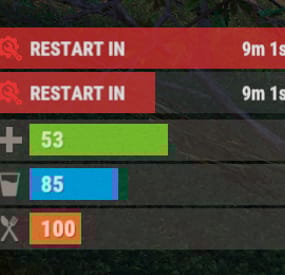
The plugin displays the time until restart in the status bar. Depends on AdvancedStatus plugin.
The ability to to add and modify any restart plugins; The ability to automatically generate code for restart hooks; The ability to automatically generate language files for different languages(filled in English); The ability to choose between bar types(TimeCounter and TimeProgressCounter); The ability to specify the order of the bar; The ability to change the height of the bar; The abillity to customize the color and transparency of the background; The ability to set a material for the background; The ability to switch between CuiRawImageComponent and CuiImageComponent for the image; The ability to get images from the local folder(*SERVER*\oxide\data\AdvancedStatus\Images); The abillity to set own image and customize the color and transparency of the image; The abillity to set sprite instead of the image; The ability to customize the color, size, font and outline of the text.
{ "Is it worth generating restart hooks? 0 - disabled, 1 - one-time activation, 2 - always enabled": 2, "List of language keys for creating language files": [ "en" ], "The type of the bar(TimeProgressCounter or TimeCounter)": "TimeCounter", "The height of the bar": 26, "The display order of the bar": 10, "The background color of the bar(HEX or RGBA)": "#E5423F", "The background transparency of the bar": 0.7, "The background material of the bar, leave empty to disable": "", "The URL of the bar image": "https://i.imgur.com/rAiHloW.png", "The local image of the bar, leave empty to use URL": "RestartStatus_Default", "The sprite image of the bar, leave empty to use local or URL": "", "Is it worth using a raw image for the bar?": false, "The color of the bar image(HEX or RGBA)": "#E5423F", "The transparency of the bar image": 1.0, "The outline color of the bar image(HEX or RGBA)": "0.1 0.3 0.8 0.9", "The outline transparency of the bar image": 1.0, "The outline distance of the bar image, leave empty to disable. Example '0.75 0.75'": "", "The size of the bar text": 12, "The color of the bar text(HEX or RGBA)": "#FFFFFF", "The transparency of the bar text": 1.0, "The font of the bar text(https://umod.org/guides/rust/basic-concepts-of-gui#fonts)": "RobotoCondensed-Bold.ttf", "The horizontal offset of the bar text": 0, "The outline color of the bar text(HEX or RGBA)": "#000000", "The outline transparency of the bar text": 1.0, "The outline distance of the bar text, leave empty to disable": "", "The size of the bar subtext": 12, "The color of the bar subtext(HEX or RGBA)": "#FFFFFF", "The transparency of the bar subtext": 1.0, "The font of the bar subtext": "RobotoCondensed-Bold.ttf", "The outline color of the bar subtext(HEX or RGBA)": "0.5 0.6 0.7 0.5", "The outline transparency of the bar subtext": 1.0, "The outline distance of the bar subtext, leave empty to disable": "", "The background color of the progress bar(HEX or RGBA)": "1 1 1 0.15", "The background transparency of the progress bar": 0.15, "Is it worth making the progress reversible?": true, "The color of the bar progress(HEX or RGBA)": "#E5423F", "The transparency of the bar progress": 0.7, "The OffsetMin of the bar progress": "0 0", "The OffsetMax of the bar progress": "0 0", "The list of restart hooks. Note: After modifying hooks, do not forget to toggle hook generation": [ { "Hook triggered at the start of a restart": "OnSmoothRestartInit", "Argument position containing the number of seconds until restart(counting from 0)": 0, "Hook triggered at the cancellation of a restart": "OnSmoothRestartCancelled" }, { "Hook triggered at the start of a restart": "OnRestartScheduled", "Argument position containing the number of seconds until restart(counting from 0)": 0, "Hook triggered at the cancellation of a restart": "OnRestartCancelled" } ], "Version": { "Major": 0, "Minor": 1, "Patch": 1 } }
EN: { "BarText": "RESTART IN" } RU: { "BarText": "РЕСТАРТ ЧЕРЕЗ" }
-
$3.99
Vanish Status
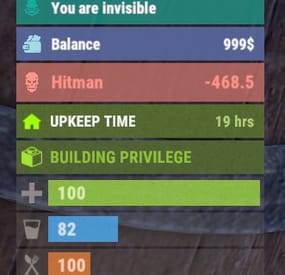
The plugin displays an invisibility indication in the status bar. Depends on AdvancedStatus plugin.
The ability to set a sound effect for disappearance and appearance; The ability to automatically generate language files for different languages(filled in English); The ability to individually toggle the display of status bars; The ability to specify the order of the bar; The ability to change the height of the bar; The abillity to customize the color and transparency of the background; The ability to set a material for the background; The ability to switch between CuiRawImageComponent and CuiImageComponent for the image; The ability to get images from the local folder(*SERVER*\oxide\data\AdvancedStatus\Images); The abillity to set own image and customize the color and transparency of the image; The abillity to set sprite instead of the image; The ability to customize the color, size, font and outline of the text.
{ "Sound effect played upon disappearance, leave empty to disable": "assets/prefabs/npc/patrol helicopter/effects/rocket_fire.prefab", "Sound effect played upon appearance, leave empty to disable": "assets/prefabs/npc/patrol helicopter/effects/rocket_fire.prefab", "List of language keys for creating language files": [ "en" ], "The height of the bar": 26, "The display order of the bar": 10, "The background color of the bar(HEX or RGBA)": "#15AC9D", "The background transparency of the bar": 0.7, "The background material of the bar, leave empty to disable": "", "The URL of the bar image": "https://i.ibb.co/LzdbT8wT/Vanish-Status-Default.png", "The local image of the bar, leave empty to use URL": "VanishStatus_Default", "The sprite image of the bar, leave empty to use local or URL": "", "Is it worth using a raw image for the bar?": false, "The color of the bar image(HEX or RGBA)": "#15AC9D", "The transparency of the bar image": 1.0, "The outline color of the bar image(HEX or RGBA)": "0.1 0.3 0.8 0.9", "The outline transparency of the bar image": 1.0, "The outline distance of the bar image, leave empty to disable. Example '0.75 0.75'": "", "The size of the bar text": 12, "The color of the bar text(HEX or RGBA)": "#FFFFFF", "The transparency of the bar text": 1.0, "The font of the bar text(https://umod.org/guides/rust/basic-concepts-of-gui#fonts)": "RobotoCondensed-Bold.ttf", "The horizontal offset of the bar text": 0, "The outline color of the bar text(HEX or RGBA)": "#000000", "The outline transparency of the bar text": 1.0, "The outline distance of the bar text, leave empty to disable": "", "The size of the bar subtext": 12, "The color of the bar subtext(HEX or RGBA)": "#FFFFFF", "The transparency of the bar subtext": 1.0, "The font of the bar subtext": "RobotoCondensed-Bold.ttf", "The outline color of the bar subtext(HEX or RGBA)": "0.5 0.6 0.7 0.5", "The outline transparency of the bar subtext": 1.0, "The outline distance of the bar subtext, leave empty to disable": "", "Version": { "Major": 0, "Minor": 1, "Patch": 8 } }
EN: { "BarVanish": "You are invisible" } RU: { "BarVanish": "Вы невидимы" }
-
$3.99
Team Announce
GUI and sound announcements for online teammates. Announcements about teammates who have connected, disconnected, been wounded or killed while sleeping. Additionally, announcements from the team leader, in Team chat channel using "!" as a first char.
{ "Chat command": "teama", "Is it worth enabling GameTips for messages?": true, "Is it worth using Notify plugins for messages instead of the vanilla UI?": false, "Specify the regular message type for notify": 0, "Specify the warning message type for notify": 1, "Is it worth enabling sound announcements?": true, "Is it worth enabling leader's group announcements?": true, "Radius within which a wounded ally notification is received": 100.0, "Radius within which a sound effect is triggered when an ally is wounded": 50.0, "Sound effect triggered when an ally is wounded": "assets/bundled/prefabs/fx/player/beartrap_scream.prefab", "Notification settings for each type": { "Connected": { "Is it worth using Notify plugins for notifications?": false, "Specify the message type for notify": 0, "Language_Key": "UiConnected", "Duration": 6.0, "Main_Color": "#4F6133", "Main_Transparency": 0.8, "Main_Material": "", "Image_URL": "https://gitlab.com/IIIaKa/images/-/raw/main/TeamAnnounce/TeamAnnounce_Connected.png", "Image_Sprite": "", "Image_IsRawImage": false, "Image_Color": "#8CBA42", "Image_Transparency": 1.0, "Text_Size": 16, "Text_Color": "#8CBA42", "Text_Font": "RobotoCondensed-Bold.ttf", "Sound_Effect": "assets/prefabs/npc/scientist/sound/chatter.prefab" }, "Disconnected": { "Is it worth using Notify plugins for notifications?": false, "Specify the message type for notify": 1, "Language_Key": "UiDisconnected", "Duration": 6.0, "Main_Color": "#BF3B26", "Main_Transparency": 0.8, "Main_Material": "", "Image_URL": "https://gitlab.com/IIIaKa/images/-/raw/main/TeamAnnounce/TeamAnnounce_Connected.png", "Image_Sprite": "", "Image_IsRawImage": false, "Image_Color": "#FFD173", "Image_Transparency": 1.0, "Text_Size": 16, "Text_Color": "#FFD173", "Text_Font": "RobotoCondensed-Bold.ttf", "Sound_Effect": "assets/prefabs/npc/scientist/sound/chatter.prefab" }, "LeaderAnnounce": { "Is it worth using Notify plugins for notifications?": false, "Specify the message type for notify": 1, "Language_Key": "", "Duration": 6.0, "Main_Color": "#216699", "Main_Transparency": 0.8, "Main_Material": "", "Image_URL": "http://gitlab.com/IIIaKa/images/-/raw/main/TeamAnnounce/TeamAnnounce_LeaderAnnounce.png", "Image_Sprite": "", "Image_IsRawImage": false, "Image_Color": "#82C7F5", "Image_Transparency": 1.0, "Text_Size": 16, "Text_Color": "#82C7F5", "Text_Font": "RobotoCondensed-Bold.ttf", "Sound_Effect": "assets/prefabs/missions/effects/mission_victory.prefab" }, "WoundedDistance": { "Is it worth using Notify plugins for notifications?": false, "Specify the message type for notify": 1, "Language_Key": "UiWoundedDistance", "Duration": 6.0, "Main_Color": "#FFC21A", "Main_Transparency": 0.8, "Main_Material": "", "Image_URL": "http://gitlab.com/IIIaKa/images/-/raw/main/TeamAnnounce/TeamAnnounce_Wounded.png", "Image_Sprite": "", "Image_IsRawImage": false, "Image_Color": "#FFF54C", "Image_Transparency": 1.0, "Text_Size": 16, "Text_Color": "#FFF54C", "Text_Font": "RobotoCondensed-Bold.ttf", "Sound_Effect": "assets/prefabs/npc/scientist/sound/death.prefab" }, "WoundedGrid": { "Is it worth using Notify plugins for notifications?": false, "Specify the message type for notify": 1, "Language_Key": "UiWoundedGrid", "Duration": 6.0, "Main_Color": "#FFC21A", "Main_Transparency": 0.8, "Main_Material": "", "Image_URL": "http://gitlab.com/IIIaKa/images/-/raw/main/TeamAnnounce/TeamAnnounce_Wounded.png", "Image_Sprite": "", "Image_IsRawImage": false, "Image_Color": "#FFF54C", "Image_Transparency": 1.0, "Text_Size": 16, "Text_Color": "#FFF54C", "Text_Font": "RobotoCondensed-Bold.ttf", "Sound_Effect": "assets/prefabs/npc/scientist/sound/death.prefab" }, "DeadWhileSleeping": { "Is it worth using Notify plugins for notifications?": false, "Specify the message type for notify": 1, "Language_Key": "UiDeadWhileSleeping", "Duration": 6.0, "Main_Color": "#FFC21A", "Main_Transparency": 0.8, "Main_Material": "", "Image_URL": "http://gitlab.com/IIIaKa/images/-/raw/main/TeamAnnounce/TeamAnnounce_Dead.png", "Image_Sprite": "", "Image_IsRawImage": false, "Image_Color": "#FFF54C", "Image_Transparency": 1.0, "Text_Size": 16, "Text_Color": "#FFF54C", "Text_Font": "RobotoCondensed-Bold.ttf", "Sound_Effect": "assets/bundled/prefabs/fx/player/howl.prefab" }, "Banned": { "Is it worth using Notify plugins for notifications?": false, "Specify the message type for notify": 1, "Language_Key": "UiBanned", "Duration": 6.0, "Main_Color": "#BF3B26", "Main_Transparency": 0.8, "Main_Material": "", "Image_URL": "https://gitlab.com/IIIaKa/images/-/raw/main/TeamAnnounce/TeamAnnounce_Banned.png", "Image_Sprite": "", "Image_IsRawImage": false, "Image_Color": "#FFD173", "Image_Transparency": 1.0, "Text_Size": 16, "Text_Color": "#FFD173", "Text_Font": "RobotoCondensed-Bold.ttf", "Sound_Effect": "assets/prefabs/missions/effects/mission_failed.prefab" } }, "Version": { "Major": 0, "Minor": 1, "Patch": 9 } }
EN: { "CmdAllEnabled": "All teammate notifications enabled!", "CmdAllDisabled": "All teammate notifications disabled!", "CmdSoundEnabled": "Teammate notification sounds enabled!", "CmdSoundDisabled": "Teammate notification sounds disabled!", "CmdConnectedEnabled": "Teammate connect notifications enabled!", "CmdConnectedDisabled": "Teammate connect notifications disabled!", "CmdDisconnectedEnabled": "Teammate disconnect notifications enabled!", "CmdDisconnectedDisabled": "Teammate disconnect notifications disabled!", "CmdWoundedEnabled": "Teammate wounded notifications enabled!", "CmdWoundedDisabled": "Teammate wounded notifications disabled!", "CmdDeathEnabled": "Teammate sleeping death notifications enabled!", "CmdDeathDisabled": "Teammate sleeping death notifications disabled!", "UiConnected": "Your teammate '{0}' has been connected!", "UiDisconnected": "Your teammate '{0}' has been disconnected!", "UiTeamEmpty": "There is only you in your team!", "UiNotTeamLeader": "Only the team leader can send announcements!", "UiTeamOffline": "All your teammates are offline!", "UiWoundedDistance": "Your teammate '{0}' was wounded by '{1}'!\nHe is {2} meters away from you.", "UiWoundedGrid": "Your teammate '{0}' was wounded by '{1}' at '{2}'!", "UiDeadWhileSleeping": "Your teammate '{0}' was killed by '{1}' while he was sleeping at '{2}'!", "UiBanned": "Your teammate '{0}' has been banned!\nReason: {1}.", "unknown": "Unknown", "chicken": "Chicken", "snake": "Snake", "boar": "Boar", "stag": "Stag", "horse": "Horse", "wolf": "Wolf", "panther": "Panther", "tiger": "Tiger", "bear": "Bear", "polarbear": "PolarBear", "crocodile": "Crocodile", "simpleshark": "Shark", "patrolhelicopter": "Patrol Heli", "bradleyapc": "Bradley APC", "scientistnpc_arena": "Scientist", "scientistnpc_bradley": "Bradley Scientist", "scientistnpc_bradley_heavy": "Bradley Heavy Scientist", "scientistnpc_cargo": "Cargo Scientist", "scientistnpc_cargo_turret_any": "Cargo Scientist", "scientistnpc_cargo_turret_lr300": "Cargo Scientist", "scientistnpc_ch47_gunner": "Chinook Scientist", "scientistnpc_excavator": "Excavator Scientist", "scientistnpc_full_any": "Scientist", "scientistnpc_full_lr300": "Scientist", "scientistnpc_full_mp5": "Scientist", "scientistnpc_full_pistol": "Scientist", "scientistnpc_full_shotgun": "Scientist", "scientistnpc_heavy": "Heavy Scientist", "scientistnpc_junkpile_pistol": "Road Scientist", "scientistnpc_oilrig": "Oilrig Scientist", "scientistnpc_outbreak": "Jungle Scientist", "scientistnpc_patrol": "Patrol Scientist", "scientistnpc_patrol_arctic": "Arctic Patrol Scientist", "scientistnpc_peacekeeper": "Peacekeeper Scientist", "scientistnpc_ptboat": "Marine Patrol Scientist", "scientistnpc_rhib": "Marine Patrol Scientist", "scientistnpc_roam": "Roam Scientist", "scientistnpc_roam_nvg_variant": "Roam NVG Scientist", "scientistnpc_roamtethered": "Roam Scientist", "scientist2": "Scientist", "scientist2.heavy": "Heavy Scientist", "scientist2.shotgun": "Scientist" } RU: { "CmdAllEnabled": "Все уведомления о тиммейтах включены!", "CmdAllDisabled": "Все уведомления о тиммейтах отключены!", "CmdSoundEnabled": "Звуковые уведомления о тиммейтах включены!", "CmdSoundDisabled": "Звуковые уведомления о тиммейтах отключены!", "CmdConnectedEnabled": "Уведомления о подключении тиммейтов включены!", "CmdConnectedDisabled": "Уведомления о подключении тиммейтов отключены!", "CmdDisconnectedEnabled": "Уведомления об отключении тиммейтов включены!", "CmdDisconnectedDisabled": "Уведомления об отключении тиммейтов отключены!", "CmdWoundedEnabled": "Уведомления о ранении тиммейтов включены!", "CmdWoundedDisabled": "Уведомления о ранении тиммейтов отключены!", "CmdDeathEnabled": "Уведомления о смерти спящего тиммейта включены!", "CmdDeathDisabled": "Уведомления о смерти спящего тиммейта отключены!", "UiConnected": "Ваш союзник '{0}' подключился!", "UiDisconnected": "Ваш союзник '{0}' отключился!", "UiTeamEmpty": "У вас нет союзников!", "UiNotTeamLeader": "Только лидер группы может отправлять объявления!", "UiTeamOffline": "Все ваши союзники не в сети!", "UiWoundedDistance": "Вашего союзника '{0}' серьезно ранил '{1}'!\nОн в {2} метрах от вас.", "UiWoundedGrid": "Вашего союзника '{0}' серьезно ранил '{1}' в '{2}'!", "UiDeadWhileSleeping": "Вашего союзника '{0}' убил '{1}', пока тот спал в '{2}'!", "UiBanned": "Ваш союзник '{0}' был заблокирован!\nПричина: {1}.", "unknown": "Неизвестный", "chicken": "Курица", "snake": "Змея", "boar": "Кабан", "stag": "Олень", "horse": "Лошадь", "wolf": "Волк", "panther": "Пантера", "tiger": "Тирг", "bear": "Медведь", "polarbear": "Полярный медведь", "crocodile": "Крокодил", "simpleshark": "Акула", "patrolhelicopter": "Патрульный вертолет", "bradleyapc": "Танк", "scientistnpc_arena": "Ученый", "scientistnpc_bradley": "Член экипажа танка", "scientistnpc_bradley_heavy": "Элитный член экипажа танка", "scientistnpc_cargo": "Защитник карго", "scientistnpc_cargo_turret_any": "Защитник карго", "scientistnpc_cargo_turret_lr300": "Защитник карго", "scientistnpc_ch47_gunner": "Защитник чинука", "scientistnpc_excavator": "Защитник экскаватора", "scientistnpc_full_any": "Ученый", "scientistnpc_full_lr300": "Ученый", "scientistnpc_full_mp5": "Ученый", "scientistnpc_full_pistol": "Ученый", "scientistnpc_full_shotgun": "Ученый", "scientistnpc_heavy": "Элитный ученый", "scientistnpc_junkpile_pistol": "Road Scientist", "scientistnpc_oilrig": "Защитник нефтевышки", "scientistnpc_outbreak": "Jungle Scientist", "scientistnpc_patrol": "Patrol Scientist", "scientistnpc_patrol_arctic": "Arctic Patrol Scientist", "scientistnpc_peacekeeper": "Peacekeeper Scientist", "scientistnpc_ptboat": "Marine Patrol Scientist", "scientistnpc_rhib": "Marine Patrol Scientist", "scientistnpc_roam": "Странствующий ученый", "scientistnpc_roam_nvg_variant": "Roam NVG Scientist", "scientistnpc_roamtethered": "Странствующий ученый", "scientist2": "Ученый", "scientist2.heavy": "Элитный ученый", "scientist2.shotgun": "Ученый" }
con - Personal enabling/disabling connected announcement; dis - Personal enabling/disabling disconnected announcement; wound - Personal enabling/disabling wounded announcement; death - Personal enabling/disabling sleeper's death announcement; sound - Personal enabling/disabling sound effects; all - Personal enabling all announcements; clear - Personal disabling all announcements(except leader and ban announces). Example: /teama con
-

$25.00
Limit Entities
The purpose of this plugin is to restrict the entities that players can build. You can limit any entity based on its prefab. To get the full list of supported prefabs, use the limitentities.list console command.
There are three types of limits available: global, building, and radius. For building limit checks, if a cupboard is placed, the limits of the cupboard owner will apply. If no cupboard is present, the restrictions of the first block's owner will be used. When you run the plugin for the first time, no players will be restricted. To apply limits, you must assign one or more permissions from your config file to a player or group. The plugin also tracks permission changes, so you won't need to restart it after granting a player new permissions or adding them to a VIP group, for example. This plugin is designed to be efficient and performant, even on heavily loaded servers.
The plugin now supports Entity Groups, and group names are translatable. All newly created groups are automatically added to the language files when the plugin loads. You can create as many groups as you like or remove them entirely. Just keep in mind that if you add an entity to a group, you cannot also add it to Limits Entities — you must use the Group name instead.
Extended Power Lights (Deluxe Christmas Lights) support has been added: a new group of limits is now included in the config. The default values are set to -1, meaning no limits. Adjust them according to your needs.
Radius Limits allow you to restrict the number of specific entities within a certain radius. This feature is designed for static deployable entities (like turrets or lights) and helps prevent spam placement in concentrated areas.
ZoneManager integration (may affect performance): IncludeMode means, limits apply only inside the specified zones, if IncludeMode = false, limits apply only outside those zones.
Note: Radius limits only work for static entities (entities that don't move after placement). This feature can be resource-intensive if used with very large radius values or too many entities, so use it judiciously. Note: If you want to have "beautiful" names even on English only, please, install Rust Translation API plugin or you will have short prefab names only. ## Permissions
limitentities.immunity -- Allows player to not being limited by this plugin limitentities.admin -- Allows player to check other player limits and execute console command
More permissions with limits are created in config file (see Configuration section below) ## Commands
/limits <player name | steamid> (optional) -- Get current limits list for a player. If player doesn't have admin permission or player name/id is empty - current player limit will be shown limitentities.list (console only) - print all tracked prefabs list into log file. Requires admin rights (can be used in server console/RCON) ## Configuration
You can remove unnecessary default permissions and also add as many permissions as you want. For cases where the player has more than one, the permission with the higher priority will be applied. Note: For better performance, grant permissions only to players you want to limit, or use an immunity permission to disable limits entirely. Enable or disable notifications and logging. Set the Building Detection Range to be used when a building is not specified (e.g., not a decay entity). Do not set this value too high — it may significantly impact performance! Enable or disable tracking (and limiting) for Power Lights (Deluxe Christmas Lights). Enable or disable tracking (and limiting) for Growable Entities. Set the SteamIDIcon to a specific SteamID to customize the account icon in chat messages. Define the commands list (defaults are limits and limit). Set the percentage (%) at which limit notifications appear. If set to 0, notifications will only show when the limit is reached. Add entity prefab names to the Excluded List to make the plugin completely ignore those prefabs. Add entity skin ID to the Excluded skin IDs to make the plugin completely ignore prefabs with those skin IDs. Enable or disable integration with the ZoneManager plugin. May impact performance!
When IncludeMode is true, limits apply only to players/entities inside the specified zones.
When IncludeMode is false, limits apply only to players/entities outside those zones. Enabling Prevent Excessive Merging of buildings may affect performance, so use it at your own risk! Use Entity Groups to combine entities and set a shared limit for the entire group. Note: The same entity cannot be listed in both Group Entities and Limits Entities at the same time.
## Localization
Plugins phrases are available on 3 languages out of the box: English, Ukrainian and Russian Plugin supports Rust Translation API which allows you to have entities names on any language Rust supports There is a free version on uMod, why do you even need this plugin?
First of all, this plugin was designed to be efficient and performant. It uses unique caching system that should not consume no additional server resources Much more efficient building limit control system even without cupboard placed More accurate mechanism for notification messages Allows you to prevent entities placement if limit is set to 0 Supports Rust Translation API so you can have full support of any language Rust supports Supports Entity Groups ! Supports checks to prevent excessive merging of buildings Supports Abandoned Bases plugin Supports advanced limits for Power Lights (Deluxe Christmas Lights) Supports setting advanced building detection range Advanced radius-based limiting system for area control Supports Zone Manager plugin Chest Stacks plugin support (v1.4.6+) PlaceryExtended plugin support (v1.2.5+) -
$5.49
Additional Metabolism
📢The Metabolism plugin will add 3 new parameters to the player, which will diversify the game on your server.
🗒️Mentality:
increase after taking damage recovery during sleep or taking pills event when the limit is reached. The appearance of 3 immortal boars around the player that are visible only to him. 🗒️Sleep:
magnification occurs every second recovery during sleep event when the limit is reached. The player falls asleep for a while without being able to wake up on his own 🗒️Relieve yourself:
increase after eating recovery after the player poops event when the limit is reached. The player squats down and poops until he empties his stomach
📎API:
ChangeStamina(string userID, int value, string param);
(kidns of param: psyche/sleep/poop);
📕Config:
{ "Offset from below": 0, "Offset to the right": 0, "Sleep chat command(The "sleep” button in UI is also clickable and sends the player to sleep)": "sleep", "Poop chat command(The "Poop” button in UI is also clickable)": "poop", "List of parameters (the bypass permission is needed to ignore the plugin [useful for admins])": { "additionalmetabolism.player": { "PSYCHE": { "Background color of psyche bar": "0.45 0.55 0.91 1.00", "Psyche per unit of take damage": 0.8, "Psyche bar limit": 100, "Psyche recovery during sleep": 0.15, "Comfort for psyche recovery (0-1)": 0.4, "Psyche recovery for custom item": 15.0, "Psyche recovery item shortname": "antiradpills", "Psyche recovery item skinid (0 = any)": 0, "Psyche value for disable event (less than limit)": 90.0, "Boar damage (Default 20)": 20.0, "Icon for the psyho bar": "https://i.imgur.com/ucB5j76.png", "The value after which the player's damage scale": 60.0, "Scale damage": 0.6 }, "SLEEP": { "Background color of sleep bar": "0.65 0.29 0.40 1.00", "Sleep bar limit": 350, "Go to sleep upon reaching the limit in seconds": 30, "Sleep per unit of time": 0.095, "Sleep recovery by N units per second": 0.5, "Icon for the sleeping bar": "https://i.imgur.com/vz0dts6.png", "Values after which the player will not be able to run": 250 }, "POOP": { "Background color of poop bar": "0.49 0.39 0.42 1.00", "Poop bar limit": 250, "Poop recovery per unit of poop": 20.0, "Food digestion time in seconds": 360, "Poop minimum value for start sleep": 40.0, "Poop delete time in seconds": 15, "Icon for the poop bar": "https://i.imgur.com/c9qDgq1.png", "List of items that are broken after the player gets diarrhea (shortname)": [ "pants", "pants.shorts", "wood.armor.pants", "heavy.plate.pants", "burlap.trousers", "attire.hide.pants" ] } }, "additionalmetabolism.vip": { "PSYCHE": { "Background color of psyche bar": "0.45 0.55 0.91 1.00", "Psyche per unit of take damage": 0.4, "Psyche bar limit": 100, "Psyche recovery during sleep": 0.25, "Comfort for psyche recovery (0-1)": 0.4, "Psyche recovery for custom item": 25.0, "Psyche recovery item shortname": "antiradpills", "Psyche recovery item skinid (0 = any)": 0, "Psyche value for disable event (less than limit)": 95.0, "Boar damage (Default 20)": 10.0, "Icon for the psyho bar": "https://i.imgur.com/ucB5j76.png", "The value after which the player's damage scale": 80.0, "Scale damage": 0.8 }, "SLEEP": { "Background color of sleep bar": "0.65 0.29 0.40 1.00", "Sleep bar limit": 350, "Go to sleep upon reaching the limit in seconds": 10, "Sleep per unit of time": 0.055, "Sleep recovery by N units per second": 1.5, "Icon for the sleeping bar": "https://i.imgur.com/vz0dts6.png", "Values after which the player will not be able to run": 300 }, "POOP": { "Background color of poop bar": "0.49 0.39 0.42 1.00", "Poop bar limit": 250, "Poop recovery per unit of poop": 40.0, "Food digestion time in seconds": 360, "Poop minimum value for start sleep": 40.0, "Poop delete time in seconds": 15, "Icon for the poop bar": "https://i.imgur.com/c9qDgq1.png", "List of items that are broken after the player gets diarrhea (shortname)": [ "pants", "pants.shorts", "wood.armor.pants", "heavy.plate.pants", "burlap.trousers", "attire.hide.pants" ] } }, "additionalmetabolism.bypass": { "PSYCHE": { "Background color of psyche bar": null, "Psyche per unit of take damage": 0.0, "Psyche bar limit": 0, "Psyche recovery during sleep": 0.0, "Comfort for psyche recovery (0-1)": 0.0, "Psyche recovery for custom item": 0.0, "Psyche recovery item shortname": "antiradpills", "Psyche recovery item skinid (0 = any)": 0, "Psyche value for disable event (less than limit)": 0.0, "Boar damage (Default 20)": 0.0, "Icon for the psyho bar": null, "The value after which the player's damage scale": 0.0, "Scale damage": 0.0 }, "SLEEP": { "Background color of sleep bar": null, "Sleep bar limit": 0, "Go to sleep upon reaching the limit in seconds": 0, "Sleep per unit of time": 0.0, "Sleep recovery by N units per second": 0.0, "Icon for the sleeping bar": null, "Values after which the player will not be able to run": 0 }, "POOP": { "Background color of poop bar": null, "Poop bar limit": 0, "Poop recovery per unit of poop": 0.0, "Food digestion time in seconds": 0, "Poop minimum value for start sleep": 0.0, "Poop delete time in seconds": 0, "Icon for the poop bar": null, "List of items that are broken after the player gets diarrhea (shortname)": null } } } } 🏳️Lang:
{ "CM_UI_STATE": "You are tired", "CM_UI_SLEEP": "SLEEP", "CM_UI_POOP": "POOP", "CM_UI_INFO": "INFO", "CM_UI_ADDITIONALMETA": "ADDITIONAL METABOLISM", "CM_UI_CHANGES": "CHANGES:", "CM_UI_DESCRIPTION": "This modification adds 3 additional metabolism stats for you, which will complicate your survival process in this wonderful game!", "CM_UI_CHANGE_LIST": "• Mind - status that reflects your mental state. Increases when you take damage. When you reach the maximum value, you begin to hallucinate, from which you can die. Can be reduced if you go to bed or use pills\n• Sleep - status indicating your desire to sleep. If the maximum reaches you, you will immediately fall to the ground and fall asleep, and you will not be able to wake up until you get enough sleep. You can reduce it with sleep (it decreases gradually). Click on the Sleep button to go to bed\n• Digestion - status displaying the fullness of your intestines. At the maximum setting, you will immediately start defecating, which takes some time. You can empty your bowels in advance by pressing the POOP button." }- #ahigao
- #metabolism
- (and 4 more)