
SLATE's Wishlist
-
$18.99
NPCShop
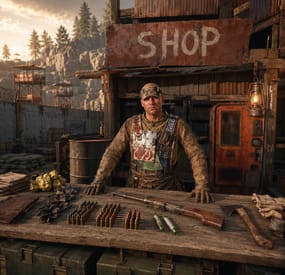
NPC traders & shops Build a trader where you stand — the whole shop, in-game Walk to a spot, type one command, and a named NPC vendor is standing there wearing your outfit. Everything after that — every lot, price, skin, stock counter and wipe limit — is edited by looking at him and clicking. No JSON, no reloads, no restart. Pin him to a monument and he finds the same corner on every new map.
17 Fields per lot 3 Economy plugins supported 99 Lots per single purchase 1 Required dependency — zero on Carbon ✓ The whole shop is built in-game — add, reorder, copy and delete lots by clicking ✓ Traders pinned to monuments — the same vendor at the same spot after every wipe ✓ Stock that refills on a timer — and survives a restart at the count it was on ✓ Traders that react to players — gestures and voice lines on approach, purchase and idle ✓ Sell items, currency or commands — kits and ranks are just another lot ✓ On the map like a vending machine — players see the vendor and what he sells Video See it in action 01 — The trader A vendor that belongs to your map Not a wooden box with a UI on it — a standing NPC with a name, an outfit and a place in the world.
Spawned where you stand, dressed like you One command drops a trader at your feet, facing where you face, wearing a copy of your clothes and holding whatever is in your hands. Change your own outfit later and one button re-copies it onto him — another button hands the set back to you. Pinned to a monument, not to coordinates Spawn him inside Bandit Camp, Outpost or any monument and his position is stored relative to it. Next wipe, on a completely different map, he stands in exactly the same corner of that monument — no repositioning, no re-spawning. Visible on the map, with his stock Toggle the vending marker and the trader shows up on the map under his display name, with his item-for-item lots listed on the map screen — exactly like a vending machine, so players know where to go and what for. Locked to a group, if you want Give a trader a permission and only that group can open him — with your own refusal message instead of the default one. A VIP-only black market is one field. Bulletproof, literally Traders can't be shot, damaged, targeted by NPCs or destroyed, and they aren't written into the map save — so they never duplicate, never leave corpses and never end up as debris in your save file. 02 — Gestures and voice A trader who notices you He waves when you walk up, thanks you for a purchase and shrugs when your pockets are empty — with his own voice, if you give him one.
Greets a player who comes closer Set a radius in meters and the trader reacts the moment somebody steps inside it — once per approach, not once per second. Walk away and come back and he greets you again. A reaction for every moment of the trade Walking up, opening the shop, buying a lot, coming up short on resources, closing the menu, and an idle line every N seconds while nobody is around. Each one carries a gesture, a voice line, or both. Random variants, weighted the way you want Every reaction holds a list of variants and one is picked by weight, so the same trader never greets two players in exactly the same way. Set a weight to zero to park a variant without deleting it. Voice lines are your own .ogg files Drop the files into oxide/data/NPCShop/sounds and write the file name in the config. Cut a long file where the phrase ends with a playback duration, and set the volume per trader. The speaker itself is invisible — players hear a voice coming from the vendor, not from a boombox at his feet. Heard by everyone, or by one player only A voice line can be global, so everybody around the trader hears it, or personal — delivered to the player who triggered it and to nobody else. Handy for greetings on a crowded Outpost. Every gesture the game has Wave, thumbs up, shrug, point, the dances — the npcshop.gestures console command prints the exact list your Rust build accepts, and an unknown name is reported at load instead of failing silently. 03 — Lots and pricing Any price for anything A lot is three item slots — what's sold, what it costs, and an optional second cost. Each slot can be a real item, a skinned item, or your server currency.
Two-item prices Charge 500 metal and 20 scrap for one lot. Turn the second slot off with a single value when you don't need it. Currency in either direction Flip a slot to money and the lot is priced in ServerRewards, Economics or IQEconomic. Flip the sale slot to money instead and the trader buys from players — a scrap-to-cash buyback counter, same editor, no second plugin. Skins, custom names, custom icons Every slot takes a skin ID, so a skinned item is a different product with a different price. Override the display name, point the icon at any image URL, and attach a description of up to 2500 characters that players open with an info button. Buy in bulk without spam-clicking A per-lot multiplier from 1 to 99 with plus, minus and a typed field. It clamps itself to what the player can actually afford, what's left in stock and what their wipe limit allows, so the number on screen is always a purchase that will go through. Oversized results are split into proper stacks. Permission discounts Map any permission to a percentage. Discounted players see an OFF badge on the price and pay less on both price slots; stacked groups resolve to the single best discount. Copy a lot, or a whole shop Copy one lot or every lot at once, walk to another trader and paste. Reorder with arrows, delete with one click, and hit preview to see the shop exactly as a player will before you close it. 04 — Stock and limits Scarcity you can schedule An unlimited shop is a vending machine with extra steps. Two independent systems keep a trader from flooding your wipe.
Stock that ticks back up Per lot: a maximum stock, a refill interval in seconds and how much comes back each interval. Sell out and the button turns grey with OUT OF STOCK until it recovers. Ten rockets an hour, and the first player there gets them. Per-player wipe limits A separate cap on how many of a lot each player may buy for the whole wipe, counted per skin. One VIP kit per person per wipe, enforced without a second plugin and reset automatically on the next map. Counts survive a reboot Remaining stock, refill timers and everyone's wipe counters are written on every server save and on unload. A restart doesn't hand out a fresh batch of rockets. 05 — Beyond items Sell anything a command can do Kits, ranks, teleports, cars, raid bases — if another plugin exposes a command, it's a lot.
Run it now, or wrap it as a gift Put a command on a lot and choose: fire it the moment the purchase clears, or hand the player a wrapped present they can save, carry and unwrap whenever they want — the command runs on unwrap. Give it a name and an icon and it looks like a real product in their inventory. %steamid% is substituted for you. A command on the trader himself Fire a command every time a player opens a given trader — a greeting in chat, a quest check, a log line. Also keyed by Steam ID. Item search that finds things The item picker searches display names and shortnames as you type and shows icons, so filling a shop doesn't mean keeping a shortname list open on your second monitor. Reliability Built to be left alone ✓ Oxide and Carbon — on Carbon the built-in image database is used and no extra plugin is needed at all ✓ Nothing is written into the map save — traders are recreated from config on boot, so they can't duplicate or survive as junk entities ✓ Clean unload — every trader is removed, open interfaces are closed for all players and stock is saved first ✓ One editor at a time — while an admin has a shop open it's locked for everyone else, so two people can't overwrite each other's lots ✓ A missing monument disables its trader with a console warning instead of dropping him into the ocean ✓ Optional 1-second buy cooldown against double-clicks and click macros Commands Three admin commands, none for players All three require the npcshop.admin permission. Players never type anything — they walk up to the trader and press use. Command names are configurable.
/settrader Spawn a trader at your position, in your clothes /remtrader Look at a trader and delete him /newtraderpos Look at a trader to select him, walk to the new spot, then /newtraderpos update. cancel aborts, and /newtraderpos <display name> moves a trader by name from anywhere npcshop.admin Spawn, edit, move and remove traders npcshop.vip 15% discount by default — rename it, change the number, or add as many discount tiers as you like Hooks & API For plugin developers void OnNPCShopItemBuy(BasePlayer player, Item saleItem, Item priceItem, Item additionalPriceItem) Fired after a successful item-for-item purchase, with the final amounts already multiplied and discounted. additionalPriceItem is null when the lot has no second price. Currency purchases don't raise it — track those through your economy plugin. Questions Before you buy What do I need installed? On Oxide, ImageLibrary — it's free and the plugin tells you in console if it's missing. On Carbon, nothing. MonumentFinder is optional and only needed for monument-pinned traders. An economy plugin (ServerRewards, Economics or IQEconomic) is optional and only needed for money prices; the right one is detected automatically. Do my traders survive a wipe? Yes. Traders, lots and prices live in the config, so they come back on the new map. Monument-pinned ones land in the right place automatically; free-standing ones keep their world coordinates and may need one /newtraderpos if the terrain changed. Stock counters and per-player wipe limits reset on a new map, which is the point of them. Can players sell things to the trader? Yes, in both forms. Item-for-item barter is what a lot does by default, and setting the sale slot to money turns the lot into a buyback: the player hands over items and gets currency. Can I sell a kit, a rank or a teleport? Anything that has a command. Either it runs immediately on purchase, or the player receives a named, custom-iconed present that runs it when unwrapped — which also makes the purchase tradeable between players. How many traders and lots can I have? No limit on either. The shop interface scrolls, and lots are reordered with arrow buttons. Why don't all my lots show on the map marker? The marker is a real vending-machine listing, and Rust's own format can only express one item for one item. Lots priced in currency, or with a second price item, are hidden from the marker — they work normally in the shop itself. Can I run different shops for different groups? Yes. Each trader takes its own permission and its own refusal message, so a VIP trader can stand next to the public one and simply refuse everyone else. Do I ever have to edit the config file? Only for server-wide settings: discount tiers, the currency icon, the buy cooldown, and a trader's access permission or greeting command. Everything about the goods themselves — lots, prices, skins, names, icons, stock, limits, descriptions — is done in-game. -
$12.99
Scientist Horse
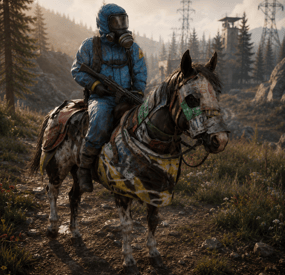
Mounted NPCs The road stops being empty Between monuments a Rust map is nothing — trees, gravel, and a run you have already made a hundred times. This puts armoured scientists on horseback out there. They patrol terrain you never had a reason to watch, they ride you down when provoked, and they are gone from the save file the moment you unload the plugin.
60 Seconds between population top-ups 25 Metre no-spawn ring around bases 4 Things you define per rider type 0 Dependencies ✓ Rider types you write yourself — NPC prefab, weapon, every worn item with its skin ID, and the horse's armour ✓ Peaceful until you shoot first — and then that player is remembered for the rest of the rider's life ✓ Never spawns on somebody's roof — the map is pre-scanned and anything within 25 m of a building block is thrown out ✓ The horses don't rot — decay damage is zeroed and Rust's decay replacement is blocked, so a patrol doesn't end in a pile of parts ✓ Nothing touches your save file — riders and horses are unsaveable by design and every one of them dies on unload 01 — Riders Dress them however you like A rider type is four fields, and you can have as many types as you want. Every spawn picks one at random, so a road can hand you a hazmat scientist with an LR300 and then something you built yourself.
Any NPC prefab as the base The default is the full-kit LR300 scientist, but the prefab path is a plain config string — heavy scientists, tunnel dwellers, anything on the scientist chassis goes in the same field. Clothing with skin IDs The wear list is shortname paired with skin ID, so a rider can turn up in your server's own skinned gear rather than the stock hazmat suit. The prefab's default clothing is cleared first, so you get exactly what you listed and nothing underneath it. One weapon, by shortname Name a weapon and the belt is cleared and rebuilt around it. Leave it empty and the prefab keeps whatever it came with. Bows are the one exception — they are skipped deliberately, because a mounted NPC cannot draw one. Armour on the horse too Roadsign barding by default, and it is equipped properly rather than dropped in the inventory — the horse renders with it on. 02 — Spawning Out in the world, not in your compound The map is surveyed once on startup and the plugin keeps a list of places a horse can actually stand. Nothing is placed blind.
Terrain only, and above the waterline Candidate points are traced straight down from 100 m and kept only if they land on terrain. Water, construction and prevent-building volumes are rejected, and so is anything at or below sea level — no riders trotting along the seabed. A 25-metre ring around anything built A point with a building block inside 25 m is dropped, and the check runs against the live map, not a snapshot. Players who wall off a hillside stop riders appearing on it. Topped up every minute A timer refills the roster to your population figure once a minute, so a night of hunting doesn't leave the map empty by morning. /spawnrider puts one in front of you when you want to look at your config instead of waiting for one to ride past. 03 — Behaviour Scenery until you make it personal Riders do not open fire on sight. Left alone they are something you watch cross a ridge; shoot one and it becomes a problem that follows you.
They shadow you before they shoot you With the passive switch on, a rider will still ride over and pace you — the scientist just won't pull the trigger. It is a far better encounter than an NPC that either ignores you or kills you, and a rider who is only shadowing gets bored after 25 seconds and goes looking for somebody else. Hit one and it never forgets Damage the scientist or the horse and you are added to that rider's grudge list permanently. The 25-second boredom timer does not apply to you any more — it will keep coming while you are both alive. It knows when a chase is over Targets are dropped the moment they enter a safe zone, start swimming, go to sleep, disconnect or die. Nobody gets shot at while loading into an outpost, and no rider stands in the surf waiting for a swimmer. A damage dial so the fight stays winnable A mounted scientist is a small target sitting behind a large animal, so incoming damage to him is multiplied — six times by default. Turn it down for a rider who takes real work to bring down, or to 1 for stock scientist health. 04 — Horses The mount is handled properly Rust's horses were built to be owned, fed and stabled. Three of those systems have to be switched off before a horse can just live outdoors, and all three are.
No decay, no decay replacement Decay damage to a rider's horse is zeroed outright, and the engine's swap-it-for-a-wreck routine is refused. A rider left alone on the far side of the map is still a rider tomorrow. No ragdoll flailing A Harmony patch suppresses the horse ragdoll for plugin mounts only, keyed on their own skin ID. Your players' horses ragdoll exactly as they always did. You decide what happens to the horse Kill the scientist and the horse either drops with him or is cut loose as a riderless animal standing where the fight ended — one switch. The second option turns every encounter into a horse worth walking over for. Reliability Leaves nothing behind ✓ Riders and horses are never saved — both are marked unsaveable at spawn, so they cannot accumulate in your map file or come back as orphans after a wipe ✓ Unload kills every one of them — scientist and horse together, no strays left standing in a field ✓ A dead rider frees its slot immediately — the roster is corrected on death, not on a sweep, so the population figure means what it says ✓ The AI stops itself — the moment a horse or its scientist is gone, the controlling component tears itself down instead of ticking against a dead entity ✓ No dependencies — nothing to install alongside it, and no economy or NPC framework required Commands One command, for you Players never type anything, and there is nothing to hand out — the command is gated on admin, not on a permission.
/spawnrider Spawn a random rider type at your feet — the fast way to check a config change Questions Before you buy Can I change what they wear and what they carry? Yes, per rider type. The wear list takes a shortname and a skin ID for each item, so custom-skinned outfits work, and the weapon is a single shortname. Bows are ignored on purpose. There is no kit-plugin integration — the items are named directly in the config. Can I have several kinds of rider on one map? Yes. Rider types are a list, and each spawn picks one at random. Each type carries its own scan radius, so a lightly armed scout can notice you from further away than a heavy. Can I set my own spawn points, or spawn a type in one region? No. Positions are generated from the terrain at startup and used for every type equally. There is no per-type placement and no way to hand-pick a location beyond spawning one yourself with the command. Do they drop the gear I dressed them in? Yes — the corpse carries whatever you put on the rider, and there is no switch to strip it. Price the outfit accordingly: expensive clothing on a common rider is a loot faucet. What about snowmobiles or other vehicles? Horses only. The movement code drives the horse's own gait and steering directly, so it does not transfer to another vehicle. Will they camp new players or shoot into outposts? No. Safe-zone players are never valid targets and an existing target is dropped the moment they enter one, along with anyone swimming, sleeping, disconnected or dead. Leave the passive switch on and a rider will not fire at all until it is shot. Do they survive a restart? No, and that is deliberate — they are never written to the save. The map is re-surveyed and the population rebuilt on load, so a restart costs you nothing but gives you a fresh spread of riders.- #scientist
- #horse
- (and 4 more)
-
$33.00
Battle Pass
Your players have a great opportunity to spend time completing different missions to get rewards! The list of possibilities is incredible: In-game Events. Fights with players. Farming, Raidings, Crafting or taking action in Custom Events(The list of supported plugins will be below), and much more!
Description:
Welcome to a world of unforgettable adventures that BattlePass can provide your users! This plugin has 30 levels that will entertain players in different ways. Let us plunge you deeper into the great atmosphere we have prepared for you!
How does it work?
You will get XP for accomplishing different goals, such as destroying the helicopter, raiding, and killing players, bots, or animals. Leveling up is also possible in a more peaceful way, too. For example, you can craft items, open boxes, and farm barrels and collect farm resources. Also, don’t forget that you can easily change parameters in the config file. Feel free to change the amount of XP awarded for missions.
What is the specialty of our BattlePass?
Support for custom events. The plugin interface looks like it was made by the game developers. Better performance. Detailed configuration of all actions in the config. The plugin has a system of permissions that will allow your server to receive additional earnings. You can configure players' access to rewards. You can also add different multipliers of getting EXP for different privileges. The reward system supports custom items and teams. Level 1 can have multiple rewards. You can change all the texts in the Lang file.
Dependencies (optional, not required)
Arctic Base Event Satellite Dish Event Junkyard Event Plant Event Air Event Harbor Event Water Event Boss Monster Plugin Config
en - example of plugin configuration in English ru - example of plugin configuration in Russian
My Discord: CASHR#6906
Join the Mad Mappers Discord here!
Check out more of my work here!
-
$14.99
Floor Drops Event
By Iftebinjan in Plugins
✨ What's New
In this new plugin update to v2, everything has been redone from scratch, fixing many bugs and improving many features!
A new user interface, much more elegant and easier to use; Plugin performance is 10x faster for users and for the server; Console to allow admins to start the event without joining in the game; It is now possible to break the ground with arrows; Now you can play alone! To win, just stay alive until the last foundation is destroyed! 📌 Commands
Note: You can change/add new commands in the plugin configuration file.
Note 2: The console and chat commands will be the same, just remove the '/' before using them in the console
/floordrops start - To start the event
/floordrops stop - To stop the event
/floordrops join - To join the event
/floordrops leave - To leave the event
🚀 API & Hooks
You can use this simple API to communicate with your plugin easily:
⚙️ Configurations
💬 Support
-
$24.00
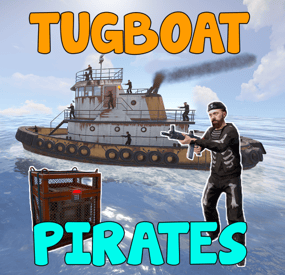
Tugboat Pirates
By The_Kiiiing in Plugins
Experience the thrill of high-seas plunder with "Tugboat Pirates". Encounter a Tugboat, brimming with NPC pirates protecting their valuable loot. Engage in intense battles, eliminate the captain for an access code, and seize the treasure.
Features
Tugboat with Pirate NPCs and loot patrols the ocean Kill the captain to get access to the loot room Fully configurable boat interior Boat location marked on the map Fully customizable NPCs (you can even give them rocket launchers in their kits) Event starts automatically (configurable time, can be disabled) Announcements via gametip and/or chat NPC are turret NPC that do not move from their station on the Tugboat
Door code of the loot room can be found in the captain's corpse (pirate quotes can be changed in the config)
Commands
All Commands require the admin permission
tugboatstart - Manually start the event tugboatstop - Manually end the event tugboatentity - Add entitys to the tugboat config. Documented below.
Tugboat Editor
The tugboat editor can be used to add entites to the configuration file without manually editing it.
Make sure you have the permission tugboatpirates.admin, Place an entity where you want it on a tugboat, look at it and use the command tugboatentity add Save the entity to the config file with tugboatentity save, Reload the plugin for the changes to take effect
Hooks
(void) OnTugboatPiratesStarted() // Called when the event has started (void) OnTugboatPiratesCompleted(ulong steamId) // Called when the event has been completed (void) OnTugboatPiratesEnded() // Called after the event has ended
Permissions
tugboatpirates.admin - Required to use admin commands
Configuration
{ "Time between events (minutes, set to -1 to disable scheduled events)": 60, "Event duration (seconds)": 3600, "Show toast when event starts": true, "Announce event in chat": true, "Boat leave time before despawning (seconds)": 120, "Time before boat despawn when captain is killed (seconds)": 1200, "Boat configurations": [ { "Location offset (used when spawning multiple boats)": { "x": 0.0, "y": 0.0, "z": 0.0 }, "Npc profile for captain (must be a valid profile)": "captain", "Npc spawn locations and profiles": { "back_right": "pirate_lr", "back_left": "pirate_lr", "upper_front_right": "pirate_lr", "upper_front_left": "pirate_lr", "upper_back_right": "pirate_lr", "upper_back_left": "pirate_lr", "roof_back": "pirate_lr", "entrance_right": "pirate_lr", "entrance_left": "pirate_lr", "roof_right": "pirate_lr", "roof_left": "pirate_lr", "front": "pirate_lr", "right": "pirate_mp5", "left": "pirate_mp5" }, "Interior objects (crates, decoration, etc.)": [ { "Prefab path": "assets/prefabs/deployable/chinooklockedcrate/codelockedhackablecrate.prefab", "Rotation": 180.0, "Position on boat": { "x": 0.0, "y": 2.0, "z": 4.2 }, "Skin id": 1394363785, "Loot profile (only for crates, leave empty for default loot)": "" }, // Removed some lines for readability reasons ] } ], "Npc profiles": { "pirate_lr": { "name": "Pirate", "health": 200.0, "enableRadio": true, "senseRange": 50.0, "visionCone": 135.0, "damageScale": 1.0, "memoryDuration": 60.0, "lootProfile": "pirate", "kit": "", "Clothing items": [ { "shortName": "hat.boonie", "amount": 1, "skinId": 965553937 }, { "shortName": "hoodie", "amount": 1, "skinId": 2984978438 }, { "shortName": "pants", "amount": 1, "skinId": 2984977257 }, { "shortName": "attire.hide.boots", "amount": 1, "skinId": 861468674 } ], "Belt items": [ { "shortName": "rifle.lr300", "amount": 1, "skinId": 0 } ] }, "pirate_mp5": { "name": "Pirate", "health": 150.0, "enableRadio": true, "senseRange": 50.0, "visionCone": 135.0, "damageScale": 1.0, "memoryDuration": 60.0, "lootProfile": "pirate", "kit": "", "Clothing items": [ { "shortName": "hat.boonie", "amount": 1, "skinId": 965553937 }, { "shortName": "hoodie", "amount": 1, "skinId": 2984978438 }, { "shortName": "pants", "amount": 1, "skinId": 2984977257 }, { "shortName": "attire.hide.boots", "amount": 1, "skinId": 861468674 } ], "Belt items": [ { "shortName": "smg.mp5", "amount": 1, "skinId": 0 } ] }, "captain": { "name": "Captain", "health": 100.0, "enableRadio": false, "senseRange": 0.0, "visionCone": 0.0, "damageScale": 1.0, "memoryDuration": 0.0, "lootProfile": "pirate", "kit": "", "Clothing items": [ { "shortName": "hat.boonie", "amount": 1, "skinId": 965553937 }, { "shortName": "tshirt", "amount": 1, "skinId": 811762477 }, { "shortName": "pants.shorts", "amount": 1, "skinId": 849256923 }, { "shortName": "attire.hide.boots", "amount": 1, "skinId": 861468674 } ], "Belt items": [ { "shortName": "mace.baseballbat", "amount": 1, "skinId": 0 } ] } }, "Loot profiles": { "crate_2": [ { "Short name": "scrap", "Min amount": 2, "Max amount": 20, "Chance": 1.0, "Skin id": 0 }, { "Short name": "metal.refined", "Min amount": 4, "Max amount": 8, "Chance": 0.5, "Skin id": 0 }, { "Short name": "gears", "Min amount": 1, "Max amount": 3, "Chance": 0.2, "Skin id": 0 }, { "Short name": "sewingkit", "Min amount": 1, "Max amount": 3, "Chance": 0.2, "Skin id": 0 }, { "Short name": "rope", "Min amount": 1, "Max amount": 3, "Chance": 0.2, "Skin id": 0 }, { "Short name": "sheetmetal", "Min amount": 1, "Max amount": 2, "Chance": 0.2, "Skin id": 0 }, { "Short name": "grenade.molotov", "Min amount": 1, "Max amount": 2, "Chance": 0.1, "Skin id": 0 }, { "Short name": "grenade.f1", "Min amount": 1, "Max amount": 4, "Chance": 0.1, "Skin id": 0 }, { "Short name": "telephone", "Min amount": 1, "Max amount": 1, "Chance": 0.1, "Skin id": 0 }, { "Short name": "multiplegrenadelauncher", "Min amount": 1, "Max amount": 1, "Chance": 0.1, "Skin id": 0 } ], "pirate": [ { "Short name": "scrap", "Min amount": 2, "Max amount": 6, "Chance": 1.0, "Skin id": 0 }, { "Short name": "bottle.vodka", "Min amount": 1, "Max amount": 1, "Chance": 0.7, "Skin id": 0 }, { "Short name": "pistol.eoka", "Min amount": 1, "Max amount": 1, "Chance": 0.2, "Skin id": 0 }, { "Short name": "ammo.handmade.shell", "Min amount": 5, "Max amount": 10, "Chance": 0.2, "Skin id": 0 }, { "Short name": "rope", "Min amount": 1, "Max amount": 3, "Chance": 0.3, "Skin id": 0 }, { "Short name": "sewingkit", "Min amount": 1, "Max amount": 2, "Chance": 0.3, "Skin id": 0 } ] }, "Priate quotes (inluded in captain's note)": [ "If rum can’t fix it, ye are not using enough rum.", "But… why is the rum gone?", "Be who you arrrr...", "All for rum and rum for all!", "Land was created to provide a place for boats to visit.", "If ye can read this ye be stupid." ] }