
Paws4Luv's Wishlist
-
$15.00
Sortify
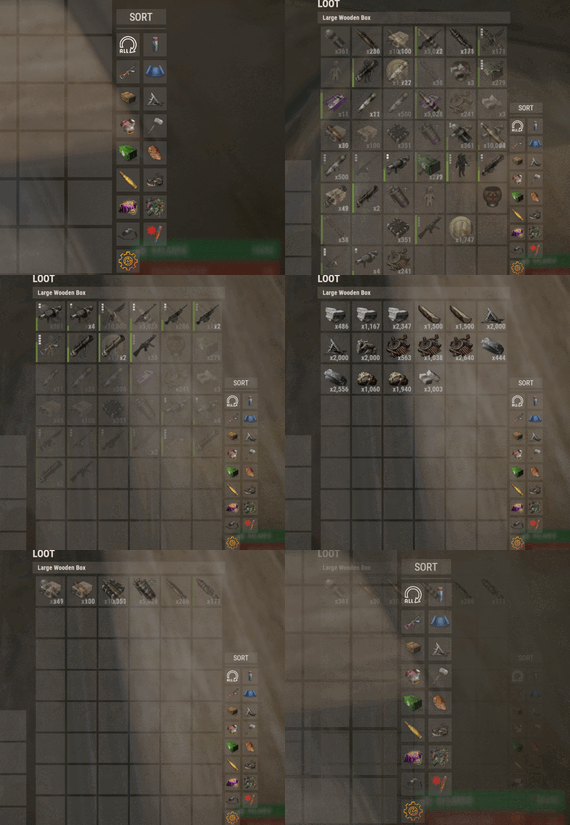
Introducing Sortify, the best plugin for making it easy to sort and filter boxes and containers from various plugins, all without the need for complex integrations. Sortify offers an intuitive solution to easily categorize your items, all within an elegant and efficient Rust-style user interface.
Key Features:
Custom Categories: With Sortify, you can create and customize your own categories to suit your unique needs. Rust style user interface: The plugin has a minimalistic and aesthetic Rust style user interface. Ease of Use: Sortify is designed with ease of use in mind. Whether you're a beginner or an experienced user, you'll find Sortify incredibly easy to use. It does not require complex training or any action on the part of the player, which allows the player to immediately begin organizing elements effectively.
Permissions:
sortify.allow - permission to use the plugin
Video at moment version 1.0.0 (after the sorting scheme was changed, see gif):
- #sorting
- #filtering
- (and 6 more)
-

$10.00
Bank Heist
Spawns custom bank hesits at specified locations.
Optional Plugins
Kits umod
Part 1: Optional Bank Prefab Setup
Part 2: Bank Plugin Setup
Custom Prefabs:
Prefab name should be labled as "bankheist" or "bankheist_1" for multiple banks.
Permission
bankheist.manage // Allow admins to setup bank events bankheist.worker // Stop guards attacking bank workers Commands
1. /bse <type>, spawn prefab entity of type for setup 2. /blp create|remove|update <profile-name>, manage bank loot profiles 3. /bgp create|remove|update|stationary <profile-name>, manage bank guard profiles 4. /bdp create|remove|update <profile-name>, manage bank door profiles 5. /bhm create|remove <bank-name>, create or remove a bank 6. /bhm parent <bank-name> <monument-name>, setup a parent monument for the bank 7. /bhm <guard|loot|door> profile <bank-name> <id> <profile-name>, setup profile for a door or loot to use 8. /bhm <guard|loot|door> remove <bank-name> <id>, remove entity from a specified bank 9. /bhm <guard|loot|door> create <bank-name>, create entity for the specified bank 10. /bhm mmr <bank-name> <radius>, map marker radius 11. /bhm pdr <bank-name> <radius>, player detection radius 12. /bhm tbr <bank-name> <seconds>, seconds before bank will reset 13. /bhm ato <bank-name> <seconds>, seconds before alarm will disable 0 = until bank reset 14. /bhm debug <bank-name> <option>, enable debug information options: loot, door, guard, info, everything 15. /bhm monuments Data
{ "BankEntries": [ { "bank display name": "Test Bank", "parent monument name": null, "time between resets": 1800.0, "alarm timeout seconds": 120.0, "alarm disable when all crates are looted": true, "spawn position": { "x": -668.1162, "y": 24.8576756, "z": 15.70411 }, "spawn rotation": { "x": 0.0, "y": 0.0, "z": 0.0 }, "player detection origin": { "x": 0.0, "y": 0.0, "z": 0.0 }, "player detection radius": 100.0, "map marker origin": { "x": 0.0, "y": 0.0, "z": 0.0 }, "map marker radius": 100.0, "map marker opacity": 0.6, "map marker ready color": "#2eff74", "map marker reset color": "#ff2e2e", "map marker outline color": "#ffffff", "loot spawn group entries": [ { "Id": 3177, "Prefab": "assets/prefabs/deployable/chinooklockedcrate/codelockedhackablecrate.prefab", "Profile": "loot1", "Position": { "x": -0.04071045, "y": 0.04530716, "z": 0.196435928 }, "Rotation": { "x": -0.00194311875, "y": 283.140167, "z": 359.913574 } } ], "door spawn group entries": [ { "Id": 3593, "Prefab": "assets/prefabs/building/wall.frame.garagedoor/wall.frame.garagedoor.prefab", "Profile": "door1", "Position": { "x": 1.49249268, "y": 0.166625977, "z": -6.467394 }, "Rotation": { "x": 0.0, "y": 13.3333187, "z": 0.0 } }, { "Id": 9537, "Prefab": "assets/prefabs/building/wall.frame.garagedoor/wall.frame.garagedoor.prefab", "Profile": "door1", "Position": { "x": 4.67230225, "y": 0.354122162, "z": 5.18401432 }, "Rotation": { "x": 0.0, "y": 13.3333187, "z": 0.0 } } ], "npcs spawn group entries": [ { "Id": 1765, "Prefab": null, "Profile": "guard1", "Position": { "x": 3.79986572, "y": -0.289468765, "z": -7.350936 }, "Rotation": { "x": 0.0, "y": 0.0, "z": 0.0 } }, { "Id": 1227, "Prefab": null, "Profile": "guard1", "Position": { "x": 7.863037, "y": -0.0256900787, "z": 4.15430927 }, "Rotation": { "x": 0.0, "y": 0.0, "z": 0.0 } }, { "Id": 2957, "Prefab": null, "Profile": "guard1", "Position": { "x": 1.5680542, "y": 0.0291461945, "z": 4.185258 }, "Rotation": { "x": 0.0, "y": 0.0, "z": 0.0 } }, { "Id": 3914, "Prefab": null, "Profile": "guard1", "Position": { "x": -0.6699219, "y": 0.08488846, "z": -3.12963676 }, "Rotation": { "x": 0.0, "y": 0.0, "z": 0.0 } } ] } ] } Loot Profiles Example
{ "ProfileEntries": { "loot1": { "MinItems": 2, "MaxItems": 5, "SkinId": 0, "HackableSeconds": 60.0, "LootItems": [ { "Shortname": "shotgun.m4", "ItemName": null, "SkinID": 0, "MinAmount": 1, "MaxAmount": 1, "IsBlueprint": false }, { "Shortname": "rifle.m39", "ItemName": null, "SkinID": 0, "MinAmount": 1, "MaxAmount": 1, "IsBlueprint": false }, { "Shortname": "rifle.semiauto", "ItemName": null, "SkinID": 0, "MinAmount": 1, "MaxAmount": 1, "IsBlueprint": false }, { "Shortname": "military flamethrower", "ItemName": null, "SkinID": 0, "MinAmount": 1, "MaxAmount": 1, "IsBlueprint": false }, { "Shortname": "weapon.mod.extendedmags", "ItemName": null, "SkinID": 0, "MinAmount": 1, "MaxAmount": 1, "IsBlueprint": false }, { "Shortname": "smg.2", "ItemName": null, "SkinID": 0, "MinAmount": 1, "MaxAmount": 1, "IsBlueprint": false }, { "Shortname": "smg.thompson", "ItemName": null, "SkinID": 0, "MinAmount": 1, "MaxAmount": 1, "IsBlueprint": false }, { "Shortname": "homingmissile.launcher", "ItemName": null, "SkinID": 0, "MinAmount": 1, "MaxAmount": 1, "IsBlueprint": false }, { "Shortname": "rifle.bolt", "ItemName": null, "SkinID": 0, "MinAmount": 1, "MaxAmount": 1, "IsBlueprint": false }, { "Shortname": "rifle.l96", "ItemName": null, "SkinID": 0, "MinAmount": 1, "MaxAmount": 1, "IsBlueprint": false }, { "Shortname": "ammo.rocket.basic", "ItemName": null, "SkinID": 0, "MinAmount": 100, "MaxAmount": 100, "IsBlueprint": false }, { "Shortname": "ammo.rocket.hv", "ItemName": null, "SkinID": 0, "MinAmount": 100, "MaxAmount": 100, "IsBlueprint": false }, { "Shortname": "ammo.rifle.explosive", "ItemName": null, "SkinID": 0, "MinAmount": 1000, "MaxAmount": 1000, "IsBlueprint": false }, { "Shortname": "ammo.rocket.mlrs", "ItemName": null, "SkinID": 0, "MinAmount": 100, "MaxAmount": 100, "IsBlueprint": false }, { "Shortname": "ammo.rocket.fire", "ItemName": null, "SkinID": 0, "MinAmount": 100, "MaxAmount": 100, "IsBlueprint": false }, { "Shortname": "submarine.torpedo.straight", "ItemName": null, "SkinID": 0, "MinAmount": 100, "MaxAmount": 100, "IsBlueprint": false }, { "Shortname": "rifle.ak", "ItemName": null, "SkinID": 0, "MinAmount": 1, "MaxAmount": 1, "IsBlueprint": false }, { "Shortname": "hmlmg", "ItemName": null, "SkinID": 0, "MinAmount": 1, "MaxAmount": 1, "IsBlueprint": false }, { "Shortname": "smg.mp5", "ItemName": null, "SkinID": 0, "MinAmount": 1, "MaxAmount": 1, "IsBlueprint": false }, { "Shortname": "rifle.sks", "ItemName": null, "SkinID": 0, "MinAmount": 1, "MaxAmount": 1, "IsBlueprint": false }, { "Shortname": "rocket.launcher", "ItemName": null, "SkinID": 0, "MinAmount": 1, "MaxAmount": 1, "IsBlueprint": false }, { "Shortname": "lmg.m249", "ItemName": null, "SkinID": 0, "MinAmount": 1, "MaxAmount": 1, "IsBlueprint": false } ] } } } Door Profiles Example
{ "ProfileEntries": { "Test": { "Health": 10000.0, "SkinId": 0 } } } Guard Profiles Example
{ "ProfileEntries": { "Test": { "Version": 0.0, "Prefab": "assets/rust.ai/agents/npcplayer/humannpc/scientist/scientistnpc_heavy.prefab", "Names": "Bank Guard", "Gender": 0, "SkinTone": 0, "Underwear": 0, "WearItems": [ { "ShortName": "jumpsuit.suit.blue", "SkinID": 0 } ], "BeltItems": [ { "ShortName": "pistol.prototype17", "Amount": 1, "SkinID": 0, "Mods": [], "Ammo": "ammo.pistol" }, { "ShortName": "syringe.medical", "Amount": 4, "SkinID": 0, "Mods": [], "Ammo": null }, { "ShortName": "smg.mp5", "Amount": 1, "SkinID": 0, "Mods": [], "Ammo": "ammo.pistol" } ], "Kit": "", "DestroyTrapsOnDeath": false, "Health": 100.0, "InstantDeathIfHitHead": false, "RoamRange": 10.0, "ChaseRange": 80.0, "SenseRange": 40.0, "ListenRange": 20.0, "DamageRange": 80.0, "ShortRange": 10.0, "AttackLengthMaxShortRangeScale": 2.0, "AttackRangeMultiplier": 1.0, "CheckVisionCone": false, "VisionCone": 286.0, "HostileTargetsOnly": false, "DisplaySashTargetsOnly": false, "IgnoreSafeZonePlayers": true, "IgnoreSleepingPlayers": true, "IgnoreWoundedPlayers": true, "NpcAttackMode": 2, "NpcSenseRange": 40.0, "NpcDamageScale": 1.0, "NpcWhitelist": "FrankensteinPet,14922524", "NpcBlacklist": "11162132011012", "AnimalAttackMode": 0, "AnimalSenseRange": 20.0, "AnimalDamageScale": 1.0, "AnimalWhitelist": "", "AnimalBlacklist": "11491311214163", "DamageScale": 0.75, "CanTurretTarget": true, "DamageScaleFromTurret": 0.5, "DamageScaleToTurret": 1.0, "AimConeScale": 2.0, "DisableRadio": false, "SleepDistance": 100.0, "Speed": 5.0, "AreaMask": 1, "AgentTypeID": -1372625422, "BaseOffSet": 0.0, "HomePosition": "", "MemoryDuration": 10.0, "States": [ "RoamState", "ChaseState", "CombatState" ], "LootPreset": "Default-Npc-KpucTaJl", "CratePrefab": "", "IsRemoveCorpse": true, "GroupAlertEnabled": false, "GroupAlertRadius": 40.0, "GroupAlertReceivers": "", "HeadDamageScale": 1.0, "BodyDamageScale": 1.0, "LegDamageScale": 1.0, "CanRunAwayWater": true, "CanSleep": true, "CanRaid": false, "Stationary": false, "UseUnderGround": false } } } Configuration
{ "enable notifications": true, "enable visible bubble": true, "enable visible marker": true, "enable alarm trigger": true, "enable eliminate guards": true, "enable zone messages": true, "prevent worker looting bank": true, "prevent teleport from bank": false, "blocked zone commands": [ "home", "tpr", "kit", "bandit", "outpost" ], "spawnable prefabs": { "vault-door": "assets/bundled/prefabs/modding/asset_store/bankheist_package/bankheist_vol03/prefabs/door.vault.static.prefab", "garage-door": "assets/prefabs/building/wall.frame.garagedoor/wall.frame.garagedoor.prefab", "single-door": "assets/prefabs/building/door.hinged/door.hinged.toptier.prefab", "double-door": "assets/prefabs/building/door.double.hinged/door.double.hinged.toptier.prefab", "elite-crate": "assets/bundled/prefabs/radtown/crate_elite.prefab", "crate-normal": "assets/bundled/prefabs/radtown/crate_normal.prefab", "crate-normal_2": "assets/bundled/prefabs/radtown/crate_normal_2.prefab", "hackable-crate": "assets/prefabs/deployable/chinooklockedcrate/codelockedhackablecrate.prefab" } }
-

$6.99
Photo Sender (Discord)
By the-bandit in Plugins
Your players will be able to publish images at any time on your discord server using the polaroid of the game and thus its location the name of the server on which the player will play.
Plugin language : EN , FR
Image format for sending: 854x480 (limited due to rust)
Type of format for sending: .png
Contents :
SendPhotoDiscord.cs Permissions oxide :
oxide.grant group default SendPhotoDiscord.use oxide.grant group vip SendPhotoDiscord.vip Permissions carbon:
carbon.grant group default SendPhotoDiscord.use carbon.grant group vip SendPhotoDiscord.vip
Install : rust\oxide\plugins\SendPhotoDiscord.cs
Config : rust\oxide\config\SendPhotoDiscord.json
{ "List Channel Discord (webHooks URL) Max (8) !": { "1": { "Url webHooks": "follow the tutorial", "Name": "Channel 1" }, "2": { "Url webHooks": "", "Name": "Channel 2" }, "3": { "Url webHooks": "", "Name": "Channel 3" } }, "Url avatar ( https://exemple.com/?id={SteamId} )": "", "Enable location": true, "Enable server name": true, "Enable map name": true, "Enable server ip": true, "Enable comments": true, "The minimum limit of letter to comment": 3, "Photo limit per player": 3, "How long should the player wait": 600, "Photo limit per VIP players": 1, "How long should the VIP player wait": 10, "Save photos to inventory": false, "The text ( Localization )": " > :triangular_flag_on_post: Location : **{PositionPlayerCordinat}** \n", "The text ( server name )": " > :mega: Server : **{NameServer}** \n", "The text ( map name )": " > :map: Map : **{NameMap}** \n", "The text ( server ip )": " > :desktop: Ip : **{IpServer}**:**{PortServer}** \n", "The text ( comment )": "\n {CommentairePhoto} " } Tutorial webHooks :
restart the plugin for any modification of the SendPhotoDiscord.json file
oxide.reload SendPhotoDiscord
-
.thumb.gif.322807c4f40719e5f260ec6c2454d8e3.gif)
$15.00$11.25Bot Purge Event
Supports Economics & Server Rewards
You can use either or, both at the same time if needed, or both set to false.
The Event
Challenge your players and have them compete for the most amount of NPC/Bot kills for the duration of the event.
The highest scoring player will earn the loot and bragging rights.
Features
Headshot "Crunch" Lets your players know its time to take out some bots.
Leaderboard tracker, counts kills of your top players, and also counts down the time.
(Kill counter sits on right side of compass.)
Tie breaker implemented to randomly decide a winner, on delay for Dramatics 😉
At the end the winner will receive whatever loot you specified in the table. (Skinning and Custom names in config)
And now you can reward them Economics balance or Server Rewards Points.
The Winner will now be logged Via Discord and state if it was a tie breaker or an uncontested win.
Commands
/Purge - Manually Starts the event
/PurgeEnd - Manually End
These commands may vary due to what you set in config.
Start and end can be executed from Rcon
HUD USERS
HUD CONFIG ADDITION
Your color and Icon taste may differ.
Feel free to Change it.
, { "Hook OnEventStart": "OnBotPurgeEventStart", "Hook OnEventStop": "OnBotPurgeEventEnd", "Name": "BotPurgeEvent", "Active color": "#f02020", "Icon": "https://cdn.discordapp.com/attachments/1131387423838961747/1149341840391278642/BOTPURGEEVENTICON.png", "Color": "#A020F0", "Enable": true }
HUD .cs File Custom Events ADDITION
private void OnBotPurgeEventStart() => OnEventTouch(System.Reflection.MethodBase.GetCurrentMethod().Name); private void OnBotPurgeEventEnd() => OnEventTouch(System.Reflection.MethodBase.GetCurrentMethod().Name);
RUNNING COMMANDS
Use {id} to target your player who won.
Config ex.
{ "Leaderboard Options": { "Enable Leaderboard UI?": true, "Leaderboard UI Anchor Min": "0.5 1", "Leaderboard UI Anchor Max": "0.5 1", "Leaderboard UI Offset Min": "250 -150", "Leaderboard UI Offset Max": "450 0", "Leaderboard UI Font": "permanentmarker.ttf" }, "Event Options": { "Enable Scheduled Events?": true, "Purge Command": "purge", "Purge End Command": "purgeend", "Min Random Event Interval in Seconds": 3600, "Max Random Event Interval in Seconds": 7200, "Minimum Players to Start Event": 2, "Event Duration in Seconds": 600, "Enable Start FX?": true, "Enable Chat Countdown?": true, "Chat Countdown Interval in Minutes": 5, "Webhook URL (Leave blank to disable)": "" }, "Reward Options": { "Enable Winner Commands?": true, "Winner Commands": [ "inventory.giveto {id} rifle.ak 1", "inventory.giveto {id} paper 10" ], "Enable Economic Payout?": true, "Economic Payout Amount": 100.0, "Enable Server Rewards Payout?": true, "Server Rewards Payout Amount": 100, "Enable Winner Items?": true, "Min Items to Give": 1, "Max Items to Give": 2, "Winner Items": [ { "Shortname": "blood", "SkinID": 0, "Probability (0-1)": 0.8, "Custom Name": "", "Minimum Amount": 10, "Maximum Amount": 20 }, { "Shortname": "bleach", "SkinID": 0, "Probability (0-1)": 0.2, "Custom Name": "", "Minimum Amount": 1, "Maximum Amount": 3 } ] } }
Lang ex.
{ "EventActive": "[<color=#880808>BOT PURGE EVENT</color>] \nThe Bot Purge Event has started! <color=#884808>Kill</color> as many bots as you can!", "EventAlreadyRunning": "[<color=#880808>BOT PURGE EVENT</color>] \nThe Event is already running.", "EventNotRunning": "[<color=#880808>BOT PURGE EVENT</color>] \nThe Event is not currently running.", "NoPermissionStart": "[<color=#880808>BOT PURGE EVENT</color>] \nYou don't have permission to start the Bot Purge Event.", "NoPermissionEnd": "[<color=#880808>BOT PURGE EVENT</color>] \nYou don't have permission to end the Bot Purge Event.", "ManuallyEnded": "[<color=#880808>BOT PURGE EVENT</color>] \nThe Event was manually Ended.", "NoParticipants": "[<color=#880808>BOT PURGE EVENT</color>] \nThe Event has ended! Unfortunately, no one participated.", "CountdownText": "[<color=#880808>BOT PURGE EVENT</color>] \nThe Bot Purge Event will end in <color=#880808>{0}</color> minute(s).", "WinnerAnnounce": "{0}", "TieMessage": "[<color=#880808>BOT PURGE EVENT</color>] \nThe Bot Purge Event has ended! There was a tie among <color=#880808>{0}</color> players with <color=#880808>{1}</color> kills.", "TieWinnerMessage": "[<color=#880808>BOT PURGE EVENT</color>]\nThe winner was randomly selected: <color=#880808>{0}</color> with <color=#880808>{1}</color> kills!\n", "HasEnded": "[<color=#880808>BOT PURGE EVENT</color>] \nThe Bot Purge Event has ended!", "EndMessage": "[<color=#880808>BOT PURGE EVENT</color>]\n\nBot Purge Rewards\n\nThe Winner is <color=#880888>{0}</color> with <color=#884808>{1}</color> kill(s)!", "RewardMessage": "\n<color=#880848>{0}</color> <color=#888808>x</color> <color=#088848>{1}</color>", "EconomicRewardMessage": "\n<color=#880888>{0}</color> received <color=#bb9b65>$</color><color=#85bb65>{1}</color>!", "PlayerEarnedMessage": "\n<color=#880888>{0}</color> earned:\n{1}", "ServerRewardsMessage": "\n<color=#880888>{0}</color> also received <color=#85bb65>{1}</color><color=#bb9b65> RP</color>!" }
Thank you!
Any questions or suggestions feel free to reach out, thank you for viewing - Wrecks
-
.thumb.gif.4707aef13cba7c3b9ad410f5f982b71c.gif)
$34.95$21.95Daily Rewards
Daily Rewards is a strong tool for Rust admins who want to keep their players engaged until the end of the wipe. You can provide your gamers with distinct daily rewards for logging in with this plugin. This way, you not only liven up gameplay, but also encourage longer playtime. With Daily Rewards, don't lose the chance to draw in new players and keep returning ones! 🎁 🎮
🌟 Features of Daily Rewards
Beautiful and user-friendly interface Daily rewards for logging Motivating players to stay in the game longer Retention of players until the end of the wipe Compatibility with many plugins Edit rewards and config via in-game interface (no JSON editing required) By default, the plugin supports English, Russian, and Chinese languages Cooldown time before receiving an award Saving rewards in the plugin's inventory Do not receive rewards from inventory while in the build block, raid block, or combat block
🎮 Commands
daily – open daily rewards interface dailyrewards.wipe – wipe of player data dailyrewards.top [format: csv, empty (default)] [limit (10 is default)] – get a list of players with the day their award. dailyrewards.manage – manage daily reward settings dailyrewards.manage playtime set <steam_id> <amount> – sets the playtime for the specified player. dailyrewards.template [fullscreen/inmenu] [target_template] – sets the interface template for daily rewards.
Parameters: [fullscreen/inmenu]: Type of interface template to set. Valid values: fullscreen or inmenu. [target_template]: For the inmenu template, you must specify the template number (1 or 2).
🛡️ Permissions
dailyrewards.use – allows you to open the DailyRewards menu dailyrewards.edit - allows you to enable edit mode
🎥 Video
📚 FAQ
Q: Where can I see an example of a config?
A: Config
Q: How do I add DailyRewards to the ServerPanel menu?
A: You can do this directly from the ServerPanel in-game:
1. Open the ServerPanel menu in-game.
2. If you have permission to edit, switch the panel to edit mode so you can see the blue "EDIT CATEGORY" and "EDIT PAGES" buttons.
3. Choose the category where you want DailyRewards to appear and click the "EDIT CATEGORY" button for that category.
4. While you are in this category in the ServerPanel, click the "EDIT PAGES" button to create a new page (or edit an existing one) for DailyRewards.
5. For that page, set these exact parameters:
Type: Plugin Plugin Name: DailyRewards Plugin Hook: API_OpenPlugin 6. Save the changes. The DailyRewards button will now appear in the ServerPanel in the category you selected.