
GangstaPichu's Wishlist
-
$11.00
Store Bundle
A bundle of my stores, including the weapons store, the clothing store and the car store.
Buying this bundle is cheaper than buying all 3 stores separately.
Please visit the pages of my stores separately to find out more detailed information about them.
All prefabs are standalone and do not include height, splat, alpha or topology of any kind.
Looking to get a prefab or map customly made? Feel free to contact me on discord [-Core-] Daan#1402
-
$12.99
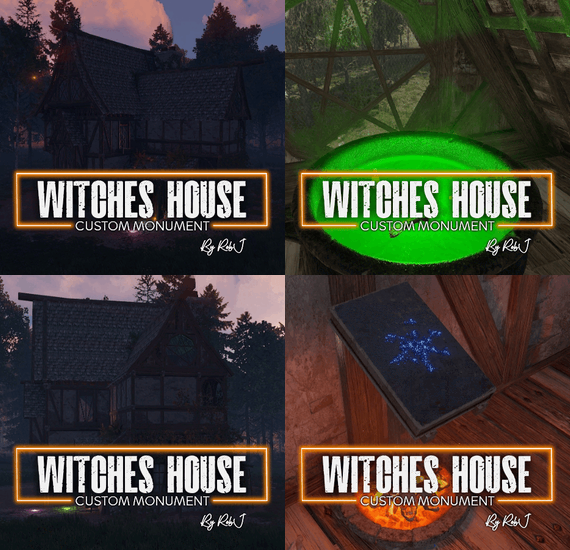
Witches House
Hello and welcome to my creepy spider infested witches house, hidden behind these doors are some very dark secrets. A number of children from the nearby village have gone missing never to be heard from again, with the only trace being bitten candy matching their dental records.
NPC’s
This monument has built-in NPC’s powered by an included plug-in. If you do not wish to use the built-in bots simply do not install the plug-in and add your own bots at your leisure.
Quick Start
Extract the zip file into your RustEdit install folder. Click on Prefabs at the top & open up your Prefab List. Under the Custom category, you will now find RobJs Premium Prefabs. Double-click on the prefab file, which will spawn it into the map for you. Drag it to the general area you want to place it. Apply Height Mask, Topology Mask, Splat Mask. Done Contact And Help
If you need to contact me discord is best: RobJ2210
For help/support my discord group is best: Join RustMaps By RobJ Discord
-
$12.99
Mines
[ ! ] The zip contains a DLL extension that goes into RustDedicated_Data/Managed. Some hosts do not allow uploading DLLs - check with your host before buying. [ ! ]
Mines is the classic high stakes gambling game, built into Rust. Players pick a bet and a number of mines, then flip tiles on a 5x5 board: every gem raises the multiplier, and one mine ends the round and takes the bet. Cash out whenever you like, or push your luck for the next gem.
A payout ladder shows what the next gems pay, a round panel tracks the multiplier, the gems found and the profit a cashout would pay right now, and when the round ends the whole board turns over so everybody sees where the mines were. Session stats, a last games strip and an AUTO mode that replays a tile pattern with win and loss rules and stop limits keep players coming back.
Payouts follow the real odds of the board minus a house edge you set, so the game drains a little currency from your economy instead of printing it. Scrap works out of the box, and Economics, ServerRewards, TCBank, IQEconomic and ShoppyStock are picked up when they are installed.
🌟 Features of Mines
A full in-game window: a bet box with 1/2, 2X, MIN and MAX, a mines stepper with quick picks 1, 3, 5, 10 and 24, MANUAL and AUTO tabs, and your balance in the header Payouts by the real odds of the board minus a house edge you set (2% by default), with a max multiplier cap that cashes the round out A payout ladder with the next eight multipliers, and a round panel with the current multiplier, what the next tile pays and the live profit on cashout The whole board turns over after every round: the mine you hit, the mines you dodged and the gems you left behind, with a result card and PLAY AGAIN Session stats (wins, losses, net profit, best multiplier, games, win rate), a SESSION chip in the header and a LAST GAMES strip with the last ten results AUTO mode: pick tiles on the board, set the number of bets or run infinite, reset or increase the bet on win and on loss, stop on a profit or loss limit, with a live progress panel Six currencies, locked during a round and always paid back into the wallet the bet came from Mines placed by a cryptographic random generator the moment the bet is placed No bet is lost to a disconnect: closing the window or leaving mid-round cashes out a round with a gem and refunds one without Tiles pulse as they flip, the window slides in and buttons light up on hover, with optional reveal, mine and win sounds 21 colors in the config, an optional server logo, every text in the language file, no Image Library and nothing to download
🎮 Commands
/mines - open or close the Mines window Every button in the window runs a mines.* console command. Players never type those, and they only work while that player's window is open.
🛡️ Permissions
mines.use - open and play Mines. Required: grant it to your default group
🏆 Included Currencies
Scrap - works out of the box, taken from and paid into the player's inventory Economics - the Economics balance ServerRewards - reward points TCBank - the TC Bank wallet IQEconomic - the IQEconomic balance ShoppyStock - any shop currency, picked with ShoppyStock Shop Name Players switch currency from the balance in the header. The currency locks during a round and while AUTO runs, and a round always pays back into the wallet it was bet from.
🎲 Payouts
A pick that survives with probability p pays 1 / p, times (1 - house edge). With the default 2% edge every bet returns 98% on average, whatever the mines and tiles a player chooses:
3 mines - 1 gem 1.11x, 5 gems 1.98x, 10 gems 4.95x 10 mines - 1 gem 1.63x, 5 gems 17.3x, 10 gems stop at the 100x cap 24 mines - the only gem pays 24.5x Max Multiplier Cap (100 by default) limits a single round. Once every gem is found or the cap is reached, the round cashes out by itself, since more picks could only lose.
🖼️ Showcase
Every screen below is the plugin running in game
A round in progress
Cashing out
Hitting a mine
Session stats and the last games
AUTO setup
AUTO running
⚙️ Configuration
Everything lives in oxide/config/Mines.json:
Bets - the minimum and maximum bet (-1 means up to the player's balance) and the most mines a round can have House Edge Percentage - the share of every bet the house keeps on average, 2 by default Max Multiplier Cap - the most a single round can pay; the round cashes out when it gets there Enable Sound Effects - the reveal, mine and win sounds Header Logo Image URL - your server logo in the window header, empty for the built-in mark Message Display Settings - every chat message on its own switch UI Settings - backdrop blur, the entrance animation and the 21 colors of the window ShoppyStock Shop Name - which ShoppyStock shop currency Mines uses
📚 FAQ
Q: Can players make money off the server with it?
A: Not on average. Every multiplier is the real odds of the pick minus your house edge, so over many rounds players get back less than they bet: 98% with the default 2%. A lucky player can still win big on a single round, which is what makes it fun. Raise the house edge for a stronger currency sink.
Q: Are the mines really random?
A: Yes. They are placed with a cryptographic random generator the moment the bet is placed, and nothing a player does afterwards can move them.
Q: What happens if a player disconnects mid-round?
A: Nothing is lost. A round with at least one gem is cashed out at its current multiplier, a round without one is refunded. The same happens when the player closes the window or the plugin reloads.
Q: Do I need an economy plugin?
A: No. Scrap works out of the box. Economics, ServerRewards, TCBank, IQEconomic and ShoppyStock show up in the currency menu when they are installed.
Q: Does it contact any external service?
A: No. Every icon ships inside the plugin. The only web request it can make is the Header Logo Image URL, and only if you set one: the server downloads that image once and keeps it cached. Nothing about your server or your players is sent anywhere.
Q: I run 2.0.0. What changes when I update?
A: Install the DLL from the zip, restart once and replace Mines.cs. Payouts now follow the real odds: 2.0.0 paid more than the bet on average, up to 162% back per bet. Your config carries over; the colors start from the new palette and the language file has new keys. The changelog and the README inside the zip have the details.
Q: Can I translate it?
A: Yes. Copy oxide/lang/en/Mines.json to oxide/lang/<code>/Mines.json and translate it: every player facing text is there.
Q: Does it work on Carbon?
A: Yes. The extension goes into carbon/extensions instead of RustDedicated_Data/Managed, and everything else is the same.
Questions, ideas or bug reports? Join our Discord.
-
$12.99
AutoBackpacks
[ ✓ ] Works on any host. [ ✓ ]
The plugin needs the free CrashExtensions library. Can't upload DLLs on your host? No problem: the zip includes a small installer plugin. Drop it in your plugins folder, run crashext.install, restart once, and you're done.
Auto Backpacks keeps Rust's wearable backpacks organised without players having to open anything. What does not fit the main inventory slips into the backpack they are wearing, priority items go to the belt, the items they never want moved stay where they are, and the backpack sorts itself by category.
Permission tiers then add room on top of the small and large backpack: up to 8 tiers and 60 slots, with a separate size for each backpack. Bonus slot permissions stack on top of any tier, so you can give everyone who joins your Discord +4 slots whatever their rank. When a player loses a tier, the extra items land in a drop bag at their feet instead of vanishing.
Players run everything from one in-game window, redesigned in 3.0 (Backpack, Settings, My Items and Capacity Tiers), with a compact HUD that shows used and free slots. Owners get an admin editor, so nobody has to edit the config file.
Works on Needs Languages Capacity Oxide and Carbon CrashExtensions 1.12.6+ (1.12.12 included) 8 built in up to 8 tiers, 60 slots, bonus slots Jump to: Features · Screenshots · Trailer · Capacity tiers · Commands · Permissions · Install · Configuration · Test server · FAQ
🌟 Features
For players
Auto move. An item that reaches a full inventory (gathered, looted, crafted or handed out by a kit) goes into the worn backpack instead of the floor. Priority items. By default wood, stones, metal ore, cloth and leather go to a free belt slot first. Owners can send them to the top of the backpack instead, or keep them in the inventory. Never-move items. Keycards stay where they are by default, and every player can add their own items to either list (24 per list) from a searchable picker with category filters. Smart sort. When a player finishes looting a box or a body with a full inventory, up to 10 items move into the backpack. Category sorting. The backpack keeps itself sorted by category, and one button (or /ab sort) sorts it on demand. Split stacks merge. When the same item sits half in the inventory and half in the backpack, the backpack half joins the inventory stack, so the slot frees up and crafting, building and reloading still see it. Capacity HUD. A compact widget left of the belt (right of it while in a team) shows the backpack, the slots used and the extra slots. Its colour changes at 40, 70 and 90 percent, and it pulses red once when the backpack becomes full. Settings per player. Every feature can be switched off from the Settings tab, and notices can come as a toast, in chat, as a game tip or not at all. For server owners
Capacity tiers. Up to 8 tiers and 60 slots, with separate sizes for the large and the small backpack. The highest tier a player has wins, and a tier whose permission belongs to another plugin (a VIP plugin, for example) works as it is. Bonus slots. Permissions that add slots on top of whatever tier a player has, and add up with each other (60 at most). The default gives autobackpacks.bonus.discord +4, ready for your Discord link plugin, and players see their bonus on their own tier card. Drop bags. With the default settings, items above a player's capacity (a lost tier, or a dropped backpack holding extra items) go into drop bags at their feet. They last 30 minutes and hold 30 items each, up to 5 bags per drop. Admin editor. /ab admin edits the general settings, the tiers, the server item lists, the drop bags and the notifications in game, and a dialog gives an online player a tier. Changes apply at once. Next-tier panel. Players see every tier, their own and how to get the next one: a chat message or a server console command that you set, such as one that opens your store. 8 languages. English, German, Spanish, French, Italian, Portuguese (Brazil), Russian and Ukrainian are built in, and each player sees the language of their own game. NCP support. With NCP (Notification Center Pro) loaded, notices can go through it instead of the plugin's own toast. 📸 Screenshots
Every screen below is Auto Backpacks running in Rust.
Backpack and capacity Settings My items Capacity tiers Searchable item picker Admin editor Player without a backpack In-game HUD 🎥 Trailer
The Auto Backpacks 3.0 trailer (click to play, 55 seconds)
🏆 Capacity tiers
Tier Permission Large backpack Small backpack Default none (everyone) 28 12 Small autobackpacks.capacity.small 34 18 Medium autobackpacks.capacity.medium 40 24 Large autobackpacks.capacity.large 46 30 Extra autobackpacks.capacity.extra 52 36 Ultimate autobackpacks.capacity.ultimate 58 42 🎮 Commands
Command What it does /ab Open the window /ab backpack, /ab settings, /ab items, /ab tiers Open it on that tab /ab star Add the item in your hand to your priority list /ab never Add the item in your hand to your never-move list /ab sort or /ab organize Sort your backpack by category /ab auto Turn auto move on or off /ab cap or /ab capacity Show your backpack's slots in chat Admin
Command What it does /ab admin Open the admin editor (needs autobackpacks.admin) autobackpack.reload Server console: re-read the config file. A broken file is kept as a copy and the running settings stay autobackpack.updatecapacity Server console: apply the capacity tiers to every online player now The chat command can be renamed in the config. The HUD widget opens the window too, and players can bind a key from their F1 console: bind b autobackpacks.open
🛡️ Permissions
Permission What it unlocks autobackpacks.use Required for everything below. Without it a player keeps the vanilla backpack autobackpacks.ui The /ab window autobackpacks.automove What does not fit the inventory goes into the backpack autobackpacks.smartsort After looting a box or a body, a full inventory moves into the backpack autobackpacks.priority Priority items and the personal priority list autobackpacks.categorysort The backpack keeps itself sorted by category autobackpacks.organize The sort button and /ab sort autobackpacks.admin The admin editor and tier grants. Staff only autobackpacks.bonus.discord The default bonus: +4 slots on top of any tier (add your own bonuses in the config) The tier permissions (autobackpacks.capacity.*) are in the table above and are configurable. A feature a player has no permission for shows as VIP ONLY on its card in the Settings tab, so permissions double as a natural VIP upsell.
A typical setup gives everyone the basics and keeps the extras for your VIPs:
oxide.grant group default autobackpacks.use oxide.grant group default autobackpacks.ui oxide.grant group default autobackpacks.automove oxide.grant group default autobackpacks.smartsort oxide.grant group default autobackpacks.categorysort oxide.grant group default autobackpacks.organize oxide.grant group vip autobackpacks.priority oxide.grant group vip autobackpacks.capacity.medium oxide.grant group discord autobackpacks.bonus.discord 📦 Install
Install the extension, once per server. Stop the server, copy Oxide.Ext.CrashExtensions.dll into RustDedicated_Data/Managed (Carbon: carbon/extensions) and start it again. The console prints Loaded extension CrashExtensions with its version. An older copy of the DLL is simply overwritten: it is one shared file for all our plugins. Install the plugin. Copy AutoBackpacks.cs into oxide/plugins (Carbon: carbon/plugins). It compiles on its own and creates its config, data and language files. Grant the permissions above, give yourself autobackpacks.admin and open /ab admin to tune everything else in game. ⚙️ Configuration
Everything lives in oxide/config/AutoBackpacks.json, and the admin editor changes the same settings in game. Each player's switches and lists are stored in oxide/data/AutoBackpacks_Users.json.
Config sections (click to expand)
🧪 Test server
Available on the new Meowcraft test server. Try AutoBackpacks before you buy: join and type /ab in chat.
client.connect 91.229.114.54:28015 📚 FAQ
Q: Does this create a separate virtual backpack?
A: No. It works with the small and large backpack items players wear, and it never gives anyone a backpack.
Q: Do players need every permission?
A: No. Grant autobackpacks.use and only the features you want. The window needs autobackpacks.ui, and autobackpacks.admin stays with your staff.
Q: How much capacity can I configure?
A: Up to 8 tiers and 60 slots. Each tier has its own large and small backpack size, and the shipped Ultimate tier is 58 / 42.
Q: Can I give extra slots for joining Discord or boosting?
A: Yes. Grant autobackpacks.bonus.discord (+4 by default) to the group your Discord link plugin uses, or add your own bonus permissions in the config. Bonuses add up and stack on any tier, up to 60 slots.
Q: Does a tier upgrade charge an economy plugin?
A: No payment flow is built in. The next-tier button shows a message or runs a server console command that you set, so it can point at your store or your VIP plugin.
Q: What happens when a player loses a tier?
A: With the default settings, items above the new capacity move into drop bags at their feet. When you update from 2.x, backpacks are not shrunk on the load that migrates the config.
Q: Do I need NCP?
A: No. NCP is optional, and without it the plugin shows its own toast.
Q: My host doesn't allow DLL uploads. Can I still use it?
A: Yes. CrashExtInstaller.cs in the zip installs the extension with one console command, crashext.install.
Q: Does it contact any outside service?
A: Only to download its icons, buttons and art (54 small images) once from cdn.crashplugins.space, which your server then caches. Nothing about your server or your players is sent.
Q: Does it work on Carbon?
A: Yes. The extension goes into carbon/extensions instead of RustDedicated_Data/Managed, and everything else is the same.
Q: How do I translate it?
A: Eight languages are built in. Edit oxide/lang/<language>/AutoBackpacks.json, or copy the English file to a new language folder and translate its values.
Questions, ideas or bug reports? Use the Support tab of this file or join our Discord.
- #backpack
- #backpacks
- (and 8 more)
-
$14.99$10.49Halloween Upside Down House
Halloween Upside Down is based on the Murder House from Seven Wonders. What you get is the House above ground flipped and placed upside down under the original house with a link between the two and an area underneath filled with the undead for you to kill. Slight changes have been made to the Upside Down to allow players to explore the whole area parkour style.
World 2.0 Update allowed a full re-design from scratch. New pictures will come in due course
- #halloween
- #niko
- (and 2 more)