
ELF's Wishlist
-
.thumb.gif.97782bbdca2ad9a725cdd1c579b7d7b0.gif)
$9.99
Grow Lights
Add custom grow lights to your server. These Lights will progress all the plants within the defined radius on the intervals configured.
Lights can also have a self watering feature to assist in cave grows.
Lights have custom colors and skins.
Add them to your loot table or shop as ceiling lights with the desired skin.
-
$19.99
Anti-Stream Sniper (with Trust System)
Anti-Stream Sniper (with Trust System)
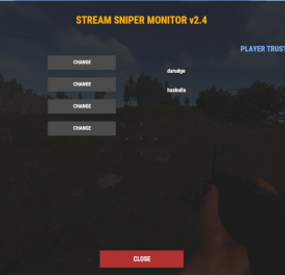
Protect your streamers and enhance your server's community with Anti-Stream Sniper. This plugin proactively detects suspicious player behavior around players with streamer permissions and applies configurable punishments to discourage sniping.
Features
Intelligent Detection: Monitors players who linger near streamers without line-of-sight obstructions. Action-Based Scoring:
Points are dynamically assigned based on: Proximity: Standing near a streamer for extended periods. Firearms: Firing weapons in the vicinity of a streamer. Aggression: Dealing damage to a streamer.
Dynamic Trust System:
Easily whitelist "trusted" players (such as teammates or friends) via the in-game UI to prevent false positives.
Automated Punishments: Once a player reaches the point threshold, the system triggers: Bounty: Places a scrap reward on their head and marks them on the map with a live tracker. Tigers: Spawns aggressive tigers at their location to provide an immediate (and lethal) distraction.
Paginated Admin UI:
A clean, easy-to-use menu to manage settings and the Trust List in real-time. Activity Logs: Real-time logs within the UI so admins can see exactly who is being flagged and why.
Commands
/si - Opens the Stream Sniper Monitor UI (Requires antistreamsniper.admin).
Permissions
antistreamsniper.streamer - Assign this to users you want to protect. antistreamsniper.admin - Allows access to the configuration menu and Trust List.
Configuration
Most settings can be adjusted directly through the in-game UI:
Mode: Toggle between Bounty or Tiger spawns. Distance: The radius (in meters) in which players are monitored. Goal: The amount of points required before a player is exposed. Bounty: The amount of scrap awarded to the player who kills the sniper.
Version: Clearly state this is v2.4.2, as it is the most stable version with the improved data-storage system.
Author: Da Rudge
anti streamsniper.mp4
-
$25.00
Legacy Of Rust 4K
By Ionut Shiro in Maps
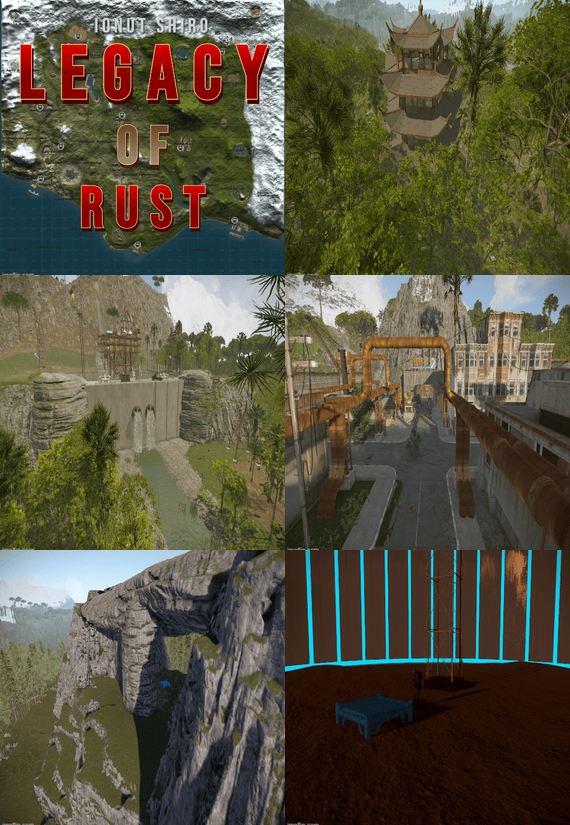
Legacy of Rust is a 4000 sized custom map shaped after the original and first Rust map in game with a custom monument twist and all procedural monuments to this moment added to it.
There is a railway system both above and underground connected taking you through breathtaking landscapes and monuments.
You can find unique building locations marked with + on the map.
Passage from west to east can also be done through the mountains via road tunnels!
Monuments:
Arctic Research Base Harbors Ferry Terminal Airfield Excavator Military Tunnels Power Plant Train Yard Water Treatment Plant Launch Site Junkyard Jungle Ziggurat Lighthouses Bandit Town Compound Nuclear Missile Silo Radtowns Oil Rigs Sewer Branch Quarries Sphere Tank Satellite Dish Gas Stations/ Supermarkets / Warehouses Stables Underwater Laboratories Fishing Villages Ruins / Water Wells / Caves Custom Monuments :
Radio Tower The Lake Custom Quarries Abandoned Military Base Shuttle Factory Various Building locations both above ground and underwater Sunken Cargo Map Size : 4000
Entity Count : 48493
- #legacy rust
- #legacy of rust
- (and 5 more)
-
![More information about "Ultimate Raidable Bases Loot Tables | 4 Styles [Classic / Enhanced / x5 / x10] (1.0.1)"](https://codefling.com/cdn-cgi/image/width=285,height=275,quality=80,fit=cover,format=webp/https://codefling.com/uploads/monthly_2026_06/Best.thumb.png.5fb880a492e1195d4c5ef9cdfac3ada6.png)
$5.00
Ultimate Raidable Bases Loot Tables | 4 Styles [Classic / Enhanced / x5 / x10] (1.0.1)
By SavageBuilder in Customizations
A premium plug-and-play loot configuration pack for the Raidable Bases plugin, featuring 20 fully balanced JSON files divided into 5 difficulty tiers and 4 unique server styles (Classic, Enhanced, x5, and x10). This package offers complete progression scaling and total Facepunch TOS compliance to instantly elevate your server's raiding economy.
⚠️ Warning: To use this loot tables pack, you need to purchase the paid Raidable Bases plugin if you do not already own it.
ℹ️ Note: This package contains only the loot table files (Base_Loot), meticulously configured from scratch. It does not include pre-built bases. All details regarding contents and installation can also be found inside the included README.txt file.
🙂 Regular Updates!
⚠️ The File contains only the loot tables! Not the raidable bases.
🔥 KEY FEATURES & STYLES
This package includes 20 fully configured, plug-and-play JSON files designed exclusively for the Base_Loot folder, structured into 4 distinct server styles:
01_Classic_Loot – Balanced high-yield vanilla progression (Ideal for 1x–2x servers).
02_Enhanced_Loot – 40% resource boost and zero junk/filler items (No eokas, bows, or basic clothes).
03_Multiplier_x5 – Exact Classic item listings with stackable resources and ammo multiplied by exactly 5x.
04_Multiplier_x10 – Massive high-rate setups with resource drops multiplied by exactly 10x.
100% Facepunch TOS Compliant: Every single entry uses "skin": 0 (no workshop skins) and contains zero DLC items. Fully safe for Official and Community servers.
📦 PACKAGE CONTENTS
Includes the 5 difficulty tiers across all 4 styles matching your file structure:
Easy / Medium / Hard / Expert / Nightmare (Base_Loot JSON tables)
Note: This package configures only the Base_Loot folder. It does not include Difficulty_Loot or Weekday_Loot.
📥 QUICK INSTALLATION
Extract the downloaded .zip file.
Choose ONE style folder that fits your server rate.
Copy the 5 JSON files and drop them directly into your server's empty directory: 📂 /serverfiles/oxide/data/RaidableBases/Base_Loot/
Type o.reload RaidableBases in your server console / RCON to apply changes.
🛠️ CRITICAL PROFILE TUNING
Native Stack Compatibility
All items in this pack inherit your server's default or custom stack limits naturally:
"stacksize": -1 Item Spawn Quantities
The number of items that pull from these tables into raid crates is determined by your profile configs (inside /RaidableBases/Profiles/), not the loot table itself. Open your profile and edit:
"Amount Of Items To Spawn": 100 Global Multipliers
I highly recommend keeping this setting at 1.0 if you are using the pre-multiplied x5 or x10 configuration files to preserve your server's economy balance:
"Loot Amount Multiplier": 1.0 In case that you need some help with the installation you can write me a message by Joining or my profile or by writing me on discord:
https://discord.gg/RD9QgxPYXh
- #raidable
- #raidablebase
- (and 35 more)
-
$4.49
Improved Fishing Village A,B,C - Drone Marketplace, Airwolf & Much More
What is Improved Fishing Villages:
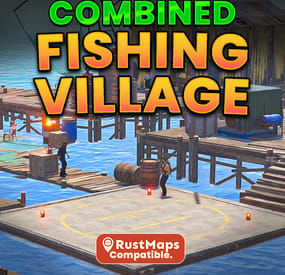
Improved Fishing Villages upgrades all 3 fishing villages with useful additions to the default version, combining everything into one seamless, fully functional update. This monument adds a safe trading zone, an Airwolf vendor, recyclers with chairs, an oil refinery, a drone marketplace, and much more. Designed for all Rust servers, it’s a perfect addition for your players.
What does Improved Fishing Village Feature:
Fishing Village A - Total prefabs: 68
Drone Marketplace 3 Recyclers with chairs 1 Oil Refinery Airwolf vendor with custom helipad 1 Workbench T1 Seating area with hobo barrel Gambling Wheel with plenty of seats. 2 BBQ's 1 Repair Bench 1 Trading Area 4 Slot Machines 1 Research Table
Fishing Village B - Total prefabs: 64
Drone Marketplace 2 Recyclers with chairs 1 Oil Refinery with a chair Airwolf vendor with custom helipad 1 Workbench T1 Seating area with hobo barrel Gambling Wheel with plenty of seats. 1 BBQ's 1 Repair Bench 2 Chairs for fishing 1 Trading Area 2 Slot Machines 1 Research Table
Fishing Village C - Total prefabs: 51
Drone Marketplace 1 Recyclers with chairs 1 Oil Refinery Airwolf Vendor with custom helipad 1 Workbench T1 Seating Area with hobo barreal Gambling Wheel with plenty of seats. 1 BBQ 1 Repair Bench 1 Trading Area 2 Slot Machines 1 Research Table
Total Prefabs:
Fishing Village A - 68 Fishing Village B - 64 Fishing Village C - 51 Combined Total Prefabs: - 183
The installation guide is provided in the README file included with the .zip file. If you need any help, message me on Codefling and I’ll get back to you as soon as possible. If you enjoy my work, please leave a 5* review. Thank you!*
- #fishingvillage
- #fishing villages
- (and 21 more)