
Chill Roleplay's Wishlist
-
![More information about "FoodSpoil for PVE/RP [*works with Raidable Bases]"](https://codefling.com/cdn-cgi/image/width=285,height=275,quality=80,fit=cover,format=webp/https://codefling.com/uploads/monthly_2024_01/icon.thumb.png.1d87abd5afa5f031dfbf22f32f5fd0e3.png)
$5.99
FoodSpoil for PVE/RP [*works with Raidable Bases]
Description
Add another option to your RP/PVE server to make life in Rust even more realistic.
Let your players use a fridge. If they don't, their food will mould and decay.
With this plugin you can automate this.
Set the time when something spoils in boxes.
You can also customise the list according to your needs. So if you prefer to have horses measuring, just replace this in your config! 🌟🍀🚀
Functions
Add the user group this plugin applies to:
foodspoil.use
Config
After you have successfully started the plugin, you can define the following container in /oxide/config/FoodSpoil.json so that the spoil item is replaced!
{ "SpoilingTimeInMinutes": 60, // At what frequency should the spoil process be executed by default (every 60 minutes) "WarningTimeInSeconds": 60, // How long before the spoil process should a warning be displayed in the chat? "AllowedContainerShortnames": [ "box.wooden.large", "woodbox_deployed", "coffin.storage", "stash.small", "storage_barrel_a", "storage_barrel_b", "storage_barrel_c" ], "ReplacementItems": { "pumpkin": "seed.pumpkin", "corn": "seed.corn", "bearmeat": "bearmeat.burned", "bearmeat.cooked": "bearmeat.burned", "meat.boar": "meat.pork.burned", "meat.pork.cooked": "meat.pork.burned", "deermeat.cooked": "chicken.burned", "deermeat.raw": "chicken.spoiled", "chicken.raw": "chicken.spoiled", "chicken.cooked": "chicken.burned", "wolfmeat.raw": "wolfmeat.spoiled", "wolfmeat.cooked": "wolfmeat.spoiled", "humanmeat.raw": "humanmeat.spoiled", "humanmeat.cooked": "humanmeat.spoiled", "apple": "apple.spoiled", "Black.Raspberries": "plantfiber", "blueberries": "plantfiber", "mushroom": "plantfiber", "fish.troutsmall": "bone.fragments", "fish.minnows": "bone.fragments", "fish.cooked": "bone.fragments", "fish.raw": "bone.fragments", "fish.catfish": "bone.fragments", "fish.herring": "bone.fragments", "fish.orangeroughy": "bone.fragments", "fish.salmon": "bone.fragments", "fish.sardine": "bone.fragments", "fish.smallshark": "bone.fragments", "fish.yellowperch": "bone.fragments" } }
load, run, enjoy 💝
Support Discord
-

Free
UAV: Radar Enemies Detection
By Yac Vaguer in Plugins
UAV: Radar Enemies Detection call a F15 to that will activate a radar during a certain period of time where you can be able to see where are the enemies located.
This enemies can be represented with different colors and symbols that you can change in the configuration.
You have three types of marks
- Team mates
- NPCs
- Other Players (Enemies)
The plugin is fully configurable
Permissions
- uavsignal.admin → all chat/console commands (/uav, /uav <player>, /uav.admin)
- uavsignal.use → required to throw the signal grenade. Without it: signal fizzles, item is refunded, "no permission" message.
Commands
Chat Command
- /uav and /uav {steamId} You can send an UAV to you (if you are an admin) or to a player given the Steam Id
- /uav.admin to change some configuration on the flight
Console Command
uav {steamId} You can send an UAV to a player given the Steam Id
Ideas on how to make the UAV Spawn in your server
1. Add The UAV in the Market if you have one
2. Add as a part of the Loot in the Raidable Bases or Custom loot
3. Add as a Skill in the Skill Tree Plugin More here
4. Make the UAV part of the /kits
5. Add the UAV in vending machines
Skins from the community that you are free to use
New Skin https://steamcommunity.com/sharedfiles/filedetails/?id=3720628271
@Dead Nasty https://steamcommunity.com/sharedfiles/filedetails/?id=3248306153
@Mabel https://steamcommunity.com/sharedfiles/filedetails/?id=3233756487
@Mr.Wild https://steamcommunity.com/sharedfiles/filedetails/?id=3247990388
-
$7.99
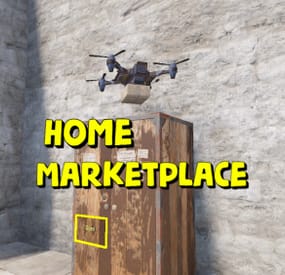
Home Marketplace
Adds a marketplace terminal to each tool cupboard. This way, players can buy items without leaving home. The plugin is easy to install on your server; no additional settings are needed. You can also change the delivery fee (but the player must still have an additional 20 scrap in their inventory)
This plugin uses the permission system
Permissions:
homeMarketplace.use - required to be able to use the marketplace
To assign a permission, use: oxide.grant <user or group> <name or steam id> homeMarketplace.use
To remove a permission, use: oxide.revoke <user or group> <name or steam id> homeMarketplace.use
Config:
{ "Terminal offset": { "x": 0.42, "y": 0.68, "z": 0.3 }, "Delivery fee": 20 } -

$20.00
Detective Stewie
The NpcDetective plugin adds a detective named Stewie, standing in the outpost and bandit camp.
Detective for a specified fee through time will send information about the location of the player, but there is a chance that the detective will not be able to find him, as well as that the target will feel the gaze of the detective directed at him.
The plugin is aimed at PVP content and will definitely be of interest to your players who love battles, because they will be able to find out the whereabouts of the obitchik or if they are lucky to find out where his house is, which will allow them to raid him.
Some details of the default plugin settings:
There are 2 spawn points on the monuments, in the outpost and the bandit camp. Default mission completion time is 5 to 10 minutes. Chance of mission failure - 30% Chance that the target will feel the detective's gaze - 10%. Kulldown 10 minutes Price for the service is 200 scrap Features:
The plugin supports 4 types of economics namely Economics, ServerRewards, IQEconomics, Items Has completely identical UI that Rust uses for conversations as well as for player selection. The UIs have been replicated from scratch and do not require extra dependencies. It has dialogs already ready to use. Provides the ability to translate each of the plugin texts, including the name of the bot above. A wide range of mission settings, including the chances of a variety of events, which greatly fuels interest. The plugin is immediately ready to use without further customization. Permissions:
npcdetective.allow - allows you to use the services of NPCs Commands:
getnpcpos - allows you to get a spawn point for an NPC, relative to a monument or world (in this case specified as "custom”)
Video:
Default Config:
{ "Spawn Points": { "assets/bundled/prefabs/autospawn/monument/medium/compound.prefab": "-26.38629 0.2249966 -20.25003 -6.138487 245.2638 7.046678", "assets/bundled/prefabs/autospawn/monument/medium/bandit_town.prefab": "42.65682 7.059561 -31.20314 8.198808 329.3285 7.740015" }, "Payment Settings": { "Provider (Economics | ServerRewards | IQEconomics | Item)": "Item", "Provider Currency Name": "scrap", "[Item Provider] Short Name": "scrap", "[Item Provider] Skin ID": 0, "Price of search service": 200 }, "Mission Properties": { "Information Accuracy Type (Mark | Grid)": "Mark", "Lead Time Range Min (in seconds)": 300.0, "Lead Time Range Max (in seconds)": 600.0, "Cooldown in seconds": 600.0, "Chance of mission failure (0-100%)": 30.0, "Сhance that the target will sense the presence (0-100%)": 10.0 } }
-

$4.99
Applications
By Murder in Discord Bots
Bot Features
➤ Accept and Deny Functions - Buttons to Accept or Deny a application depending on if it is enabled for that application type in the config.
➤ Custom Accept and Deny responses - Custom text to be sent to the user when they have been accepted or denied
➤ Able to give a role once user is accepted - The bot is able to give any role to the applicant if they have been accepted
➤ Stats gathering and command - Display some interesting stats easily by using /stats
➤ Custom panel embed title and description - Customise the embeds for your server
➤ Reply commands - Use this to do functions like accepting a user or telling them some other information about there application all through the bot to there DM's
➤ Toggleable help command - Enable and disable the help command to be able to use other bots slash commands while running the same bot client/token
➤ Easy to use sendpanel command - Able to generate multiple application panels.
➤ Overview message to send/cancel - Option to send or cancel applicationn during and once completed.
➤ Application logging - Logging of general events
Setup
Fill out the config.json file and make sure your hosting is configured to run python, make sure your bot has all Discord intents enabled on the developers panel (Which is how you can create your Discord Bot).
Use the OAuth Section and the URL Generator to create a link to invite your discord bot to your server, make sure that it has applications.commands and bot enabled, and that the permissions are set to Administrator.
Take note that when configuring the emojis, you must use Discord Custom emojis which you can add by uploading them to your discord server. To get the <name:ID:> format needed for the bot you can type a backslash (\) followed directly by the emoji.
Support Notice
If you need support I more than welcome you to reach out to me on discord: murderdev.
Thank you for reading this description and I hope that you enjoy!
Note: I will always be constantly updating and developing this bot, if you find any bugs or have any feature requests.
- #discord
- #discordbot
- (and 3 more)