OxideBro
-
Posts
77 -
Joined
-
Last visited
Content Type
Profiles
Warranty Claims
Downloads
Forums
Store
Services
Downloads Plus Support
DOWNLOADS EXTRA
Reels
Everything posted by OxideBro
-
 It is possible but there may be problems with the language file.
 -
Version 1.0.1
678 downloads
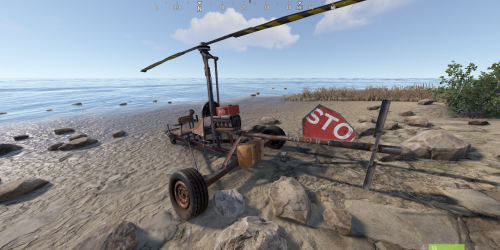
Minicopter Storage - The plugin adds a small customizable storage to all minicopters. All storages are stored after server restart. The plugin does not consume many server resources. #Configuration: { "Storage Prefab": "assets/prefabs/deployable/hot air balloon/subents/hab_storage.prefab", "Panel Name": "generic_resizable", "Inventory Capacity": 10, "Configuration version": { "Major": 1, "Minor": 0, "Patch": 0 } }Free -
I'm already working on an update to make it work more universally with the same items but with different skins.
-
Version 1.2.2
38 downloads
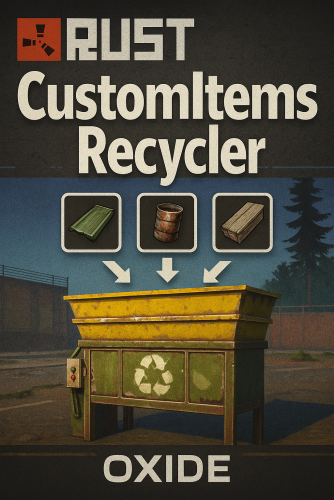
CustomItemsRecycler for Oxide – transform your Rust server’s recycling system! Ability to recycle any items, with support for skinned items. Full customization of recycling on your server. # Key Features Fully Configurable Yields Define per-item output amounts, skins, and names via a simple JSON config. Support for both resources and blueprints—mix and match however you like. Custom Shortnames & Display Names Use standard Rust item names or override them with your own text to fit server lore and branding. Blueprint Support Turn recycled items into usable blueprints automatically, or keep them as tradable resources—perfect for modded crafting loops. Skin Integration Assign any SkinID to recycled items, letting you reward players with rare or event-specific cosmetic drops. # Configuration: { "Item settings": [ { "Item ShortName": "diesel_barrel", "Item SkinID": 0, "How many items are processed in one run (maximum—if you set 10, it will process 10 at a time)": 2, "Custom item name in UI": "Custom Item Name", "Output item settings (per processed item)": [ { "ShortName": "lowgradefuel", "Amount": 150, "SkinID": 0, "Custom name on creation (leave empty to use the default item name)": "", "IsBlueprint": false }, { "ShortName": "metal.fragments", "Amount": 100, "SkinID": 0, "Custom name on creation (leave empty to use the default item name)": "", "IsBlueprint": false } ] }, { "Item ShortName": "computerstation", "Item SkinID": 0, "How many items are processed in one run (maximum—if you set 10, it will process 10 at a time)": 1, "Custom item name in UI": "", "Output item settings (per processed item)": [ { "ShortName": "wood", "Amount": 500, "SkinID": 0, "Custom name on creation (leave empty to use the default item name)": "", "IsBlueprint": false }, { "ShortName": "metal.fragments", "Amount": 100, "SkinID": 0, "Custom name on creation (leave empty to use the default item name)": "", "IsBlueprint": false } ] }, { "Item ShortName": "glue", "Item SkinID": 0, "How many items are processed in one run (maximum—if you set 10, it will process 10 at a time)": 1, "Custom item name in UI": "", "Output item settings (per processed item)": [ { "ShortName": "lowgradefuel", "Amount": 10, "SkinID": 0, "Custom name on creation (leave empty to use the default item name)": "", "IsBlueprint": false } ] }, { "Item ShortName": "crude.oil", "Item SkinID": 0, "How many items are processed in one run (maximum—if you set 10, it will process 10 at a time)": 1, "Custom item name in UI": "", "Output item settings (per processed item)": [ { "ShortName": "lowgradefuel", "Amount": 20, "SkinID": 0, "Custom name on creation (leave empty to use the default item name)": "", "IsBlueprint": false } ] }, { "Item ShortName": "horsedung", "Item SkinID": 0, "How many items are processed in one run (maximum—if you set 10, it will process 10 at a time)": 1, "Custom item name in UI": "", "Output item settings (per processed item)": [ { "ShortName": "scrap", "Amount": 1, "SkinID": 0, "Custom name on creation (leave empty to use the default item name)": "", "IsBlueprint": false } ] } ], "Configuration version": { "Major": 1, "Minor": 2, "Patch": 1 } } # Lang RU/EN: { "UI.TITLE": "Custom item recycling information" }$9.99 -
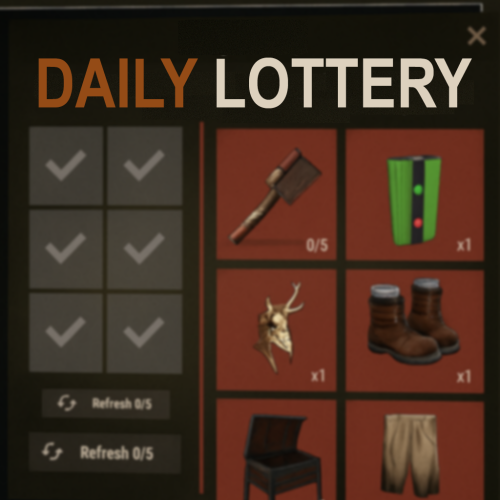
Version 1.1.03
22 downloads
HiddenSlotsLottery gives your players a chance to win items by opening hidden “slots” in a simple, engaging format. #Features: Base Draw: each player gets up to N attempts per day to open slots and claim prizes. Oxide/Carbon supported Support for permissions and their settings from the config. Super Game: landing a “Super Slot” triggers a bonus round where you must match three identical items to win exclusive rewards. Daily Limits: configure maximum opens and refreshes per day to control participation. Full Customization: define your prize list in JSON — set short names, quantities, SkinIDs, custom images, and even execute extra commands (e.g. grant VIP, issue permissions). ImageLibrary Integration: use standard item renders or your own PNG icons for a unique look. Sleek CUI Interface #Configuration: { "(Default) Maximum number of opens": 5, "(Default) Maximum number of refreshes": 3, "Setting Permission": { "dailylottery.vip": { "Maximum number of opens": 7, "Maximum number of refreshes": 4 }, "dailylottery.elite": { "Maximum number of opens": 10, "Maximum number of refreshes": 5 } }, "Chat command to open menu": "lot", "Using ImageLibrary for images": false, "Possible items for drop": [ { "Item description": { "Item short name": "axe.salvaged", "Quantity": 1, "Item SkinID": 0, "Additional image": "", "Additional command (%STEAMID%)": "" }, "Super game": true }, { "Item description": { "Item short name": "coffeecan.helmet", "Quantity": 1, "Item SkinID": 0, "Additional image": "", "Additional command (%STEAMID%)": "" }, "Super game": false }, { "Item description": { "Item short name": "attire.hide.vest", "Quantity": 1, "Item SkinID": 0, "Additional image": "", "Additional command (%STEAMID%)": "" }, "Super game": false }, { "Item description": { "Item short name": "hat.candle", "Quantity": 1, "Item SkinID": 0, "Additional image": "", "Additional command (%STEAMID%)": "" }, "Super game": false }, { "Item description": { "Item short name": "electrical.memorycell", "Quantity": 1, "Item SkinID": 0, "Additional image": "", "Additional command (%STEAMID%)": "" }, "Super game": true }, { "Item description": { "Item short name": "weapon.mod.oilfiltersilencer", "Quantity": 1, "Item SkinID": 0, "Additional image": "", "Additional command (%STEAMID%)": "" }, "Super game": true }, { "Item description": { "Item short name": "woodarmor.gloves", "Quantity": 1, "Item SkinID": 0, "Additional image": "", "Additional command (%STEAMID%)": "" }, "Super game": true }, { "Item description": { "Item short name": "electric.timer", "Quantity": 1, "Item SkinID": 0, "Additional image": "", "Additional command (%STEAMID%)": "" }, "Super game": false }, { "Item description": { "Item short name": "rocket.launcher", "Quantity": 1, "Item SkinID": 0, "Additional image": "", "Additional command (%STEAMID%)": "" }, "Super game": false }, { "Item description": { "Item short name": "torch", "Quantity": 1, "Item SkinID": 0, "Additional image": "", "Additional command (%STEAMID%)": "" }, "Super game": false }, { "Item description": { "Item short name": "longsword", "Quantity": 1, "Item SkinID": 0, "Additional image": "", "Additional command (%STEAMID%)": "" }, "Super game": false }, { "Item description": { "Item short name": "tool.binoculars", "Quantity": 1, "Item SkinID": 0, "Additional image": "", "Additional command (%STEAMID%)": "" }, "Super game": true }, { "Item description": { "Item short name": "ballista.static", "Quantity": 1, "Item SkinID": 0, "Additional image": "", "Additional command (%STEAMID%)": "" }, "Super game": false }, { "Item description": { "Item short name": "mask.balaclava", "Quantity": 1, "Item SkinID": 0, "Additional image": "", "Additional command (%STEAMID%)": "" }, "Super game": false }, { "Item description": { "Item short name": "flameturret", "Quantity": 1, "Item SkinID": 0, "Additional image": "", "Additional command (%STEAMID%)": "" }, "Super game": false }, ], "Configuration version": { "Major": 1, "Minor": 0, "Patch": 0 } } #LANG RU/ENG: { "UI.Title": "Daily Lottery", "UI.ItemList.Description": "List of possible prizes—remember that to obtain a unique item (marked in red), you must win the Super Game!", "UI.RightMenu.Description": "Select an item, attempts {0}/{1}\nIf a rare item is dropped, you will play the Super Game! Good luck!", "UI.Button.Refresh": "Refresh {0}/{1}", "UI.Inventory.Button": "Inventory", "UI.Inventory.Back": "Back", "UI.Inventory.Title": "Your inventory", "UI.SuperGame.Start": "You’ve entered the Super Game; you need to find three matching items! If you fail, you won’t receive anything!", "UI.Attempts.Over": "<size=24><b>YOU HAVE USED ALL YOUR ATTEMPTS</b></size>\n<size=20>COME BACK TOMORROW</size>" } #API: bool IsReadyLotOpen(BasePlayer player) - Checking if the player has the ability to open slots$15.49 -
Changed Fixed In to 2.0.01
-
Changed Status from Pending to Fixed
-
Fixed, thx
-
Oh, sorry, I'll update it now.
-

Version 1.0.2
42 downloads
An add-on for your drone in Rust Oxide that provides a full rocket container and pinpoint firing from any standard drone. #Key Features: Rocket Container: A dedicated slot on the drone for any type of RPG rocket. Pinpoint Firing: Shoot rockets with precision as if using a handheld launcher, but from your drone. Flexible Configuration: Customize slot count, rocket types, reload time, and more via a config file. Privilege System: Assign fpvdrone.use and fpvdrone.admin permissions to users or groups. Harmony Patches: Integrates seamlessly with your server without modifying game files. Compatibility: Works on any standard FPV drone; no client-side changes required. #Configuration: { "Maximum flight distance of the drone from the player (there is a command drone.maxcontrolrange)": 250, "Permission": "fpvdrone.use", "Short name of rockets that can be put in loot": [ "ammo.rocket.basic", "ammo.rocket.fire" ], "Configuration version": { "Major": 1, "Minor": 0, "Patch": 0 } } Get your rockets loaded and take flight—drone barrages have never been this powerful!$7.99 -

Version 2.2.1
252 downloads
AdminESP - Lightweight Admin ESP for Rust Servers AdminESP gives server administrators a powerful real-time player tracking tool with minimal impact on server performance. See player positions, health, names, sleep status, and view direction - all rendered through the game's built-in DDraw system with a fully customizable settings menu Key Features Real-time player ESP with names, health bars, bounding boxes, and view direction lines Track specific players by selecting them from the built-in player list with avatar display Filter players by status: All, Online, or Sleepers Fully customizable settings through an intuitive in-game UI panel Editable numeric fields - type values directly or adjust with +/- buttons Complete English and Russian localization out of the box Per-player settings saved between sessions Permission-based access control Developer API for integration with other plugins Performance AdminESP is built with server performance as a top priority. Unlike traditional ESP plugins, it uses direct JSON generation instead of standard CUI classes, eliminating unnecessary memory allocations. The ESP rendering engine only runs when active, produces minimal network traffic, and leverages object pooling and string caching throughout. Designed to run smoothly on high-population servers with 300+ players. # Configuration: { "Privilege of using the ESP": "adminesp.use", "UI customization": { "Enable display of UI for the player": true, "AnchorMin Position": "0 0.025", "AnchorMax Position": "0.05 0.053" }, "Display player avatars": true, "Enable prefix in messages": true, "Configuration version": { "Major": 2, "Minor": 0, "Patch": 0 } } Privilages: # Chat and console commands: # API: private bool API_HasActive(ulong userID) - Does the player have ESP enabled return true/false private void API_EspActivate(BasePlayer player) - Force ESP to turn on private void API_EspDeactivate(BasePlayer player) - Force Disable ESP #HOOKS object CanChangedESP(BasePlayer player, bool activated) - Called before ESP is enabled/disabled, returning any value other than null will prevent the player from activating/deactivating ESP void OnEspActivated(BasePlayer player) -Notification about player's ESP enabled void OnEspDeactivated(BasePlayer player) - Notification about player's ESP being disabled # LANG: { "UI.ESP.Title": "ESP Settings", "UI.Button.Title": "ESP", "UI.Sleepers.Title": "Sleepers:", "UI.Sleepers.Description": "Display sleeping players", "UI.Distance.Title": "Distance:", "UI.Distance.Description": "Display distance", "UI.Update.Title": "Update:", "UI.Update.Description": "Update frequency", "UI.Admins.Title": "Admins:", "UI.Admins.Description": "Display administrators", "UI.Names.Title": "Names:", "UI.Names.Description": "Display names", "UI.Boxes.Title": "Boxes:", "UI.Boxes.Description": "Display player boxes", "UI.ViewLine.Title": "View Line:", "UI.ViewLine.Description": "Display player view line", "UI.LineLength.Title": "Line Length:", "UI.LineLength.Description": "Player view line length", "UI.Button.Off": "OFF", "UI.Button.On": "ON", "MSG.OFF": "ESP has been disabled", "MSG.ON": "ESP has been enabled", "MSG.Prefix": "<color=orange>[Admin ESP]:</color> ", "MSG.Permission": "You do not have access to this command", "UI.Msg.Help": "ESP Settings:\n/ae settings UpdateTime {0} - data update frequency (0.15 sec)\n/ae settings PlayerDistance {1} - max display distance (200 meters)\n/ae settings ShowAdmins {2} - display admins (true/false)\n/ae settings DrawNames {3} - display player names (true/false)\n/ae settings DrawBoxes {4} - display player boxes (true/false)\n/ae settings DrawEyeLine {5} - display player view line (true/false)\n/ae settings Sleeping {6} - display sleeping players (true/false)\n/ae settings EyeLineDistance {7} - player view line length (20 meters)", "DDRAW.Sleep": "Sleep", "DDRAW.Health": "Health:", "UI.Description.Bottom": "Powered by OxideBro 2025", "UI.SelectedPlayer.Title": "Selected player:", "UI.Buttons.All": "All", "UI.Buttons.Online": "Online", "UI.Buttons.Sleep": "Sleepers", "UI.Buttons.Enabled": "You have <color=green>enabled</color> the display of players in the world", "UI.Buttons.Disabled": "You have <color=red>disabled</color> the display of players in the world" }$15.00 -
I deliver end-to-end development and administration services with a personalized approach and quality guarantee: Bot Development for Discord, Telegram, and VK in JavaScript and C# — from auto-moderation and notifications to advanced gaming and analytics solutions. Plugins for Rust (Oxide/uMod) and Carbone — full-cycle plugin creation and enhancement, including performance optimization and anti-cheat protections. C# Applications of Any Complexity — from Windows utilities to web APIs and microservices, featuring clean architecture and thoughtful UX/UI. Rust Server Deployment — installation, configuration, and automation of any server type (PvP, RP, PvE), plus backup and monitoring. Administration & Technical Support — 24/7 monitoring, rapid incident resolution, software updates, DDoS and malware protection. Consulting & Audit — security, performance, and scalability reviews, with actionable recommendations to optimize and reduce costs. Why work with me: Nearly 10 years of experience in gaming and web projects. Strict adherence to deadlines and contractual obligations. Custom testing and acceptance procedures. Flexible payment options: hourly, milestone-based, or fixed price. Complete confidentiality: NDA available upon request.