

ninco90
-
Posts
798 -
Joined
-
Last visited
-
Days Won
5
Content Type
Profiles
Warranty Claims
Downloads
Forums
Store
Services
Downloads Plus Support
DOWNLOADS EXTRA
Reels
Everything posted by ninco90
-
Are you sure you have all the necessary permissions? The wood one should appear to you at least, how is your configuration?
-
Changed Status from Pending to Closed Changed Fixed In to Next Version
-
I put the wood in to put something in and not give me an error. The objective of this plugin is to keep it updated remotely. To do this, click on the blue button and the list of options will automatically download. So the configuration will be completed.
-
 Hello! It might be interesting if I write this down on the to-do list. If someone else requests it I will try to give it priority.
- 464 comments
-
- 2
-

-
- #builder
- #automation
- (and 9 more)
-
Changed Status from Pending to Closed
-
Yes, the wooden skin has already been added. I will try to add the Christmas one very soon, before it comes out since it will not be a DLC. To see the new wood skin, simply click on the blue button to check for updates in the plugin interface. Fast and easy. Skins are added this way, which is why there is no need to launch a plugin update as usual.
-
The wooden skin has already been added. I will try to add the Christmas one very soon, before it comes out since it will not be a DLC. To see the new wood skin, simply click on the blue button to check for updates in the plugin interface. Fast and easy. Skins are added this way, which is why there is no need to launch a plugin update as usual.
-
Yes, the wooden skin has already been added. I will try to add the Christmas one very soon, before it comes out since it will not be a DLC. To see the new wood skin, simply click on the blue button to check for updates in the plugin interface. Fast and easy. Skins are added this way, which is why there is no need to launch a plugin update as usual.
-
Changed Status from Pending to Closed
-
Changed Status from Pending to Closed Changed Fixed In to Next Version
-
Intente esto, debería solucionarse.
-
I miss this... It should page automatically. I'll try to try it, although of course the maximum on my server is 5 players, maybe I add the entire staff and we authorize ourselves in a tc hahaha or I add all the players in a closet using a code, another option...
-
Hello! Open a closet again and close it to remove it from the screen. The icons don't seem to have loaded properly from the image library, refresh the Image Library images by running the command: refreshallimages Once that is executed, reload the plugins that use images with image library and it should now load instead of showing the black icon.
-
The skins will be added once they are officially published on the market. In order to obtain your ID and your image. The same thing will happen with the ginger skin when the update comes out, if I can add it sooner I will.
- 464 comments
-
- 1
-

-
- #builder
- #automation
- (and 9 more)
-
Hello! No, this plugin does not incorporate anything related to protection. Simply other clients have shown what the interface can look like for those who also use protection plugins. Since some people may be concerned about the layout of the buttons on the screen.
- 464 comments
-
- 1
-
-
- #builder
- #automation
- (and 9 more)
-
Version 1.1
23 downloads
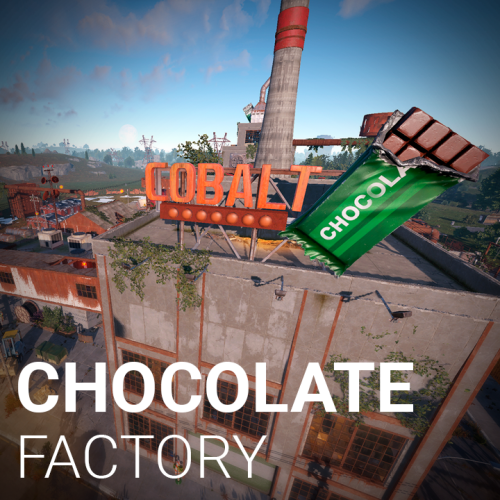
CobaltMaps / Monument Collection Chocolate Factory Christmas MonumentCustom Rust Maps Bring a little Christmas spirit to your Rust server. Give your players a festive place to explore. This chocolate factory features several carefully decorated buildings, with corners to discover and delicious loot to hunt for throughout the monument. Christmas atmosphere Detailed festive buildings Keycard areas Green and blue card access 8 CCTV cameras Camera IDs listed below 01 / Video demo Explore the Chocolate Factory Take a look around the monument and its Christmas decoration in the video demo. Watch on YouTube 02 / Monument features Loot routes, keycards and useful facilities Keycard access 2 green keycard access areas. These areas do not spawn keycards. 1 blue keycard access area. This area spawns a red keycard. Included facilities 1 Chinook drop zone. 2 recyclers. 1 repair bench. 1 refinery. 1 level 1 workbench. 1 pumpjack. 03 / CCTV cameras Connect to the factory's cameras Use the following identifiers to access the monument's CCTV cameras. The table below includes the location of each camera. Camera ID Location (X, Y, Z) CHOCO1 (91.09, 10.40, -161.58) CHOCO2 (95.03, 22.68, -180.01) CHOCO3 (45.54, 10.46, -147.43) CHOCO4 (172.90, 12.94, -153.61) CHOCO5 (95.42, 19.49, -203.43) CHOCO6 (133.76, 19.41, -198.69) CHOCO7 (103.13, 13.56, -152.75) CHOCO8 (95.01, 13.13, -189.17) 04 / Map integration Monument size and map modifiers Approximately 3,000 prefabs. Medium-sized rad monument. Its footprint is approximately the size of the Nuclear Power Plant. Included modifiers: Height, Biome, Splat and Topology. 05 / Support Questions, suggestions or a little help? If you run into a problem, have a question or want to share a suggestion, feel free to contact me on Discord. Discord: ninco90$10.00 -
Changed Status from Pending to Closed
-
You don't have to, you can switch between stone, bricks or adobe using the little button on the spray can, that's the reskin function.
-
Did you check all the permissions? You do not need to restart the server to make it work. Just make sure you have the necessary permits and materials in the closet.
-
Don't you see the blue button to update? You have to give yourself admin permissions. This way the button will appear, you click it and the skins that are available to date will be added.
-
Can you tell me what your server is and I'll take a look? Let's see if it looks the same to me. And I try the two resolutions that I have, 2k and 1080.