


-
Posts
252 -
Joined
-
Last visited
Content Type
Profiles
Warranty Claims
Downloads
Forums
Store
Services
Downloads Plus Support
DOWNLOADS EXTRA
Reels
Support Center
Everything posted by Budapeshter
-

I didn't understand how to update the last version
Budapeshter replied to Guillermo Olivares Romo's Support Report in Support
Changed Status from Pending to Closed -
I downloaded version 2.0.3 try it!
-
You can use the sizes 256*256, 512*512, I do not recommend it anymore, it is possible to use less Happy New year! I want the panel to work without problems, so I will try to solve some errors today
-
It is better to use a 512*512 logo in png format and compressed by any online image compression service. This will speed up image loading and save your RAM
-
Throw off the plugin itself , I 'll check it out
-
I see an error on the players who connect to the server. I will fix it soon. According to the version everything is fine, in the plugin I just didn't change the version to the new one, too, I will fix it. The images themselves should be displayed correctly, since they are displayed constantly on my server. Thank you for writing comments. I will try to fix some mistakes today!
-
Or send a video, as when the panel does not display images
-
Hello. I have not met such an error, this plugin is on my servers. Send your configuration file
-
I didn't understand how to update the last version
Budapeshter replied to Guillermo Olivares Romo's Support Report in Support
o.reload SvPanUi or or uninstall and download the plugin again -
I didn't understand how to update the last version
Budapeshter replied to Guillermo Olivares Romo's Support Report in Support
There is a readme file. If you need a panel at the top left, then download the plugin and that's it. If you need a panel at the top right, Then rename the file SvPanUi(TopRight).json in SvPanUi.json and upload to the config folder. Next, download the SvPanUi.cs plugin to the plugins folder and your panel will work -
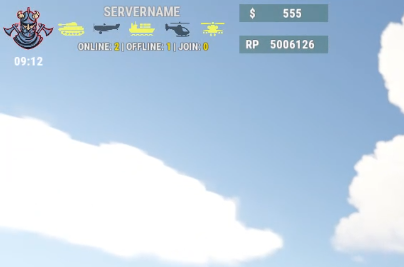 You can write me in private messages what exactly you want and I will try to do it
 -
The panel will not be ready this month. When I download the new version, you will receive a notification. You can follow the product
-
This is a long process of moving the panel to another part of the screen. I have started working on a new version of the panel, I will try to add a ready-made config to place the panel at the top right
-
You have installed https://umod.org/plugins/image-library ? Reload the plugin o.reload SvUi and reload to the server.
-
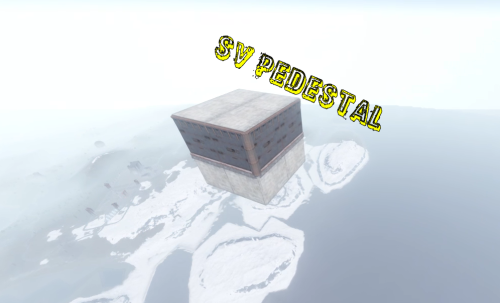
Version 0.8.1
21 downloads
A great plugin for donation services! The plugin issues an access card to the secure zone of the server, after activating which, it is teleported to a small 2 * 2 database, where it can store its resources! 1. The base is created high in the sky (900 meters) in a random location 2. The base is completely invulnerable, it cannot be destroyed by other players from the ground! 3.The plugin does not depend on other plugins 4.The name of the map, the name of the sleeping bag, the height of the base construction and much more are configured! The database model is sewn into the code, it cannot be changed through the configuration file, pay attention to this when buying. The plugin supports English The plugin was created for my server, where I actively use it for donation services. PERMISSIONS: svpedestal.use OUTPUT COMMAND VIA THE CONSOLE: dropzone steamid CONFIG: { "Settings": { "Permission": "svpedestal.use", "Height spawn zone": 900.0, "SkinId Cards": 2560602174, "SkinId sleepbags": 1102195403, "ItemId": 609049394, "Name sleepbags": "Zone", "Chat Tag": "[SV_ZONE]", "Name Cards": "ZONE_CARD", "Font size": 16, "Building Grade": 4, "Time teleport": 10, "Effect teleport": "assets/prefabs/locks/keypad/effects/lock.code.denied.prefab" } }$5.00 -
Changed Status from Pending to Closed Changed Fixed In to 1.3.3
-
Changed Status from Pending to Closed Changed Fixed In to 1.3.2
-
Changed Status from Pending to Closed Changed Fixed In to 1.3.2
-
Update the plugin and config file, I have already brought this to the config to make it easier to configure the plugin
-
Now you can move icons
-
4 color transparency is inserted. 1 1 1 0.90
-
Hello. I didn't notice this problem, but you can remove the panel to the background. You need to open SvUi.cs and find Overlay there, this parameter needs to be changed to Hud. Then when you open the interface, the panel will not be visible. I will add this feature in the next update
-
Hi. I will add these features in a coming update!
-
Hello! I recommend using the service https://csscolor.ru/hex/ff00008a You need to select an RGB color, for example white 1, 1, 1, 0.89 and insert it into the desired setting item. Please skip your example how you write your color code
-
 does not download
