

-
Posts
906 -
Joined
-
Last visited
-
Days Won
12
Content Type
Profiles
Warranty Claims
Downloads
Forums
Store
Services
Downloads Plus Support
DOWNLOADS EXTRA
Reels
Everything posted by Martian
-
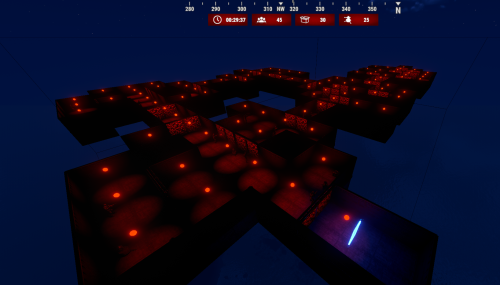 Hello! Thank you for your interest in the plugin! It doesn’t use a lot of resources, so it should run smoothly on your server. Regarding the zone functionality, I haven’t implemented that yet, but it’s something I can add in future updates. For now, there’s an option in the configuration that allows the first player to enter a dungeon to lock it for themselves. You can also configure whether clan members or friends are allowed to enter the dungeon as well.
 -
Bonjour ! Merci pour votre suggestion. Je prévois d'ajouter l'achat par scrap dans une future mise à jour.
-
Changed Status from Not a Bug to Fixed Changed Fixed In to 1.1.0
-
What's New in Version 1.1.0 Added support for the SkillTree plugin. When the player does not have the "turboweapons.customcapacity" permission, it checks if there is a change in capacity size in the SkillTree.
-
What's New in Version 1.2.0 Performance Improvements: Optimized overall system performance for a smoother experience. New RCON Command: Added an RCON command for event purchasing. buydungeon hard %steamID% Random Auto Spawn: Implemented a random auto-spawn system. NPC Loot: Loot for NPCs is now fully configurable, allowing greater customization and control. Configuration for NPCs, Boxes, and Turrets: These are now configured with fixed numbers instead of percentages. Enhanced Turret Behavior: Turrets now engage targets more effectively. (For now, turrets have been removed from ceilings as they were sometimes getting stuck in walls.)
-
I will still try to fix this this weekend.
-
Changed Status from Work in Progress to Not a Bug
-
Hello, the solution provided by the skill tree developer was this one. I asked for access to their plugin to try to solve it, but they did not want to grant it. Instead, they asked me to pass this on to you. I will still try to find a solution, but it won't be quick.
-
Changed Status from Work in Progress to Fixed Changed Fixed In to 1.1.7
-
I just released an update to prevent this issue.
-
Changed Status from Pending to Work in Progress
-
Good evening, Thanks for purchasing Dungeon Events! To get it working, you’ll need to enable the Halloween dungeon, as the Christmas dungeon is currently disabled. I’m waiting for Facepunch to fix a bug with it. Let me know if you need any help setting it up!
-
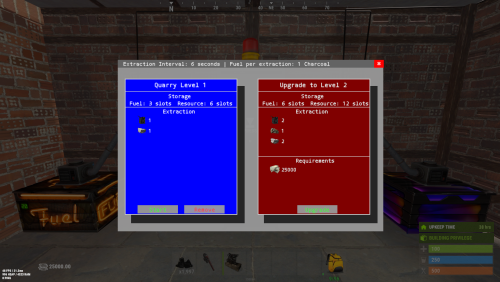 { "Use LangAPI Plugin": true, "Use Notify Plugin": true, "RP Image URL": "https://i.ibb.co/C22VZDj/money.png", "Allow Team Access": true, "Allow Friends Access": true, "Give Quarry Command": [ "gq", "givequarry" ], "Drop Quarry Item on Destruction": true, "No Upgrades (Level 1)": { "Fuel Configuration": { "Shortname": "diesel_barrel", "Resource Extraction Interval In Seconds": 3600, "Fuel Required Per Extraction": 1 }, "Storage Slots": { "Fuel": 1, "Resources": 6 }, "Resources Output Per Extraction": [ { "Shortname": "crude.oil", "Amount": 4 }, { "Shortname": "stones", "Amount": 35 }, { "Shortname": "metal.ore", "Amount": 7 }, { "Shortname": "sulfur.ore", "Amount": 7 } ] }, "Upgrades (Level 2+)": [ { "Fuel Configuration": { "Shortname": "lowgradefuel", "Resource Extraction Interval In Seconds": 30, "Fuel Required Per Extraction": 50 }, "Storage Slots": { "Fuel": 3, "Resources": 12 }, "Resources Output Per Extraction": [ { "Shortname": "crude.oil", "Amount": 6 }, { "Shortname": "stones", "Amount": 50 }, { "Shortname": "metal.ore", "Amount": 10 }, { "Shortname": "sulfur.ore", "Amount": 10 } ], "Required Items To Upgrade": [ { "Shortname": "Economics", "Amount": 25000 }, { "Shortname": "scrap", "Amount": 1000 }, { "Shortname": "pumpkin", "Amount": 100 } ] }, { "Fuel Configuration": { "Shortname": "charcoal", "Resource Extraction Interval In Seconds": 20, "Fuel Required Per Extraction": 100 }, "Storage Slots": { "Fuel": 6, "Resources": 24 }, "Resources Output Per Extraction": [ { "Shortname": "crude.oil", "Amount": 10 }, { "Shortname": "hq.metal.ore", "Amount": 10 }, { "Shortname": "metal.ore", "Amount": 30 }, { "Shortname": "stones", "Amount": 100 }, { "Shortname": "sulfur.ore", "Amount": 25 } ], "Required Items To Upgrade": [ { "Shortname": "scrap", "Amount": 5000 }, { "Shortname": "pumpkin", "Amount": 1000 }, { "Shortname": "cloth", "Amount": 10000 }, { "Shortname": "red.berry", "Amount": 1000 }, { "Shortname": "bone.fragments", "Amount": 1000 } ] }, { "Fuel Configuration": { "Shortname": "charcoal", "Resource Extraction Interval In Seconds": 20, "Fuel Required Per Extraction": 100 }, "Storage Slots": { "Fuel": 6, "Resources": 24 }, "Resources Output Per Extraction": [ { "Shortname": "crude.oil", "Amount": 10 }, { "Shortname": "hq.metal.ore", "Amount": 10 }, { "Shortname": "metal.ore", "Amount": 30 }, { "Shortname": "stones", "Amount": 100 }, { "Shortname": "sulfur.ore", "Amount": 25 } ], "Required Items To Upgrade": [ { "Shortname": "scrap", "Amount": 5000 }, { "Shortname": "pumpkin", "Amount": 1000 }, { "Shortname": "cloth", "Amount": 10000 }, { "Shortname": "red.berry", "Amount": 1000 }, { "Shortname": "bone.fragments", "Amount": 1000 } ] } ], "Keep Upgrades On Remove Quarry": true, "Profiles": { "Default (No Permission)": { "Quarry Limit": 1 }, "VIP (quarrycomputer.vip Permission)": { "Quarry Limit": 1 } }, "Item Name": "Quarry Computer", "UI Configuration": { "Font (DroidSansMono.ttf / PermanentMarker.ttf / RobotoCondensed-Bold.ttf / RobotoCondensed-Regular.ttf)": "DroidSansMono.ttf", "Header": { "Background Color": "0.4 0.4 0.4 0.95", "Font Color": "1 1 1 1", "Close Button": { "Background Color": "1 0 0 1", "Font Color": "1 1 1 0.5", "Font Size": 13 } }, "Background Color": "0.6 0.6 0.6 0.95", "Line Color": "1 1 1 1", "Left Panel": { "Shadow Color": "0 0 0 0.97", "Font Color": "1 1 1 1", "Background Color": "0 0 1 1", "Remove Button": { "Background Color": "0.6 0.6 0.6 0.95", "Font Color": "1 0 0 1", "Font Size": 14 }, "Start Stop Button": { "Background Color": "0.6 0.6 0.6 0.95", "Font Color": "0 1 0 1", "Font Size": 14 }, "Stop Stop Button": { "Background Color": "0.6 0.6 0.6 0.95", "Font Color": "1 0 0 1", "Font Size": 14 } }, "Right Panel": { "Shadow Color": "0 0 0 0.97", "Font Color": "1 1 1 1", "Background Color": "0.5 0 0 1", "Upgrade Button": { "Background Color": "0.6 0.6 0.6 0.95", "Font Color": "0 1 0 1", "Font Size": 14 } }, "Popup": { "Overlay Color": "0 0 0 0.9", "Shadow Color": "0 0 0 0.85", "Border Color": "1 1 1 1", "Background Color": "0 0 0 1", "Button Color": "0.6 0.6 0.6 0.95", "Confirm Button Color": "0 1 0 1", "Cancel Button Color": "1 0 0 1" } }, "Version": { "Major": 1, "Minor": 4, "Patch": 0 } }
 -
No, the levels are that way:
-
Don't worry, I'm at work right now, but in a few hours, I'll take a look at it. I'll find a solution.
-
Changed Status from Pending to Work in Progress
-
Hello! I will try to adjust this issue. I don't currently have the other plugin, but I will try to get in touch with the developer.
-
 I plan to look into implementing this feature this week.
 -
1.4.0 - What's New Level-Specific Fuel Configuration Fuel requirements, extraction intervals, and specific fuel types are now tied directly to the quarry's level. This allows for more customization and progression as you upgrade your quarry.
-
Changed Status from Work in Progress to Fixed Changed Fixed In to 1.0.3
-
Fixed in new version!
-
Could you please clarify what exactly happens for users in the 'default' group who do not have the permissions? Are the Extended Magazines simply not functioning at all? Any additional details would be helpful!
-
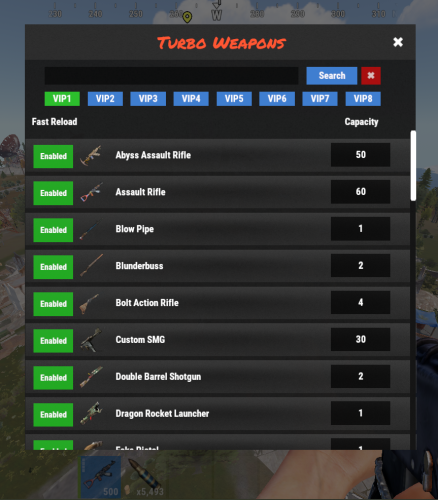
Hello! I'll take a look today to see what might be causing the issue. Do you have any console logs or error messages that could help? Also, please confirm if you have the permission turboweapons.fastreload, which enables faster reload times for weapons, and turboweapons.customcapacity, which customizes weapon capacity to specified values. Thank you!
-
Changed Status from Pending to Work in Progress
-
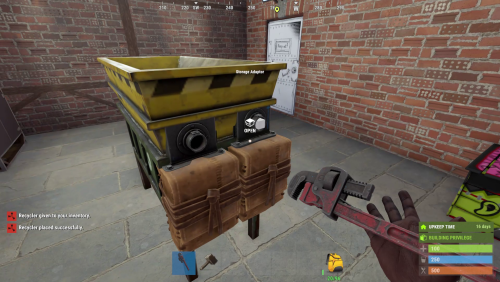 Hi! Buy Commands /buyindustrialrecycler Permission: industrialrecycler.buyindustrial /buyrecycler Permission: industrialrecycler.buystandard
- 73 comments
-
- 2
-

-

-
- #recycler
- #industrial
- (and 2 more)