T-Nuts
-
Posts
243 -
Joined
-
Last visited
-
Days Won
2
Content Type
Profiles
Warranty Claims
Downloads
Forums
Store
Services
Downloads Plus Support
DOWNLOADS EXTRA
Reels
Everything posted by T-Nuts
-
Sorry, just realized you added multiple commands to be added. Disregard
-
I was wondering if we could have what they get from the Lucky Block into their inventory show up in chat? I see the description in the config but that doesn't seem to show up in chat. I know it shows what they get above their Health bar but could we add a message to chat as well when they get something? That way if it's a custom item that they are unsure of the message will tell them.
-
Failed to call hook 'OnServerInitialized' on plugin 'UltimateIndustrialFarm v1.5.1' (TypeLoadException: Could not resolve type with token 010001d3 from typeref (expected class 'ProtoBuf.PerformanceReport' in assembly 'Rust.Data, Version=0.0.0.0, Culture=neutral, PublicKeyToken=null')) at (wrapper managed-to-native) System.Reflection.MonoMethodInfo.get_method_info(intptr,System.Reflection.MonoMethodInfo&) at System.Reflection.MonoMethodInfo.GetMethodInfo (System.IntPtr handle) [0x00000] in <f98723dd4586469db5213ec59da723ca>:0 at System.Reflection.MonoMethodInfo.GetDeclaringType (System.IntPtr handle) [0x00000] in <f98723dd4586469db5213ec59da723ca>:0 at System.Reflection.RuntimeMethodInfo.get_DeclaringType () [0x00000] in <f98723dd4586469db5213ec59da723ca>:0 at MonoMod.Utils.Extensions.Is (Mono.Cecil.MemberReference mref, System.Reflection.MemberInfo minfo) [0x0008f] in <6c906b4f1de440f3a86cb0ebb3f48ea6>:0 at MonoMod.Utils.ReflectionHelper+<>c__DisplayClass20_0.<_ResolveReflection>b__23 (System.Reflection.MethodBase m) [0x00000] in <6c906b4f1de440f3a86cb0ebb3f48ea6>:0 at System.Linq.Enumerable.TryGetFirst[TSource] (System.Collections.Generic.IEnumerable`1[T] source, System.Func`2[T,TResult] predicate, System.Boolean& found) [0x0003f] in <8b0c76c7efa244bc95eeee75bf1314cd>:0 at System.Linq.Enumerable.FirstOrDefault[TSource] (System.Collections.Generic.IEnumerable`1[T] source, System.Func`2[T,TResult] predicate) [0x00000] in <8b0c76c7efa244bc95eeee75bf1314cd>:0 at MonoMod.Utils.ReflectionHelper._ResolveReflection (Mono.Cecil.MemberReference mref, System.Reflection.Module[] modules) [0x008fc] in <6c906b4f1de440f3a86cb0ebb3f48ea6>:0 at MonoMod.Utils.ReflectionHelper.ResolveReflection (Mono.Cecil.MemberReference mref) [0x00000] in <6c906b4f1de440f3a86cb0ebb3f48ea6>:0 at MonoMod.Utils._DMDEmit.Generate (MonoMod.Utils.DynamicMethodDefinition dmd, System.Reflection.MethodBase _mb, System.Reflection.Emit.ILGenerator il) [0x005f2] in <6c906b4f1de440f3a86cb0ebb3f48ea6>:0 at MonoMod.Utils.DMDEmitDynamicMethodGenerator.GenerateCore (MonoMod.Utils.DynamicMethodDefinition dmd, System.Object context) [0x00342] in <6c906b4f1de440f3a86cb0ebb3f48ea6>:0 at MonoMod.Utils.DMDGenerator`1[TSelf].Generate (MonoMod.Utils.DynamicMethodDefinition dmd, System.Object context) [0x00013] in <6c906b4f1de440f3a86cb0ebb3f48ea6>:0 at MonoMod.Utils.DynamicMethodDefinition.Generate (System.Object context) [0x00149] in <6c906b4f1de440f3a86cb0ebb3f48ea6>:0 at MonoMod.Utils.DynamicMethodDefinition.Generate () [0x00000] in <6c906b4f1de440f3a86cb0ebb3f48ea6>:0 at HarmonyLib.MethodPatcher.CreateReplacement (System.Collections.Generic.Dictionary`2[System.Int32,HarmonyLib.CodeInstruction]& finalInstructions) [0x006a4] in <6c906b4f1de440f3a86cb0ebb3f48ea6>:0 at HarmonyLib.PatchFunctions.UpdateWrapper (System.Reflection.MethodBase original, HarmonyLib.PatchInfo patchInfo) [0x00059] in <6c906b4f1de440f3a86cb0ebb3f48ea6>:0 at HarmonyLib.PatchProcessor.Patch () [0x000fc] in <6c906b4f1de440f3a86cb0ebb3f48ea6>:0 at HarmonyLib.Harmony.Patch (System.Reflection.MethodBase original, HarmonyLib.HarmonyMethod prefix, HarmonyLib.HarmonyMethod postfix, HarmonyLib.HarmonyMethod transpiler, HarmonyLib.HarmonyMethod finalizer) [0x0002a] in <6c906b4f1de440f3a86cb0ebb3f48ea6>:0 at Oxide.Plugins.UltimateIndustrialFarm.OnServerInitialized () [0x0039d] in <b022c7f93b2b41068d3f7e36fe418d12>:0 at Oxide.Plugins.UltimateIndustrialFarm.DirectCallHook (System.String name, System.Object& ret, System.Object[] args) [0x00c87] in <b022c7f93b2b41068d3f7e36fe418d12>:0 at Oxide.Plugins.CSharpPlugin.InvokeMethod (Oxide.Core.Plugins.HookMethod method, System.Object[] args) [0x00079] in <42f9bedc659b4f4786eb778d3cd58968>:0 at Oxide.Core.Plugins.CSPlugin.OnCallHook (System.String name, System.Object[] args) [0x000de] in <15f61ddda771464d8246ebdce8ff4811>:0 at Oxide.Core.Plugins.Plugin.CallHook (System.String hook, System.Object[] args) [0x00060] in <15f61ddda771464d8246ebdce8ff4811>:0 (12:06:33) | Calling 'OnServerInitialized' on 'UltimateIndustrialFarm v1.5.1' took 209ms (12:06:33) | Loaded plugin UltimateIndustrialFarm v1.5.1 by Scalbox
-
Yes there was an update yesterday that required a server restart. I'll double check my end but updated my server yesterday with the update that was dropped after the monthly update on Thursday
-
Looks like this happened after Heli was shot down Failed to call hook 'OnEntityDeath' on plugin 'BotReSpawn v1.5.1' (KeyNotFoundException: The given key 'Female' was not present in the dictionary.) at System.Collections.Generic.Dictionary`2[TKey,TValue].get_Item (TKey key) [0x0001e] in <f98723dd4586469db5213ec59da723ca>:0 at Oxide.Plugins.BotReSpawn+CustomGroup.Spawn (System.Int32 numToSpawn) [0x001c2] in <ec0e937bf0354737a88309e714c0cea7>:0 at Oxide.Plugins.BotReSpawn+CustomGroup.Setup (System.Collections.Generic.List`1[T] bsps, Oxide.Plugins.BotReSpawn+Profile p, System.String n, System.Boolean t, System.Int32 q, System.String g, System.Collections.Generic.List`1[T] sps, System.Boolean canChute) [0x0011a] in <ec0e937bf0354737a88309e714c0cea7>:0 at Oxide.Plugins.BotReSpawn.FinaliseSpawnGroup (Oxide.Plugins.BotReSpawn+CustomGroup comp, UnityEngine.GameObject gameObject, Oxide.Plugins.BotReSpawn+Profile profile, System.String name, System.Collections.Generic.List`1[T] Points, System.Boolean t, System.Int32 q, System.String g) [0x0011c] in <ec0e937bf0354737a88309e714c0cea7>:0 at Oxide.Plugins.BotReSpawn.SetUpSpawnGroup (BasePlayer MainTarget, UnityEngine.GameObject gameObject, Oxide.Plugins.BotReSpawn+Profile profile, System.String name, System.Boolean t, System.Int32 q, System.String g) [0x004e3] in <ec0e937bf0354737a88309e714c0cea7>:0 at Oxide.Plugins.BotReSpawn.CreateTempSpawnGroup (BasePlayer MainTarget, UnityEngine.Vector3 pos, System.String name, Oxide.Plugins.BotReSpawn+Profile profile, System.String group, System.Int32 quantity) [0x0005d] in <ec0e937bf0354737a88309e714c0cea7>:0 at Oxide.Plugins.BotReSpawn.DoEvent (System.String name, UnityEngine.Vector3 pos) [0x00047] in <ec0e937bf0354737a88309e714c0cea7>:0 at Oxide.Plugins.BotReSpawn.OnEntityDeath (BaseEntity entity) [0x00104] in <ec0e937bf0354737a88309e714c0cea7>:0 at Oxide.Plugins.BotReSpawn.DirectCallHook (System.String name, System.Object& ret, System.Object[] args) [0x00e31] in <ec0e937bf0354737a88309e714c0cea7>:0 at Oxide.Plugins.CSharpPlugin.InvokeMethod (Oxide.Core.Plugins.HookMethod method, System.Object[] args) [0x00079] in <42f9bedc659b4f4786eb778d3cd58968>:0 at Oxide.Core.Plugins.CSPlugin.OnCallHook (System.String name, System.Object[] args) [0x000de] in <15f61ddda771464d8246ebdce8ff4811>:0 at Oxide.Core.Plugins.Plugin.CallHook (System.String hook, System.Object[] args) [0x00060] in <15f61ddda771464d8246ebdce8ff4811>:0
-
 The most recent one today
 -
Getting this issue as well in the console
-
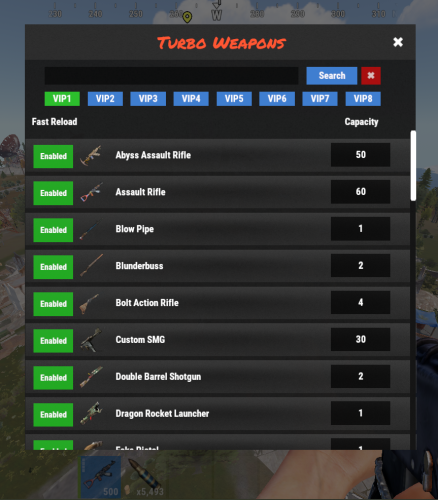 I'm using Custom C4 and Rocket Tiers plugin and wondering if a blacklist could be added to Turbo Weapons so I could take the Skin ID's used for Custom C4 and Rocket Tiers and block them from being used with Turbo Weapons. Right now when I reload one of these Rocket Launchers, Turbo Weapons is over written by this plugin but it still takes all the Rockets. For instance I have it set to 10 as the magazine size for the Rocket Launcher. Custom Rocket Launcher max is 4 but when I reload the Rocket Launcher it still takes 10 out of my inventory but only loads 4 in the Rocket. Is this something that can be added to Turbo Weapons?
 -
Wow, that was super fast. Thanks so much
-
I'm testing out the condition loss on the PrototypeLauncherTiers and for proto4 I would like it to not last as long. I've set the loss to 10 thinking it would work like the rocket_tier3 condition loss. It doesn't. It seems to take the normal condition loss even when I set it to 10 and then went crazy and set it to 250 because nothing that I changed it to seemed to make it lose more than the normal rate. Also haven't tested but if I'm using Skill Tree and a player has the Maintenance buff under Combat (This skill reduces durability loss by 20% per level) will this plugin override the Skill Tree buff?
-
Copy that, I'll see if this resolves anything. Thanks
-
He is a solo and he placed everything in his base. It's only the things I listed that won't repair but everything else will. Not sure if we can add Rope to be placed in TC or not.
-
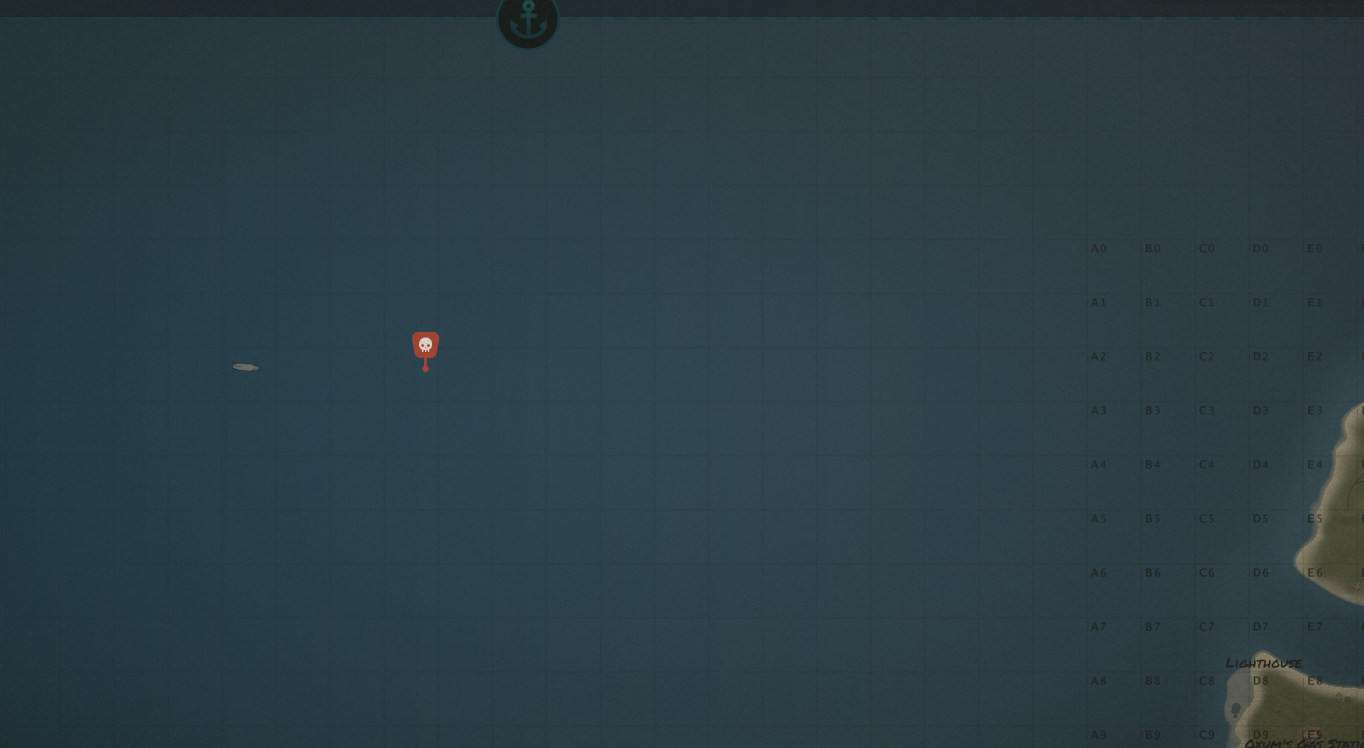
Ok this might be a map issue but I did the del assets/prefabs/npc/ch47/ch47.entity in the console and then started the event again and the CH47 is stuck out in the ocean for some reason. Just sits there the whole time. Will get my friend to message the dev of the map and see what's up

-
It could potentially be the map as well because they use InfiniteVendingStock and it works fine at Bandit but there is a custom Outpost and it doesn't really work there. Just wanted to check and see if this has ever been mentioned or maybe a second set of eyes on the issue.
-
Correct, using that map and the event starts and is mentioned in chat. The starting NPCs are there but the CH47 never shows up. No plugins or anything to stop CH47 from spawning. Checking on a few other things as well but helping a friend out their server. Works fine on my server and using a custom map as well but not this one.
-
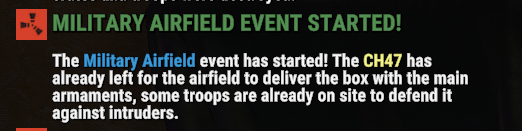
Evening, trying to figure out why the CH47 doesn't spawn and come to Airfield to drop the crate. Using the map Metropolis but when I start the event the CH47 never comes so the event is basically useless since there are only the few NPCs there at the start to help guard the crate. Attached is my config file for it. Been sitting at Airfield for 20mins now and the CH47 has not appeared MilitaryAirfield.json
-
Long day, I'm an idiot. I was thinking it was oxide/data/NpcSpawn/Images but I clearly can't read and it's in oxide/data/images
-
-
What did you do to fix this? Having that same issue right now. Trying to help out a friend on their server and I didn't have this issue when updating on my server
-
Yeah, can't seem to figure out how to get this right in the loot profile. Every time I try and then reload the loot tables, it reverts back to default loot so I'll get with the AlphaLoot dev. You can close this now, thanks
-
Ok so change this to "false" and it should be fine. Thanks boss
-
Copy all, thanks boss.
-
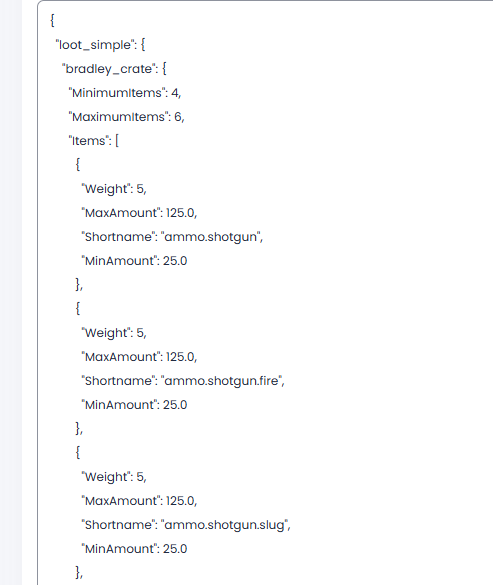
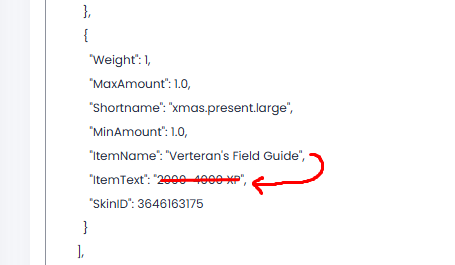
Not sure exactly what you mean by profile name. I would think the profile name is "bradley_crate" but don't think I need to put that down there do I? So take the ItemName and copy that down to also be in the ItemText?
-
Lol when I was adding it using AlphaLoot to add it into the loot tables. Ok so the ItemName needs to go into the ItemText field? So instead of it saying 2000-4000 XP it needs to say Verteran's Field Guide
-
Had a player let me know that some things are not repairing in the base. I have it so deployables get repaired as well. He has told me that the Wooden Ladder, Twitch Sofa and Trophy, the festive garland for doors/windows and the computer station don't get repaired when clicking the repair button in the TC.