


realedwin
-
Posts
225 -
Joined
-
Last visited
Content Type
Profiles
Warranty Claims
Downloads
Forums
Store
Services
Downloads Plus Support
DOWNLOADS EXTRA
Reels
Support Center
Everything posted by realedwin
-

Splash Fire destroys prefabs that should be protected
realedwin replied to Kleementin's Support Report in Support
Changed Status from Pending to Closed Changed Fixed In to 1.1.6 -
Splash Fire destroys prefabs that should be protected
realedwin replied to Kleementin's Support Report in Support
Hello, thank you for your request. Please update the plugin and update the configuration "Only mitigate damage caused by players": false -
Pay attention to upper and lower case or use the steamID64
-
 What does your configuration file look like? There is protection when all authorised players are offline.
 -
There is only protection from other players. If a player leaves the MLRS vehicle immediately, only 1 missile won't do any damage. If a player stays in the vehicle, it won't do any damage. This bug has been around for years.
-
I fixed it a few minutes ago just to be on the safe side
-
It compiles without errors. Please reload the plugin. This is happening since the new update on Oxide, when the server boots.
-
I cannot reproduce the error. Please update the plugin to version 1.1.4.
-
What version of the Clans plugin are you using? I haven't checked the changes. Seems like the author has updated things that break this plugin.
-
This is the correct behaviour of the command. So it still doesn't work? I will test it when I have time, maybe a rust update broke something.
-
When you first put it on your server or deleted the data files, run the orp.fill.onlinetimes command in RCON or in-game.
-
When you first put it on your server or deleted the data files, run the orp.fill.onlinetimes command in RCON or in-game.
-
Changed Status from Pending to Not a Bug Changed Fixed In to 1.1.2
-
When you first put it on your server, run the orp.fill.onlinetimes command in RCON or in-game.
-
Hello, Your configuration is correct. You don't need '"1": 0.0,' in your config, it's not necessary. I cannot reproduce your error. You said it worked before and now it does not, what did you do on your server before the error occurred? Can you please send me the oxide\data\OfflineRaidProtection\LastOnlineData.json file? Whose base did you attack? Does this happen to all bases?
-
I would like to recommend this plugin
-
I would like to recommend this plugin
-
I would like to recommend this plugin
-
Version 1.8.2
7,992 downloads
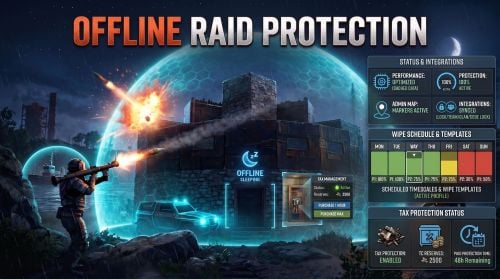
The Offline Raid Protection plugin is a comprehensive solution that reduces or completely prevents damage to player-owned bases, vehicles, and boats when their owners are offline. Offering unparalleled control, server owners can adjust the level of damage based on real-world hours or the amount of time a player has been offline. New in version 1.6.0, you can also set customized schedules and automated wipe phases. New in version 1.7.0, optional Tax Protection lets players maintain their Tool Cupboard protection by paying with a configurable in-game currency, such as Scrap. Designed for servers seeking meaningful offline or online protection, without sacrificing server performance, this plugin provides total control over damage scales, cooldowns, team behaviour, decaying bases/boats, rentable shops, apartments and more. Highlights Flexible Damage Scaling: Set damage scales based on real-world hours and/or offline time. A scale of 0.0 blocks all damage; a scale of 1.0 allows normal, vanilla-level damage; and values above 1.0 actively increase incoming damage. Scheduled Timescales: Temporarily override standard damage scales for specific date ranges. Perfect for custom weekend rates, holiday events, wipe-day protection, or planned balance changes. Wipe Templates: Automate your wipe cycle with reusable phases (e.g., more protection immediately post-wipe, scaling down over subsequent days). Assign a default template for every wipe, or queue a specific template for the next wipe only. Tax Protection: An optional upkeep-style system for Tool Cupboards. Configure the currency, hourly cost, maximum purchased hours, reserve limit, and unused-time refunds when a Tool Cupboard is destroyed. Tax Overlay: An optional in-game panel UI shown while an authorized player loots a Tool Cupboard. It displays active, paused, or inactive Tax Protection, remaining time, costs, reserves, total available protection, and purchase buttons. Status HUD: An optional, configurable on-screen HUD that displays a building's or boat's current protection status, protection percentage, remaining time, and penalty timers. Position and visibility rules are customizable. Game Tip Messages: Displays color-coded game-tip messages to attackers, optionally restricted to specific damage types (Melee, Ranged, Explosive, and None for everything else). Admin-Only Map Markers: Equip your admins with color-coded map markers for protected Tool Cupboards and boats. Markers feature dynamic protection-state circles, live boat tracking, and detailed hover tooltips showing authorized players. Marker colors, radius, transparency, and refresh rates are configurable. ORP DDraw: An in-game F1-console inspection tool for admins. It displays the current ORP state of nearby Tool Cupboards and protected boats, including protection percentage, remaining time, Tax Protection time, and authorized-player count. Team, Clan & Code Lock Integration: Protection intelligently accounts for teams or clans, and optionally Code Lock whitelists. Boat & Vehicle Protection: Optionally extend protection to modular boats, tugboats, and vehicles, including their relevant authorization paths. Apartment & Rentable Shop Support: Protects against master-key break-ins based on the actual rental owner, ignoring team or clan status for these specific entities. Anti-Abuse Penalties: Discourage players from exploiting protection by applying configurable penalties when they leave or disband teams. Grief TC Detection: Automatically identifies and excludes later-placed, overlapping Tool Cupboards from receiving protection. Admins can manually inspect and override these classifications. Cache System: The plugin uses a caching system to optimize performance and keep the impact on the server to a bare minimum. Developer API: Exposes endpoints for other plugins to query protection scales, owner IDs, remaining time, and penalty states via Plugin.Call. Scheduled Timescales & Wipe Templates Your standard configuration acts as the baseline fallback when "Enable scheduled timescales" is true and a valid scheduled profile is active, its specific damage-scale tables take absolute precedence for that date range. Once the schedule expires (or if no profile is active), the plugin seamlessly reverts to your standard configuration. Wipe Templates are reusable blueprints, not live schedules. When the server detects a new save, the plugin checks for a queued template. If there is none, it uses your designated default template to automatically generate concrete, dated schedule profiles based on the template's phases. Then, the queued selection is cleared while the default template remains ready for future wipes. Configuration & Editing Carbon Users: Type /orp.schedule to open a powerful in-game Schedule and Wipe Template editor. Oxide Users (or Carbon without Admin UI modules): Schedules and templates can be easily edited manually within their dedicated .json data files. The Documentation section describes how to edit the JSON files in detail. Using /orp.schedule will instead report the current schedule state in the chat. Tax Protection Tax Protection is an optional upkeep-style system for Tool Cupboards. When enabled, players with the Tax Protection permission must maintain active paid protection time for eligible Tool Cupboards before the configured protection scales apply. Players without the Tax Protection permission continue to use the normal protection rules. Players can use `/orp.tax` to view their Tax Protection status and purchase protection time with the configured currency item. Currency stored inside the Tool Cupboard can also act as a reserve and automatically extend protection when eligible. Set the reserve limit to -1 to disable Tool Cupboard currency reserves while retaining manual Tax Protection purchases. Server owners can configure the currency, hourly cost, maximum purchased protection time, reserve limit, unused-time refunds, and the optional Tax Overlay. Flexible Protection for Every Server Offline Raid Protection supports a variety of server types, including full PvP, hybrid, and PvE. You can configure protection for bases, boats, vehicles, shops, apartments, teams, clans, and more. It also works with other plugins, such as "Raidable Bases", allowing you to customize raid protection for your server without altering the rest of your gameplay. Built with performance in mind Offline Raid Protection is designed to minimize its impact on server performance, even on busy servers. Protection data is cached and recurring updates, such as status HUD and map marker refreshes, are processed in controlled batches. Temporary data is reused where appropriate to reduce unnecessary allocations. No other raid protection plugin is built with such a focus on efficient protection checks, caching, and controlled background work. This plugin is engineered to minimize server overhead and avoid unnecessary lag or FPS drops, even on large, active servers. Development is focused on Carbon, taking advantage of its modern runtime, optimized systems, and native modules to deliver the best possible performance. Carbon generally outperforms Oxide, ensuring that Offline Raid Protection maintains efficiency and responsiveness on demanding servers. Commands All command names can be changed in the configuration. /orp or /ao <Steam ID or full name> — Check a player's offline protection status. You can type the command without a name when looking at a player's structure /raidprot — Show Offline Raid Protection information /orp.tax [hours] — Show Tax Protection status or purchase protection time for the current Tool Cupboard area /orp.fill.onlinetimes — Fill all players offline times (Chat & Console command) /orp.test.offline <Steam ID or full name> <hours> — Change a player's offline time /orp.test.online <Steam ID or full name> — Change a player's offline time to the current time /orp.test.penalty <Steam ID or full name> <hours> — Change the duration of a player's penalty. A negative value or zero would disable the penalty /orp.test.grief — Display the detected Grief-TC status of the building you are looking at /orp.test.grief <true|false|none> — Force the Grief-TC status of the looked-at building /orp.test.grief <true|false|none> <TC network ID> [...] — Set the status for one or more Tool Cupboards by network ID /orp.schedule — Open the Carbon schedule/template editor when available; otherwise show scheduling information. /orp.schedule <true|false> — Enable or disable Scheduled Timescales (admin only). orp.update.permissions — Refresh the permission status for all players (Console command) orp.update.prefabs <true> — Updates the 'Prefabs to protect' list in the configuration. Overwrites the list with the 'true' argument (Console command) orp.dump.prefabs — Clears the 'Prefabs to protect' list in the configuration (Console command) orp.ddraw [range] — Display nearby Tool Cupboards and protected boats with their current ORP state (in-game F1 console, admin only; range: 10-1000 metres) orp.ddraw off — Disable your ORP DDraw display (in-game F1 console, admin only) Permissions All permissions can be configured. offlineraidprotection.protect — Allows a player to be protected from raids offlineraidprotection.tax — Allows a player to manage Tax Protection through `/orp.tax` offlineraidprotection.check — Allows a player to check the offline protection status of other players offlineraidprotection.admin — Allows use of administrative commands, including schedule controls and ORP DDraw (which also requires server-admin status) offlineraidprotection.onlineprotect — Bypasses the normal online-status restriction for players with this permission, allowing the configured protection rules to protect them while online. This is separate from the normal protection and Tax Protection permissions. Use oxide.grant / oxide.revoke or carbon.grant / carbon.revoke to manage permissions, depending on the framework in use. Configuration The configuration is to a large extent self-explanatory. Raid Protection Options Only mitigate damage caused by players: Choose whether or not to only mitigate damage caused directly by players. Enable this to prevent players from causing base damage by baiting patrol helicopters, etc. Protect players that are online: Choose whether or not to protect the bases of the players who are online. Works when "Scale of damage depending on the current hour of the real day" is configured. Enable scheduled timescales: Enable this option to allow valid profiles in `ScheduledTimescale.json` to override the normal real-time and offline-time damage-scale tables during their configured date range. When disabled, the plugin always uses the normal configuration tables. This option also enables Wipe Template materialization on a new save. As an admin, use the command /orp.schedule true or /orp.schedule false to change it in-game. On Carbon with the required UI modules, `/orp.schedule` opens the editor; on Oxide or without those modules, edit the dedicated JSON files manually. Scale of damage depending on the current hour of the real day: Defines the protection levels based on the current hour of the real day. The key is the hour of the day (0-23), and the value is the protection scale (0 — 340282300000000000000000000000000000000). Example: "0": 0.0, "1": 0.0, "2": 0.0, "3": 0.0 This means that the protection level is 100% from midnight to 3am. Scale of damage depending on the offline time in hours: Defines the protection levels based on the time since the player went offline. The key is the number of hours since the player went offline, and the value is the protection scale (0 — 340282300000000000000000000000000000000). The value of the hours can also be a decimal number. Example: "12": 0.25, "24": 0.5, "48": 1.0, "96": 2.0 This means that 12 hours after the player goes offline, the protection level will be 75%. After 24 hours it will be 50% and after 48 hours it will be 0%. After 96 hours, the damage is increased by 100%. Cooldown in minutes: During this time, damage levels will remain vanilla. Raids are possible. Set this to a positive value to discourage defenders from interrupting raids by logging off. Scale of damage between the cooldown and the first configured time: During this time, the level of damage between the cooldown and the first configured time can be set to a specific value, such as 0.0 Online time to qualify for offline raid protection in minutes: Time to qualify for offline raid protection after a player connects Set this to a positive value to discourage players from quickly logging on and back off solely to reset protection. Protect all prefabs: Choose whether to protect all prefabs or only specific ones. This will protect anything in the TC range. Protect AI (animals, NPCs, Bradley and attack helicopters etc.) if 'Protect all Prefabs' is enabled: Choose whether or not to protect AI entities if "Protect all Prefabs" is enabled. Set to false to reduce hook times, and to avoid protecting wild animals that wander by offline bases. Protect modular and tug boats: Choose whether to protect modular boats and tugboats and their deployables. Checks wheel authorization list, plus optionally lock authorization lists. Protect vehicles: Choose whether to protect vehicles or not. Vehicle lock authorization always has priority. If you want to exclude certain vehicles from protection, add them to the blacklist. Tugboats and modular boats are separate from this. Protect twigs: Choose whether to protect twigs or not. Protect decaying buildings: Choose whether to protect buildings that are either decaying, or have at least 50% of building blocks below 50% health. Ignore decay if due solely to twig: Choose whether to ignore decay state caused solely due to the presence of twig building blocks combined with a lack of wood in the TC. Set to true to ensure raiders cannot disable protection by building twig onto an offline base. Protect decaying modular boats: Choose whether modular boats should remain protected while they are in a decaying state. Protect grief TCs: Choose whether Tool Cupboards detected as grief TCs should receive Raid Protection. True: Grief-TC detection is disabled and Tool Cupboards are protected normally. False: The plugin detects separately placed Tool Cupboards whose buildings overlap within the configured Grief privilege distance. A later-created Tool Cupboard can be classified as a grief TC and excluded from Raid Protection. Tool Cupboards are not classified as grief TCs when they share an owner, authorized player, or other configured player relationship such as teams, clans, or Code Lock whitelist players. The default is true. Set this to false only if you want ORP to detect and exclude grief TCs. Admins can use /orp.test.grief to inspect or override individual classifications. Grief privilege distance: Sets the maximum distance, in metres, between building blocks belonging to separate Tool Cupboard buildings for them to be considered overlapping during Grief-TC detection. The distance is measured between the bounds of the building blocks, not between the Tool Cupboards themselves. A larger value allows buildings farther apart to be considered overlapping; a smaller value requires them to be closer together. Only used when Protect grief TCs is set to false. Valid range: 0 to 512 metres. Default: 16 metres. Prefabs to protect: List of prefabs that will be protected. Make sure you remove the prefabs you don't want to protect, some of them are pointless. Prefabs blacklist: List of prefabs that will not be protected. Prefabs in the blacklist will always have priority to be unprotected. Protection multipliers by prefab: Add a prefab short name and a multiplier between 0.0 and 1.0. A value of 1.0 uses the normal configured protection level. A value of 0.5 applies half of the protection strength. A value of 0.0 disables damage mitigation for that prefab. Example: "autoturret_deployed": 0.5, "wall.external.high.stone": 0.75 This keeps the normal protection rules in place, but reduces their effect for the listed prefabs. Tax Protection Options Tax Protection is optional and disabled by default. When enabled, players with the Tax Protection permission must maintain active paid protection time for eligible Tool Cupboards. Enabled: Enables or disables the Tax Protection system. When enabled, players with the tax permission need active paid Tax Protection to receive Protection within their Tool Cupboard privilege area. Enable for modular boats: Choose whether Tax Protection should also apply to eligible modular boats with a mounted Tool Cupboard. Requires "Protect modular and tug boats" to be enabled. Currency item ID: Sets the item used as Tax Protection currency. (default is Scrap) Use the Rust item ID for the currency you want players to pay with. Cost per hour: Sets how many configured currency items are required to purchase one hour of Tax Protection. Refund unused tax protection on Tool Cupboard destruction: Choose whether unused paid Tax Protection is refunded when a Tool Cupboard is destroyed by a trusted player. True: Eligible unused paid time is refunded. False: No refund is created. Maximum tax currency reserves per Tool Cupboard: Sets the maximum amount of configured currency that can be stored in a Tool Cupboard as Tax Protection reserves. Set to 0 for unlimited reserves. Set to -1 to disable Tool Cupboard currency reserves entirely: currency can remain in the Tool Cupboard, but it is not capped or automatically converted into Tax Protection time. Maximum total purchased protection hours: Sets the maximum amount of Tax Protection time that can be purchased and held for one Tool Cupboard. Group size hourly cost scaling options: Optionally increase the Tax Protection hourly cost based on the number of authorized players. Enabled — Enables group-size-based hourly pricing. Players included in the base hourly cost — Sets how many authorized players are included in the normal hourly price. Additional players in the small group tier — Sets how many players use the small-group price increase. Hourly cost increase per additional small group player — Sets the percentage added for each additional player in the small-group tier. Hourly cost increase per player above the small group tier — Sets the percentage added for players beyond the small-group tier. Maximum hourly cost multiplier — Limits how high the hourly cost can increase. The adjusted hourly cost is used consistently for Tax Protection purchases, status information, the Tax Overlay, and Tool Cupboard reserves. Tax Overlay Options: Adds an optional in-game Tax Overlay when authorized players loot a Tool Cupboard. The overlay shows Tax Protection status, remaining paid time, hourly cost, cupboard currency reserves, reserve limit, and total available protection time. Enabled — When enabled, authorized players can purchase one hour or buy the maximum currently available Tax Protection time directly from the Tool Cupboard overlay. Anchor minimum / maximum — Sets the overlay’s screen anchor position. Use these values together with the offset settings to place the overlay where you want it displayed. Offset minimum / maximum — Sets the overlay’s size and position relative to its anchors. The default values place a compact Tax Management panel in the center of the screen. Apartment Complex Protection Options Protect apartments from break-ins: Whether to protect apartments from master key break-ins when Raid Protection is active. Protect apartment even when owner absent: Whether apartments with no owner inside should remain protected. True: Apartment protection applies regardless of owner's offline location. False: Apartment protection applies only when owner is offline inside of the apartment. Protect apartment even when rent due: Whether apartments with no upkeep remaining should remain protected. True: Apartment protection applies even in Rent Due state. False: Apartment protection does not apply in Rent Due state. Protect shops from break-ins: Whether to protect rentable shops from master key break-ins when Raid Protection is active. Protect only when damage scale below: Whether to limit apartment and/or shop break-in protection based on damage scale. Example: Set to 0.2 to protect only when damage scale is between 0 and 0.2 (i.e. when protection level is between 80% and 100%). Set to 1.0 or higher to apply break-in protection regardless of damage scale. Use damage scale as break-in success chance: Whether to make a random roll on each break-in attempt, with chance of success equal to damage scale (e.g. 25% chance of success at 75% protection level, 80% chance at 20% protection level, etc.). Only applies when apartment or shop is otherwise protected. Status HUD Options The Status HUD is optional and disabled by default. It provides players with a compact, configurable view of the protection state for the privilege area they are in. Enabled — Turns the Status HUD on or off. Anchor minimum / Anchor maximum — Sets the HUD anchor position using Unity screen coordinates. The default anchors place it at the top-right of the screen. Offset minimum / Offset maximum — Sets the HUD bounds in pixels relative to its anchors. Adjust these values to move or resize the panel without changing its anchor position. Refresh interval in seconds — Controls how often the HUD refreshes. A lower value updates it more frequently. Display inside trusted privilege — Choose whether the normal HUD is shown while the player is authorized on the relevant building or boat. Display only when protection is active — Hides the normal HUD whenever no active protection is being applied. Display after status command — Shows the HUD temporarily when a player uses the check status command. Status command display duration in seconds — Sets how long the command-triggered HUD remains visible. Show protection percentage — Displays the current protection percentage. Show remaining protection time — Displays the remaining time for the current protection scale when applicable. Show penalty timer — Displays a player’s active penalty timer when applicable. Map Marker Options Map markers are optional and disabled by default. Only players with the plugin’s admin permission can use them; regular players cannot. Enabled — Turns Tool Cupboard and boat markers on or off. Refresh interval in seconds — Controls how often marker state and labels are refreshed. Use a longer interval if immediate visual updates are not required. Enable boat live circle — Updates the map-radius circle for tugboats and modular boats as they move. Visual radius in metres — Sets the radius of each marker circle. Alpha — Sets circle transparency. "0" is fully transparent, and "1" is fully opaque. Protected color — The color used for 100% protected status. Partial protection color — Color used when only partial protection applies. Vulnerable color — Color used when normal or vulnerable status applies. Decaying color — Color used for decaying building status. Grief color — Color used for a detected or forced grief tool cupboard status. Outline color — Color used for the marker circle outline. Tooltip marker text max. players — Limits how many authorized player names are shown in a marker tooltip. Timezone Options The fallback timezone is UTC if you leave it blank in the configuration, or if your configured timezone doesn't exist. The timezone identifiers are different for Windows and Linux. You can check the appendices to find your preferred timezone. Developer API Other Carbon/Oxide plugins can access ORP data through `Plugin.Call`. Available API methods: float API_GetEntityDamageScale(BaseCombatEntity entity, BasePlayer attacker) ulong API_GetEntityProtectionTargetID(BaseCombatEntity entity, BasePlayer attacker) float API_GetPlayerDamageScale(ulong playerID) long API_GetRemainingTimeTicks(ulong playerID) long API_GetPenaltyEndUtcTicks(ulong playerID) bool API_EnablePenalty(ulong playerID, float durationHours) bool API_DisablePenalty(ulong playerID) int API_EnablePenalties(ICollection<ulong> playerIDs, float durationHours) int API_DisablePenalties(ICollection<ulong> playerIDs) Return conventions: Damage-scale methods return -1f when no applicable ORP scale exists API_GetEntityProtectionTargetID returns 0UL when no target is available Time methods return 0L when no active value exists Bulk methods return the number of successfully processed known players Conclusion The Offline Raid Protection plugin provides a comprehensive solution for protecting players' structures and vehicles. This plugin is essential for any Rust server owner who wants to provide a fair and enjoyable gaming experience for their players. Windows_Timezones.txt Linux_Timezones.txt Prefabs.txtFree

