Jump to content

Sheo

Creator Pro
  • Posts

    1,311
  • Joined

  • Last visited

  • Days Won

    18

Everything posted by Sheo

  1. Sheo

    Nueva compra

    Changed Status from Pending to Not a Bug Changed Fixed In to 1.0.3
  2. Changed Status from Pending to Work in Progress Changed Fixed In to Next Version
  3. Sheo

    Color

    Changed Status from Pending to Closed Changed Fixed In to 1.0.3
  4. Sheo

    Shrink and transparence

    Changed Status from Pending to Closed Changed Fixed In to 1.0.3
  5. Sheo

    Modify airdrop Icon

    Changed Status from Pending to Closed
  6. Sheo

    Modify airdrop Icon

    No
  7. Changed Status from Pending to No Response Changed Fixed In to 2.0.0
  8. Sheo

    Breed Animals

    Hello. Haven't heard of this plugin. If you want, you can order it from me (My discord AhigaO#4485)
  9. Sheo

    Nueva compra

    Perhaps you mean the ImageLibrary plugin? If you don't have it, download it here -> https://umod.org/plugins/image-library
  10. Sheo

    Nueva compra

    What key are you talking about? The plugin does not require a key
  11. Sheo

    Server Hud

    No, today I will post an update where you can choose a plugin with a currency (Economics or Server Reward)
  12. Sheo

    Server Hud

    Version 3.5.2

    14,957 downloads

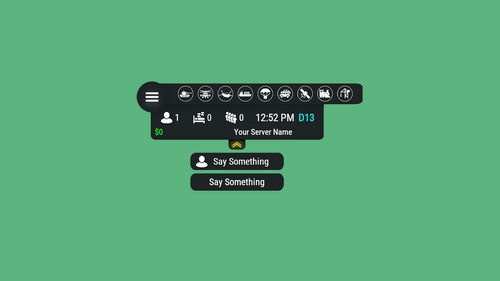
    Server HUD · Rust · Oxide · CARBON Your chat is «is heli up?» twelve times an hour Put the answer on screen. Online count, clock, grid square, balance, and a live bar of every event running — Bradley, heli, cargo, airdrop, both oil rigs. Nine events out of the box, set up entirely from a panel in game. How it goes From install to the event you added yourself MINUTE ONE Install and it's on screen It doesn't wait for the next wipe to be useful Install mid-wipe and the heli that's already flying is on the bar. ImageLibrary is the only other plugin you need. Nine events on by default. Bradley, Patrol Heli, CH47, Cargo Ship, Airdrop, Harbor cargo, both Oil Rigs, Deep Sea. Rigs turn red while the crate is being hacked. Players see the fight starting from across the map. Icons are just URLs. Fetched and cached for you. First install reloads once to pick them up — expected, not a fault. No file to edit first. Defaults draw a finished HUD with your server name in it. FROM THEN ON Every player, every day The numbers your chat keeps asking for Updated as they change. A player standing still costs you nothing. K12 or X:-1204 Z:842 Grid square or raw coordinates. Your choice, your colour. Online, sleeping, queue. Admins can be left out of the count. Clock in each player's own format. 12- or 24-hour from their game language, or force one. Two balances, side by side. Economics, ServerRewards or ShoppyStock. Only what's live. One switch hides idle events instead of showing a wall of grey. Info messages on rotation. A random line from your list, any corner, any width. IN THE WAY The player decides Four states, and the choice is remembered Your logo is the button: full panel → events only → hidden. One command removes it entirely. Still set that way after a reconnect. Streamers keep coordinates off camera. One permission drops the position readout. CCTV and drones get a clean screen. Hides on mount, back on dismount, switchable. Any corner, any scale. Pixel offsets, one scale value, and a toggle to show it over the inventory. MONTHS LATER All of it, from in game The config file is optional One command opens an admin panel over every setting there is. Change it, it saves, everyone online sees it. Events from other plugins. A name, an icon, and the hooks it fires. Convoy, Sputnik, Armored Train and Harbor come pre-filled. Adding one rewrites a marked block in the plugin file and reloads it. A drop-down of command buttons. Any chat or console command, own icon, own permission, closes itself after use. Updates don't reset your settings. New events land with defaults; a section you deleted comes back. Or edit the file. Auto reload picks it up the moment you save. The look See it running, then make it yours Every icon is a URL in the config. Take a pack, or draw your own from the blank template. Free custom HUD icons Free Custom HUD icons Paid Server HUD custom icon pack Paid While you're not looking Built to be left alone ✓ A typo in the config won't take the HUD down — it falls back to defaults and says so ✓ Switching a counter off stops the work behind it, not just the display ✓ An economy you enabled but never installed shows 0, and the HUD carries on ✓ Unloading clears every panel off every screen — nothing stuck until relog Reference One chat command, five words after it Setup is admins only. Menu buttons take whatever permission you name in the config. Chat /h Show the command list Chat /h open Full panel — counters, clock, position, balance, events Chat /h events Event bar only Chat /h hide Hide the panels, keep the logo button Chat /h close Remove it entirely Chat /h setup Settings panel — admins only Perm hud.streamer Hides the position readout from whoever holds it Hook object CanHudChangeState(BasePlayer player, string currentState, string nextState) Fires before a state change. Return non-null to stop it. API string API_PlayerHudState(string playerId) Returns full, events, hidden or closed for a player. Straight answers Asked before buying Can players turn it off? Full panel, event bar only, or gone entirely — their choice, and it survives a reconnect. Do I have to edit the config file? No, the in-game panel covers all of it. If you prefer a text editor, auto reload picks the file up as you save. I stream — my coordinates are on screen. Grant yourself the streamer permission. The position readout goes, everything else stays. Can I add an event from another plugin? Yes — name it, give it an icon, and name the hooks it fires. Most plugins list those in their own description. What if I run no economy plugin? Leave it off and the HUD closes the gap. Enable it without the plugin and you get a 0, not a broken HUD. Does it block CCTV and drones? It hides itself in a Computer Station and comes back on dismount. One toggle if you'd rather it stayed. 9 events out of the box 4 states, chosen per player 2 economy balances at once 1 dependency — ImageLibrary
    $14.99
  13. Sheo

    Air Drop Marker

    Ok, I'll add it today or tomorrow
  14. Sheo

    Air Drop Marker

    There is only LangFile, in which you can change the text of the message. And what in this plugin could be added to the config?
  15. Sheo

    Air Drop Marker

    Version 1.1.2

    4,998 downloads

    The plugin notifies players of an AirDrop by telling them the spawn square on the map, as well as displaying a marker on the map. Config: { "Show notify in chat": true, "Create MapMarker on map": true, "Select the type of marker (shopmarker | cratemarker)": "cratemarker", } Lang: { "CM_DROPSPAWNED": "AirDrop has been dropped in square {0} (You can see the marker when you open the map)" }
    Free
  16. If I'm not mistaken, this error no longer exists. Write to me if she stays
  17. Sheo

    ERROR IN CONSOLE

    Changed Status from Pending to Closed Changed Fixed In to 2.0.0
  18. Posted an update. Thank you for your patience!
  19. Send me a message on Discord: AhigaO#4485
  20. Send me a message on Discord: AhigaO#4485
  21. Sheo

    ERROR IN CONSOLE

    I'll post an update in a couple of hours. Once again I apologize for the delay.
  22. Write me a discord, we will solve your problem

About Us

Codefling is the largest marketplace for plugins, maps, tools, and more, making it easy for customers to discover new content and for creators to monetize their work.

Downloads
3.1m
Total downloads
Customers
12.1k
Customers served
Files Sold
171.4k
Total sales
Payments
3.7m
Processed total
×
×
  • Create New...

Important Information

We have placed cookies on your device to help make this website better. You can adjust your cookie settings, otherwise we'll assume you're okay to continue.