
-
Posts
450 -
Joined
-
Last visited
-
Days Won
26
Content Type
Profiles
Warranty Claims
Downloads
Forums
Store
Services
Downloads Plus Support
DOWNLOADS EXTRA
Reels
Everything posted by UserLeftRust
-
This video is private... whaaaa whhaaaa
-
There is a plugin available on uMod to scale car damage called: Car Collision Damage Scaler
-
Update has been pushed 0.2.8 hopefully this will solve any issues.
-
 Yeah its because the new helis spawn with 20% of your stack size of lowgrade.... Stupid decision on FP's side but meh.. Glad its helping!
 -

Version 1.1.1
1,996 downloads
Rusty Bangers is a UI for Vehicle Licence. STOP... I HAVE REWRITTEN THE PLUGIN TO MAKE SPACE FOR ANY OTHER VEHICLES COMING TO RUST. I HAVE ALSO ADDED THE ABILITY TO CUSTOMISE THE VEHICLE IMAGES. IF YOU USE THE DEFAULT CONFIG AND MY VEHICLE LICENSE CONFIG (PASTE BIN LINK BELOW) IT SHOULD WORK STRAIGHT OUT OF THE BOX (MINUS NEEDING SOME PRICE AND POSSIBLE COOL DOWN CHANGES TO MATCH YOUR SERVER) Check out updates below Permissions Rusty Bangers now requires vehiclelicence.use permission to be opened AND NOW Players can now only see options for vehicles that they have been granted permissions to spawn. Command /rusty << opens the UI Configuration { "Genericsettings": { "Command List": [ "mini", "tcop", "hab", "ch47", "rhib", "row", "sedan", "horse", "smallchassis", "mediumchassis", "largechassis", "smallcar", "mediumcar", "largecar", "workcart", "magnetcrane", "subsolo", "subduo" ] }, "Page1Settings": { "Slot 1 Permission": "vehiclelicence.minicopter", "Slot 1 Image": "https://i.imgur.com/1eCWmxC.png", "Slot 2 Permission": "vehiclelicence.transportcopter", "Slot 2 Image": "https://i.imgur.com/KMXvIiC.png", "Slot 3 Permission": "vehiclelicence.hotairballoon", "Slot 3 Image": "https://i.imgur.com/huK1pU3.png", "Slot 4 Permission": "vehiclelicence.chinook", "Slot 4 Image": "https://i.imgur.com/MQRcEcv.png", "Slot 5 Permission": "vehiclelicence.rhib", "Slot 5 Image": "https://i.imgur.com/jXf4fNl.png", "Slot 6 Permission": "vehiclelicence.rowboat", "Slot 6 Image": "https://i.imgur.com/SlE8lLs.png", "Slot 7 Permission": "vehiclelicence.sedan", "Slot 7 Image": "https://i.imgur.com/aNUvab6.png", "Slot 8 Permission": "vehiclelicence.ridablehorse", "Slot 8 Image": "https://i.imgur.com/eZvi0n2.png" }, "Page2Settings": { "Slot 1 Permission": "vehiclelicence.smallchassis", "Slot 1 Image": "https://i.imgur.com/Nlgsj4h.png", "Slot 2 Permission": "vehiclelicence.mediumchassis", "Slot 2 Image": "https://i.imgur.com/WX0iPUB.png", "Slot 3 Permission": "vehiclelicence.largechassis", "Slot 3 Image": "https://i.imgur.com/0JSrdCy.png", "Slot 4 Permission": "vehiclelicence.smallmodularcar", "Slot 4 Image": "https://i.imgur.com/7QsY72X.png", "Slot 5 Permission": "vehiclelicence.mediummodularcar", "Slot 5 Image": "https://i.imgur.com/65VPddU.png", "Slot 6 Permission": "vehiclelicence.largemodularcar", "Slot 6 Image": "https://i.imgur.com/zkmYF9d.png", "Slot 7 Permission": "vehiclelicence.workcart", "Slot 7 Image": "https://i.imgur.com/TU0DD1v.png", "Slot 8 Permission": "vehiclelicence.magnetcrane", "Slot 8 Image": "https://i.imgur.com/sXMrzuq.png" }, "Page3Settings": { "Slot 1 Permission": "vehiclelicence.submarinesolo", "Slot 1 Image": "https://i.imgur.com/bu3vBjM.png", "Slot 2 Permission": "vehiclelicence.submarineduo", "Slot 2 Image": "https://i.imgur.com/To7tiMp.png", "Slot 3 Permission": "", "Slot 3 Image": "https://i.imgur.com/6RjWdNd.png", "Slot 4 Permission": "", "Slot 4 Image": "https://i.imgur.com/6RjWdNd.png", "Slot 5 Permission": "", "Slot 5 Image": "https://i.imgur.com/6RjWdNd.png", "Slot 6 Permission": "", "Slot 6 Image": "https://i.imgur.com/6RjWdNd.png", "Slot 7 Permission": "", "Slot 7 Image": "https://i.imgur.com/6RjWdNd.png", "Slot 8 Permission": "", "Slot 8 Image": "https://i.imgur.com/6RjWdNd.png" }, "PageSettings": { "Home Icon Image": "https://i.imgur.com/ZTNqNQM.png", "Page 2 active": true, "Page 2 Icon Image": "https://i.imgur.com/W9Kr4jB.png", "Page 3 active": true, "Page 3 Icon Image": "https://i.imgur.com/qi5kX0c.png" }, "ButtonSettings": { "Buy Button Color": "1 0 0 1", "Deliver Button Color": "0 1 0 1", "Recall Button Color": "0 0 1 1", "Kill Button Color": "0.5 0.5 0.5 1" } } Set your config Variables to the same details displayed in your Vehicle Licence Config. Command List are the spawn commands from the Vehicle License config. e.g. In the Vehicle licence config "Commands": [ "car", "sedan" ], So in the list for RustyBangers we add either car or sedan. The order of the command list the must be the order of your icons and perms. The link below is a blank image. if you are not using the section I would suggest using this image. https://i.imgur.com/6RjWdNd.png Button Color Configuration is done in the RGBA format with values between 0 and 1. Examples at bottom. Vehicle licence config Here is a pastebin link for the config I use.. if your missing cars and chassis this contains them as you have to manually create them now. (Set prices and cool downs to your requirements mine maybe weird because it's for testing) https://pastebin.com/N5LKf6EJ Color Examples blackSolid black. RGBA is (0 0 0 1). blueSolid blue. RGBA is (0 0 1 1). clearCompletely transparent. RGBA is (0 0 0 0). cyanCyan. RGBA is (0 1 1 1). grayGray. RGBA is (0.5 0.5 0.5 1). greenSolid green. RGBA is (0 1 0 1). greyEnglish spelling for grey. RGBA is the same (0.5 0.5 0.5 1). magentaMagenta. RGBA is (1 0 1 1). redSolid red. RGBA is (1 0 0 1). whiteSolid white. RGBA is (1 1 1 1). The Last digit dictates Alpha channel... so for an opaque appearance select a value below 1 E.g. 0.7 UPDATE V1.1.0 Rewritten to allow users to make images that reflect their VL settings and include Subs, WorkCart and Crane. V1.0.4 Global configuration section removed thanks to Arainrr exposing fields in VehicleLicence for the RustyBangers project.Free- 60 comments
- 2 reviews
-
- 3
-

-

-
- #vehicle licence
- #ui
- (and 7 more)
-
What completely no damage? as In nothing... natta.. zilch? With a permission? or toggle?
-
Having a hard time recreating the error... Was there anything in particular that was happening when the error came up?
-
yes 2.0.9 is todays update
-
Changed Status from Work in Progress to Can't Reproduce
-
I've added you on discord.. we can continue there once you accept my request... Starting point would of disabled on update as it changed a config value.. As for wipestart. It is a console command but will only reply in rcon not the F1 console. Config looks fine.. I'm going to close this ticket as cannot reproduce.. because.. well I cant and I get pinged twice a day about it. But I'm going to sort this with you via discord.. I'll make a test version for you and we can bug this out together. So I will see you over there!
-
Auto Respawn just removes the death screen. You could use the plugin as say a small scale event that way.. Im having a hard time replicating the issue... Do you have a discord etc? I can send you a version with a few test commands in it and we can try and replicate the issue and juggle some plugins... see if the issue is something silly. for the mean time, i see random spawns is in the list.. thats not actively running is it? and with zones.... are you stacking zones? as in, say you have a zone around that monument you've made and a zone around the spawn... if thats the case set Zone On StartPoint true/false": false, I think its going to be something really stupid thats causing this... but i've taken my slowest machine and pasted in some big bases and still not getting the issue so we really need to work together on this to figure it out..
-
It was as giveaway ended... i think giveaway is causing some incompatibility... it announced me as the winner and then poof... the blob. blob.zip
-
I've joined your server and there is something majorly wrong in that area and something is causing a compatibility issue... local player is being set up multiple times.... are you getting any rcon errors? I spawned outside the area as there was a packet flood on first connect and then as i entered the beach i had red text and my play model turned into the blob... are you running anything else in this area?
-
on top of each other is fine because its a single point that they are teleporting too... and walking through them is fine because well... rust as for the guy sitting in mid air... that seems to be a dismount issue... however how he got there is the question... are you using "Only Spawn at SpawnPoint true/false": true? wondering if he died and it hasnt dismounted him.. still odd though as that should be done through rust.....
-
I'll jump on in a little bit.. I'm hoping it's just the process is running too quickly and that a the timer will help slow it down and give the client a chance to catch up... This is running 2 processes to try and get the buildings to spawn.. if it doesn't quite do the trick then I have some other ideas up my sleeve :D
-
I'm making some changes and adding a timer. If you could drop me a message in the discord I'd like for you to test, As on my dev server its working fine out of the box and I'd like to send you a version to try and resolve the issue your having.
-
Changed Status from Pending to Work in Progress
-
I've tested a few scenarios and this issue would arise on slower servers or clients. The teleport function was changed to try and prevent this.. I'll have another play... may just need to add a timer to the spawn wake... are you in the discord? discord.gg/trvz85Q May grab your server details off you so i can load in and make some timings
-
Are you using Clean up plugins? Anything that deletes "Planners"?
-
Personally I've not had any issues with the plugin. However that said.. if you have posted the issue in the umod help section.... LaserHydra seems to be an active member again.. am sure he can address the issues without the need for a rewrite.
-
Don't you just need to add the prefab to the config on "No vehicle Fuel"?
-
Personally I'd suggest manually re creating the spawn points to suit you as Kierox should not be distributing BotSpawn. But that's just me.... You will have a better understanding of how BotSpawn works and it will be easier for you to make changes in the future. I have some rough videos on setting up BS as well on le youtube that might help in future. Quick Setup Custom Spawns Have Fun
-
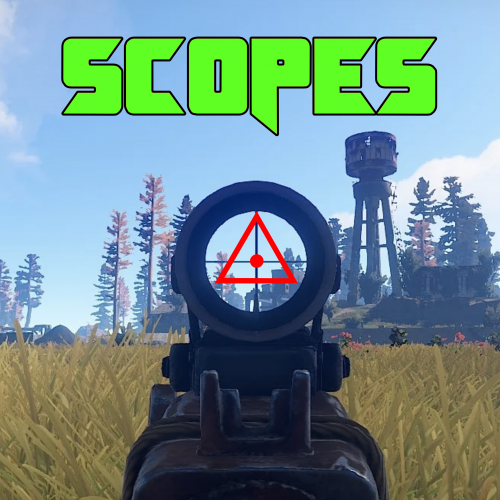
Version 1.3.2
1,575 downloads
Scopes is an on screen crosshair solution for all your rusty shooting needs. Features Selection of 6 Scopes that are customisable via the config. Permissions Scopes.Toggle << Required to use Scopes. Commands /Scope << Tells players to use the following: /Scope 1 << Scope1 (Default is 「」 /Scope 2 <<Scope2 (Default is + /Scope 3 <<Scope3 (Default is ◊ /Scope 4 <<Scope4 (Default is ◬ /Scope 5 <<Scope5 (Default is ・ /Scope 6 <<Scope6 (Default is Ⓧ /NoScope <<Disables the Scope. Configuration The settings and options for this plugin can be configured in the Scopes.json file under the oxide/config directory. The use of a JSON editor or validation site such as jsonlint.com is recommended to avoid formatting issues and syntax errors. { "symbols": [ "「」", "+", "◊", "◬", "・", "Ⓧ" ], "Colour": "1 0 0 1" } SPECIAL CAUTION NEEDS TO BE TAKEN WHEN EDITING THE CONFIG. USE NOTEPAD++ OR VSC. SOME PLAIN TEXT EDITORS (Like the one built into WinSCP) CANNOT LOAD THE SYMBOLS AND REPLACES THEM WITH GARBAGE! Variables As you can see to change a symbol you just type in your favourite character Within Rusts abilities (Some symbols are not supported as they are not included in Rusts Language packs... can be a little bit trial and error) Symbol Color is in the RGBA format Examples below.. Color Examples blackSolid black. RGBA is (0 0 0 1). blueSolid blue. RGBA is (0 0 1 1). clearCompletely transparent. RGBA is (0 0 0 0). cyanCyan. RGBA is (0 1 1 1). grayGray. RGBA is (0.5 0.5 0.5 1). greenSolid green. RGBA is (0 1 0 1). greyEnglish spelling for grey. RGBA is the same (0.5 0.5 0.5 1). magentaMagenta. RGBA is (1 0 1 1). redSolid red. RGBA is (1 0 0 1). whiteSolid white. RGBA is (1 1 1 1). The Last digit dictates Alpha channel... so for an opaque appearance select a value below 1 E.g. 0.7Free -
Ufff... there's always one ay?! If it becomes a constant issue I'd add the server name to the map file or similar.... until a rewrite comes around
-
Also if you increment the map name you wont get the mismatch error.... If i had CFv1.map and CFv1.save and I update the map and save it as CFv2.map and rename the save to CFv2.save Everything will be perfect....