
ELF's Wishlist
-
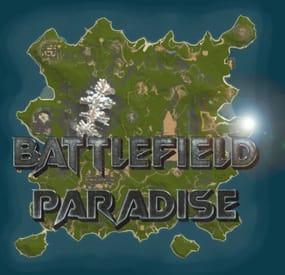
$24.99$19.99Battlefield Paradise 2800K Custom Map
By SlayersRust in Maps
In the heart of this EPIC RUST BATTLEFIELD MAP lies a breathtaking landscape crafted for High-FPS and fast paced PVP Gameplay. Amidst towering mountains and sprawling valleys, players navigate custom buildable underwater caves that offer strategic advantages for building and hiding bases. At its center, a colossal mountain dominates the skyline with the iconic Large Oil Rig and a meticulously designed Buildable Dome, all optimized for peak performance with minimal entity counts. This will be the central area where your players gather to practice PVP in the Large Oil Rig and fend off enemies practicing Raid Defense and Offense in the EPIC scale Buildable Dome!
NEW EXPERIENCE! Battle Towers Buildable Zone stands as a fortress of opportunity and conflict. Towering HUGE structures invite players to build bases on top of, defend against raids, and engage in intense PvP battles atop their formidable heights, giving one of the most FUN experiences any player can have in Rust!
Scattered across the terrain are 22 bespoke buildable monuments, each marked with an X on the map, bringing in your players with a fresh take on base building locations. This masterpiece of design not only promises thrilling PvP encounters but also showcases a commitment to immersive gameplay and efficient server performance, making it the best released Map for Battlefield Rust servers to date! 🌟
FEATURES 💎
• Size: 2800
• Prefab Count: 6352
• Map Optimized for Performance!
• Map Password: Included.
• Vast array of 22 EPIC Custom Buildable Monuments!
• Designated building zones (marked X on the minimap)
• Several Majestic Underwater Buildable Cave Bunkers!
• Legendary Battle Towers Build Zone: An expansive custom-built zone featuring multiple towers for epic building, raiding, and intense PVP combat!
• Monuments crafted for peak performance with minimal entities!
• EPIC Scale PVP Mountain center of map with Large Oil Rig and Buildable Dome!
• Everything crafted with Battlefield PVP Servers in mind for peak performance and EPIC scale FUN!
• Monumental and realistic landscape!
• Underground railway.
CUSTOM BUILDABLE MONUMENTS: 🏡
• Amount: 22 Total!
• Buildable Dome
• Custom Underwater Bunkers
• Custom Large Size Bus Stop Base
• EPIC Scale Rock Formation Cave
• Medium Sized Glass Roof Cave
• + MANY MORE!
Facepunch Monuments: 🏡
Launch Site ✅
Dome ✅
Giant Excavator ✅
Military Base ✅
2X Large Oilrig ✅
Small Oilrig ✅
Nuclear Missile Silo ✅
Ferry Terminal ✅
Satellite Dish ✅
Small Harbor ✅
2X Lighthouse ✅
2X Gas Station ✅
2X HQM Quarry ✅
Sulfur Quarry ✅
Stone Quarry ✅
Supermarket ✅
RadTown ✅
Power Substations Small and Large ✅
Jungle Ziggurat ✅
Cave Large Sewers Hard ✅
Cave Large Hard ✅
Cave Medium Medium ✅
Cave Large Medium ✅
Ranch Stables ✅
Fishing Village ✅
Bandit Town ✅
Outpost ✅
To Enable the Travelling Vendor on Custom Maps its optional to use this Oxide Plugin: https://codefling.com/plugins/anymapvendor
Help Discord: 🆘
@DarkoRust
- #battlefield
- #custom map
- (and 26 more)
-
$15.00
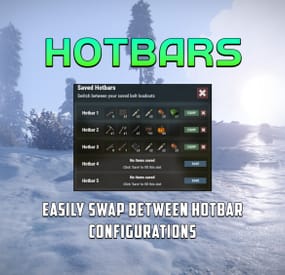
Hotbars
Hotbars is a Rust plugin that lets users create multiple MMO-style hotbars they can switch between on the fly either with chat commands, key binds or a GUI interface. Users can configure up to 5 bars to switch between. If the items are lost, the items are removed from the hobar when the user switches or recalls the hotbar.
Permissions
hotbars.use - Required for use. hotbars.(1-5) - Limits the amount of hotbars a player/group can have. Example: hotbars.3
Commands
/hotbar - Will print a list of availible commands. /hotbar list - Alternative method to open GUI interface. /hotbar close - Alternative method to close GUI interface. /hotbar save - Alternative method to save a hotbar. /hotbar delete 1-5 - Alternative method to delete a saved hotbar. /hotbar 1-5 - Alternative method to switch between hotbars.
Config
OnlyUsableItems (Default: true) - Prevents un-usable items from being saved into a hotbar, like resources, etc.. RestoreHotbarOnDeath (Default: false) - Restores the hotbar on respawn after a player dies. ToggleButtonContainerBounds - Configure the placement of the GUI hotbar button. ToggleButtonImageBounds - Configure the placement of the GUI hotbar button icon. ToggleButtonBounds - Configure the placement of the GUI hotbar button texture layer. ToggleButtonColor - Configure the color of the GUI hotbar button. ToggleButtonBackgroundColor - Configure the background color of the GUI hotbar button. ToggleButtonOpacity - Configure the opacity of the GUI hotbar button. ToggleButtonBackgroundOpacity - Configure the background opacity of the GUI hotbar button. HotbarContainerBounds - Configure the placement of the hotbar menu.
Preview
-
$9.99
Simple Bounty
Add excitement and tension to your Rust server with Simple Bounty, the ultimate bounty system plugin! Players can set bounties on others for revenge, justice, or just for fun. The longer a target evades capture, the more their bounty grows, raising the stakes with every passing moment.
Features:
Player-Driven Contracts: Anyone can place a bounty on any player for a customizable cost. Dynamic Growth: Bounties increase over time, making long-standing fugitives irresistible targets. Claim Rewards: Successful hunters are rewarded with the bounty upon eliminating the target. Risk and Strategy: Will you go after the high-stakes targets or lay low to keep your head? Perfect for PvP-focused servers or adding depth to faction gameplay. Get ready to turn your Rust world into a high-stakes game of cat and mouse!
Commands
/Wanted – Open Wanted Menu /ShowMostWanted – Show the Most Wanted Player on the Server Permissions
Use - Allows players to open the wanted menu Excluded - Players wont be available to have bounties placed on them Admin - Can cancel active bounties -
$20.00
Clan Warfare
Overview
Clan Warfare is a clan tracking and leaderboard system for Rust servers that transforms clan warfare into a competitive, point-based experience. The plugin tracks kills, deaths, and TC raids across all clans, featuring a registration system where clans protect their Tool Cupboards, a dynamic GUI leaderboard, and an engaging points economy that rewards PvP dominance and successful raids.
When a clan's registered TC is destroyed, they lose all points, and the raiding clan claims those points plus a raid bonus. This creates high-stakes territorial warfare where every TC matters and every raid can dramatically shift the leaderboard rankings.
Key Features
TC Registration System: Each clan can register one Tool Cupboard as their "core" - their most valuable asset Comprehensive Stat Tracking: Automatically tracks kills, deaths, and successful TC raids for every clan Dynamic Points Economy: Earn points for kills (configurable, default: 100 points) Earn points for destroying key prefabs (configurable, e.g., helicopters: 2000 points) Earn massive points for raids (configurable base: 1000 points + all points from raided clan) Lose ALL points when your registered TC is destroyed Place map markers on registered TCs for easy identification Beautiful GUI Leaderboard: Interactive in-game leaderboard with real-time updates, color-coded rankings, and TC registration indicators Smart Caching System: High-performance caching for leaderboards and clan lookups reduces server load Discord Integration: Optional webhook notifications for major events (kills, raids) with rich embeds Admin Tools: Comprehensive admin commands for managing clans, points, and TC registrations Auto-Save: Configurable auto-save system with dirty flag tracking ensures data integrity Clan Detection: Full integration with the Clans plugin for automatic clan identification Config Example
PointsPerKill: Points awarded for killing enemy clan members PointsPerRaid: Points awarded for successfully raiding an enemy clan's base PointsPerDestroyedPrefab: Points awarded for destroying specific prefabs (e.g., helicopters, barrels) HelicopterUseLastHit: If true, points for helicopter kills are awarded to the last player who damaged it AwardPointsOnPlayerKill: Toggle to enable/disable points for player kills LoseAllPointsOnRaid: Toggle to enable/disable losing all points upon being raided LeaderboardMaxEntries: Maximum number of entries to display on the leaderboard LeaderboardCacheTimeMinutes: Duration in minutes to cache the leaderboard data AutoSaveIntervalMinutes: Interval in minutes for auto-saving clan data TCDetectionRadius: Radius around tool cupboards to detect raids EnableDebugLogging: Toggle to enable/disable debug logging NotifyPlayersOnKills: Toggle to notify players when they earn points from kills NotifyPlayersOnRaids: Toggle to notify players when they earn points from raids EnableTCMapMarkers: Toggle to enable/disable map markers for registered tool-cupboards UseDiscordWebhooks: Toggle to enable/disable Discord webhook notifications DiscordWebhookURL: URL for the Discord webhook to send notifications to { "HelicopterUseLastHit": true, "PointsPerKill": 100, "PointsPerRaid": 1000, "PointsPerDestroyedPrefab": { "patrolhelicopter": 2000, "bradleyapc": 3000, "loot_barrel_2": 3, "loot_barrel_1": 2, "oil_barrel": 1 }, "AwardPointsOnPlayerKill": true, "LoseAllPointsOnRaid": true, "LeaderboardMaxEntries": 15, "LeaderboardCacheTimeMinutes": 5, "AutoSaveIntervalMinutes": 10.0, "TCDetectionRadius": 10.0, "EnableDebugLogging": false, "NotifyPlayersOnKills": true, "NotifyPlayersOnRaids": true, "EnableTCMapMarkers": true, "UseDiscordWebhooks": false, "DiscordWebhookURL": "WEBHOOK_URL_HERE" } Commands
Player Commands
/cw - Display help and available commands /cw register - Register the TC you're looking at (must be authorized) /cw stats [clan] - View detailed stats for your clan or specified clan /cw top - View top 5 clans in chat /cw leaderboard - Open the interactive GUI leaderboard Admin Commands (Requires clancores.admin permission)
/cwadmin save - Force save all data immediately /cwadmin reload - Reload configuration from file /cwadmin resetcache - Clear leaderboard and clan caches /cwadmin resetclan <clan> - Completely reset a clan's stats and TC registration /cwadmin addpoints <clan> <amount> - Add or remove points from a clan /cwadmin removetc <clan> - Remove a clan's TC registration Requirements
Clans Plugin: Required for clan detection and integration Rust Server: with Oxide/uMod framework Permissions
clanwarfare.use - Allows players to use basic commands (granted by default) clanwarfare.admin - Required for admin commands and data management Support & Customization
For support, feature requests, custom modifications, or help with advanced setup, feel free to contact me via private message.
-
$15.99
Private Islands 🏘️
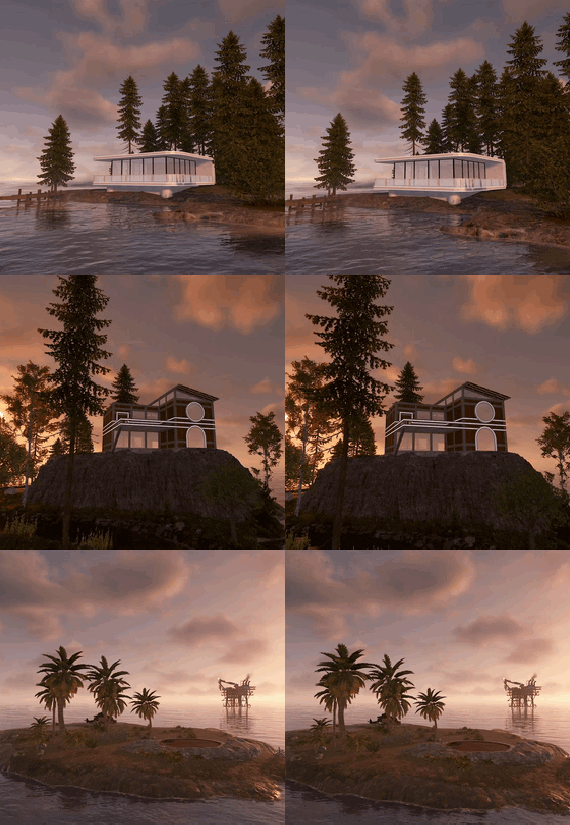
Upgrade your server with a set of three carefully crafted islands - suitable for solo players and groups. Each island can be fully built out or used to live only in the custom structure. Thoughtful layouts and clear build zones make these islands an excellent choice for PvP, PvE, roleplay servers, and cinematic locations.
What's included
Pine Island
Small, atmospheric island with a private pier.
Illuminated helipad for dramatic landings.
Compact modern 3×3 house.
A great option for a cozy base.
Mansion Island
Large house with stunning views and its own river.
Private pier and cohesive stylistic design.
Buildable area marked by a blue strip to show where construction is allowed.
Ideal as a showcase base for several players.
Bunker Island
Abandoned bunker available for partial development.
Large buildable cave for extra space.
Small oil refinery and a private garage for a submarine with a modest supply room.
Internal lighting that can be toggled on or off.
Three security cameras - two inside the bunker and one outside - for monitoring and defense.
Versatile - suitable for any biome.
Intuitive build zones.
If you have any questions or encounter issues, contact me here or on Discord - I’m always happy to help.