
ELF's Wishlist
-
$4.99
Multi Bot Bot Script - RCON
By AlexDev101 in Discord Bots
Simple script to manage multiple pop bots and a global one for rust game servers in discord
NB : If your not using a bot container :
You will need to install python and git (must be 3.7+)
(https://www.youtube.com/watch?v=XF_rklW9XkU&ab_channel=CBTNuggets)
1. Go to https://discord.com/developers/applications, create a new bot application
2. Go to O2Auth - > URL Generator -> Select bot & invite the bot to your discord
3. Go to BOT -> reset token -> input token in the config
Example Config
{ "RefreshRate":10, "GlobalBotDiscordToken":"", "Servers":[ { "name":"server_name_1", "ip":"168.100.161.191", "rcon_port":28065, "rcon_password":"", "discord_bot_token":"" }, { "name":"server_name_2", "ip":"168.100.161.191", "rcon_port":28085, "rcon_password":"", "discord_bot_token":"" } ] } 5. Input your rust game info, serverip, rcon port and password
6. Install requirements run **pip install -r requirements.txt** in your console
7. Run the main.py file to run the script
NB - The server names must be unique for the script to work
Suggested hosts -> https://serverstarter.host/ or anything offering a simple bot container - Python is key!
-
$41.00$31.95Multi Events
Introducing MultiEvents, the ultimate event management plugin for your Rust server! Seamlessly create, manage, and display events with a beautiful, customizable interface that engages your players. With support for multiple event types, easy integration with other plugins, and a powerful visual editor, MultiEvents is the perfect solution to enhance your server's community experience and keep players coming back for more.
⭐️ Features of Multi Events
Beautiful, fully customizable UI with multiple template options (Fullscreen, ServerPanel V1, ServerPanel V2) for a tailored player experience. In-game visual editor for creating and customizing event interfaces, allowing for real-time adjustments without coding. Support for event categories, descriptions, icons, and banners to enhance event visibility and player engagement. Integrated event notifications system to alert players about upcoming and ongoing events, ensuring maximum participation. Event inventory management with customizable permissions, providing control over player access and participation. Image library support for custom graphics and icons, enabling a unique and branded event presentation. Multi-language support with easy localization, making the plugin accessible to a global player base. ServerPanel integration for seamless menu access, enhancing user interaction and ease of use. Developer-friendly API for plugin integration, allowing for extended functionality and customization. Pre-loaded with diverse events such as CollectionResources, FoundationDrop, HelicopterPet, HuntAnimal, KingOfHill, LookingLoot, and SpecialCargo, each offering unique gameplay experiences. Advanced configuration options in JSON format, providing flexibility in event setup and management. Optimized for performance, ensuring smooth operation even with large player bases and extensive data.
🏆 Included Events
MultiEvents comes pre-loaded with several exciting events ready to use on your server:
CollectionResources - Collect resources and compete with other players! The more resources you collect, the higher your score. Use different tools to get multipliers for your gathering. Top players will receive valuable rewards! FoundationDrop - Players spawn on a platform made of foundations. The foundations begin to degrade and fall away one by one. Players must survive by jumping between foundations. The last player standing wins! When only one foundation remains, players receive weapons and radiation appears to speed up the finale. HelicopterPet - Try to get the attention of the patrol helicopter! The more it focuses on you, the more points you earn. Get points when the helicopter orbits around you and even more when it's attacking. The player with the most points at the end wins! Be careful though - this isn't your friendly neighborhood chopper! HuntAnimal - Hunt animals across the map to earn points! Different animals are worth different amounts - chickens are worth 1 point, while bears are worth 10 points. Wolves, boars, horses, and deer are worth 4 points each. The player with the most points at the end of the event wins! KingOfHill - Race to the highest point! Your score is based on the highest elevation you reach. Stay on solid ground - no flying, swimming, or using vehicles. The player who reaches the highest point and maintains their position wins! Watch your step and keep climbing! LookingLoot - Search for loot across the map! Earn points by looting containers and barrels. Most items are worth 1 point each, but special items like scrap and gears are worth 2 points. The player who collects the most valuable loot wins! Be quick - containers can only be looted once! SpecialCargo - Deliver the special cargo from one monument to another! A random player will be chosen to carry the cargo. The carrier must reach the destination monument marked on the map while avoiding other players. If the carrier dies, a new random player becomes the carrier. Teleportation is disabled for the carrier. Successfully deliver the cargo to win! Each event is fully customizable through the visual editor and comes with default settings ready to play immediately after installation!
🚀 Expansion Packs & Add‑ons
Enhance MultiEvents with premium expansion packs and our large‑scale raid framework. Pre‑configured, fully customizable, and designed to plug directly into your server.
✨ MultiEvents Pack 1 Barrels, PvP Player Battle, NPC Missile Silo, Pumpkin Picker, Vehicle Hunter. View on Codefling → 🌟 MultiEvents Pack 2 Another set of competitive and gathering‑focused events to diversify rotations. View on Codefling → 💠 MultiEvents Pack 3 Corn Collector, Gold Rush (with rare items), Mushroom Madness, NPC Underwater Lab, Patrol Helicopter Hit. View on Codefling → 🏰 OPERATION FORTRESS Large‑scale PvE raid framework with handcrafted bases, waves, and rewards — a perfect complement to your event ecosystem. View on Codefling →
🖼️ Showcase
Fullscreen Template
ServerPanel V1 Template
ServerPanel V2 Template
📬 Video Overview
🎮 Commands
/events - Opens the events menu for players
🛡️ Permissions
multievents.edit - Permission to edit events
🗒️ Visual Editor
MultiEvents includes a robust visual editor that simplifies the process of creating and customizing events. No coding is required—use the intuitive interface to adjust settings, modify colors, add text, and configure event elements directly in-game. This allows for quick and efficient event setup, ensuring your server's events are both engaging and visually appealing.
⚙️ Web Config Editor
Easily manage your MultiEvents settings with our web-based configuration editor. This tool allows you to adjust plugin configurations through a user-friendly interface, eliminating the need to manually edit files on your server.
P.S. To access the web config editor, you must be part of the "MultiEvents" group in our Discord server. Join us at https://discord.gg/mevent and submit a request in the #ticket-verify channel to get started.
📚 FAQ
Q: Can I integrate MultiEvents with other plugins?
A: Yes! MultiEvents has an API that allows other plugins to register and manage events. It also integrates with ServerPanel for menu access.
Q: How do I add MultiEvents to the ServerPanel menu?
A: You can do this directly from the ServerPanel in-game:
1. Open the ServerPanel menu in-game.
2. If you have permission to edit, switch the panel to edit mode so you can see the blue "EDIT CATEGORY" and "EDIT PAGES" buttons.
3. Choose the category where you want MultiEvents to appear and click the "EDIT CATEGORY" button for that category.
4. While you are in this category in the ServerPanel, click the "EDIT PAGES" button to create a new page (or edit an existing one) for MultiEvents.
5. For that page, set these exact parameters:
Type: Plugin Plugin Name: MultiEvents Plugin Hook: API_OpenPlugin 6. Save the changes. The MultiEvents button will now appear in the ServerPanel in the category you selected.
Q: How do I add custom images for my events?
A: MultiEvents supports an image library. Upload your images to your server, and reference them in the plugin configuration or through the visual editor.
Q: Does MultiEvents support multiple languages?
A: Yes, MultiEvents has built-in localization support. You can customize all text elements in the editor and add translations for different languages.
Q: How do I configure rewards in MultiEvents?
A: Rewards can be configured in two ways. If you want rewards to drop into a custom inventory UI, you need to set up items in the inventory settings and assign them unique IDs. Then, reference these IDs in the event configuration. If you prefer to give rewards directly to the player's in-game inventory, simply specify the rewards directly within the event settings.
Q: How do I set up rewards (Item, Command, Plugin, Kit) and what placeholders are available?
A: Types: Item (ShortName, Amount, DisplayName, Skin), Command (Command string), Plugin (Plugin Name, Hook, Amount), Kit (Kit name). Placeholders for Command: %steamid%, %username%. Multiple commands are separated by | (line breaks are also supported).
Give an item: "Type": "Item", "ShortName": "stones", "Amount": 2500, "DisplayName": "Stones", "Skin": 0 Give a kit: "Type": "Kit", "Kit": "vip_starter" Run commands: "Type": "Command", "Command (%steamid%)": "inventory.giveto %steamid% scrap 1000|oxide.usergroup add %steamid% vip" Add BankSystem balance (via Plugin): "Type": "Plugin", "Plugin": "BankSystem", "Hook": "Deposit", "Amount": 2500 Q: What are the recommended sizes for event images?
A: For optimal display, event banners should be 390x349 pixels, and event icons should be 64x64 pixels.
💻 Developer API
MultiEvents provides a developer-friendly API for integration with other plugins:
void API_RegisterEvent(string eventId, JObject data) - Register a new event with MultiEvents API_RegisterEvent Parameters:
eventId (string): unique identifier for the event. data (JObject): JSON object containing event details. JObject Structure:
title (string, required): The title of the event. description (string, optional): A brief description of the event. commandToStart (string, required): The command to start the event. commandToStop (string, required): The command to stop the event. bannerURL (string, optional): URL for the event's banner image. icon (string, optional): URL for the event's icon image. scrollElements (JArray, optional): Custom UI elements for the event's scroll view. Creating UI Elements for scrollElements:
The scrollElements parameter allows you to add custom UI elements to your event description. Each element is defined as a JObject with specific properties based on its type.
Common Properties: type (string): "label", "image", "panel", or "button" color (string): HEX color code (e.g., "#FFFFFF") alpha (float): Opacity from 0 to 100 position (JObject): Element position and dimensions Type-Specific Properties: Text Elements: text (JArray of strings), textColor (HEX), fontSize (int), font (string) Image Elements: image (string URL) Button Elements: text, textColor, fontSize, command (string) Panel Elements: cursorEnabled (bool) Example of UI Elements:
var customScrollElements = new JArray { // Label example new JObject { ["type"] = "label", ["text"] = new JArray { "Duration: <color=#D74933>10 mins</color>", "Reward: <color=#D74933>100 scrap, Jackhammer, Python Revolver</color>" }, ["textColor"] = "#E2DBD3", ["alpha"] = 100f, ["fontSize"] = 14, ["font"] = "robotocondensed-regular.ttf", ["align"] = "MiddleLeft", ["position"] = new JObject { ["anchorMinX"] = 0f, ["anchorMinY"] = 1f, ["anchorMaxX"] = 1f, ["anchorMaxY"] = 1f, ["offsetMinX"] = 0f, ["offsetMinY"] = -200f, ["offsetMaxX"] = 0f, ["offsetMaxY"] = -140f } }, // Image example new JObject { ["type"] = "image", ["image"] = "https://example.com/image.png", ["color"] = "#FFFFFF", ["alpha"] = 100f, ["position"] = new JObject { ["anchorMinX"] = 0f, ["anchorMinY"] = 1f, ["anchorMaxX"] = 0f, ["anchorMaxY"] = 1f, ["offsetMinX"] = 0f, ["offsetMinY"] = -234f, ["offsetMaxX"] = 42f, ["offsetMaxY"] = -192f } }, // Button example new JObject { ["type"] = "button", ["text"] = "Click Me", ["textColor"] = "#FFFFFF", ["color"] = "#D74933", ["alpha"] = 100f, ["fontSize"] = 14, ["command"] = "customcommand {user}", ["position"] = new JObject { ["anchorMinX"] = 0.5f, ["anchorMinY"] = 0f, ["anchorMaxX"] = 0.5f, ["anchorMaxY"] = 0f, ["offsetMinX"] = -60f, ["offsetMinY"] = 20f, ["offsetMaxX"] = 60f, ["offsetMaxY"] = 50f } } }; Example Usage:
MultiEvents.Call("API_RegisterEvent", "CollectionResources", new JObject { ["title"] = "Collection Resources", ["description"] = "Collect resources and compete with other players! The more resources you collect, the higher your score. Use different tools to get multipliers for your gathering. Top players will receive valuable rewards!", ["commandToStart"] = "collectionresources.start", ["commandToStop"] = "collectionresources.stop", ["bannerURL"] = "https://gitlab.com/TheMevent/PluginsStorage/raw/main/Images/MultiEvents/CollectionResources.png", ["icon"] = "https://gitlab.com/TheMevent/PluginsStorage/raw/main/Images/MultiEvents/Icons/CollectionResources.png", ["scrollElements"] = customScrollElements });
(hook) OnEventStart(string eventName) - Hook called when an event begins (hook) OnEventEnd(string eventName) - Hook called when an event ends bool API_PlayerHideNotify(ulong userId) - Allows hiding event notifications for a specific player. Returns a boolean indicating whether notifications are hidden for the player. string GetBannerUrlByEventId(string eventId) - Retrieves the banner URL for a specific event by its ID. This is useful when you need to reference an event's banner in your custom UI.
🧪 TEST SERVER
Join our test server to view and experience all our unique features yourself!
Copy the IP Address below to start playing!
connect 155.103.86.38:28015
Elevate your server's event management with MultiEvents - the complete solution for creating engaging and visually stunning events that will keep your players excited and coming back for more!
- #mutlievents
- #events
- (and 15 more)
-
$40.00
Resistance Islands
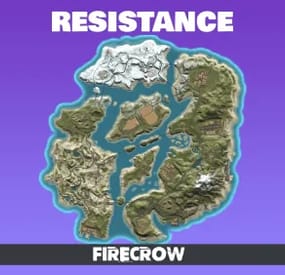
Biotech Research Labs chased miracles, only to unleash horror: mutated plants erupted, ripping through concrete walls, now forming 30-year jungles in weeks. Towns decay in months, while planes and ships collapse on mid-trip, since plants bursting even through metal.
Pieced together from found Cobalt Post news fragments*
Features:
- Island Layout: United by bridges and ziplines, balanced distances for quick swimming
- Railway: Covers major islands, passing through mountain tunnels
- Bridges: Easy crossings by car or train, high enough for large boats
- Coastal Caves: Private bays fit even TugBoats
- Desert Lab: Collapsed research lab, NPCs, Blue keycard, elite crates
- Mountain Research Complex: Blue & Red keycards, NPCs, elite crates
- CargoShip (Safe Zone): SafeZone & trading hub
- Winter GreenBunker: Hidden building spot for quiet farmers
- Sailing Yacht: Vibest building spot
- Monuments: Match facepunch keycard progression
- Ziplines: Fast travel across all islands, full coverage
- Tunnels: For trains and cars, through mountains and underwater
- Roads: Smooth curves, no steep slopes, for comfy drive
- Boats: Deep water, high bridges, easy navigation between islands
- Cliffs: Carefully placed, no procedural generation
The map includes BunkerFix.cs plugin to fix plant lighting in GreenBunker planter boxes
Love this map? Discover more unique maps like our Oasis or Cacatua
For any questions or support, feel free to contact us anytime! Discord: https://discord.com/invite/GGgx822❤️
-
$45.00
Tiers Mode
Rust / Server Plugins
TiersMode
Tier-Based ProgressionRust Plugin
A new stage. New possibilities. Your wipe, at your pace.
Create a staged progression system for your Rust server. Decide when players can access building grades, items, events, vendors and vehicles, and adjust crafting and gathering as the wipe progresses.
4 default tiers
Add and customize your own stages
Per-tier rules
Building, events, access and rates
In-game editing
Manage blocked items with /tier edit
01 / Video demo
See TiersMode in action
Watch the video demo for a look at TiersMode.
Watch on YouTube
02 / Progression
Set the pace of your wipe
Add a tier-based game mode to an existing modded server or build a new server around staged progression. TiersMode generates four tiers by default, and you can create additional stages and configure each one independently.
Give every tier its own name, icon URL and color. Set stage duration in minutes: 60 for one hour, or 1,440 for one day. Customize what becomes available as your server moves through the tiers. 03 / Player information
Keep players informed as the server progresses
On-screen counter. Display the current tier and the time remaining until the next stage. Tier information window. Enable or disable the information screen and control whether players can view upcoming tiers. Configurable modal alerts. Notify players about restrictions, tier changes and events such as airdrops, Cargo Ship arrivals or Oil Rig respawns. Custom announcements. Send a server-wide modal message with /tieralert. Chat messages. Configure alert notifications and a welcome message explaining the game mode. Discord announcements. Announce wipe starts and tier changes using the Discord Messages plugin. Server title. Optionally update the server title using the configured tier placeholder. 04 / Building & workbenches
Control building progression and research
Tool cupboard limits. Set a maximum number of cupboards per player or allow unlimited placement. Cupboard destruction alerts. Optionally notify the server when a player destroys another player's tool cupboard. Building grades. Set the maximum upgrade level allowed in each tier. Workbench research. Allow or block research through workbenches by tier. Workbench placement. Allow all workbenches, block placement, or permit only the workbenches specified for that stage. 05 / Events & trading
Decide when major events and services become available
Server events
Enable or disable Cargo Ship, Oil Rig, Chinook, Patrol Helicopter, Airdrop and Bradley APC events for each tier.
Vendors and public trading
Control helicopter, boat and horse vendors, drone use and public monument vending machines.
06 / Spawns & vehicles
Unlock cards and vehicles stage by stage
Keycard spawns. Choose which access cards can spawn in each tier. Start with green cards and introduce blue and red cards later. Car spawns. Choose which modular car sizes can appear around the map, or disable car spawns for a tier. Vehicle access. Allow or block MLRS, Workcart and Locomotive use independently. 07 / Rates & gathering
Match crafting and resource rates to each tier
Configure crafting speed, research time and recycling time independently for each stage. Keep vanilla values or adjust the pace as progression advances.
The integrated gather system supports Dispenser Gather, Dispenser Bonus, Collectible Pickup, Growable Gathered, Survey Gather, Quarry Gather and Excavator Gather.
Use one gather system for these rates: disable TiersMode's gather system if another gather plugin controls them, or remove the overlapping plugin before enabling the integrated system.
08 / Restrictions & automation
Edit blocked items in game and run commands per tier
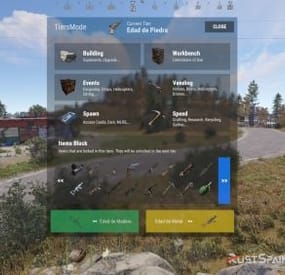
Use /tier edit to manage the items blocked by each stage through the administrative interface, without manually searching for their names in the configuration.
Block crafting of items restricted in the current tier. Prevent placement of specified deployables when the player lacks building privilege. Run your configured server commands when a tier loads, including on tier changes and server restarts. Use tier commands to enable or disable other plugins, trigger their events, or apply your own stage-specific server setup.
09 / Commands
Player and administrator commands
Command Purpose /tier Open the tier information window when enabled. /tier edit Open the blocked-item editor. Requires tiersmode.admin. /tieralert textmsg Send a custom modal alert to online players. Requires tiersmode.admin. 10 / Permissions
Fine-tune access and bypass permissions
Permission Purpose tiersmode.admin Access the tier editor and custom alert command. Assign to administrators only. tiersmode.bypass.use_workcart Bypass the Workcart use restriction. tiersmode.bypass.use_locomotive Bypass the Locomotive use restriction. tiersmode.bypass.use_mlrs Bypass the MLRS use restriction. tiersmode.bypass.limit_cupboard Bypass the tool cupboard limit. tiersmode.bypass.block_items Bypass item restrictions. tiersmode.bypass.block_place_no_building Bypass specified deployable restrictions without building privilege. tiersmode.bypass.upgrade Bypass the maximum building upgrade level. tiersmode.bypass.block_place_all_workbench Bypass workbench placement restrictions. tiersmode.bypass.block_research Bypass workbench research restrictions. tiersmode.bypass.block_vending_helis Bypass helicopter vendor restrictions. tiersmode.bypass.block_vending_boat Bypass boat vendor restrictions. tiersmode.bypass.block_vending_horses Bypass horse vendor restrictions. tiersmode.instant_research Instant research. tiersmode.alerts.block Disable alerts for the player. tiersmode.instant_recycler Instant recycling. 11 / Default configuration
Four tiers to use as your starting point
This example uses four stages: Wood Age, Stone Age, Metal Age and Explosive Age. Each lasts 1,440 minutes, with progressively higher building grades and different events, rates and restrictions. Tier names in the configuration are customizable and appear in Spanish in this example.
Adjust the server title, image URLs, Discord webhook placeholder and server commands for your own setup. Discord announcements require the Discord Messages plugin when enabled.
{ "Automatic Server Title": { "Enabled Auto Changue": true, "Base title to modify": "RustSpain.com | Tiers Mode ({0})" }, "GUI Config": { "On-Screen GUI Counter": true, "Counter Config": { "Color Title": "1.0 1.0 1.0 0.70", "Color Subtitle": "1.0 1.0 1.0 0.70", "Color Button": "0.46 0.46 0.46 0.49", "Show Icon/Color": true, "Show Button Info": true }, "Enabled Alert Modal": true, "Modal Config": { "Duration Show": 10.0, "Color Title": "1.0 1.0 1.0 0.70", "Color Description": "1.0 1.0 1.0 0.70", "Sound Alert": true, "Prefab Sound": "assets/prefabs/tools/pager/effects/beep.prefab" }, "Enabled Alert Modal Changue Tier": true, "Modal Changue Config": { "Duration Show": 15.0, "Color Title": "1.0 1.0 1.0 0.70", "Color Description": "1.0 1.0 1.0 0.70", "Sound Alert": true, "Prefab Sound": "assets/bundled/prefabs/fx/item_unlock.prefab" }, "Enabled Alert Modal Events": true, "Modal Events Config": { "Duration Show": 15.0, "Color Title": "1.0 1.0 1.0 0.70", "Color Description": "1.0 1.0 1.0 0.70", "Sound Alert": true, "Prefab Sound": "assets/prefabs/tools/pager/effects/vibrate.prefab" }, "Enabled Custom Alert Modal": true, "Modal Custom Config": { "Duration Show": 15.0, "Color Title": "1.0 1.0 1.0 0.70", "Color Description": "1.0 1.0 1.0 0.70", "Sound Alert": true, "Prefab Sound": "assets/prefabs/tools/pager/effects/vibrate.prefab" }, "Windows Info Config": { "Show GUI Info Window on Enter": true, "Show GUI Info use Command": true, "Show Previous Tier Button": true, "Show Next Tier Button": true, "Color Title": "1.00 1.00 1.00 1.00", "Color Text": "0.90 0.90 0.90 1.00", "Color Header Info": "0.0 0.0 0.0 1.0", "Color Button Close": "0.20 0.20 0.20 0.80" } }, "Messages": { "Enabled Chat": true, "Enabled Welcome Chat": true, "Use Discord Message Plugin": true, "Webhook Channel Announcement Change of Stag": "Put here your Webhook of the Channel where you want to announce the changes of Tiers." }, "Tiers": [ { "Tier Name": "Edad de Madera", "Tier Icon URL": "https://img.rustspain.com/tiers/1.png", "Tier Color": "0.17 0.75 0.42 0.50", "Duration of the tier in Minutes": 1440, "Cupboards": { "Limit Maximum Placed Cupboards": true, "Maximum Cupboards per player": 3, "Global Alert for Destruction of Cupboard": false, "Config Destruction Alert": { "Show Name of the player who destroyed it in the info": true, "Show Position in info": true }, "Maximum Upgrade Level (1 = Wood, 2 = Stones, 3 = Metal, 4 = HQ)": 1 }, "Workbench": { "Allow research from Workbench": false, "Allow Place All Workbench": false, "Allow placing only the following workbenches": [ "assets/prefabs/deployable/tier 1 workbench/workbench1.deployed.prefab" ] }, "Events": { "Cargoship": false, "Oil Rig": false, "Chinook": false, "Patrol Helicopter": true, "Airdrop": true, "Bradley APC": false }, "Sellers": { "Helicopter Sale": false, "Boat Sales": false, "Horse Sales": false, "Use of Drones": false, "Use of Public Vending Machine (Rads)": false }, "Spawn": { "Spawn Cards": [ "keycard_green_pickup" ], "Spawn Vehicles (Cars)": [], "Use Vehicle MLRS": false, "Use Vehicle Workcart": true, "Use Vehicle Locomotive": true }, "Speed": { "Crafting Rate (1.0 = Vanilla | 0.0 = Instant)": 1.0, "Research Seconds (10.0 = Vanilla | 0.0 = Instant)": 10.0, "Recycler Seconds (5.0 = Vanilla | 0.0 = Instant)": 5.0, "Gather System (If you use another plugin for the Gather disable this or remove the other one)": false, "Gather Config (Setting 0.0 will disable this option and it will work as vanilla)": { "DispenserGather": 0.0, "DispenserBonus": 1.0, "CollectiblePickup": 0.0, "GrowableGathered": 0.0, "SurveyGather": 0.0, "QuarryGather": 0.0, "ExcavatorGather": 0.0 } }, "Lists": { "Items lock Craft": true, "Items lock": [ "shotgun.waterpipe", "shotgun.pump", "pistol.semiauto", "pistol.revolver", "rifle.semiauto", "maxhealthtea", "radiationresisttea", "healingtea", "ammo.rifle", "ammo.shotgun.fire", "ammo.shotgun", "ammo.shotgun.slug" ], "Deployable lock without Building Permissions": false, "Items lock without Building Permissions": { "trap.bear": "assets/prefabs/deployable/bear trap/beartrap.prefab", "trap.landmine": "assets/prefabs/deployable/landmine/landmine.prefab" }, "Server Commands": [ "o.unload Backpack", "o.unload TheStorm" ] } }, { "Tier Name": "Edad de Piedra", "Tier Icon URL": "https://img.rustspain.com/tiers/2.png", "Tier Color": "0.06 0.58 0.86 0.50", "Duration of the tier in Minutes": 1440, "Cupboards": { "Limit Maximum Placed Cupboards": true, "Maximum Cupboards per player": 5, "Global Alert for Destruction of Cupboard": false, "Config Destruction Alert": { "Show Name of the player who destroyed it in the info": true, "Show Position in info": true }, "Maximum Upgrade Level (1 = Wood, 2 = Stones, 3 = Metal, 4 = HQ)": 2 }, "Workbench": { "Allow research from Workbench": false, "Allow Place All Workbench": false, "Allow placing only the following workbenches": [ "assets/prefabs/deployable/tier 1 workbench/workbench1.deployed.prefab" ] }, "Events": { "Cargoship": true, "Oil Rig": false, "Chinook": true, "Patrol Helicopter": true, "Airdrop": true, "Bradley APC": false }, "Sellers": { "Helicopter Sale": false, "Boat Sales": true, "Horse Sales": true, "Use of Drones": false, "Use of Public Vending Machine (Rads)": false }, "Spawn": { "Spawn Cards": [ "keycard_green_pickup", "keycard_blue_pickup" ], "Spawn Vehicles (Cars)": [ "2module_car_spawned.entity" ], "Use Vehicle MLRS": false, "Use Vehicle Workcart": false, "Use Vehicle Locomotive": false }, "Speed": { "Crafting Rate (1.0 = Vanilla | 0.0 = Instant)": 0.6, "Research Seconds (10.0 = Vanilla | 0.0 = Instant)": 8.0, "Recycler Seconds (5.0 = Vanilla | 0.0 = Instant)": 4.0, "Gather System (If you use another plugin for the Gather disable this or remove the other one)": true, "Gather Config (Setting 0.0 will disable this option and it will work as vanilla)": { "DispenserGather": 1.5, "DispenserBonus": 1.5, "CollectiblePickup": 1.5, "GrowableGathered": 1.5, "SurveyGather": 1.5, "QuarryGather": 1.5, "ExcavatorGather": 1.5 } }, "Lists": { "Items lock Craft": true, "Items lock": [ "weapon.mod.8x.scope", "rifle.bolt", "hmlmg", "pistol.python", "smg.thompson", "shotgun.double", "roadsign.gloves", "roadsign.kilt", "hazmatsuit.arcticsuit", "explosives", "submarine.torpedo.straight", "ammo.rocket.basic", "ammo.rocket.hv", "ammo.rifle.incendiary", "ammo.pistol.fire", "ammo.rocket.fire", "ammo.rifle.hv", "ammo.pistol.hv" ], "Deployable lock without Building Permissions": true, "Items lock without Building Permissions": { "trap.bear": "assets/prefabs/deployable/bear trap/beartrap.prefab", "trap.landmine": "assets/prefabs/deployable/landmine/landmine.prefab" }, "Server Commands": [ "o.unload Backpack", "o.unload TheStorm" ] } }, { "Tier Name": "Edad de Metal", "Tier Icon URL": "https://img.rustspain.com/tiers/3.png", "Tier Color": "0.87 0.75 0.05 0.50", "Duration of the tier in Minutes": 1440, "Cupboards": { "Limit Maximum Placed Cupboards": false, "Maximum Cupboards per player": 5, "Global Alert for Destruction of Cupboard": false, "Config Destruction Alert": { "Show Name of the player who destroyed it in the info": true, "Show Position in info": true }, "Maximum Upgrade Level (1 = Wood, 2 = Stones, 3 = Metal, 4 = HQ)": 3 }, "Workbench": { "Allow research from Workbench": false, "Allow Place All Workbench": false, "Allow placing only the following workbenches": [ "assets/prefabs/deployable/tier 1 workbench/workbench1.deployed.prefab", "assets/prefabs/deployable/tier 2 workbench/workbench2.deployed.prefab" ] }, "Events": { "Cargoship": true, "Oil Rig": true, "Chinook": true, "Patrol Helicopter": true, "Airdrop": true, "Bradley APC": true }, "Sellers": { "Helicopter Sale": true, "Boat Sales": true, "Horse Sales": true, "Use of Drones": false, "Use of Public Vending Machine (Rads)": true }, "Spawn": { "Spawn Cards": [ "keycard_green_pickup", "keycard_blue_pickup", "keycard_red_pickup" ], "Spawn Vehicles (Cars)": [ "2module_car_spawned.entity", "3module_car_spawned.entity", "4module_car_spawned.entity" ], "Use Vehicle MLRS": false, "Use Vehicle Workcart": false, "Use Vehicle Locomotive": false }, "Speed": { "Crafting Rate (1.0 = Vanilla | 0.0 = Instant)": 0.3, "Research Seconds (10.0 = Vanilla | 0.0 = Instant)": 6.0, "Recycler Seconds (5.0 = Vanilla | 0.0 = Instant)": 3.0, "Gather System (If you use another plugin for the Gather disable this or remove the other one)": true, "Gather Config (Setting 0.0 will disable this option and it will work as vanilla)": { "DispenserGather": 2.0, "DispenserBonus": 2.0, "CollectiblePickup": 2.0, "GrowableGathered": 2.0, "SurveyGather": 2.0, "QuarryGather": 2.0, "ExcavatorGather": 2.0 } }, "Lists": { "Items lock Craft": true, "Items lock": [ "rifle.l96", "lmg.m249", "multiplegrenadelauncher", "pistol.m92", "shotgun.spas12", "rifle.m39", "explosive.timed", "weapon.mod.muzzlebrake", "weapon.mod.muzzleboost", "chainsaw", "jackhammer", "weapon.mod.extendedmags", "ammo.rocket.mlrs", "ammo.grenadelauncher.he", "ammo.grenadelauncher.buckshot", "ammo.grenadelauncher.smoke", "ammo.rifle.explosive" ], "Deployable lock without Building Permissions": false, "Items lock without Building Permissions": { "trap.bear": "assets/prefabs/deployable/bear trap/beartrap.prefab", "trap.landmine": "assets/prefabs/deployable/landmine/landmine.prefab" }, "Server Commands": [ "o.load Backpack", "o.unload TheStorm" ] } }, { "Tier Name": "Edad Explosiva", "Tier Icon URL": "https://img.rustspain.com/tiers/4.png", "Tier Color": "0.80 0.26 0.13 0.50", "Duration of the tier in Minutes": 1440, "Cupboards": { "Limit Maximum Placed Cupboards": false, "Maximum Cupboards per player": 5, "Global Alert for Destruction of Cupboard": false, "Config Destruction Alert": { "Show Name of the player who destroyed it in the info": true, "Show Position in info": true }, "Maximum Upgrade Level (1 = Wood, 2 = Stones, 3 = Metal, 4 = HQ)": 4 }, "Workbench": { "Allow research from Workbench": true, "Allow Place All Workbench": true, "Allow placing only the following workbenches": [ "assets/prefabs/deployable/tier 1 workbench/workbench1.deployed.prefab", "assets/prefabs/deployable/tier 2 workbench/workbench2.deployed.prefab", "assets/prefabs/deployable/tier 3 workbench/workbench3.deployed.prefab" ] }, "Events": { "Cargoship": true, "Oil Rig": true, "Chinook": true, "Patrol Helicopter": true, "Airdrop": true, "Bradley APC": true }, "Sellers": { "Helicopter Sale": true, "Boat Sales": true, "Horse Sales": true, "Use of Drones": true, "Use of Public Vending Machine (Rads)": true }, "Spawn": { "Spawn Cards": [ "keycard_green_pickup", "keycard_blue_pickup", "keycard_red_pickup" ], "Spawn Vehicles (Cars)": [ "2module_car_spawned.entity", "3module_car_spawned.entity", "4module_car_spawned.entity" ], "Use Vehicle MLRS": true, "Use Vehicle Workcart": false, "Use Vehicle Locomotive": false }, "Speed": { "Crafting Rate (1.0 = Vanilla | 0.0 = Instant)": 0.0, "Research Seconds (10.0 = Vanilla | 0.0 = Instant)": 4.0, "Recycler Seconds (5.0 = Vanilla | 0.0 = Instant)": 2.0, "Gather System (If you use another plugin for the Gather disable this or remove the other one)": true, "Gather Config (Setting 0.0 will disable this option and it will work as vanilla)": { "DispenserGather": 3.0, "DispenserBonus": 3.0, "CollectiblePickup": 3.0, "GrowableGathered": 3.0, "SurveyGather": 3.0, "QuarryGather": 3.0, "ExcavatorGather": 3.0 } }, "Lists": { "Items lock Craft": true, "Items lock": [], "Deployable lock without Building Permissions": true, "Items lock without Building Permissions": { "trap.bear": "assets/prefabs/deployable/bear trap/beartrap.prefab", "trap.landmine": "assets/prefabs/deployable/landmine/landmine.prefab", "water.catcher.large": "assets/prefabs/deployable/water catcher/water_catcher_large.prefab", "water.catcher.small": "assets/prefabs/deployable/water catcher/water_catcher_small.prefab" }, "Server Commands": [] } } ] } 12 / Language & support
Make the game mode fit your community
Language files are generated in English by default. A Spanish translation is available on request.
For questions, problems, suggestions or help with your setup, contact ninco90 on Discord.
A custom configuration service is also available for an additional fee if you would like the game mode configured around your server's preferences.
Give every stage of your wipe its own rules
Start with the four default tiers, adjust the timing and unlocks, and build a progression experience around your community.
-
$49.90$37.42Radiant Peak | Custom Map By Shemov&Answer
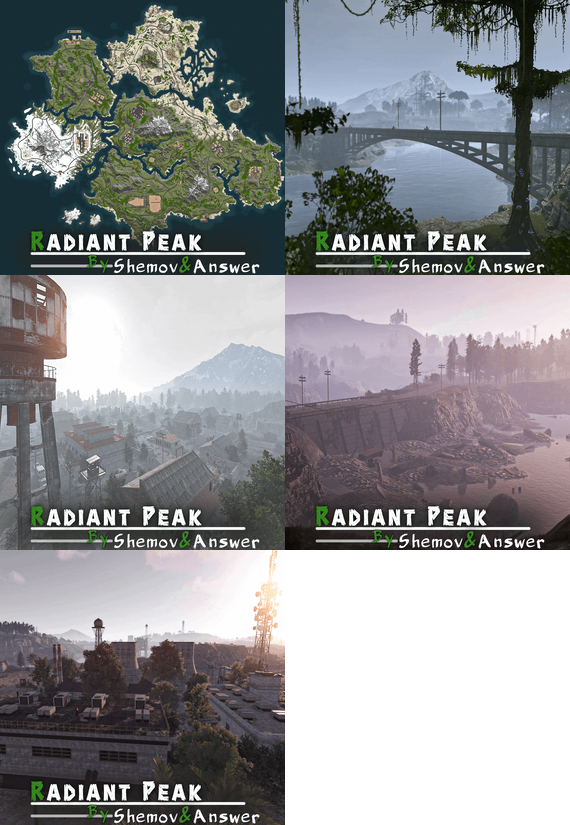
Radiant Peak is unique map where 2 developers have joined forces, featuring a 4500 size and approximately 60,000 prefabs. It supports BetterNPC plugins and Train Homes, enhancing gameplay with bot configurations. Players can explore numerous unmarked abandoned settlements along the roads. The map includes custom building sites, custom zipline points, lakes, and rivers for resources. An underground railway and a double-track surface railway offers metro access. Freshwater lakes and rivers support farming, while a ring road is compatible with events. Monuments are evenly spaced to optimize FPS, and custom subway building sites are available. Bridges are designed for easy tugboat access, and underwater dive sites are marked on the map.
> Adventurers will uncover many unmarked settlements and isolated buildings scattered across the landscape, offering hidden surprises for those willing to explore. Many underwater dive sites have been designed, indicated by 'O' on the minimap. For an extra thrill, the map includes ziplines, offering fast and exciting ways to traverse the map - and this is just the beginning!
You can view this map yourself on the test server 185.207.214.245:35800
FEATURES
- Map size: 4500;
- Prefab count: ~60K;
- Compatible with BetterNPC plugins (Config for bots in the file), and Train Homes;
- Lots of abandoned settlements can be found along the roads, left unmarked so players can find and explore them on their own;
- Custom building sites (X on the minimap);
- Custom Zipline Points spread across the map;
- Custom lakes and rivers for food and water;
- Underground railway;
- Double-track surface railway with 2 entrances to the metro with separate branches for spawn trains;
- Fresh water and vegetation for farmers are in the rivers of the map;
- Ring road (compatible with event plugins);
- Evenly spaced monuments to spread the FPS load of client;
- Custom places for building in the subway (XU on the minimap);
- All bridges are designed for easy tugboat access;
- Underwater farm zones (O on the minimap);-Single small lakes with fresh water throughout the map.
CUSTOM MONUMENTS
- Lots of unmarked settlements spread evenly across the map;
- Wood Industry;
- Container Park;
- Comms Tower;
- Abandoned Town;
- Deserted Motels;
- Office building;
- Train station;
- Construction Site;
- Heat Station;
- MLRS camp;
- Wind Turbine;
- Oil Rig 3;
- Zipline Points;
- RW station;
- Bandit Fishing Village: optimized safe zone;
- Sunken Stone, Sulfur & HQM quarries;
- Custom build spots: marked with X or XU;
- Underwater dive sites: marked with O.
FACEPUNCH MONUMENTS
- Combined Outpost;
- Harbor (2/2)
- Ferry Terminal
- Oxum's Gas Station
- Abandoned Supermarket
- Launch Site
- Airfield
- Arctic Research Base
- Power Plant
- Water Treatment Plant
- Train Yard
- Missile Silo
- Satellite Dish
- Giant Excavator Pit
- Small & Large Oil Rig
- Underwater Lab
- Ziggurat
NOTES
- The password for the map is included, just in case you want to edit it.
- Need help? You can contact Shemov or Answer
- #rust custom
- #custom map
- (and 6 more)