
DeutscherRitterPlatz's Wishlist
-
$19.99
Motorbike Racing
By imthenewguy in Plugins
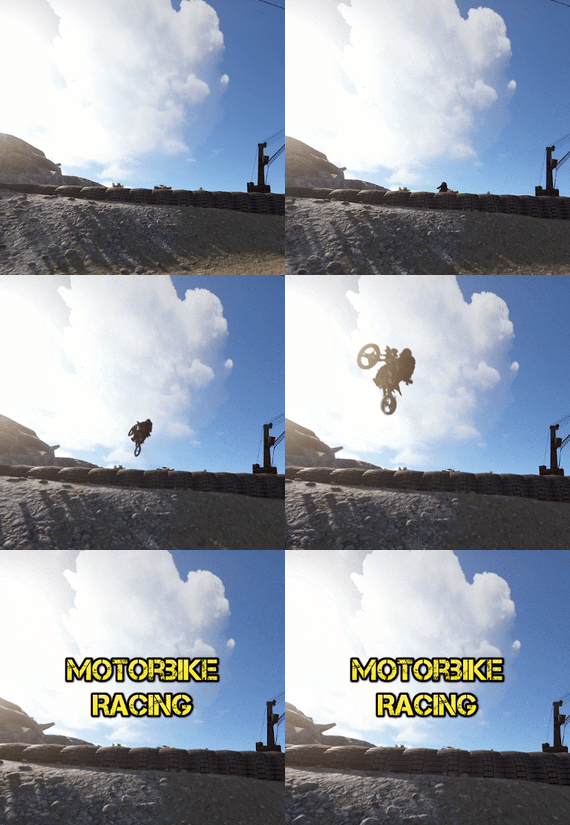
Motorbike racing is a plugin that allows you to build and host motorbike race tracks in-game.
The plugin is integrated with a track building system that gives you full control over where and how you build your race tracks.
Players can compete for prizes for winning, or compete for the fastest lap times on a map for bragging rights.
Races are associated with the .map file name that they were built on, and will automatically load when a map with the same name is loaded.
I would like to extend a special thanks to @monsterqueen for the idea and supplying the prefab. You can test out the plugin and prefab on her server: us.themonsterden.net.
Features
Map building system that is easy to use and powerful. Global scoreboard to track the amount of wins for each race track, as well as the fastest times. Seamless enrollment into the event - players will be teleported to the race when it begins, and their items will be stored safely until it's completion (or they leave). Start to finish race handling - the plugin will restrict the contestants to the configured value or the number of motorbike spawns (whatever is lower), and will handle the race, scoring and prizes. Customizable prizes based on placement - you can set customizable prices (including economics, server rewards and items), based on the position that the player finished. EventHelper support - the plugin will work with EventHelper's auto start and event vote features.
Permissions
motorbikeracing.admin - allows for the user of the buildmap command and the manual starting of races
Chat commands
buildmap <race name> - Starts the map building process. Avoid using the dash (-) symbol in the map name. buildclearspawns - removes all spawns from a map while in building mode. savemap - Only usable during the map builder. It saves the map file you are working on. startrace <race name> - Manually starts the desired race. Run the command with no parameters to see valid races for the current map. endrace <race name> - Ends the selected race. If there is only 1 race active, you don't need to use the race name parameter. rscore - Opens up the hi scores. joinrace <race name> - Joins the desired race. leaverace - Leaves the active race. racerestoreitems - restores the players items if they weren't restored automatically (ie they died somehow). raceprize - redeems any prizes that the player is owed.
Video and pictures were taken using this prefab:
-
$40.00
Train Bases
By LeroyJenkins420 in Plugins
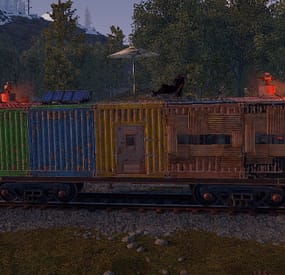
This plugin allows any player to find and build on a train directly on the rails in either a 1x5 or 1x3 configuration.
Features:
Throttle syncing for trains (syncs throttles when updated) Build anything almost anywhere (on trains) Limited to 2x1 or 5x1 carts Can be built inside of some monument (Trainyard, etc) Can be built inside underground tunnels Electrical entities powered by the train Configurable Health Preset Support NO MAP EDITING REQUIRED!!!
How To Use:
To use this plugin you need to:
1. Put the plugin in your plugins folder and enjoy!
Chat Commands:
/blacklist: Admin only, will blacklist items in your inventory, this will prevent these items from being placed on the train.
/killtrains: Admin only, will kill all trains on the server.
Args: All - kills all trains Built - kills only built trains Unbuilt - kills only unbuilt trains
Config:
Bounds defines the buildable area on the train, default is 1x5 or 1x2 for work carts. Larger building bounds may or may not be supported in the future.
Building grade support 0-4
0: twigs 1: wood 2: stone 3: metal 4: high quality { "Version Number": { "Major": 1, "Minor": 1, "Patch": 7 }, "Upgrade Chance (0-100 = %0-100 chance)": 50.0, "Building Grade to spawn as": 3, "Train Wagon Start Health": 5000.0, "Train Engine Force": 250000.0, "Blacklisted Entities (shortnames)": [ "example1", "example2", "For ShortNames Go to:", "https://docs.carbonmod.gg/references/items/", "https://www.corrosionhour.com/rust-item-list/" ], "Sync Train Throttles": true, "Max Train Pop": 24.0, "Max coupled trains": 12, "Max Train Couple Speed": 9.0, "Message Prefix": "<size=18px><color=#51a3f5>[</color><color=#FFFFFF>T</color><color=#FF0000>B</color><color=#51a3f5>]</color></size>" } Note: Presets can be found in a seperate folder (TrainBases > TrainPresets)
Please also be aware that at this time bounds are only setup for default types. EX: you can create presets for WagonC, however if you create presets for locomotive the player will be able to build infinitely off the train. Default types meaning train types that come with presets by default (wagonc, wagonb, etc).
The bounding system will be re-engineered shortly to allow for dynamic bound creation.
Note: weighted chance modifiers can be modified for each preset valid arguments for these modifiers are 0-100 and affect the likelihood of that preset spawning.
- #trainserver
- #train
- (and 11 more)
-
$19.95$11.95Hit Markers
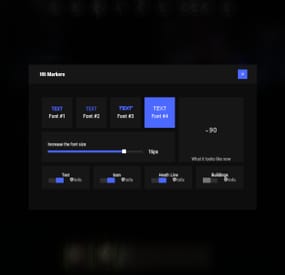
Each player picks the hit marker that suits them. 🙂
Commands
marker - open the UI
Permissions
You can set permission in config, for example:
"Permission (ex: hitmarkers.use)": "hitmarkers.use", You can also set your own permission for each font and button.
Config
{ "Commands": [ "marker", "hits" ], "Permission (ex: hitmarkers.use)": "", "Work with Notify?": true, "Fonts": { "0": { "Font": "robotocondensed-bold.ttf", "Permission (ex: hitmarkers.font)": "" }, "1": { "Font": "robotocondensed-regular.ttf", "Permission (ex: hitmarkers.font)": "" }, "2": { "Font": "permanentmarker.ttf", "Permission (ex: hitmarkers.font)": "" }, "3": { "Font": "droidsansmono.ttf", "Permission (ex: hitmarkers.font)": "" } }, "Min Font Size": 8, "Max Font Size": 18, "Buttons": [ { "Enabled": true, "Title": "Text", "Type": "Text", "Description": "<b>Damage numbers</b> will pop up in the center of the screen!", "Permission (ex: hitmarkers.text)": "hitmarkers.text" }, { "Enabled": true, "Title": "Icon", "Type": "Icon", "Description": "The familiar hit icon changes color after a <b>headshot!</b>", "Permission (ex: hitmarkers.text)": "hitmarkers.icon" }, { "Enabled": true, "Title": "Heath Line", "Type": "HealthLine", "Description": "A bar appears above the slots, showing the <b>remaining</b> health of the enemy", "Permission (ex: hitmarkers.text)": "hitmarkers.line" }, { "Enabled": true, "Title": "Buildings", "Type": "Buildings", "Description": "Displaying damage by buildings", "Permission (ex: hitmarkers.text)": "hitmarkers.buildings" } ], "Info Icon": "https://i.imgur.com/YIRjnIT.png", "Show damage to NPC": true, "Show damage to animals": false, "Marker removal time": 0.25, "Default Values": { "Font ID": 0, "Font Size": 14, "Text": true, "Icon": false, "Health Line": false, "Buildings": false } }
⚙️ Web Config Editor
Manage the HitMarkers settings in our web config editor. You change the config in a browser form instead of editing files on the server by hand.
P.S. The web config editor is open to members of the "HitMarkers" group in our Discord server. Join at https://discord.gg/mevent and ask for the group.
-
$35.00
Ferry Terminal Event
Want to spice up the Ferry Terminal location on your map? Look no further! Captors have taken hostages and are going to execute them if they cannot enslave them. Liberate the hostages while waves of backup arrive Johnny Blaze style on their motorcycles. They will be relentless and merciless. It's recommended that you bring a friend or two for this one!
Description
The event will begin with a notification that captors have taken hostages and will be trying to take them away to enslave them from the Ferry Terminal monument.
First you will want to dispatch as many of the enemies on site as possible without alerting them of your intent or presence. Once you are ready though, alarms will be sounded and they will attempt to call for backup.
Once the backup begins coming on motorcycle they will continue to send units to keep you from liberating the hostages, or execute them as opposed to letting you get them to freedom!
Each hostage will have a small radius and a configurable countdown will begin as you work on releasing them from their shackles. Once freed you will still need to escort them to a ferry nearby, and they will thank you by opening a hackable crate for you.
There are indicators that help highlight important event items such as the hostages. The configuration file gives plenty of options to customize the event, from NPCs, timers, rewards, and plenty of other options like integration with plugins you already own, in game UI, and more!
Dependencies (optional, not required)
True PVE Pve Mode GUI Announcements Notify Discord Messages Alpha Loot Custom Loot NTeleportation Economics Server Rewards IQEconomic XPerience Kits Better Npc Monument Owner
Chat commands (only for administrators)
/ftstart - start the event
/ftstop - end the event
/ftpos - determining the position coordinates for changing the location of NPCs and crates. It should write in the configuration (Attention! The event must be started, the current position of the administrator in relation to the monument is read)
Console commands (RCON only)
ftstart - start the event
ftstop - end the event
Plugin Config
en - example of plugin configuration in English ru - example of plugin configuration in Russian
Hooks
void OnFerryTerminalEventStart(Vector3 pos, float radius) – called when the event starts
void OnFerryTerminalEventEnd() – called when the event ends
void OnFerryTerminalEventWinner(ulong winnerId) – called at the end of the event, where the winnerId is the player who did more actions to complete the event
My Discord: kpuctajl
Join the Mad Mappers Discord here!
Check out more of my work here!
- #ferry terminal
- #ch47
- (and 25 more)
-
$4.99
UpgradeRestrictor (inspired by DuckSide)
Description
The UpgradeRestrictor plugin prevents players in Rust from skipping upgrade levels for building structures. Inspired by the new game Duckside, which showcases this upgrade progression and is loved by players, this plugin enforces Rust's upgrade sequence: Twig → Wood → Stone → Metal → HQ. It ensures that players follow this order and blocks attempts to skip material tiers. If players try to bypass a step, the upgrade is blocked, and a color-coded message appears in the chat, indicating the next required tier.
Features
- Blocks players from skipping upgrade tiers for building structures.
- Displays a color-coded chat message with the plugin name and the next required upgrade level.
- Requires specific permission to apply restrictions.
- Supports the following upgrade path: Twig → Wood → Stone → Metal → HQ.
Commands
No specific commands available.
Permissions
upgraderestrictor.use For these players, the upgrade restrictions must be used. Players without this permission can upgrade structures without restrictions.
Configuration
No specific configuration settings required.
load, run, enjoy 💝