

-
Posts
3 -
Joined
-
Last visited
Content Type
Profiles
Warranty Claims
Downloads
Forums
Store
Services
Downloads Plus Support
DOWNLOADS EXTRA
Reels
Everything posted by Laminiia
-
Version 1.0.0
11 downloads
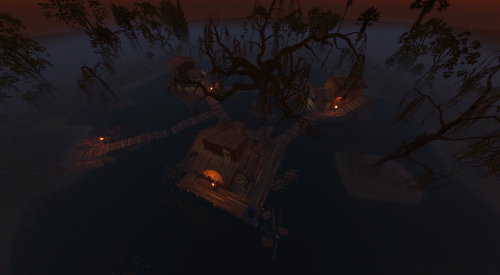
Crow Hollow Deep in the swamp, a forgotten stilt village still stands above the murky water. Once a shop by day and a gambling den by night, Crow Hollow now belongs to the crows. The last bet is still on the poker table, dinner was left half-prepared, and the sign at the entrance says it all: turn back now. What’s included: CrowHollow-Fog (499 prefabs). The full village with low swamp fog, for the best atmosphere. CrowHollow-NoFog (498 prefabs). The same village without fog. The village: The Shop & Poker Den: a former storefront by day, a card game gone wrong by night. The Living Quarters: a kitchen and a dormitory where the villagers lived. The Storage: village supplies, fishing gear and a boat hanging from a crane. Sunken containers used as a makeshift bridge, collapsed walkways, a fishing spot and a giant swamp tree at the heart of the village. Features: Built entirely with native RustEdit and vanilla Rust prefabs. No custom models. Freshwater swamp: players can drink and fill bottles. Working sink. Atmospheric lighting designed for night gameplay. Balanced loot: 1 military crate, 1 normal crate, 1 tool crate, 2 food crates, 1 medical crate, 6 barrels, 2 oil barrels and 1 green keycard. Terrain modifiers included (Height, Splat, Biome, Topology). Requires the Oxide.Ext.RustEdit.dll extension installed on your server. Prevent Building volume included around the village. Note: The Lake topology is required for the water to work in game, so make sure to apply the Topology modifier. Trees around the village are spawned by the included Forest topology, so their placement will vary on each map. No monument marker is included. Installation: Place the Crow Hollow prefab files in your RustEdit/CustomPrefabs/ folder, load RustEdit, and place the prefab on your map. Then select it and apply the Prefab Modifiers (Height, Splat, Biome, Topology). Enjoyed Crow Hollow? Check out my other work! Feedback and suggestions are always welcome!Free -
Version 1.0.0
1 download
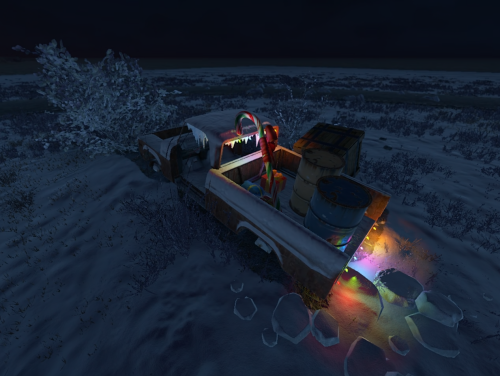
Christmas Junkpiles Six small roadside scenes, frozen in the middle of the holidays. Each one tells its own little story, from a delivery that never made it to a junkpile someone tried to make festive. Every scene comes in two versions, Snow and Temperate, for a total of 12 prefabs. What’s included: Pickup (Snow 25 prefabs / Temperate 20 prefabs). A broken-down pickup, abandoned in the middle of a repair, with part of its Christmas delivery still in the bed. Van (Snow 26 / Temperate 23). A delivery van left with its doors open, as if someone started unloading and never came back. Bus Stop (Snow 29 / Temperate 23). A forgotten bus stop, with a string of Christmas lights and old newspapers scattered on the floor. Car (Snow 25 / Temperate 22). A car that never made it home, with a sleigh still strapped to its roof. Truck (Snow 32 / Temperate 24). An old forgotten truck, still carrying part of its cargo. Scrap Pile (Snow 28 / Temperate 24). A roadside junkpile that someone decided to decorate for Christmas. Features: Built entirely with native RustEdit and vanilla Rust prefabs. No custom models. Vanilla-style roadside POIs: players instantly know what to expect. Low prefab count (20 to 32 per scene). Balanced early-game loot on every scene (2 barrels + 1 crate or tool crate + tier 1 vehicle parts). Terrain modifiers included (Height, Splat, Biome, Topology). Requires the Oxide.Ext.RustEdit.dll extension installed on your server. Prevent Building volume included on all 12 prefabs. Installation: Place the Christmas Junkpiles folder in your RustEdit/CustomPrefabs/ folder, load RustEdit, and place the prefab on your map. Then select it and apply the Prefab Modifiers (Height, Splat, Biome, Topology). Note: Depending on the placement and orientation, small terrain adjustments may be needed (raising or smoothing the ground slightly) for the best result. Feedback and suggestions are always welcome!$2.99 -
Version 1.0.1
2 downloads
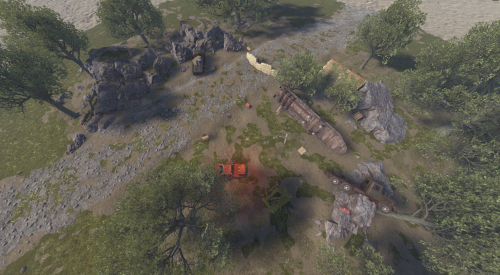
Lost Convoy Series Four scattered remnants of the same vanished military convoy. Each scene tells a different part of the story, starting at the last organized rally point and ending at the decontamination site where the trail goes cold. What’s included: Convoy Rally Point (Desert, 111 prefabs). The convoy’s last organized stop before disaster struck. Camouflage netting, sandbags, and a command tent. Convoy Ambush Site (Forest, 83 prefabs). Where the convoy was ambushed. A wrecked truck, scattered supplies, and signs of a firefight. The Stranded Truck (Snow/Arctic, 103 prefabs). A vehicle that got separated from the convoy and ended up stuck in the cold. A makeshift shelter with a working campfire, and a grim reminder of what happened to those who waited too long. Contaminated Supply Cache (123 prefabs). A hidden supply depot, now abandoned and irradiated. Features: Built entirely with native RustEdit and vanilla Rust prefabs. No custom models. Requires the Oxide.Ext.RustEdit.dll extension installed on your server. Prevent Building volume included on all 4 scenes. Balanced loot across all scenes. Terrain modifiers included (Height, Splat, Biome). Installation: Place the scene folder(s) you want in your RustEdit/CustomPrefabs/ folder, load RustEdit, and place the prefab on your map. Then select it and apply the Prefab Modifiers (Height, Splat, Biome). Note: For Contaminated Supply Cache, keep rotation at 90, 180, or 270 degree increments for the best terrain rendering under the walkway.$6.00-
- 1
-

-
- #prefab pack
- #poi
- (and 4 more)