


-
Posts
42 -
Joined
-
Last visited
-
Days Won
1
Content Type
Profiles
Warranty Claims
Downloads
Forums
Store
Services
Downloads Plus Support
DOWNLOADS EXTRA
Reels
Everything posted by SavageBuilder
-

Issue with missing monument loot (Dome/Sphere, barrels, etc.) in 3x Setup
SavageBuilder posted A Support Report in Support
I recently purchased your "3X Server Setup Full Complete" pack, and the configurations are great for the tier 3 loot crates. However, I’m running into a major issue with several vanilla monuments on procedural maps. Monuments like The Dome (Sphere) are completely empty—no crates or barrels are spawning there at all. Additionally, red fuel barrels (oil barrels) and standard roadside barrels aren't spawning across the map either. After checking the LootTables.json file inside oxide/data/BetterLoot, it seems that standard prefabs (like crate_normal, crate_normal_2, crate_elite, and oil_barrel) are completely missing from the table definitions, which causes the plugin to block them from spawning entirely. Since I bought this as a full, complete setup, could you please provide an updated LootTables.json file that includes all Rust monuments and barrels configured correctly at 3x? I want to keep the great custom loot tables you created, but I need the entire map to be active and populated. Barrels, and other crates dont give an x3 loot at all, saw maybe a difference on elite boxes maybe it gave a better loot and thats it. Can you give me a hadn with that please? Thank you! -
The stone walls are a default feature of the plugin, not the base itself. Here is how you can disable them: Locate the Profile: Go to your server FTP and navigate to: oxide/config/RaidableBases/Profiles/ Open the Config: Open the Easy.json file (or the specific difficulty file you are using). Change the Setting: Search for the section called "Zone Settings". Find the following line: "Spawns Enclosure": true Change it to: "Spawns Enclosure": false Save & Reload: Save the file and type the following command in your server console: rb.reload Note: If you want to keep the walls but make them weaker, you can leave the setting as true and change "Enclosure Material" from "Stone" to "Wood". However, for a clean look with only the base, setting it to false is the best option.
-
But I would say better to let the plugins to autmaically make those folders. I think that it will be better. The plugins are going to make em after u load them for the first time.
-
Hello! Thank you for your purchase. I will help you clear this up: 1. Regarding the "CopyPaste" folder: The Folder Name: In the zip file you downloaded, the folder containing the bases is named "Easy". You should copy the entire "Easy" folder from my pack into your server's oxide/data/CopyPaste/ directory. Missing CopyPaste folder: If you just installed the CopyPaste plugin, you need to either restart your server or type oxide.load CopyPaste in the console for the plugin to create its data folders automatically. If it still doesn't appear, yes, you can manually create the folder named CopyPaste inside oxide/data/. 2. Regarding the RaidableBases config: Folder creation: The oxide/config/RaidableBases/ folder is created automatically only after the Raidable Bases plugin has been successfully loaded for the first time. Step: Please make sure the Raidable Bases plugin is installed and loaded. If the folder is missing, you can manually create the path: oxide/config/RaidableBases/Loot Modules/ and then paste the Easy.json file there. Summary of your files: Contents of my "Easy" folder -> oxide/data/CopyPaste/Easy/ Easy.json (from Configuration folder) -> oxide/config/RaidableBases/Loot Modules/ Let me know if you need further assistance!
-
Version 2.6.1
44 downloads
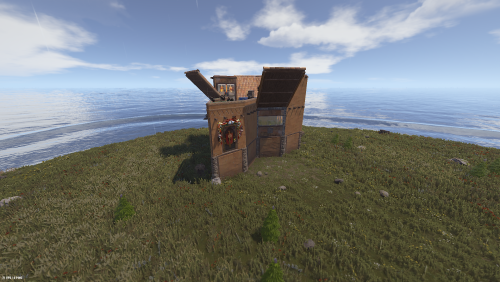
This is a premium pack with 20 unique Easy difficulty Raidable Bases for the Nivex Raidable Bases plugin. The Bases were Tested on 3 Different Online Servers with more than 50 pop! What's included in the pack: 20 Custom Easy Bases (all built with high foundations for perfect stability) Each base has a unique and beautiful exterior + interior design Easy.json (Loot profile) - Balanced and rewarding Easy loot with 2-5 Wind Turbines per base RaidableBases.json (Main configuration file) - Fully configured with loot distribution, anti-hammer protection, infinite turret ammo, vending machines & lockers support README.txt - Complete installation guide and information Main Features: All bases are unique (no copies) High foundations - no stability or sinking issues Loot distributes correctly into lockers, vending machines and all containers Balanced Loot: The loot tables are carefully tuned to ensure players can recover their raiding costs while still making a profit. Optimized specifically for the paid/premium version of Raidable Bases 🛠 Installation & Setup Guide: Base Files (.json): Move all 20 base files from the Easy folder into oxide/data/copypaste. The folder name must be all lowercase: copypaste. If it is capitalized ("CopyPaste"), the plugin will not find the bases. Loot Profile (Easy.json): Move this file to oxide/data/RaidableBases/Profiles. Main Configuration (RaidableBases.json): Move this file to oxide/config. Final Step: Once files are moved, type rb.reload in your server console or RCON. Tips: Ensure you have the CopyPaste plugin and the premium version of Raidable Bases installed for all features (like vending machine loot) to function properly. These bases are built with high foundations to prevent sinking on uneven terrain, but always ensure your spawn points are clear of steep cliffs for the best results. IMPORTANT: Remove Stone Walls (Enclosures): By default, the plugin spawns a giant stone wall around bases. To remove it: Open oxide/config/RaidableBases/Profiles/Easy.json Find "Spawns Enclosure": true and change it to false. Run command: rb.reload in console. [!IMPORTANT] To maintain the intended experience, please set Allow Players To Pickup Items to false. This prevents players from simply picking up your traps/deployables with a hammer! Perfect for monthly, weekly or modded Rust servers. Just drop the files in the correct folders, reload the plugin and you're ready to go.$3.00 -
Hello, got a question, does it work with the new updates? Jungle, deeap sea and blue prints, cargo, and heli?
