
-
Posts
73 -
Joined
-
Last visited
Content Type
Profiles
Warranty Claims
Downloads
Forums
Store
Services
Downloads Plus Support
DOWNLOADS EXTRA
Reels
Support Center
Everything posted by WinterChild84 aka Nexus84
-
Changed Status from Pending to Closed Changed Fixed In to 1.2.3
-
Dont worry you are the onlyone who sees it till you f7 report it or if they are reported by anbother player Then this user got reported for ESP: ESP Detection Player: King Frosty Steam64: 76561198137154128 Steam | ServerArmour | BattleMetrics ESP Probability 77% Target Atomic Distance 124.2m Suspect Pos -805.7, 65.7, 816.7 Target Pos -683.4, 48.9, 802.9 Yesterday at 07:14 But he is a good friend of mine and wouldnt cheat so im doubting the software. The i have speed hacks, many of them, for players i really would not suspect using, how accurate is that dedtcetion? The plugin works great in theroy but if we get to many false flags then we back at square one, is there paramaters i should be looking at in the plugin config ? Which af the detctions are you more confident in that are more reliable for detdtcing cheaters?
-
also your boy king im assuming you are using another plugin that is reporting him or he has been on a server that has been reporting him/her for aimbot/ norecoil granted these reports that are now public something NCR does not currently do are to be taken as what they are suspicion (hopes it will in the future as i am working on a website for player scoring and suspicion soo it can be shared with other users ) and this is one of the main reasons i didn nmot hard code specific things into the plugin i left it configurable for the users to adjust to their server playstyle
-
also always keep in mind no anti cheat plugin will ever replace good old spectating it will always be a this does not seem right some one should check it out type of plugin also tuning is key every server is diffrent high population servers are going to have a diffrent setting then lower population especially when there is alot of lag anti cheat plugins are not a replacement and definitly can be fooled and yes i was made aware that i uploaaded a version i was doing some things on preparing for upsdated settings during my testing i had things on that should only be on individually insted are pammiing ytour discord esp has 3 risk levels set 2 of them to false you only need one and try to keep your score above 75 probrobility also if a player is delibratly staring at you through a wall for ax amonunt of time yes its going to fire off
-
Delete config file. Update to new version 1.2.3
-

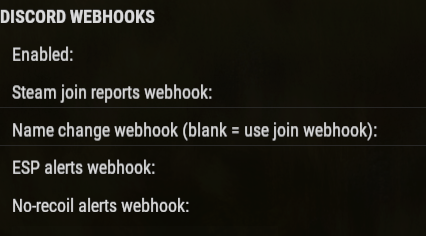
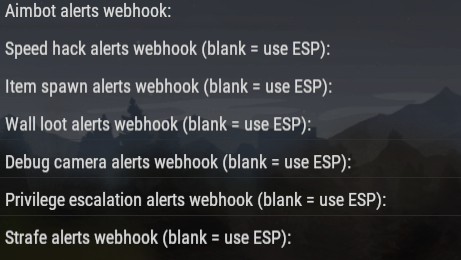
Each dection needs s discord channel and web hook
WinterChild84 aka Nexus84 replied to rustybros's Support Report in Support
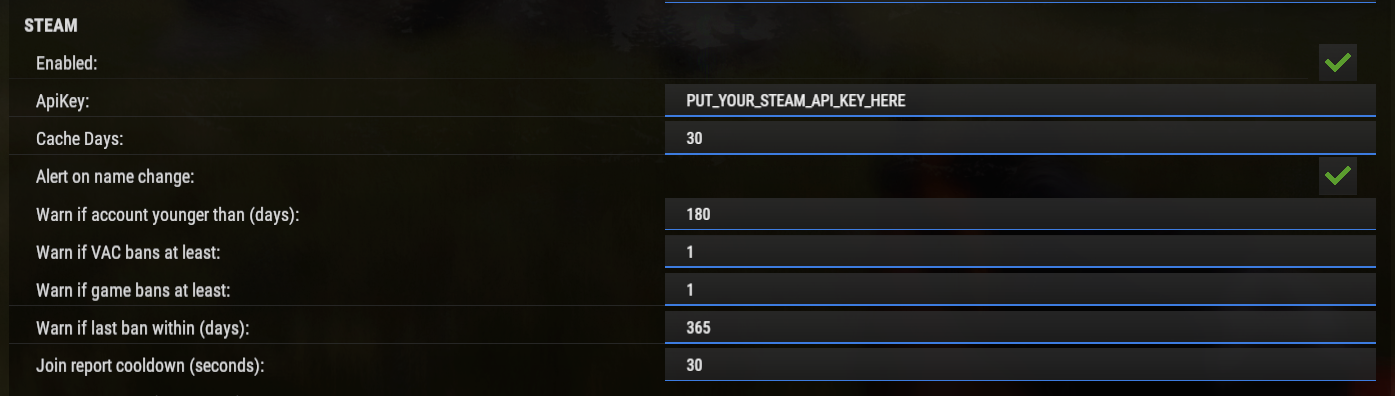
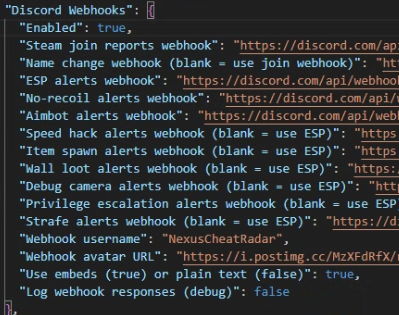
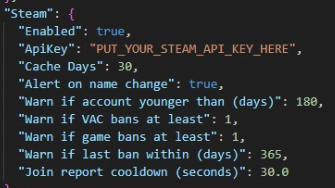
have me thinking i am crazy lol i lableed everthing in the config steam reports needs its own now i need to clerify the name change thing cause thats going to be the next question it wont read name change untill the user lets say is on the server and decides 1 day to change his name origionally i had it pull previously used names from the steam id but i had 1 guy that had about 25 diffrent names popup so instead it checks name on coming to the server lets say they do some shady stuff and change thir name it will aleart that they changed their name its one sign to start watching suspected cheaters frequent name changes but to answer the question the ones that dont state they are picked up by another webhook those ones you can decide where they fire off to also steam info and join logic will not show unless you input your steam api if you are not using carbon youy will see this instead in config file I also recomend check what is on and is not you may have detect admins on or something completly unneeded like esp debug but they dont haver to hacve a seprate webhook you just need to add it into that line
-
Each dection needs s discord channel and web hook
WinterChild84 aka Nexus84 replied to rustybros's Support Report in Support
have me thinking i am crazy lol i lableed everthing in the config steam reports needs its own now i need to clerify the name change thing cause thats going to be the next question it wont read name change untill the user lets say is on the server and decides 1 day to change his name origionally i had it pull previously used names from the steam id but i had 1 guy that had about 25 diffrent names popup so instead it checks name on coming to the server lets say they do some shady stuff and change thir name it will aleart that they changed their name its one sign to start watching suspected cheaters frequent name changes but to answer the question the ones that dont state they are picked up by another webhook those ones you can decide where they fire off to also steam info and join logic will not show unless you input your steam api if you are not using carbon youy will see this instead in config file I also recomend check what is on and is not you may have detect admins on or something completly unneeded like esp debug
-
Each dection needs s discord channel and web hook
WinterChild84 aka Nexus84 replied to rustybros's Support Report in Support
Changed Status from Pending to Closed -
Each dection needs s discord channel and web hook
WinterChild84 aka Nexus84 replied to rustybros's Support Report in Support
Changed Fixed In to 1.2.0 -
Each dection needs s discord channel and web hook
WinterChild84 aka Nexus84 replied to rustybros's Support Report in Support
all default to esp webhook if left empty nr and aimbot detection are the only ones i left that do not default to esp you dont need to make more then one channel and one webhook they call all be put into 1 channel with the same webhook it can be used over and over but all the rest default to the esp webhook if left empty i did a poll and came back 70 percent prefered being able to place them individually in sepratre channels its basically because some of the things they dont care for so they drop them into a ghost channel and if fp drops a update and it breaks part of the detection they can easily move it to silence it until a fix is made i try to stay ontop of that and have patches ready but branch isnt always accurate -
Changed Status from Pending to Closed
-
lol im actuyally suprised i have not any reviews and with these types of plugins its definitly not easy fine tuning i made it my goal that if i put something out i am there to correct it in a timely manner also made a update to the plugin as for the steam api key showing error if it faults out i actually did try that toi say invalid api and have a fall back method but was not a priority im currently working on the unified half of the plugin and debating weather or not its worth to keep or replacce with a diffrent detection method i found to be of great use
-
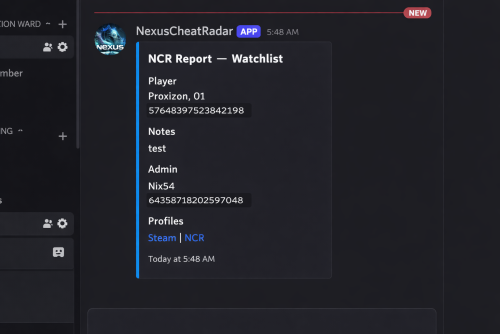 yes its just alot of seperating that has to be done does not take away from the plugin just doesnt give a overall score and honestly i like itemized scoring so you know what to be looking for vs ok what could it be
 -
the api key is is just so it can read it from steam but i just did this here
-
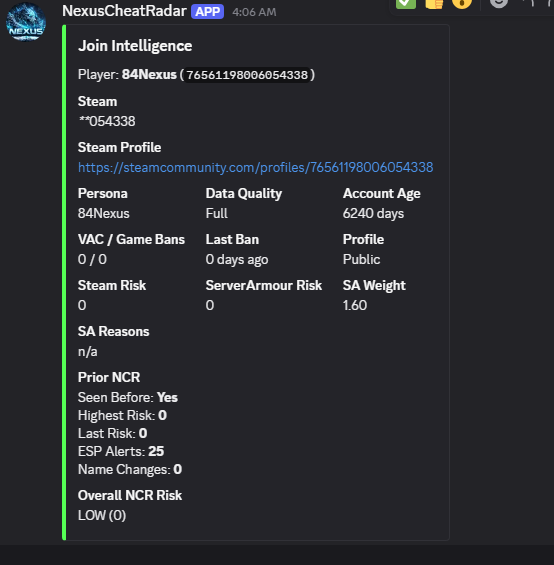
im just confused i tested it again for accuracy and my card pulled up without a problem only thing i can think possible is if your version is diffrent from my version or you didnt put in your api key or because its a test account it is not valid to read i will let it run on my test server for the night and see what happens also i removed the dead code emds some were from cf not liking old oxide version of doing plugins
-
can you send me a screen shot of the output from it too when you get a chance thank you
-
i will look into this thank you for bringing it to my attention
-
if the profile is private it can only pull what it can see
-
it is intentional still working on a fix to have unified risk data as it was causeing issues with esp detection
-
i get what you are saying and what they are trying to accomplish ,,, granted i had one of my plugins shot down because it was suspected ai generated and i was also insulted being told i had no idea what is going on being honest i cnt make up what actually happened but i can say this the person that did the review of the plugin did not even look at it they raqn it through ai to determine if it was ai i verified this by doing the same thing and 2 things that were in the plugin oout of a 108kb plugin were deemedf ai by the curator and by the ai i used to check same 2 lines same output on why on another note in the plugin anyone who even were to look in the plugin would have instantly realized its not ai that told me the cureator did not look in the plugin till i told him what was going on now while i dont agree with suggesting to take traffic away from the site hey everyone is there own person but back to their goal of ai written /generated plugins they are worried people wont maintain the plugins or that it cant be concidered origional but do i agree with the ai thing not in the least hey if it works then it works but with that said you wonder why a simple plugin cost the same as a advanced one
-
how to run the plugins after downloading step by step
WinterChild84 aka Nexus84 replied to AMG's Support Report in Support
Changed Status from Pending to Closed -
NexusRestartManager
WinterChild84 aka Nexus84 commented on WinterChild84 aka Nexus84's file in Plugins
 sorry didnt see this till now for some reason i am not recieving notifications or antything from cf and my updated files are not posting but if you are referring to the "ui" you see on screen in the pictures that is carbon ui if you are using oxide all of this is done within the configuration file
 -
EPS spam on small stash cupboard.tool and bed, sleepingbag
WinterChild84 aka Nexus84 replied to SCRAPZONE WOLF's Support Report in Support
if you can send me a screenshot of the discord output im having truble recreating it for the tc stash and bags spam -
EPS spam on small stash cupboard.tool and bed, sleepingbag
WinterChild84 aka Nexus84 replied to SCRAPZONE WOLF's Support Report in Support
Changed Status from Pending to Closed -
EPS spam on small stash cupboard.tool and bed, sleepingbag
WinterChild84 aka Nexus84 replied to SCRAPZONE WOLF's Support Report in Support
{ "ESP Detection" "Hard Alerts Enabled By Default": true, "Hard Alert Threshold": 18.0, "Soft Alert Threshold": 12.0, "Sample Interval Seconds": 2.5, "Distance Cap (Meters)": 80.0, "Vision Cone Degrees (Full)": 14.0, "2-Hit Confirmation Required": 3, "Hit Confirm Window Seconds": 2.0, "Per-Target Cooldown Seconds": 15.0, "Detect Admins": false, "Include Sleepers As Player Targets (ESP)": false, "Ignore Team Members": true, "Ignore Authorized Tool Cupboards": true, "Include Extended ESP Details": true, "Extended ESP Details: Hard Alerts Only": true, "Blocked LOS Base Score": 3.0, "Score Decay Per Second": 1.0, "Sound Awareness Window Seconds": 4.0, "Discord Alert Cooldown Seconds": 45.0 "Aimbot Detection": "Enabled": true, "Detect Admins": false, "Snap Angle Degrees": 60.0, "Snap Time Seconds": 0.05, "Alignment Degrees": 1.0, "Required Confirmations": 3, "Confirm Window Seconds": 6.0, "Score Per Incident": 35.0, "Per-Player Cooldown Seconds": 180.0 these are my current settings but once again you need to adjust thenm to your server unfortunatly i cannot see everyones ping and what lag and other plugins are being used at the time there are plugins that actually help detect stashes give you a false esp and if you are jsut staring with a large cone and you change your distance like any cone if its 60 and the cone is 24 you drag it out to 120 now rthat 24 cone is about 48 so you will want to shrink the cone the further out you go or it will be reading the whole area nonstop