Jump to content

P1S4G0R

Creator
  • Posts

    182
  • Joined

  • Last visited

Everything posted by P1S4G0R

  1. P1S4G0R

    Extended Switch

    The player can see the switch but cannot turn it on or off; it will give a warning that they do not have permission.
  2. P1S4G0R

    F1 Grenade Base

    Yes, there is a console command that works now, you can use it that way.
  3. P1S4G0R

    Pvp Marker

    if you set true "Npc Fight All Notification Enabled": true, " it works geerally
  4. Version 1.0.7

    40 downloads

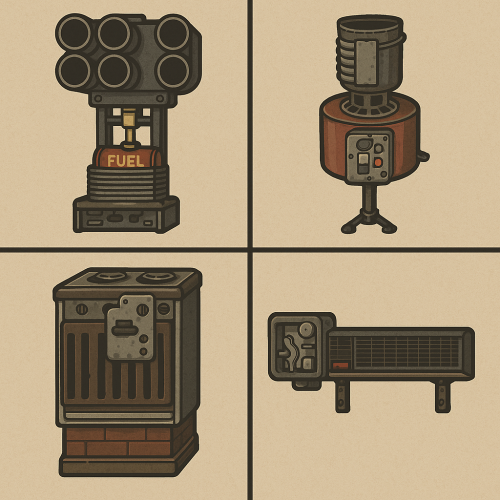
    The Extended Switch plugin enhances the functionality of Rust's deployable switches by automatically attaching them to various entities like turrets, SAM sites, electric furnaces, and electrical heaters. With this plugin, players can control these entities easily while ensuring that their functionality respects server permissions and configurations. Features: Automatic Switch Attachment: Attaches an electric switch to specific entities upon their spawn: Auto Turrets SAM Sites Electric Furnaces Electrical Heaters Toggle Functionality: Players can use the attached switch to toggle the state of the parent entity (e.g., turning a turret or SAM site on/off). Includes support for toggling furnaces and heaters without requiring direct interaction with the entity. Permission-Based Control: Separate permissions for controlling each type of entity ensure players can only toggle entities they're authorized for: extendedswitch.turretuse: Toggle Auto Turrets. extendedswitch.samuse: Toggle SAM Sites. extendedswitch.electricfurnaceuse: Toggle Electric Furnaces. extendedswitch.electricalheateruse: Toggle Electrical Heaters. Configurable Power Requirement: Need Electric? setting determines if entities require electricity to function when toggled by the switch. Disabling this option allows toggling entities even if they're unpowered. Pickup Restriction: Prevents players from picking up switches attached to specific entities, ensuring the setup remains intact. Configuration: The plugin includes a simple configuration file with the following option: Need Electric? (Boolean): Determines if entities require electricity to toggle. Default: true. Example Configuration File: { "Need Electric?": true } How It Works: Entity Spawn Handling: When an Auto Turret, SAM Site, Electric Furnace, or Electrical Heater spawns, a switch is automatically created and attached to the entity. Switch Interaction: Players interact with the switch to toggle the parent entity's state. The plugin checks permissions and configuration settings before executing the toggle action. Power Control: If power is required (Need Electric? is true), the plugin prevents toggling when the entity lacks electricity. Otherwise, toggling works regardless of the power status. Benefits: Simplifies management of deployable entities with automated switch attachment. Improves gameplay by providing players with convenient control over their entities. Customizable power requirements allow for flexibility in server rules and playstyle. This plugin is ideal for Rust server administrators who want to enhance the usability of deployable switches and streamline control over critical entities like turrets and furnaces.
    $9.99
  5. P1S4G0R

    Bomb Drone

    Version 1.0.0

    4 downloads

    The BombDrones plugin allows players to spawn explosive drones in Rust. It offers a unique experience by enabling strategic explosions to damage enemies using bomb-equipped drones. The mechanics of explosions and drones are fully customizable to suit players' needs. Drone Spawning: Players can spawn explosive drones using specific commands. Example commands: /dr, /bombdrone Detonator: Drones are detonated using an RF transmitter given to the player. If the player does not have a detonator and has the required permissions, a free detonator is provided. RF Receivers: Drones are assigned a random RF frequency linked to the detonator. When the detonator is triggered, the linked drone explodes, and its receiver is removed. Explosive Damage: When a drone explodes, it fires multiple rockets, causing widespread damage. Damage and explosion radius are configurable. Drone Customization: Health: Drones' durability can be adjusted. Resilience: Resistance to environmental damage can be increased. Bomb Count: The number of bombs per drone can be configured. Command Cooldown: A cooldown period can be set between command uses. Players are restricted from using the command again until the cooldown ends. Multi-Language Support: Supports English and Turkish. Chat messages and notifications are customized based on the player's language preference.
    $9.99
  6. P1S4G0R

    Wipe Protect

    yes you can do it with general protect, and @IlIDestroyerIlI thanks for your reply
  7. P1S4G0R

    Raid Markers

    i updated plugin
  8. P1S4G0R

    Raid Markers

    i will update in 3-4 days.
  9. P1S4G0R

    Raid Markers

    Did u buy?
  10. P1S4G0R

    F1 Grenade Base

    dont need any perms what is the problem?
  11. P1S4G0R

    Raid Markers

    yes it is possible as like Channel Message( not direct Message), If you buy it, I will add it in the next update.
  12. P1S4G0R

    Raid Markers

    Version 1.0.1

    38 downloads

    This plugin can help show all Raid activities (all entitys destroyed that are owned by a player) . When players destroy any entity that is owned, a marker will show on the map and can be adjusted to give you a chat notifiction. This can help players who are online by notifiying them if they are being raided or can help other players know that a base is being raided so they could counter. You can change the marker settings from the config file. You can change chat messages from the language folder. All Config Settings { "Raid Map Marker Enabled": true, "Raid Chat Message Enabled": true, "Show Message If player in Raid area": true, "Webhook Message Enabled": true, "Webhook Url": "https://discord.com/api/webhooks/YOUR_URL", "Webhook Raid Message": "Raid Start At {0}",// {0} => coordinate "Marker Color": "00FF00", "Marker Outline Color": "00FFFFFF", "Marker Duration (Second)": 10, "Marker Radius (float)": 0.4, "Show Entity Owner Name": false, "Iconid": 0, "Color Opacity Percent example (%25 =0.25, %50 = 0.5 ...": 0.5, "Use Map Marker Plugin (true or false)": true, "If Player Own Entity Dont Show Marker": true, "Showing Damage Type": [ "Bullet", "Stab", "Explosion", "Arrow", "Heat" ] } Language Settings: You can modify the notification messages in different languages under the 'Language' folder. Discord: If you find any bugs, need assistance, or have suggestions related to the plugin, you can reach out on Discord. Discord pisagor0104 https://discord.gg/JnQftZeSXD
    $9.99
  13. P1S4G0R

    Timed Test Vip

    İf u dont clear data, player cant use again.
  14. P1S4G0R

    Timed Test Vip

    One of those groups is randomly assigned by the user who writes the command.
  15. players don't need type the code with this plugin, just players press e while "building planner" on hand so a little practical
  16. Version 1.2.10

    48 downloads

    Similar to B Grade, but with a more premium feel. Once you equip a blue print, a beautiful GUI pops up, in the top right, which highlights what tier your building in. Permissions per tier can be given according to what your aiming for. You can change this tier images from config file. Upgrade, Downgrade and Base Repari from Tc They can upgrade and downgrade the levels of structures they have built from the cabinet, provided they have the necessary permissions. Remove With Hammer If they have the required permissions, they can use a hammer to remove items and walls. { "Plugin Icon Id": 0, "Tc Build Helper Button Coordinate AnchorMin": "0.849 0.865", "Tc Build Helper Button Coordinate AnchorMax": "0.949 0.91", "Upgrade Coold Down Time?": 30.0, "Downgrade Coold Down Time?": 30.0, "Base Repair Down Time?": 30.0, "Twig Tier Icon Image": "https://community.akamai.steamstatic.com/economy/image/6TMcQ7eX6E0EZl2byXi7vaVKyDk_zQLX05x6eLCFM9neAckxGDf7qU2e2gu64OnAeQ7835Zf4GLCfDY0jhyo8DEiv5dbOK86r70-SfG-0at6CZk/360fx360f", "Wood Tier Icon Image": "https://static.wikia.nocookie.net/play-rust/images/f/f2/Wood_icon.png/revision/latest/thumbnail/width/360/height/360?cb=20151106061551", "Stone Tier Icon Image": "https://static.wikia.nocookie.net/play-rust/images/8/85/Stones_icon.png/revision/latest/thumbnail/width/360/height/360?cb=20150405123145", "Metal Tier Icon Image": "https://static.wikia.nocookie.net/play-rust/images/7/74/Metal_Fragments_icon.png/revision/latest?cb=20151106061759", "High Metal Tier Icon Image": "https://static.wikia.nocookie.net/play-rust/images/a/a1/High_Quality_Metal_icon.png/revision/latest/thumbnail/width/360/height/360?cb=20151106061156", "Panel AnchorMin": "0.94 0.5", "Panel AnchorMax": "0.99 0.95", "Gui Button Enabled": true, "Message Size?": 15, "Remove Allow Distance": 3.0, "Plugin Meesage Pre Tag Color ": "#FFA500", } Permissions buildhelper.grade.all //if player has this perm, player can upgrade all tier(not for water base) buildhelper.grade.wood //if player has this perm, player can upgrade wood tier(not for water base) buildhelper.grade.stone //if player has this perm, player can upgrade stone tier(not for water base) buildhelper.grade.metal //if player has this perm, player can upgrade metal tier(not for water base) buildhelper.grade.hq //if player has this perm, player can upgrade hq tier(not for water base) buildhelper.waterall //if player has this perm, player can upgrade all tier in water base buildhelper.waterwood //if player has this perm, player can upgrade wood tier in water base buildhelper.waterstone //if player has this perm, player can upgrade stone tier in water base buildhelper.watermetal //if player has this perm, player can upgrade metal tier in water base buildhelper.waterhq //if player has this perm, player can upgrade hquality tier in water base buildhelper.up.wood buildhelper.up.stone buildhelper.up.metal buildhelper.up.hq buildhelper.down.wood buildhelper.down.stone buildhelper.down.metal buildhelper.down.hq buildhelper.remove buildhelper.removeadmin buildhelper.base_repair You can change messages with Language File { "dont_have_enough_resourche": "You don't have enough <color=#FF0000>{0}</color>.", "build_helper": "Build Helper", "removed": "Removed", "downgrade": "Downgrade", "upgrade": "Upgrade", "twig": "Twig", "wood": "Wood", "stone": "Stone", "metal": "Metal", "hq": "Hq Metal", "stones": "Stones", "metal.fragments": "Metal Fragments", "metal.refined": "Hq Metal", "dont_have_enough_resource": "You Dont Have Enough Resourche", "cupboard_dont_have_enouh_resourch": "Cupboard dont have enough resourche.", "base_repair": "Repair Base", "max_auth": "You do not have sufficient authority to upgrade higher", "press_e_button": "Automatic upgrading is now set to grade <color=#FFA500>{0}</color>. Press <color=#FFA500>E</color> to change auto enhancement.", "press_e_button_remove": "Press <color=#FFA500>R</color> to switch to remove mode. ", "press_e_button_for_normal_mod": "Press <color=#FFA500>R</color> to switch to normal mode. ", "press_e_button_for_remove_admin_mod": "Press <color=#FFA500>R</color> to switch to remove Admin mode.", "must_wait_n_secon": "You must wait {n} second for using this button again.", "no_entity": "No Entity", "no_cost": "No Cost", "cost": "Cost", "remove": "Normal Mode", "admin_remove": "Admin Mode", "plugin_pre_tag": "<color=#FF0000>[Build Helper] :</color>", "cupboard_not_found": "Cupboard Not Found", "dont_have_permission_this_button": "You don't have permission to use this button." }
    $19.99
  17. P1S4G0R

    Wipe Protect

    yes you can set first weeek 7 days protection under the general protect then third week you can set 21 days protect so plugin working what you want
  18. P1S4G0R

    Smart Base

    sorry, my mistake i just update again
  19. P1S4G0R

    Smart Base

    this issiua without pick up coffin?
  20. P1S4G0R

    Smart Base

    Hi, photos may change with config file.
  21. P1S4G0R

    Marker API

    https://prnt.sc/7K89vMhMNlqs #4374769c color code not working for transparency
  22. P1S4G0R

    Smart Base

    added new config for that. "Open container If Player Has BuildingPrivilage": true
  23. P1S4G0R

    Smart Base

    that settings intrested in open box button. if you change that config with true and player in building blocked then player cant open the box with open button. Whatever you want it to open the box, that setting must remain false.
2.3m

Downloads

Total number of downloads.

10.5k

Customers

Total customers served.

152.3k

Files Sold

Total number of files sold.

3.2m

Payments Processed

Total payments processed.

×
×
  • Create New...

Important Information

We have placed cookies on your device to help make this website better. You can adjust your cookie settings, otherwise we'll assume you're okay to continue.