.thumb.jpg.f2f378cbb4943d7036c8a674f8a23b40.jpg)

Works with
Optional integrations and compatible files.


About NpcRaiders
NpcRaiders
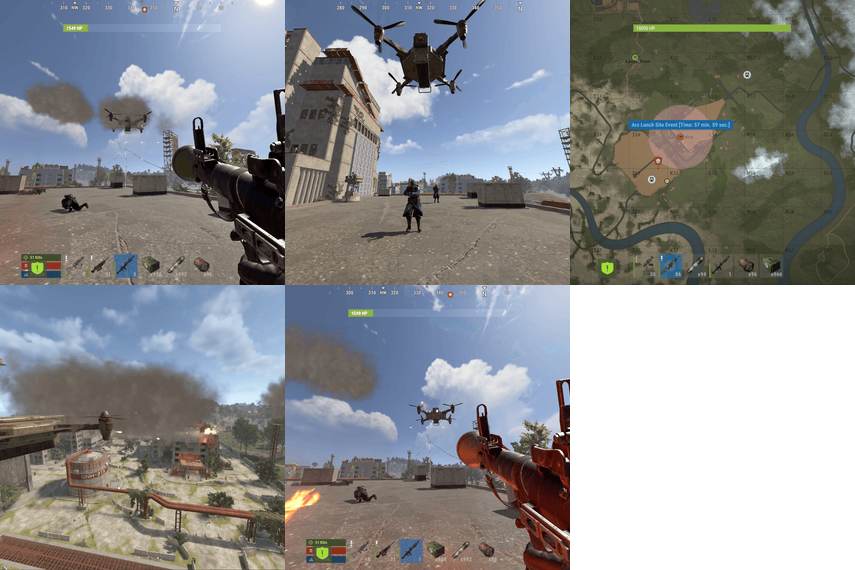
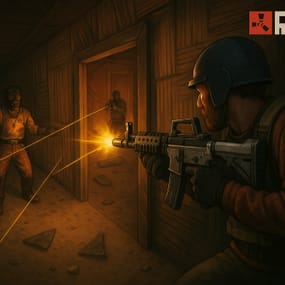
Raid night, any night. Players call a squad of armed NPC raiders onto their own base and defend it wave after wave. It's safe, self-contained raid content for solo players, small groups and PvE servers, with no waiting for a real raider.
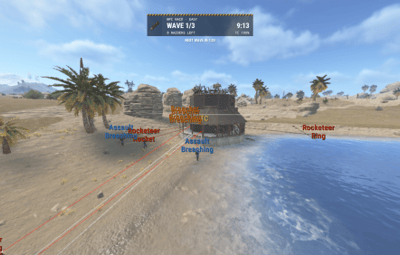
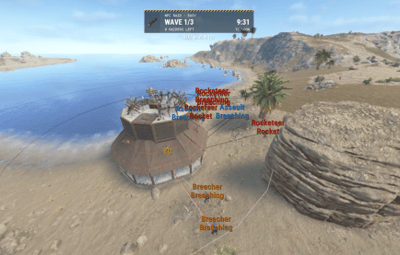
The raiders spawn near the base, pick a side and work through it layer by layer with rockets and explosives, then push in through the holes they make. Wipe out every wave before time runs out to win the reward. Lose the TC, or run out the clock, and the raiders win.
Fully sandboxed. Only players authorized on the targeted TC can hurt the raiders, and the raiders only fight those players. Nobody else can interfere, and the raiders never wander off to bother the rest of the server.
Note
New in 2.0.0: smarter raiding AI with roles, raiders that don't know where your TC is, pushing in through breaches, a fully configurable raid HUD you can move in game, Loottable and CustomLoot support, and SimplePVE support. Configs from 1.9.x upgrade themselves, there's nothing to delete.
Video Showcase
Features
The raid
- Self-raid events. Players call raiders on a base they're authorized on. Nobody else's base can be targeted.
- Waves. Set the NPCs per wave, the number of extra waves and the delay between them, from a quick skirmish to a full siege.
- Time limit. Every wave has to be cleared before the event timer runs out. Chat warns you 60 and 30 seconds before the end.
- MLRS strikes (optional). On chosen waves an MLRS barrage spreads across the base. Set the spread, the damage and whether it can hurt building blocks.
- Block repairs (optional) during the event, so players can't just hammer their walls back.
Raiders that actually raid
- Real aim. Every rocket goes at the first wall or door between the raider and its target, so a base gets opened up layer by layer instead of splashing the outside.
- Roles. Each wave is split into Rocketeers who circle the base and fire rockets, Breachers who walk up and plant C4 or satchels, and Assault raiders who come in closer and hunt defenders. You set the split per tier.
- They don't always know where your TC is. Turn it off per tier and the raiders pick one random side and dig in from there, like a real raid group. On the wave you choose (the last wave by default) they find the TC and go straight for it.
- Pushing in. When a wall or door breaks, a few raiders go through the gap toward the TC.
- Breach alerts. Defenders get a chat message telling them which side was breached.
- No friendly fire. Raiders never kill each other, whatever the weapon, and the MLRS strike can't hurt them either.
Raid HUD
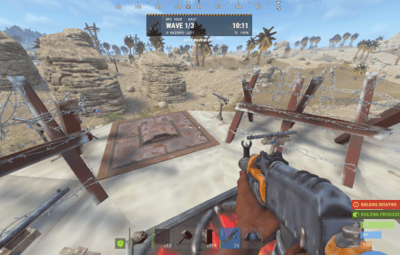
- Live raid card for everyone authed on the TC: wave, time left, raiders left, TC health and status lines such as MLRS strikes, the raiders finding your TC, or the next wave countdown.
- Fully configurable. Position, background color and material, frame, hazard tape, icon background, icon (image URL, png ID, or item shortname with skin) and every text color. All text comes from the lang file, so it can be translated.
-
Move it in game. Admins nudge or snap it with
/raidme hudpos, and the position is saved to the config. -
Players can hide it with
/raidme hud.
Tiers and economy
- Unlimited raid tiers. Easy, Medium, Hard, Expert and Nightmare come built in, each with its own AI tuning. Add as many as you like, each with its own permission.
- Per-tier tuning. NPC count, waves, health, names, kits, aim, damage scales, AI behaviour, loot, cost and reward.
- Pay to raid. Charge any item (Scrap by default), Economics money or ServerRewards points.
- Win rewards. Give an item, Economics money, ServerRewards points or a kit, to the starter or to everyone on the TC.
- Sell it in your shop. A console command starts a raid for a player from any shop or GUI plugin.
Fair play
- Locked-down combat. No griefing and no stray damage to bystanders.
- Cooldowns. A raid cooldown, plus a separate TC-auth cooldown so nobody re-auths a cupboard to farm events.
- VIP cooldowns. Give permission groups their own shorter cooldowns.
- Queue. At the maximum number of running raids, new events wait in line and players are told when it's their turn.
- Location checks. No raids underground, in deep water, or on terrain you block (icebergs, ice sheets and cliffs by default).
Loot and stats
- NPC loot from anywhere. AlphaLoot profiles, Loottable presets, CustomLoot presets, your own loot files, or vanilla scientist loot.
-
Build loot files in game. Put items in your inventory and type
/raidme loot add <name>. Done. - Corpses are locked to the raid's members, so nobody else can steal the loot.
-
Leaderboards.
/raidme statsopens a Top 25 screen for wins, losses, kills, deaths and waves, plus your own stats. - Kits support. Dress and arm each tier's raiders to match its difficulty.
Server friendly
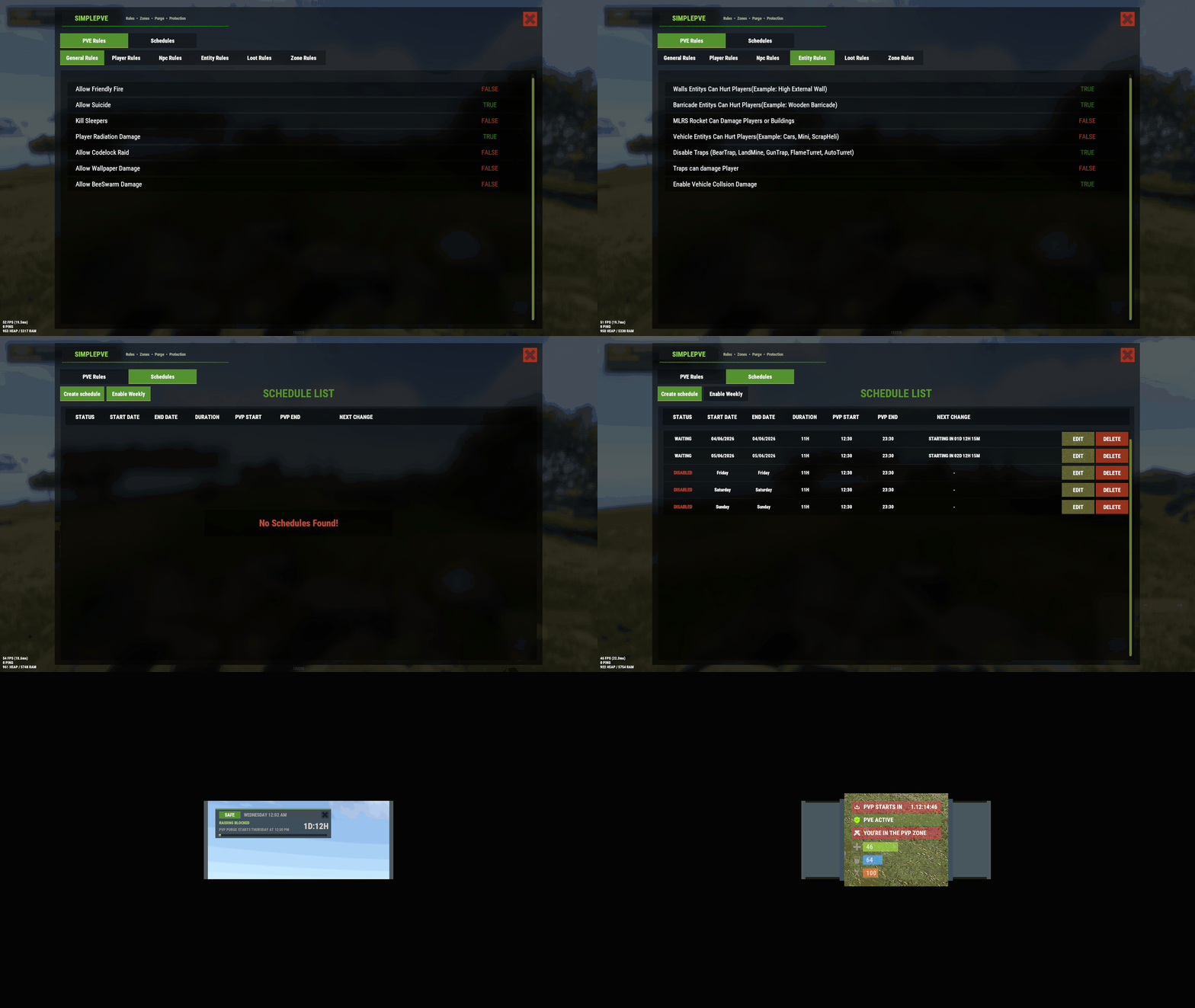
- PvE friendly. Works with SimplePVE, TruePVE and LifeSupport. The raid's damage rules keep working even while your PvE plugin is switched off for a PvP or purge schedule.
- Every message in the player's own language. All chat and HUD text is in the lang file.
- Light on the server. Raiders scan for targets twice a second instead of every frame.
How a raid works
-
Start it. Stand in your building area and type
/raidme buy <type>. The cost is taken, or you join the queue if the server is busy. - Get ready. You get a short warning before the first wave, and the raid HUD appears.
- Defend. Raiders spawn around the base, take up positions and start working through your walls. Breachers walk in with explosives, and when a wall falls some raiders push inside. Chat tells you where they broke through.
- Win or lose.
| Result | When |
|---|---|
 Win Win
|
Every raider in every wave is dead before the timer runs out |
 Loss Loss
|
The raiders destroy your tool cupboard |
 Time's up Time's up
|
The timer runs out with raiders still alive: no reward |
Everyone authorized on that TC fights together. A win pays the reward and adds to your stats.
Raid tiers
Each tier is a preset in the config with its own permission, so you can sell them separately or bundle them into ranks. The built-in tiers come tuned like this:
| Tier | Permission | NPCs per wave | Waves | Knows the TC | Rockets every | Pushers |
|---|---|---|---|---|---|---|
| Easy |
npcraiders.easy
|
10 | 3 | No (finds it on the last wave) | 8-14s | Off |
| Medium |
npcraiders.medium
|
15 | 4 | No (finds it on the last wave) | 6-11s | 2 |
| Hard |
npcraiders.hard
|
20 | 5 | Yes | 5-9s | 3 |
| Expert |
npcraiders.expert
|
30 | 5 | Yes | 4-8s | 4 |
| Nightmare |
npcraiders.nightmare
|
30 | 6 | Yes | 3-6s | 5 |
Note
Add your own tier: copy a tier block in the config, give it a new lowercase name and permission, then add matching entries under Raid Buy Options and Raid Reward Options. The new permission is registered on reload.
Raider AI
Every tier has an AI behaviour block in the config.
Roles
| Role | What it does |
|---|---|
| Rocketeer | Circles the base on the stand-off ring and fires rockets at whatever is between it and the target |
| Breacher | Walks up to the wall in its way, plants an explosive from the tier's explosive list, then falls back |
| Assault | Stands closer, sees further and goes after defenders on walls and roofs |
Rocketeers and Assault raiders also walk in to plant an explosive now and then, instead of firing a rocket (20% of the time by default).
Does the raid know where the TC is?
- Yes: raiders circle the whole base and aim straight at the TC.
-
No: they pick one random side and aim for the middle of the base. If the middle is already blown open, they switch to the nearest standing low wall. On the wave you set (
0= the last wave) they find the TC, move to its side and go for it, and the HUD tells the defenders.
Pushing in
When a wall or door of the raided base breaks, up to the tier's max pushers go through the gap toward the target, shooting the next piece in their way. Only Breachers and Assault raiders push.
Tip
Raiders firing too many rockets? Seconds between rockets counts per raider, so 20 raiders firing every 5-10 seconds is still 2-4 rockets a second across the raid. Raise both numbers for a slower siege, or raise the Breacher share for more explosives.
Permissions
| Permission | Allows |
|---|---|
npcraiders.use
|
Using /raidme to view and start raids
|
npcraiders.<tier>
|
Starting that raid tier (for example npcraiders.hard)
|
npcraiders.admin
|
Admin commands: cancel raids, clear data, loot files, HUD position, debug view |
npcraiders.nocooldown
|
Skipping the raid and TC-auth cooldowns |
npcraiders.nocost
|
Starting raids for free |
npcraiders.vip1 / vip2 / vip3
|
Shorter cooldowns (set in Raid Vip Options, add as many as you like) |
Commands
The chat command is /raidme by default. You can rename it in the config.
Players
| Command | Description |
|---|---|
/raidme
|
Help menu: the tiers you can use, with NPC and wave counts |
/raidme buy
|
Every tier you can buy, with its cost |
/raidme buy <type>
|
Start a raid of that tier on the base you're authorized on |
/raidme stats
|
Open the leaderboards and your personal stats |
/raidme hud
|
Hide or show the raid HUD |
Admins
| Command | Description |
|---|---|
/raidme reload all
|
Cancel every running raid |
/raidme reload player <name>
|
Cancel one player's raid |
/raidme clear
|
Wipe all stored cooldowns and player data |
/raidme loot add <name>
|
Create a loot file from your inventory, or add your inventory to one |
/raidme loot clear <name>
|
Remove all items from a loot file |
/raidme hudpos
|
Show a preview of the raid HUD and its current position |
/raidme hudpos left|right|up|down [pixels]
|
Move the HUD (10px by default) and save it to the config |
/raidme hudpos anchor <name>
|
Snap the HUD to topleft, top, topright, left, center, right, bottomleft, bottom or bottomright
|
/raidme hudpos reset
|
Put the HUD back in its default spot |
/raidme debug
|
Draw every raider's role, state, destination and aim, plus the ring, target and breaches (needs a real admin) |
/raidme terrain
|
Debug: shows the terrain colliders and water depth where you stand (for the block list) |
Server console
| Command | Description |
|---|---|
npcraiders buy <type> <playerID>
|
Start a raid purchase for a player (for shops and GUI plugins) |
npcraiders.debug
|
One line per running raid: wave, raiders alive by role, fighting, pushing, breaches and time left |
NPC loot
Loot only drops when the tier has Npc drop loot on death set to true. Each corpse uses the first source that's set up, in this order:
-
AlphaLoot: profile names in
AlphaLoot profile names For Npc Loot -
Loottable: custom preset names in
Loottable custom preset names For Npc Loot -
CustomLoot: preset names in
CustomLoot preset names For Npc Loot -
Your own loot files: names in
Npc drop loot config names - Vanilla scientist loot, when none of the above is set
If a list has more than one name, each corpse gets one at random. If a plugin isn't loaded or a preset doesn't exist, that source is skipped and the console tells you once.
Making your own loot file
- Put the items you want raiders to drop into your inventory.
-
Type
/raidme loot add <name>. -
(Optional) Open
oxide/data/NpcRaiders/LootProfiles/<name>.jsonand set the min / max number of items to drop. If you leave them at 0, a corpse drops between 1 and all of the file's items. Each item's amount ranges from 1 to the amount you had when you created it, and you can change those too. -
Add the name to a tier's
Npc drop loot config names.
Hosting partner
Game hosting perfected, that's Physgun.
Join the thousands of server owners using Physgun to take their game server communities to the top.
Installation
-
Upload
NpcRaiders.cstooxide/plugins. - Grant the basic and tier permissions, for example:
oxide.grant group default npcraiders.use
oxide.grant group default npcraiders.easy
- (Optional) Install Kits and create kits for each tier's raiders.
- Set the costs and rewards in the config, then reload.
-
Stand in your base and type
/raidme buy easy.
Note
Updating from 1.9.x? Just replace the file. Your config keeps all its settings and gets the new ones added on load. Upgraded tiers get the standard AI values (raiders know the TC, rockets every 5-10s, up to 3 pushers). A fresh config gets the per-tier values from the table above.
Configuration
Config (oxide/config/NpcRaiders.json), shortened to one tier
{
  "Random settings": {
    "Chat command": "raidme",
    "The Maxum amount of raid events that can go on at once": 6,
    "Cooldown before you can call in another raid": 3600,
    "Cooldown after authorising on a tc be for you can start a raid": 86400,
    "The maxum amount of time a rocket will fly before exploding": 4.0,
    "Limit the damage to players building": false,
    "Npc spawn damage delay": 2.0,
    "Log raidme buy chat command": false,
    "Use GameTip messages": true,
    "Use chat messages": true,
    "Raid HUD": {
      "Show the raid HUD to players authed on the raided TC": true,
      "Anchor min": "0.5 1",
      "Anchor max": "0.5 1",
      "Offset min": "-150 -128",
      "Offset max": "150 -40",
      "Background color": "0.09 0.09 0.085 0.90",
      "Background material": "assets/content/ui/uibackgroundblur.mat",
      "Use blur materials (broken on Rust's new Render Pipeline, keep false)": false,
      "Frame color": "0.55 0.52 0.47 0.25",
      "Show hazard tape": true,
      "Hazard tape color": "1 1 1 0.92",
      "Icon background color": "0 0 0 0.45",
      "Icon divider color": "1 1 1 0.16",
      "Icon image (url or png id, leave empty to use the item below)": "",
      "Icon item shortname": "rocket.launcher",
      "Icon item skin": 0,
      "Icon color": "1 1 1 1",
      "Text colors": {
        "Title (NPC RAID · TYPE)": "1 1 1 1",
        "Wave": "1 1 1 1",
        "Timer": "1 1 1 1",
        "Next wave countdown": "1 1 1 1",
        "Raiders left and wave cleared": "1 1 1 1",
        "TC health": "1 1 1 1",
        "Status line": "1 1 1 1",
        "Raid defended": "1 1 1 1",
        "Raid over": "1 1 1 1",
        "Raid summary": "1 1 1 1"
      }
    }
  },
  "All Raid Types": {
    "Raid types must be in lowercase": {
      "easy": {
        "The Permission": "npcraiders.easy",
        "Total npcs per wave": 10,
        "How many extra waves": 2,
        "Seconds untell next wave": 120,
        "Npc fires Mlrs at base": false,
        "Mlrs waves and amounts": { "1": 6 },
        "Mlrs spread radius (0 = size of the base)": 0.0,
        "Mlrs damages building blocks": true,
        "Mlrs damage scale": 1.0,
        "Total event time in seconds": 640,
        "Block event players from repairing": false,
        "Npc drop loot on death": true,
        "AlphaLoot profile names For Npc Loot": [],
        "Npc drop loot config names": [],
        "Loottable custom preset names For Npc Loot": [],
        "CustomLoot preset names For Npc Loot": [],
        "Spawn health of the npc": 100.0,
        "Rocket damage scale": 1.0,
        "Player damage scale from npc": 1.0,
        "Auto turret damage scale to npc": 1.0,
        "External Tc Scan Range": 150.0,
        "Explosive item shortnames": [ "explosive.timed", "explosive.satchel" ],
        "Names to give the npcs": [ "Cobalt Scientist" ],
        "Spawn kits for the npcs": [],
        "NPC aimConeScale default 2.0": 2.0,
        "AI behaviour": {
          "NPCs know where the TC is (false = they raid one random side until they find it)": false,
          "Wave the NPCs find the TC when they do not know it (0 = last wave)": 0,
          "Raid side width in degrees when the TC is unknown": 70.0,
          "Stand-off ring min distance from the base centre": 15.0,
          "Stand-off ring max distance from the base centre": 35.0,
          "Seconds between rockets min": 8.0,
          "Seconds between rockets max": 14.0,
          "Seconds between explosive plants min (per breacher)": 8.0,
          "Seconds between explosive plants max (per breacher)": 14.0,
          "Chance in percent a Rocketeer or Assault walks in to plant an explosive instead of firing a rocket": 20,
          "NPC sense range": 25.0,
          "Role split in percent (Rocketeer circles and rockets, Breacher plants explosives, Assault hunts defenders)": {
            "Rocketeer": 70,
            "Breacher": 10,
            "Assault": 20
          },
          "Push into the base through a breached wall or door": false,
          "Max NPCs pushing in at once": 0
        }
      }
    }
  },
  "Raid Buy Options": {
    "BuyOptions": {
      "easy": { "BuyType": "-932201673", "BuyAmmount": 500 }
    }
  },
  "Raid Reward Options": {
    "RewardOptions": {
      "easy": { "enabled": false, "rewardAll": false, "RewardType": "-932201673", "RewardAmmount": 500 }
    }
  },
  "Raid Vip Options": {
    "VipOptions": {
      "npcraiders.vip1": { "cooldownSeconds": 3600, "TcAuthCooldown": 43200 }
    }
  },
  "Block raid in colider": {
    "Blocked": [ "iceberg", "ice_berg", "ice_sheet", "icesheet", "prevent moving", "cliff" ]
  }
}
Key settings explained
| Setting | What it does |
|---|---|
BuyType
|
Item ID (for example -932201673 = Scrap), economics or serverrewards
|
BuyAmmount
|
How much it costs to start the raid |
RewardType
|
Item ID, economics, serverrewards or kit
|
RewardAmmount
|
Amount of the reward, or the kit name for kit
|
rewardAll
|
true = every online player authorized on the TC is rewarded (items for each, money or points split between them), false = only the starter
|
How many extra waves
|
Waves after the first one, so 2 means 3 waves in total
|
Mlrs waves and amounts
|
Which wave fires MLRS, and how many rockets ("1": 6 = 6 rockets on wave 1)
|
Mlrs spread radius
|
How wide the barrage lands around the base. 0 uses the size of the base
|
Mlrs damages building blocks
|
Whether the strike can damage the raided base. Only the raided base can ever be hit |
External Tc Scan Range
|
How far from the event the target base's TC is searched for. If none is found, the event ends |
NPC aimConeScale
|
Raider accuracy: lower = more accurate |
NPCs know where the TC is
|
false = raid one random side until the TC is found
|
Wave the NPCs find the TC
|
The wave they find it on when they don't know it. 0 = the last wave
|
Stand-off ring
|
How far from the base centre Rocketeers stand. Bigger bases push the ring out on their own |
Seconds between rockets
|
Per raider, the wait between rockets |
Role split in percent
|
How each wave is split between Rocketeers, Breachers and Assault raiders |
Push into the base / Max NPCs pushing in at once
|
Whether raiders go through breached walls and doors, and how many at a time |
Background material
|
Any UI material. Blur materials are skipped unless Use blur materials is true, because they wash out on Rust's new render pipeline
|
Icon image
|
An image URL or a png ID. Leave it empty to show the item from Icon item shortname and Icon item skin
|
Block raid in colider
|
Terrain names where raids can't start. Use /raidme terrain to find names
|
Lang file (oxide/lang/en/NpcRaiders.json)
{
  "blocked": "<color=orange>You need to be in a building area!</color>",
  "start": "<color=orange>Your event is starting!</color>",
  "nextWave": "<color=orange>The next wave of raiders are coming.</color>",
  "eventOver": "<color=orange>Your event is now over!</color>",
  "eventOverWin": "<color=orange>Your just won the event!</color>",
  "waiting": "<color=orange>Your event will start shortly!</color>",
  "noHurt": "You can not hurt the event npc!   ",
  "max": "<color=orange>The maximum amount of event's are running. There is {0} ahead of you.</color>",
  "noTypeRaid": "<color=orange>There is no raid type named {0}</color>",
  "cooldown": "<color=orange>You are in cooldown for {0} seconds!</color>",
  "cooldownAuth": "<color=orange>You are in cooldown for Cupboard Authorize {0} seconds!</color>",
  "ThereAlready": "<color=orange>You are already wating on the event.</color>",
  "InEvent": "<color=orange>Someone authed on the TC just started a raid event.</color>",
  "noPerm": "<color=orange>You do not have permission to use this raid type!</color>",
  "noPermUse": "<color=orange>You do not have permission to execute this command!</color>",
  "noMoney": "<color=orange>You need {0} {1} to start this event!</color>",
  "MultiplePlayers": "<color=orange>Found to many matches {0}!</color>",
  "destroyEvent": "<color=orange>Event for {0} destroyed!</color>",
  "destroyEventNotFound": "<color=orange>Event for {0} was not found!</color>",
  "MoneyIssued": "<color=orange>{1} you just recived ${0} for winning the event.</color>",
  "Blockedhere": "<color=orange>The Admin has blocked raids on this terrain type.</color>",
  "Blockedhere2": "<color=orange>The Admin has blocked raids on this terrain type {0}.</color>",
  "BlockedhereWater": "<color=orange>You can not start the event underground.</color>",
  "BlockedhereWaterDeep": "<color=orange>You can not start the event in this water depth.</color>",
  "RewardedItem": "<color=orange>You just won the event and got {0} {1}</color>",
  "waitingNext": "<color=orange>There is currently {0} events running you are next in line!</color>",
  "waitingLine": "<color=orange>There is currently {0} events running and {1} ahead of you. You will be notified before your event starts.</color>",
  "waitingToStart": "<color=orange>Your event will start in 60 seconds.</color>",
  "TcNotFound": "<color=orange>Your event tc was not found, Event canceled!</color>",
  "NoLoot": "<color=orange>You can not loot this event corpse!</color>",
  "UIHeader": "<color=orange>NPC RAIDERS STATS</color>",
  "UI1": "<color=orange>Total events played</color><color=white>:</color>",
  "UI2": "<color=orange>Total events won</color><color=white>:</color>",
  "UI3": "<color=orange>Total events lost</color><color=white>:</color>",
  "UI4": "<color=orange>Total npc's killed</color><color=white>:</color>",
  "ArivalTimeNext": "<color=orange>Wave {1}/{0} will start in</color><color=white>:</color><color=yellow>{2}</color>",
  "NoRepair": "You can not repair while in this event!",
  "EventEndINTime": "<color=orange>You're event will end in {0}</color>",
  "ChatHeader": "<size=22><color=green>NpcRaiders</color></size> <color=#ffffff>by ifte</color>",
  "Reward": "Reward <color=orange>$",
  "RewardMessage": "Reward",
  "Mode": "Mode",
  "NPCs": "NPCs",
  "Waves": "Waves",
  "Buy": "buy",
  "RaidType": "Raid Type",
  "Cost": "Cost:",
  "Nothing": "Nothing you can buy here!",
  "buyMsg": "- Shows the costs of each buyable raiding type.",
  "buyMsg1": "- Start an NPC Raiding event on your base that you have TC Auth on.",
  "buyMsg2": "You do not have any buy permisions!",
  "Randomkit": "Random kit",
  "UsageAdmin": "<color=orange>Usage: /{0} reload player <player></color>",
  "PlayerNotFound": "<color=orange>No player was found with that name!</color>",
  "EventCanceledByAdmin": "<color=orange>An admin cancelled your raid event.</color>",
  "TcWasAlreadyDestroyed": "<color=orange>Your TC was destroyed before the event started, event cancelled!</color>",
  "RewardDropedOnGround": "<color=orange>Your inventory was full, the reward was dropped on the ground.</color>",
  "lootFileAdded": "<color=orange>Your inventory was added to the loot file.</color>",
  "lootFileCleared": "<color=orange>The loot file was removed.</color>",
  "lootFileNotExists": "<color=orange>There is no loot file with that name.</color>",
  "LootFileAddMore": "<color=orange>Put some items in your inventory first.</color>",
  "ConsoleUsage": "Usage: npcraiders buy <type> <optional playerID>",
  "AllEventsCancelled": "<color=orange>Killing events. All events have been cancelled.</color>",
  "DataReset": "<color=orange>Resetting all player data & cooldowns</color>",
  "AdminUsageReload": "<color=orange>Admin Command Usage</color>:\n<color=orange>/{0} reload all</color> - Will cancel all events.\n<color=orange>/{0} reload player <player></color> - Will cancel their raid event.",
  "AdminUsageLoot": "<color=orange>Admin Command Usage</color>:\n<color=orange>/{0} loot add <name></color> - Will add all inventory to loot file.\n<color=orange>/{0} loot clear <name></color> - Will remove loot file.",
  "AdminCommands": "<color=red>Admin Commands</color>:\n<color=orange>/{0} reload all</color> - Will cancel all events.\n<color=orange>/{0} reload player <player></color> - Will cancel their raid event.\n<color=orange>/{0} clear</color> - Reset all player data and cooldowns.\n<color=orange>/{0} hudpos</color> - Move the raid HUD and save its position to the config.\n<color=orange>/{0} debug</color> - Toggle the raid debug view.",
  "RewardPoints": "Reward Points",
  "EcoPoints": "Eco Points",
  "HudPosUsage": "<color=orange>Raid HUD position</color> (anchor {1}, offset min {2}, offset max {3})\n<color=orange>/{0} hudpos left|right|up|down [pixels]</color> - Move it, default 10px.\n<color=orange>/{0} hudpos anchor <name></color> - Snap it to a screen corner or edge.\n<color=orange>/{0} hudpos reset</color> - Back to the default position.",
  "HudPosSaved": "<color=orange>Raid HUD position saved to the config</color> (anchor {0}, offset min {1}, offset max {2})",
  "HudPosAnchors": "<color=orange>Anchors:</color> topleft, top, topright, left, center, right, bottomleft, bottom, bottomright\n<color=orange>/{0} hudpos anchor top</color>",
  "Hud2Title": "NPC RAID",
  "Hud2Wave": "WAVE {0}/{1}",
  "Hud2Raiders": "{0} RAIDERS LEFT",
  "Hud2Moving": "RAIDERS MOVING IN",
  "Hud2Cleared": "WAVE {0}/{1} CLEARED",
  "Hud2NextWave": "NEXT WAVE",
  "Hud2NextWaveIn": "NEXT WAVE IN {0}",
  "Hud2Tc": "TC {0}%",
  "Hud2TcGone": "TC DESTROYED",
  "Hud2Repair": "REPAIR NOW",
  "Hud2Mlrs": "MLRS STRIKE INCOMING",
  "Hud2MlrsNext": "MLRS STRIKE AT WAVE {0}",
  "Hud2TcFound": "THE RAIDERS FOUND YOUR TC",
  "Hud2Win": "RAID DEFENDED",
  "Hud2Lose": "RAID OVER",
  "Hud2Summary": "{0} WAVES · {1} RAIDERS KILLED",
  "BreachChat": "<color=orange>Raiders breached your wall on the {0} side!</color>",
  "BreachChatPush": "<color=orange>Raiders breached your wall on the {0} side and are pushing in!</color>",
  "HudHidden": "<color=orange>Raid HUD hidden. Type /{0} hud to show it again.</color>",
  "HudShown": "<color=orange>Raid HUD shown.</color>",
  "DebugOn": "<color=orange>Raid debug view on. Only raids within 200m are drawn.</color>",
  "DebugOff": "<color=orange>Raid debug view off.</color>",
  "DebugAdminOnly": "<color=orange>The debug view needs a real admin (ddraw only draws for admins).</color>",
  "DirN": "north",
  "DirNE": "north-east",
  "DirE": "east",
  "DirSE": "south-east",
  "DirS": "south",
  "DirSW": "south-west",
  "DirW": "west",
  "DirNW": "north-west"
}
Optional plugins
None are required. NpcRaiders connects to these on its own when they're installed:
| Plugin | Used for |
|---|---|
| Kits | Raider loadouts and kit rewards |
| AlphaLoot | Raider corpse loot profiles |
| Loottable | Raider corpse loot from custom presets |
| CustomLoot | Raider corpse loot from presets |
| Economics | Raid costs and money rewards |
| ServerRewards | Raid costs and point rewards |
| SimplePVE / TruePVE | Raid combat works on PvE servers |
| LifeSupport | Revives are handled correctly during an event |
FAQ
Can players raid other players with this?
No. A player can only start an event on a base they're authorized on, so it's self-contained PvE content.
Can I sell different difficulty levels?
Yes. Every tier has its own permission, NPC count, waves, AI behaviour, loot, cost and reward. Sell each tier on its own or bundle them into ranks.
What does it depend on?
Nothing. Kits, AlphaLoot, Loottable, CustomLoot, Economics, ServerRewards, SimplePVE/TruePVE and LifeSupport are optional and connect on their own.
Do I need to delete my config when updating to 2.0.0?
No. New settings are added to your existing config on load, and everything you've set stays as it is.
The raiders only shoot rockets, I want more C4.
Raise the Breacher share in the role split, lower Seconds between explosive plants, or raise the walk-in plant chance. Make sure the tier's Explosive item shortnames list isn't empty.
Can I move or restyle the raid HUD?
Yes. As an admin use /raidme hudpos to move it in game. Colors, material, icon and every text color are in the Raid HUD section of the config, and the text itself is in the lang file.
The HUD background looks washed out or see-through.
Leave Use blur materials on false. Blur materials are broken on Rust's new render pipeline, so they're skipped unless you turn that on.
Can players skip paying or the cooldown?
With permissions: npcraiders.nocost makes raids free and npcraiders.nocooldown skips both cooldowns. That's useful for staff testing or as a VIP perk.
Can players re-auth on TCs to farm rewards?
No. A separate TC-auth cooldown stops players from authorizing on a cupboard and starting another event straight away.
What happens when too many raids are running?
New raids wait in a queue. Players see their place in line and get a warning 60 seconds before their event starts.
Can I start a raid from my shop plugin?
Yes. Run npcraiders buy <type> <playerID> from the shop as a server command.
Raids won't start on my map's terrain.
That terrain is in the Block raid in colider list. Stand there, use /raidme terrain to see the collider names, and remove the one you want to allow.
For developers
void NpcRaidersEventStart(BasePlayer player, ulong playerID, string raidType, Vector3 location, object raidEvent)
void NpcRaidersEventEnd(BasePlayer player, ulong playerID, string raidType, Vector3 location)
void NpcRaidersGenerateEventMembers(BasePlayer player, ulong playerID, string raidType, int totalWaves, Vector3 location, object raidEvent)
Support
Need help or found a bug? Open a support ticket on this page.