

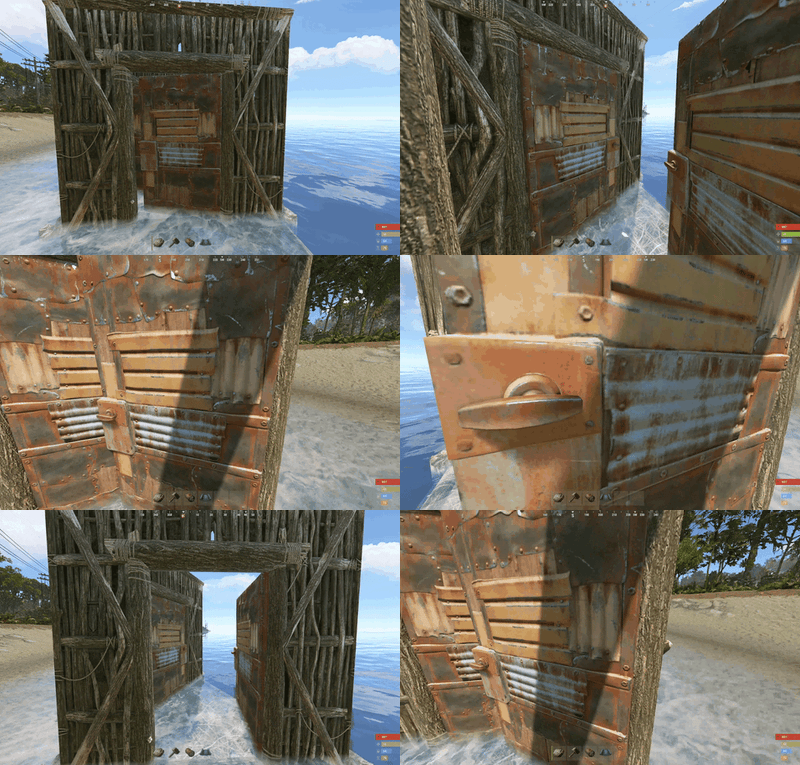
About Airlock Auto Door
Airlock Buddy lets players connect two nearby doors into an airlock. When one door opens, the other closes. An optional timer also closes the door that was opened after a configured delay.
The two features can be controlled independently for each door pair. Existing pairs and configuration files from v1.0.2 are retained.
Installation
-
Put
AirlockBuddy.csinoxide/plugins/(or your Carbon plugins directory). -
Grant permissions in the server console:
oxide.grant group default airlockbuddy.use -
Look at your first door and type
/airlock 1. -
Look at your second door and type
/airlock 2.
using oxide.grant user STEAMID64 permission.name.
Permissions
-
airlockbuddy.use— create/remove your own door pairs, check status, and change their automation settings. -
airlockbuddy.toggle— check status and enable/disable automation on your own existing door pairs, without granting permission to create/remove pairs. -
airlockbuddy.admin— all commands, bypasses the ownership restriction. Rust admins also bypass permissions.
Commands (look at either door in a pair)
-
/airlock— show help -
/airlock 1— select first door -
/airlock 2— connect second door -
/airlock status— show status of selected pair -
/airlock auto off— disable all automatic closing for this pair (both the other-door interlock and timer) -
/airlock auto on— re-enable automatic closing for this pair -
/airlock timer off— disable only the timed close for this pair; opening one door still closes the other -
/airlock timer on— restore timed close for this pair (requires global delay above 0) -
/airlock remove— unlink the pair entirely
Paired-door automatic behavior applies to whoever opens a door, not just the player who created the pair.
Configuration
The plugin creates/updates oxide/config/AirlockBuddy.json:
{
  "Maximum distance between paired doors (meters)": 7.0,
  "Automatically close the opened door after (seconds, 0 to disable)": 5.0,
  "Require the player to own both doors (admins bypass)": true,
  "Enable all airlock automation globally": true,
  "Enable airlock automation for new pairs": true,
  "Enable delayed door closing for new pairs": true
}
-
Set
Automatically close the opened door after (seconds, 0 to disable)to0to disable the timer for every pair. -
Set
Enable all airlock automation globallytofalseto suspend automatic closing for every pair, without deleting saved links. -
Set
Enable airlock automation for new pairstofalsefor new pairs to start in the disabled state. -
Set
Enable delayed door closing for new pairstofalsefor new pairs to start with timed close off.
After editing the configuration, reload the plugin from your server console: oxide.reload AirlockBuddy.
Saved Data
The plugin keeps pair links in oxide/data/AirlockBuddy.json across restarts. Pair settings are also saved. Data resets with a new map wipe or when the pair is removed.
Upgrade from 1.0.2
Replace the existing AirlockBuddy.cs with this version. Older links that do not have mode settings will retain both of their previous behaviors by default. Make a backup of the data file before updating.