
ARobinhood's Wishlist
-

$34.99
AdvancedPerks
By Blackmatic in Plugins
⚡ AdvancedPerks
Turn every item into a legend.
AdvancedPerks introduces collectible Perk Tokens you can Gamble, Apply, Clear, Trade on the Market, or even find in Loot.
All wrapped in a clean UI with full server-side configuration config.
🎮 What Players Get
✔️ Gamble – roll for a random perk token with transparent drop odds
✔️ Apply – attach tokens to compatible items (Weapons / Armor / Tools)
✔️ Clear – remove perks from items (cost & workbench rules configurable)
✔️ Market – list, buy, cancel, and claim Scrap payouts (even offline)
✔️ Loot Drops – perk tokens can appear in configured crates & barrels
✔️ StatTrack – live kill counter for weapons
✔️ Hunter’s Instinct – highlights nearby animals
✔️ Aquaman & Fall Resist – underwater breathing & fall-damage reduction
✔️ Fun Perks – comic hit texts, laser beams, and blood fountains
⚙️ How It Works
📜 Tokens are real items (e.g., notes) bound to a secure server-side Perk ID (unspoofable)
📋 /perks UI – choose category → select token → target item → apply
🧩 Balancing system – stack caps, category caps, item blacklist/whitelist, and workbench requirements
🏷️ Item Names & Info – compact perk tags
📖 Perk Catalog
🔫 Weapons
• Bullet Damage I–IV – Increases bullet damage dealt.
• Explosion Damage I–IV – Increases explosive damage dealt.
• Accuracy I–IV – Reduces weapon spread (tighter aimcone).
• Magazine Size I–IV – Increases magazine capacity.
• StatTrack – Tracks lifetime kills (players / animals / NPCs).
• Hunter’s Instinct – Highlights nearby animals with markers.
🛡 Armor
• Projectile Resist I–IV – Reduces incoming projectile damage.
• Melee Resist I–IV – Reduces incoming melee damage.
• Explosion Resist I–IV – Reduces incoming explosive damage.
• Max Health I–IV – Increases maximum health (respects server caps).
• Durability I–IV – Slows condition loss on the item.
• Aquaman – Enables underwater breathing.
• Fall-damage Resist – Reduces fall damage taken.
⛏ Tools
• Wood Yield I–IV – Increases wood gathered.
• Ore Yield I–IV – Increases ore/stone gathered.
• Animal Yield I–IV – Increases animal resources gathered.
• Plant Yield I–IV – Increases plant/cloth/crop yield.
• Lucky Strike I–IV – Chance to double gathered resources.
🎭 Fun
Comic Hit – classic BAM/POW/WHACK text bursts
Laser Beam – colorful laser lines
Blood Fountain – juicy blood FX
🖥 User Interface
🔳 Three-column layout (Perk Tokens / Targets / Context)
🔍 Category filters: Weapons, Armor, Tools, Fun
🎲 Gamble panel with drop chances & costs
🧹 Held item panel with active perks + clear cost
📚 Perk Info window – rarity colors, pages, readable descriptions
🛒 Market UI – browse all listings, manage yours, and claim payouts
💻 Commands
/perks → Open main UI
/pmarket → Open market
/marketclaim → Claim pending payouts
/ap → Shortcut to /perks
Admin Only: /perks give <player> <perkId> [amount]
🔧 Balance & Config Highlights
⚖️ Costs: Scrap / Tech Trash / Wood / Stones, plus Economics or ServerRewards
⚖️ Workbench Rules: configurable tiers & radius for Apply / Clear
⚖️ Rarity Weights: fully adjustable odds for Common → Epic + Fun
⚖️ Loot Spawns: per-container filters with min/max token count
⚖️ Market System: min/max price, listing cap per player, duration, safe payouts
⚖️ Max Perks per Item: configurable caps for Weapons / Armor / Tools
⚖️ Item Rules: blacklist (e.g., C4) & whitelist (e.g., rocketlauncher → Magazine Size only)
⚖️ Health Caps: server-wide % cap, HP cap, or unique-per-player
⚖️ Hunter’s Instinct: tick rate, radius, marker count & color
🛡 Safety & Compatibility
• 🔒 Tokens securely bound to Perk IDs (server-mapped, unspoofable)
🧹 Wipe Reminder (Important)
After each server wipe, delete this plugin’s data file to prevent old item GUID/perk mappings or market records from carrying over.
Default path (Oxide): oxide/data/AdvancedPerks.json
Default path (Carbon): carbon/data/AdvancedPerks.json
The file will be recreated fresh on next load.
✨ With AdvancedPerks, every item becomes unique—whether it’s a Weapon, Armor, Tool, or just for Fun.
https://youtu.be/JvtK5Mbwbgw
-
$40.00
Train Bases
By LeroyJenkins420 in Plugins
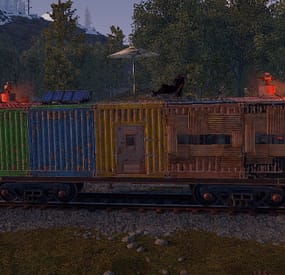
This plugin allows any player to find and build on a train directly on the rails in either a 1x5 or 1x3 configuration.
Features:
Throttle syncing for trains (syncs throttles when updated) Build anything almost anywhere (on trains) Limited to 2x1 or 5x1 carts Can be built inside of some monument (Trainyard, etc) Can be built inside underground tunnels Electrical entities powered by the train Configurable Health Preset Support NO MAP EDITING REQUIRED!!!
How To Use:
To use this plugin you need to:
1. Put the plugin in your plugins folder and enjoy!
Chat Commands:
/blacklist: Admin only, will blacklist items in your inventory, this will prevent these items from being placed on the train.
/killtrains: Admin only, will kill all trains on the server.
Args: All - kills all trains Built - kills only built trains Unbuilt - kills only unbuilt trains
Config:
Bounds defines the buildable area on the train, default is 1x5 or 1x2 for work carts. Larger building bounds may or may not be supported in the future.
Building grade support 0-4
0: twigs 1: wood 2: stone 3: metal 4: high quality { "Version Number": { "Major": 1, "Minor": 1, "Patch": 7 }, "Upgrade Chance (0-100 = %0-100 chance)": 50.0, "Building Grade to spawn as": 3, "Train Wagon Start Health": 5000.0, "Train Engine Force": 250000.0, "Blacklisted Entities (shortnames)": [ "example1", "example2", "For ShortNames Go to:", "https://docs.carbonmod.gg/references/items/", "https://www.corrosionhour.com/rust-item-list/" ], "Sync Train Throttles": true, "Max Train Pop": 24.0, "Max coupled trains": 12, "Max Train Couple Speed": 9.0, "Message Prefix": "<size=18px><color=#51a3f5>[</color><color=#FFFFFF>T</color><color=#FF0000>B</color><color=#51a3f5>]</color></size>" } Note: Presets can be found in a seperate folder (TrainBases > TrainPresets)
Please also be aware that at this time bounds are only setup for default types. EX: you can create presets for WagonC, however if you create presets for locomotive the player will be able to build infinitely off the train. Default types meaning train types that come with presets by default (wagonc, wagonb, etc).
The bounding system will be re-engineered shortly to allow for dynamic bound creation.
Note: weighted chance modifiers can be modified for each preset valid arguments for these modifiers are 0-100 and affect the likelihood of that preset spawning.
- #trainserver
- #train
- (and 11 more)
-
$24.99
War Mode PVP/PVE
Allows both PVE and PVP players to exist on a server at the same time. PVE players will have certain configurable protections and restrictions. You can have players use a command to flag themselves as PVP/PVE or you can assign it to them when they first spawn. If you have ZoneManager you can also designate specific zones to force player's to be PVE or PVP. Plugin is also compatible with SimpleStatus.
Note: Video is outdated, see documentation for a full list of new features!
Documentation:
A full readme including permissions, commands, and config options is available in this wiki site.
Disclaimer:
Like all of my plugins - this plugin is sold as is. I will be happy to take feature requests into consideration but make no guarantees about which ones get implemented. Please refer to the feature list before you make your purchase!
Developer API:
API Methods
// Returns the mode of the given entity. Also takes into account if the entity is in a forced mode zone. string GetEntityMode(BaseEntity entity); // Returns the group name for the given mode. For example if given 'pve' will return 'warmodepve' string GetModeGroup(string modeId); // Returns the target type for a given entity. Target types are the category that an entity falls into. // For example, if given a BasePlayer entity, it will return 'players'. If given a horse entity is will // return 'horses'. string GetEntityTargetType(BaseEntity entity); Hooks - place these in your plugin and WarMode will call them.
// Called when a player's mode has been updated or config changes have ocurred that may affect the mode. private void WarMode_PlayerModeUpdated(string userid, string modeId) // Used to override WarMode logic for taking damage. // If true/false is returned then WarMode logic will be skipped. Return null to continue WarMode logic. private object CanEntityTakeDamage(BaseCombatEntity target, HitInfo info) // Used to override WarMode logic for targeting. // If true/false is returned then WarMode logic will be skipped. Return null to continue WarMode logic. private object CanEntityBeTargeted(BasePlayer target, BaseEntity attacker, bool skipVendingCheck) // Used to override WarMode logic for triggering a trap. // If true/false is returned then WarMode logic will be skipped. Return null to continue WarMode logic. private object CanEntityTrapTrigger(BaseTrap trap, BasePlayer basePlayer) // Used to override WarMode logic for looting an entity. // If true/false is returned then WarMode logic will be skipped. Return null to continue WarMode logic. private object CanEntityLoot(BasePlayer looter, BaseEntity target, bool skipVendingCheck)
FREE Extension Plugins:
All extension plugins are optional, and included in the downloadable zip that WarMode comes in.
War Mode Admin Panel
Use the /warmode.config or /wmc command to open a panel that allows admins to update mode rules in game without having to reload the pluign. Requires the warmode.admin permission to use.
I HIGHLY recommend you use this extension!
War Mode Spawn UI
Provides a UI that is shown to players when they first spawn that prompts them to choose whether they want to be PVP or PVE. Also supports custom modes. Localization and config options available. This can also be configured to appear when players use the /flag command.
War Mode Rules UI
Using the /rules command (which is configurable) players can see a list of what restrictions they have for their current mode. These ruling will update dynamically based on your config settings.
War Mode Badges
Customizable UI elements that will appear on the player's HUD to indicate what their current mode is.
-
$9.99
Super Hammer
🔨 Super Hammer enhances the building hammer with powerful features for managing, upgrading, and manipulating building structures. Perfect for builders, admins, and creative servers that want expanded hammer functionality.
✨ Features
- Instant Repair - Automatically repair building blocks to full health on hit
- Building Grade Cycling - Upgrade/downgrade building blocks through all tiers and skins with R key or entire structure at once!
- Skin Support - Cycles through Frontier, Gingerbread, Adobe, Brick, Concrete, Jungle, and Container skins
- Rotate Deployables - Rotate any deployable entity by 45° increments
- Quick Delete - Middle mouse to delete single entities, Shift+Middle Mouse for entire structures
- Modern UI Interface - Toggle features on/off with a sleek dark-themed GUI
- HUD Indicator - Shows active features below the hotbar when holding hammer
- Admin Tools - Check entity info, view code locks, transfer ownership
- Structure Analysis - View ownership distribution across connected structures
- TC Authorization Checks - Respects building privilege for non-admin users
- Per-feature Permissions - Granular control over which features players can access
- Persistent Settings - Player preferences saved between sessions
🔐 Permissions
superhammer.adminmenu | Access to admin menu (check entities, transfer ownership, bypass ownership checks)
superhammer.repair | Allows use of instant repair feature
superhammer.upgrade | Allows use of building grade upgrade/downgrade feature
superhammer.rotate | Allows use of deployable rotation feature
superhammer.delete | Allows use of entity deletion feature
superhammer.check | Allows use of entity check commands
superhammer.own | Allows use of ownership transfer commands
💬 Commands
/sh | Opens the Super Hammer GUI menu
/sh.check | View detailed info about the entity you're looking at
/sh.checkall | Analyze ownership distribution of connected structure
/sh.own [player] | Transfer ownership of single entity (to self or specified player)
/sh.ownall [player] | Transfer ownership of all connected entities
/sh.removeall | Delete all connected entities you own
Keyboard Shortcuts (While Holding Hammer)
Shift + R | Open Super Hammer menu
R | Upgrade building block / Rotate deployable
Ctrl + R | Downgrade building block
Middle Mouse | Delete single entity
Shift + Middle Mouse` | Delete entire connected structure
⚠️ Caveats and Disclaimers
- Admin permissions are powerful - The `superhammer.adminmenu` permission bypasses ownership checks. Only grant to trusted staff.
- Ownership transfer is permanent - Use `/sh.ownall` carefully as it will transfer ALL connected entities.
- Structure deletion is irreversible - Deleted structures cannot be recovered. Confirmation dialogs are shown for mass deletions.
- UberTool compatibility - Super Hammer automatically disables when UberTool is detected to prevent conflicts.
🌐 Localization
{ "BuildingBlocked": "<color=#ffc34d>Super Hammer</color>: Cannot use in a building blocked area.", "Permission": "<color=#ffc34d>Super Hammer</color>: You don't have permission to use a building hammer.", "HoldingHammer": "<color=#ffc34d>Super Hammer</color>: You must be holding a hammer.", "Enabled": "<color=#ffc34d>Super Hammer</color>: <color=#b0fa66>Enabled</color>.", "Disabled": "<color=#ffc34d>Super Hammer</color>: <color=#ff6666>Disabled</color>.", "EntityOwner": "<color=#ffc34d>Super Hammer</color>: You do not own this entity.", "TakeOwnership": "Took ownership of {0} entities.", "WallpaperRemoved": "Removed {0} wallpapers from your building blocks.", "CodeLock": "<color=#66ccff>Code</color>: " } 🤝 Support
Join the Dark Side Development for support!
☕ Ko-Fi
Like what we do? Support us over at Ko-Fi
📜 Legal
Copyright © 2026 Lincoln
This plugin, Super Hammer, is the intellectual property of Lincoln. The plugin may not be copied, modified, merged, published, or redistributed without the explicit permission of the creator, Lincoln.
Permission is granted solely for personal use on a Rust server that you own or manage. Commercial use, sharing with third parties, or distribution on multiple servers is strictly prohibited without prior consent from the creator.
Disclaimer of Warranty and Liability:
This plugin is provided "as is" without any express or implied warranties. The creator disclaims any liability for damages, including but not limited to server malfunctions, data loss, or other issues arising from the use of this software. Use of the plugin is at your own risk.
-
.gif.9100f5179d43e78cc27c910c5be0fcfb.thumb.gif.b28ea972dca389237452fa5c07412809.gif)
$20.00
Better Medicine
Change your survival experience on Rust with BetterMedicine! This comprehensive plugin introduces a range of medical items including injection guns, defibrillators, syringes, first aid kits, and bandages. Imagine a scenario where you can strategically lift and heal a teammate from a distance, administer special syringes, or even perform a life-saving resurrection with a defibrillator. BetterMedicine is your key to improving medical gameplay and increasing survivability in the harsh environment of Rust.
Default configuration file composition:
Customized defibrillator 3 levels of injection syringes 3 levels of syringes, includes quality icons for each level 3 levels of bandages, includes quality icons for each level 3 levels of first aid kits, includes quality icons for each level For each item there are already ready-made crafts for the SimpleCraftSystem plugin. This is just what comes by default, you can create bandages, syringes and first aid kits with any effects you want, as well as other injection gun configurations.
Features:
Injection Pistols: Heal and lift teammates from a distance. Lifting and healing are accompanied by effects. Customizable working distance, treatment volume, magazine capacity, and crafting options. Defibrillator: Resurrect fallen players. Start the resurrection animation by pointing at the corpse and holding down the LMB (Left Mouse Button). Keep focus on the corpse during the resurrection process. Customizable resurrection time and crafting options. Syringes, first aid kits and bandages: Create different syringes, first aid kits and bandages with a different set of effects. Available effect types:
Calories/Hydration/Heartrate/Poison/Radiation/Bleeding/Health/HealthOverTime.
Demo Video:
Installation Instructions:
Download the CustomItemDefinitions dependency library from here. Place the library in the plugins directory of your server. Wait for it to load on your server. Download the plugin you purchased. Place the plugin in your server's plugin directory. Configure the settings to your liking using the provided examples in the configuration file. Enjoy!
Instructions for use (Permission and Commands):
The plugin does not need permissions as it provides a variety of medical items.
You can give out items using the standard command give {shortname}.
Injection gun - pistol.injection.{configuration name} Example from the default config: give pistol.injection.level2 Defibrillator - give defibrillator Syringes - give syringe.medical.{configuration name} Example from default config: syringe.medical.level3 Medkit - give largemedkit.{configuration name} Example from default config: largemedkit.level1 Bandage - give bandage.{configuration name} Example from default config: bandage.level1
Default Config:
{ "General": { "Effects": { "Number of electric balls when lifting an wounded player": 3, "Syringe effect": true }, "[SimpleCraftSystem] Craft Page Settings": { "Title": "<color=#00FF91><b>MEDICINE</b></color>", "Command to open": "medicine", "Permission to open (simplecraftsystem.*)": "medicine" } }, "Defibrillator config": { "Name": "Defibrillator", "Description": "A device that delivers an electrical charge to the heart to resurrect a dead player.", "Icon SkinId": 3141788438, "Seconds to resurrect": 3.0, "Electic skeleton at the end": true, "Become wounded after the resurrect": true, "Use item after the resurrect": true, "Heal amount after the lift": 0.0, "[SimpleCraftSystem] Craft": { "Permission": "", "Ingradients": [ { "Shortname": "electric.battery.rechargable.small", "SkinID": -1, "Amount": 1, "Name": null, "Description": null }, { "Shortname": "wiretool", "SkinID": -1, "Amount": 3, "Name": null, "Description": null }, { "Shortname": "electric.teslacoil", "SkinID": -1, "Amount": 1, "Name": null, "Description": null }, { "Shortname": "fuse", "SkinID": -1, "Amount": 1, "Name": null, "Description": null }, { "Shortname": "metal.refined", "SkinID": -1, "Amount": 50, "Name": null, "Description": null } ] } }, "Injection gun configs": { "level1": { "Name": "Injection Gun (Level 1)", "Description": "A cutting-edge tool designed to heal and lift wounded players swiftly in critical situations. This compact device administers precise healing injections while enabling the levitation of injured comrades, ensuring rapid aid and transport on the battlefield.", "Capacity": 1, "Icon SkinId": 3132962420, "Weapon SkinId": 2512906636, "Ability to lift a wounded player": true, "Heal Amount": 10.0, "Operating distance": 10.0, "[SimpleCraftSystem] Craft": { "Permission": "", "Ingradients": [ { "Shortname": "syringe.medical", "SkinID": -1, "Amount": 1, "Name": null, "Description": null }, { "Shortname": "metalspring", "SkinID": -1, "Amount": 1, "Name": null, "Description": null }, { "Shortname": "metal.fragments", "SkinID": -1, "Amount": 100, "Name": null, "Description": null } ] } }, "level2": { "Name": "Injection Gun (Level 2)", "Description": "A cutting-edge tool designed to heal and lift wounded players swiftly in critical situations. This compact device administers precise healing injections while enabling the levitation of injured comrades, ensuring rapid aid and transport on the battlefield.", "Capacity": 3, "Icon SkinId": 3132962420, "Weapon SkinId": 2512906636, "Ability to lift a wounded player": true, "Heal Amount": 10.0, "Operating distance": 20.0, "[SimpleCraftSystem] Craft": { "Permission": "", "Ingradients": [ { "Shortname": "syringe.medical", "SkinID": -1, "Amount": 4, "Name": null, "Description": null }, { "Shortname": "metalspring", "SkinID": -1, "Amount": 2, "Name": null, "Description": null }, { "Shortname": "metal.fragments", "SkinID": -1, "Amount": 100, "Name": null, "Description": null } ] } }, "level3": { "Name": "Injection Gun (Level 3)", "Description": "A cutting-edge tool designed to heal and lift wounded players swiftly in critical situations. This compact device administers precise healing injections while enabling the levitation of injured comrades, ensuring rapid aid and transport on the battlefield.", "Capacity": 5, "Icon SkinId": 3132962420, "Weapon SkinId": 2512906636, "Ability to lift a wounded player": true, "Heal Amount": 10.0, "Operating distance": 50.0, "[SimpleCraftSystem] Craft": { "Permission": "", "Ingradients": [ { "Shortname": "syringe.medical", "SkinID": -1, "Amount": 10, "Name": null, "Description": null }, { "Shortname": "metalspring", "SkinID": -1, "Amount": 5, "Name": null, "Description": null }, { "Shortname": "metal.fragments", "SkinID": -1, "Amount": 100, "Name": null, "Description": null } ] } }, "admin": { "Name": "Injection Gun (Admin)", "Description": "A cutting-edge tool designed to heal and lift wounded players swiftly in critical situations. This compact device administers precise healing injections while enabling the levitation of injured comrades, ensuring rapid aid and transport on the battlefield.", "Capacity": 1000, "Icon SkinId": 3132962420, "Weapon SkinId": 2512906636, "Ability to lift a wounded player": true, "Heal Amount": 10.0, "Operating distance": 1000000.0, "[SimpleCraftSystem] Craft": { "Permission": "admin", "Ingradients": [] } } }, "Bandage configs": { "level1": { "Name": "Bandage (Level 1)", "Description": "", "Icon SkinId": 3141443625, "Effects": { "[Read Only] Type Identifiers": "Calories/Hydration/Heartrate/Poison/Radiation/Bleeding/Health/HealthOverTime", "List of Effects": [ { "Effect Type": "Poison", "Amount": -5.0 }, { "Effect Type": "Bleeding", "Amount": -60.0 }, { "Effect Type": "Health", "Amount": 10.0 } ] }, "[SimpleCraftSystem] Craft": { "Permission": "", "Ingradients": [ { "Shortname": "bandage", "SkinID": -1, "Amount": 2, "Name": null, "Description": null }, { "Shortname": "cloth", "SkinID": -1, "Amount": 2, "Name": null, "Description": null }, { "Shortname": "gunpowder", "SkinID": -1, "Amount": 3, "Name": null, "Description": null } ] } }, "level2": { "Name": "Bandage (Level 2)", "Description": "", "Icon SkinId": 3141443298, "Effects": { "[Read Only] Type Identifiers": "Calories/Hydration/Heartrate/Poison/Radiation/Bleeding/Health/HealthOverTime", "List of Effects": [ { "Effect Type": "Poison", "Amount": -10.0 }, { "Effect Type": "Bleeding", "Amount": -70.0 }, { "Effect Type": "Health", "Amount": 15.0 } ] }, "[SimpleCraftSystem] Craft": { "Permission": "", "Ingradients": [ { "Shortname": "bandage", "SkinID": -1, "Amount": 3, "Name": null, "Description": null }, { "Shortname": "cloth", "SkinID": -1, "Amount": 3, "Name": null, "Description": null }, { "Shortname": "gunpowder", "SkinID": -1, "Amount": 5, "Name": null, "Description": null } ] } }, "level3": { "Name": "Bandage (Level 3)", "Description": "", "Icon SkinId": 3141443691, "Effects": { "[Read Only] Type Identifiers": "Calories/Hydration/Heartrate/Poison/Radiation/Bleeding/Health/HealthOverTime", "List of Effects": [ { "Effect Type": "Poison", "Amount": -15.0 }, { "Effect Type": "Bleeding", "Amount": -80.0 }, { "Effect Type": "Health", "Amount": 20.0 } ] }, "[SimpleCraftSystem] Craft": { "Permission": "", "Ingradients": [ { "Shortname": "bandage", "SkinID": -1, "Amount": 5, "Name": null, "Description": null }, { "Shortname": "cloth", "SkinID": -1, "Amount": 5, "Name": null, "Description": null }, { "Shortname": "gunpowder", "SkinID": -1, "Amount": 10, "Name": null, "Description": null } ] } } }, "Syringe configs": { "level1": { "Name": "Medical Syringe (Level 1)", "Description": "", "Icon SkinId": 3141445760, "Effects": { "[Read Only] Type Identifiers": "Calories/Hydration/Heartrate/Poison/Radiation/Bleeding/Health/HealthOverTime", "List of Effects": [ { "Effect Type": "Poison", "Amount": -10.0 }, { "Effect Type": "Radiation", "Amount": -20.0 }, { "Effect Type": "Health", "Amount": 25.0 }, { "Effect Type": "HealthOverTime", "Amount": 20.0 } ] }, "[SimpleCraftSystem] Craft": { "Permission": "", "Ingradients": [ { "Shortname": "syringe.medical", "SkinID": -1, "Amount": 2, "Name": null, "Description": null }, { "Shortname": "healingtea", "SkinID": -1, "Amount": 1, "Name": null, "Description": null }, { "Shortname": "radiationresisttea", "SkinID": -1, "Amount": 1, "Name": null, "Description": null } ] } }, "level2": { "Name": "Medical Syringe (Level 2)", "Description": "", "Icon SkinId": 3141445205, "Effects": { "[Read Only] Type Identifiers": "Calories/Hydration/Heartrate/Poison/Radiation/Bleeding/Health/HealthOverTime", "List of Effects": [ { "Effect Type": "Poison", "Amount": -15.0 }, { "Effect Type": "Radiation", "Amount": -30.0 }, { "Effect Type": "Health", "Amount": 50.0 }, { "Effect Type": "HealthOverTime", "Amount": 30.0 } ] }, "[SimpleCraftSystem] Craft": { "Permission": "", "Ingradients": [ { "Shortname": "syringe.medical", "SkinID": -1, "Amount": 4, "Name": null, "Description": null }, { "Shortname": "healingtea.advanced", "SkinID": -1, "Amount": 1, "Name": null, "Description": null }, { "Shortname": "radiationresisttea.advanced", "SkinID": -1, "Amount": 1, "Name": null, "Description": null } ] } }, "level3": { "Name": "Medical Syringe (Level 3)", "Description": "", "Icon SkinId": 3141445599, "Effects": { "[Read Only] Type Identifiers": "Calories/Hydration/Heartrate/Poison/Radiation/Bleeding/Health/HealthOverTime", "List of Effects": [ { "Effect Type": "Poison", "Amount": -20.0 }, { "Effect Type": "Radiation", "Amount": -40.0 }, { "Effect Type": "Health", "Amount": 100.0 }, { "Effect Type": "HealthOverTime", "Amount": 35.0 } ] }, "[SimpleCraftSystem] Craft": { "Permission": "", "Ingradients": [ { "Shortname": "syringe.medical", "SkinID": -1, "Amount": 4, "Name": null, "Description": null }, { "Shortname": "healingtea.pure", "SkinID": -1, "Amount": 1, "Name": null, "Description": null }, { "Shortname": "radiationresisttea.pure", "SkinID": -1, "Amount": 1, "Name": null, "Description": null } ] } } }, "Medkit configs": { "level1": { "Name": "Large Medkit (Level 1)", "Description": "", "Icon SkinId": 3141443942, "Effects": { "[Read Only] Type Identifiers": "Calories/Hydration/Heartrate/Poison/Radiation/Bleeding/Health/HealthOverTime", "List of Effects": [ { "Effect Type": "Poison", "Amount": -20.0 }, { "Effect Type": "Bleeding", "Amount": -100.0 }, { "Effect Type": "Health", "Amount": 20.0 }, { "Effect Type": "HealthOverTime", "Amount": 100.0 } ] }, "[SimpleCraftSystem] Craft": { "Permission": "", "Ingradients": [ { "Shortname": "largemedkit", "SkinID": -1, "Amount": 1, "Name": null, "Description": null }, { "Shortname": "syringe.medical", "SkinID": -1, "Amount": 1, "Name": null, "Description": null }, { "Shortname": "tarp", "SkinID": -1, "Amount": 1, "Name": null, "Description": null }, { "Shortname": "cloth", "SkinID": -1, "Amount": 1, "Name": null, "Description": null }, { "Shortname": "rope", "SkinID": -1, "Amount": 1, "Name": null, "Description": null } ] } }, "level2": { "Name": "Large Medkit (Level 2)", "Description": "", "Icon SkinId": 3141444145, "Effects": { "[Read Only] Type Identifiers": "Calories/Hydration/Heartrate/Poison/Radiation/Bleeding/Health/HealthOverTime", "List of Effects": [ { "Effect Type": "Poison", "Amount": -30.0 }, { "Effect Type": "Bleeding", "Amount": -100.0 }, { "Effect Type": "Health", "Amount": 30.0 }, { "Effect Type": "HealthOverTime", "Amount": 100.0 } ] }, "[SimpleCraftSystem] Craft": { "Permission": "", "Ingradients": [ { "Shortname": "largemedkit", "SkinID": -1, "Amount": 2, "Name": null, "Description": null }, { "Shortname": "syringe.medical", "SkinID": -1, "Amount": 1, "Name": null, "Description": null }, { "Shortname": "tarp", "SkinID": -1, "Amount": 1, "Name": null, "Description": null }, { "Shortname": "cloth", "SkinID": -1, "Amount": 1, "Name": null, "Description": null }, { "Shortname": "rope", "SkinID": -1, "Amount": 1, "Name": null, "Description": null } ] } }, "level3": { "Name": "Large Medkit (Level 3)", "Description": "", "Icon SkinId": 3141444029, "Effects": { "[Read Only] Type Identifiers": "Calories/Hydration/Heartrate/Poison/Radiation/Bleeding/Health/HealthOverTime", "List of Effects": [ { "Effect Type": "Poison", "Amount": -40.0 }, { "Effect Type": "Bleeding", "Amount": -100.0 }, { "Effect Type": "Health", "Amount": 40.0 }, { "Effect Type": "HealthOverTime", "Amount": 100.0 } ] }, "[SimpleCraftSystem] Craft": { "Permission": "", "Ingradients": [ { "Shortname": "largemedkit", "SkinID": -1, "Amount": 2, "Name": null, "Description": null }, { "Shortname": "syringe.medical", "SkinID": -1, "Amount": 2, "Name": null, "Description": null }, { "Shortname": "tarp", "SkinID": -1, "Amount": 3, "Name": null, "Description": null }, { "Shortname": "cloth", "SkinID": -1, "Amount": 3, "Name": null, "Description": null }, { "Shortname": "rope", "SkinID": -1, "Amount": 3, "Name": null, "Description": null } ] } } } }