


-
Posts
73 -
Joined
-
Last visited
Content Type
Profiles
Warranty Claims
Downloads
Forums
Store
Services
Downloads Plus Support
DOWNLOADS EXTRA
Reels
Support Center
Everything posted by WinterChild84 aka Nexus84
-

EPS spam on small stash cupboard.tool and bed, sleepingbag
WinterChild84 aka Nexus84 replied to SCRAPZONE WOLF's Support Report in Support
yes it was tested all settins need to be adjusted according to the sensitivity of your server also cone should be about 14 thats what i have seen was the most accurate i have posted my settings during testing ifor another user if you would like send me your config settings and i will test it with the settings you have -
how to run the plugins after downloading step by step
WinterChild84 aka Nexus84 replied to AMG's Support Report in Support
instructions should be in description but i will double check -
how to run the plugins after downloading step by step
WinterChild84 aka Nexus84 replied to AMG's Support Report in Support
how are you thank you for your patronage , 3 things to verify 1 are you running carbon or oxide ,,, 2 are you admin on the server ,,, 3 did you set permissions for yourself -
Changed Status from Pending to Closed
-
thank you for that as soon as i am back near my computer i will look into that it was actually fixed already but undid it because i was testing and using team mates was the easiest way so i removed it to test and when i made some needed changes i guess i didnt add it back in and i will look into the other concerns thank you i will have the updatyed in asap
-
Version 1.9.6
303 downloads
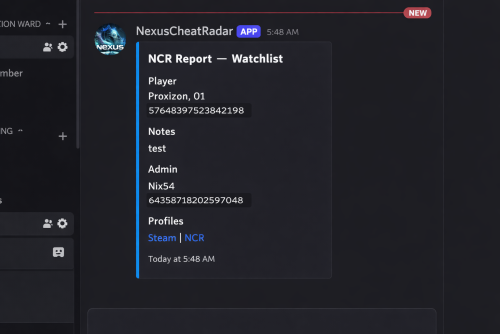
DISCORD WEBSITE RCON RCON is a separate product — NCR works completely standalone without it. What it actually does No anticheat plugin can go unmonitored and be 100% accurate, they have and will always need admin verification .. as cheats get more advanced detection must adapt , it wont happen automatically but the morre advanced cheats can sometimes slide right through so we update as we find and never share what we know NCR runs quietly in the background on your server. It watches player behaviour across 9 detection categories, builds a risk profile for every player it sees, and sends a Discord alert with all the relevant info when something looks off. You get the data, you make the call. What makes it different from a normal anticheat plugin is the network layer. Every server running NCR is connected. When someone who's already been flagged or banned somewhere else joins your server, you find out immediately on join — before they've done anything. 9 behavioural detection systems running in the background Risk profiles that persist across disconnects, wipes, and server changes Cross-server intelligence — flagged players carry their history to your server Discord alerts with full context so you can make an informed call Free web portal — public player lookup + private server owner dashboard Admin report panel for submitting and managing reports in-game F7 Cheat Report intercept , so you can see with ease what players are reporting suspected cheaters remember every server is diffrent and your config must be adjusted to suit your server (there may at times be features that are set in a test setting so check thresholds and adjust as needed ) For the full cross-server experience — shared violation history, network bans, IP cross-referencing, and join intelligence — enable the Web section in config. The web portal is completely free. Detection Systems Every system can be toggled on or off individually. Tuning is always required — every server is different. What works on a 2x will not work on vanilla, and a high-pop server needs different thresholds again. The config is built with this in mind, but expect to spend some time adjusting values to your environment. ESP / Wallhack — Tracks how often a player is locking onto targets through walls and structures they can't actually see. Runs continuously, not just during fights. Aimbot — Looks for snap patterns and alignment that just don't happen with a mouse. Compares across multiple engagements before flagging anything. No-Recoil — Checks recoil compensation per weapon over sustained fire. Accounts for attachments, ping, and burst patterns so legit players don't get caught. Speed Hack — Catches movement beyond server limits. SkillTree speed bonuses, vehicle movement, and dismount frames are all handled to keep noise low. Wall Loot — Detects looting through player-built walls. Only fires when the blocking geometry is player-owned — world crates and terrain never trigger it. Freecam / Debug Cam — Catches anyone using spectator or debug camera modes while still alive in the game world. NoClip / Fly — Flags movement through solid geometry or flying without a valid surface. Teleport plugins are accounted for automatically. Strafe / Backpedal — Picks up on movement bot behaviour — perfectly timed strafes and backpedal speeds that aren't physically possible. Privilege Escalation — Watches for players trying to run admin commands they don't have access to, or attempting to grab permissions at runtime. Risk Profiles Every player gets a risk profile the first time NCR sees them. It builds up over time — each detection type contributes its own score into an overall risk level. Scores decay naturally so one old incident doesn't follow someone forever, but a pattern absolutely will. Leaving and rejoining doesn't reset anything. The profile lives on the network, not on your server. Per-category scoring with individual probability weights Scores decay over time — isolated old incidents fade Steam data pulled on every join — VAC bans, game bans, account age, library size ServerArmour cross-referenced automatically Watchlist for players you want to keep an eye on — whitelist for players you've cleared Discord Alerts When something gets flagged you get a full embed in Discord — not just "player X did something suspicious." You get the player's name, Steam ID, current risk level, exactly what was detected and at what confidence, their IP with country and VPN/proxy flags, and a link to their Steam profile. There's a button to share the violation to the network and one to dismiss it. Nothing ever goes to the public network without you clicking the button. Everything stays private to your server unless you choose to share it. You can set up a separate webhook channel for each detection type — ESP, Aimbot, No-Recoil, Speed, WallLoot, Freecam, NoClip, Strafe, Privilege, Bans, Join Reports, and Toxic Reports. NCR Web Portal Free — no extra subscription needed. Public lookup — no account needed Anyone can search a Steam ID and see that player's risk score, violation history, ban status, VAC history, account age, name aliases, and which NCR servers they've shown up on. There's a live feed showing recent bans and violations across the network as they happen. Server owner dashboard — Steam login, no passwords All your linked servers with live online/offline status Live player list — who's on your server vs. other NCR servers right now Recent violations, ban history, and IP intelligence per server Detection charts and full player lookup with network-wide history Team management — add admins and mods with their own Steam logins, granular permissions per role, fully separate from Oxide permissions To unlock the full network experience — shared history, network bans, IP cross-referencing, and join alerts for flagged players — enable the Web section in config and link your server. Set Enabled: true under Web, then grab your server key from the config file and enter it in the portal after signing in with Steam. Nexus RCON Nexus RCON Pro is a separate web-based console panel that connects to your Rust servers over RCON. It's built to work alongside NCR but is completely optional — NCR has no dependency on it and works fine without it. If you do run both together, RCON gets a dedicated NCR tab that gets detections in real time and lets you act on them — ban, dismiss, share to network — without leaving the panel. Live RCON console per server in the browser Dedicated NCR tab — real-time detections, one-click actions Player list, Permissions, ban management, plugin list Multi-server support from a single dashboard — no software to install Nexus RCON is a separate subscription. NCR works completely independently — you don't need it to use any of NCR's features. In-Game Report Panel There's a built-in admin UI for submitting and managing reports directly from inside Rust. Open it with /ncr.report or via the radar strip button. Report type selection and player search by name or Steam ID Reports logged to the network database and forwarded to your Discord There is leveled permissions control what each admin/moderator role can submit Admin Commands /ncrToggle the radar HUD overlay /ncr.lookupFull player history, risk profile, and Steam data /ncr.riskPer-category risk score breakdown /ncr.incidentsLast 8 detections on a specific player /ncr.historyFull violation history for a player /ncr.watch / .unwatchAdd or remove a player from the watchlist /ncr.watchlistView everyone currently on the watchlist /ncr.statsServer-wide detection stats and top risk scores /ncr.resetClear a player's risk score and local history /ncr.ban / .unbanIssue or lift a ban with Discord embed and network log /ncr.webshareManually push a violation to the public network /ncr.reportOpen the admin report panel /ncr.testSend a test alert to Discord ncr.link / ncr.unlinkLink or unlink your server from the web portal (console) Main permission: nexuscheatradar.admin Report panel: .report.mod .report.admin .report.kick .report.tempban .report.serverban .report.networkban Getting Started Takes about 5 minutes. Drop NexusCheatRadar.cs into oxide/plugins/ Start the server — config generates at oxide/config/NexusCheatRadar.json Add your Discord webhook URLs and Steam Web API key. Set Enabled: true under the Web section Grant the permission: oxide.grant group admin nexuscheatradar.admin Reload: oxide.reload NexusCheatRadar Go to the web portal, head to the Servers tab, and click Setting Up a New Server. Copy your server key from the config file and paste it in, then sign in with Steam — it will link to your account automatically Test your Discord: /ncr.test Works With Oxide / uMod and Carbon Rust (PC) — no required dependencies False positive handling built in for SkillTree, Backpacks, RaidableBases, Kits, KitController, ServerKits, and teleport plugins ━━━━━━━━━━━━━━━━━━━━━━━━━━━━━━━━━━━━━━━━━━━━━━━ ◈ TROUBLESHOOTING ━━━━━━━━━━━━━━━━━━━━━━━━━━━━━━━━━━━━━━━━━━━━━━━ No Discord alerts arriving? » Check webhook URLs are correctly pasted — no trailing spaces » Confirm Discord.Enabled is true in config » Make sure the detection module is enabled » Run ncr.testmode <steamid> true to simulate Too many false positives? » Raise threshold values in ESP, Aimbot, or NoRecoil config sections » Increase shot/sample count requirements before alerts fire » Whitelist high-ping players by SteamID » Enable SuppressStrafeForSkillTree if using skill tree plugins Radar or UI not showing? » Grant nexuscheatradar.admin permission via Oxide » Toggle with /ncr.radar — requires admin flag or the permission node » Verify it loaded: oxide.reload NexusCheatRadar Plugin fails to load? » Delete the config file — NCR will regenerate it cleanly on next load » Check oxide/logs for the specific error line » Confirm you're on a compatible Oxide/uMod build » Set AutoNormalizeConfigLists to true ━━━━━━━━━━━━━━━━━━━━━━━━━━━━━━━━━━━━━━━━━━━━━━━ https://nexuscheatradar-6yt.pages.dev ━━━━━━━━━━━━━━━━━━━━━━━━━━━━━━━━━━━━━━━━━━━━━━━$19.99 -
Version 1.0.0
28 downloads
NexusRestartManager is a professional Rust server lifecycle plugin that manages restarts, wipe tracking, Discord notifications, and native decay configuration COMMANDS (ADMIN): • Restart server: /nrm restart <seconds> [reason] Example: /nrm restart 300 Server update • Cancel a scheduled restart: /nrm cancel COMMANDS (PLAYERS): • View wipe info : /nrmwipe • View wipe info: /nextwipe PERMISSIONS: Admins must have: nexusrestartmanager.admin Grant using your permissions plugin (Oxide/Carbon). oxide.grant user <playername_or_steamid> nexusrestartmanager.admin carbon.grant user <playername_or_steamid> nexusrestartmanager.admin DISCORD FEATURES (AUTOMATIC): • Server Online message (status + wipe cycle) • Restart Scheduled message (countdown + reason) • Server Offline message (uptime + wipe age + wipe cycle) • No duplicate or spam messages • No fake player counts DECAY SETTINGS (CONFIG ONLY): This plugin uses Rust’s native decay system. Example: "Decay": { "Upkeep period (minutes)": 1440 } • 1440 = normal (vanilla) decay • Higher number = slower decay • Lower number = faster decay • Applies automatically on server start and wipe • No commands required IMPORTANT NOTES: • Requires Oxide/Carbon Discord extension for Discord messages • Does NOT wipe blueprints • Does NOT force wipes (tracking only) • Lightweight and production safe This plugin uses a Discord webhook to send server status messages. STEP 1: Create a Discord webhook 1. Open Discord 2. Go to your server 3. Right-click the channel you want messages in 4. Click "Edit Channel" 5. Go to "Integrations" 6. Click "Webhooks" 7. Click "New Webhook" 8. Copy the Webhook URL STEP 2: Add webhook to the plugin config 1. Start the server once with the plugin installed 2. Stop the server 3. Open this file: oxide/config/NexusRestartManager.json or use carbon config 4. Paste your webhook URL into: "Discord": { "Webhook URL": "PASTE_URL_HERE" } STEP 3: Save the file and restart the server • Do NOT reload for first setup • Restart the server fully STEP 4: Verify it works • When the server starts, Discord should show "Server Online" • Run: /nrm restart 60 Test • You should see a restart message in Discord$4.99 -
he is just repeating it in spanish for the spanish community
-
I as well i see that with the oxide.ext update it changed alot of the source code
