


Bxrflip
-
Posts
113 -
Joined
-
Last visited
Content Type
Profiles
Warranty Claims
Downloads
Forums
Store
Services
Downloads Plus Support
DOWNLOADS EXTRA
Reels
Everything posted by Bxrflip
-
Changed Status from Pending to Fixed Changed Fixed In to 1.7.37
-
 Thanks! And I appreciate the bug report!
-
ok, I can help with that! I prefer to communicate through discord; you can find the invite link to my discord community by typing bxrflip.gg into your browser url. It will redirect to the invite link. What hosting provider are you using for your server? Are you hosting dedicated on a panel like pterodactyl? What software are you using? How are you hosting the map file? (dropbox, mapstr, etc.)
-
Waterfalls have been fixed! there is no Ferry terminal on the map though
- 31 comments
-
- 1
-

-
- #map
- #synecdoche
- (and 8 more)
-
yes there is!
-
yeah, on Synecdoche, those labels were only used to show the name of the map in the corner, there are no custom monuments that require labels on Synecdoche. I will include the map name in the coming update tho
-
what labels are you referring to?
-
 Yes! You can remove the weapon file from the config folder entirely, or alternatively set enabled for mini/scrappy/attack heli all to false
-
Hey, I just checked this and I'm not able to replicate the bug. can you tell me more about your server, maybe send me a log and a list of all the other plugins your running?
-
oof, that's not good. I'll check it out rn
-
Possibly! tbh I hadn't studied how the barrel spin works, and didn't think it mattered, but I'll check it out!
-
Howdy! Thanks for letting me know, I just pushed the fix! There is a global setting that disables the individual weapon permissions by default, called: "DisablePermissionCheck" If you set that to false, then players will only be able to use weapons they have permission to use
-
Possibly! There's quite a bit I'd have to consider regarding implementation, but I might be able to make something work It will take a long time tho
- 27 comments
-
- 1
-

-
- #copter
- #helicopter
- (and 10 more)
-
Just realized I forgot to respond to this: This issue has been fixed
- 27 comments
-
- 1
-
-
- #copter
- #helicopter
- (and 10 more)
-
 not by default, no. It's compatible with the most recent server updates since the jungle update (jungle compatible) but does not feature an area with jungle biome. Edit: I've read more about this on the discord and the link from the jungle compatibility badge and I think I might have misread the intent of the flair. I'm going to remove the "Jungle Compatible" flair since the map does not and will not feature the jungle biome. However, I do keep my maps maintained (generally; If you find any bugs please let me know, I'm not always ahead of development), so to anyone who it may concern, this map is updated and ready to go on any server, it just does not feature the jungle biome because 2021 Hapis did not have a jungle biome.
-
Version 1.1.33
556 downloads
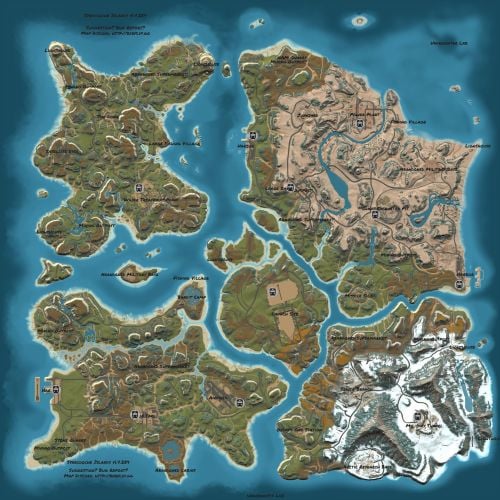
True Hapis 2021 is a loose Recreation of Hapis from the April 2021 Update. Details The map data was extracted systematically and imported into a modern custom map file. Missing prefabs were replaced with manual re-creations, and spawners, loot, puzzles, etc, were faithfully re-created by hand. Some small errors from the original Facepunch version were also patched, like gaps between bunker room pieces, floating props, etc. Everything should be in its exact place, precisely where it was in 2021. Welcome Back! Dependencies The map depends on an alternative to the RustEdit Oxide extension, called Core. These dependencies will be provided with your download. The map will work fine with the RE Oxide extension, but Core does a much better job with scientist AI, and keycard spawning. Avoid using both Core and the RE Oxide extension at the same time. Additional instructions included in the READ ME file. Bug Reporting & Community Please report any bugs in my discord channel at bxrflip.gg You can also get in contact with me there for any unrelated matters.Free -
ok, my b, I was under the impression that the issue had been solved as per our correspondence on discord. I'm, of course, still happy to help and will continue our conversation on Discord
-
Changed Status from Pending to Not a Bug Changed Fixed In to 2.1.117
-
This would have to be an issue with a plugin or save file on your server. Trees are spawned by by the server in places on the map indicated by many different types of topology and most of that topology hasn't changed on the map for years. I ran the map on a fresh wipe on my test server just now to double check and the trees are spawning normally. I think you have a plugin or some other server issue that is messing with the autospawn mechanic. Try loading the map onto a server with oxide disabled and see if the issue persists.
-
Changed Status from Pending to Fixed Changed Fixed In to 1.6.14
-
I have seen this and I've been working on a fix for the past couple days, sit tight
- 31 comments
-
- 1
-
-
- #map
- #synecdoche
- (and 8 more)
-
That's done on purpose to get the travelling vendor to spawn. The ring road would be too small for the travelling vendor if you snapped those nodes to the terrain. As you say, It has no effect on anything in-game, other than to trick the server into thinking the ring road is long enough to spawn the travelling vendor.
- 31 comments
-
- 1
-
-
- #map
- #synecdoche
- (and 8 more)
-
I think so! I Don't have that plugin, but it looks like it uses the Ring Road to to route the convoy and this map does have a ring road. However, the ring road is pretty small and only encircles the center island, so keep that in mind.
- 31 comments
-
- 1
-
-
- #map
- #synecdoche
- (and 8 more)
-
I can make it so the stash does not appear for all minicopters, or all scrappys, etc, but right now there is not a feature to enable/disable it for specific copter instances. I'm looking into ways to implement this, but the plugin was never meant to make some copters 'special' and other copters not. it's designed to allow players to mount items to any copter. You can use permissions to enable/disable weapons for certain players or copter types though! For True PVE, the issue is that in order to mount the weapons to the copter, the copter must be the owner of the weapon. It basically treats the copter as an autoturret. True PVE is blocking attacks made by anything except a player. The PVE plugin needs to be modified to allow damage from objects of type: PlayerHelicopter. I don't think there's a way for me to do it on my end. I'm not sure what you mean "using the * key on my keypad causes an automatic attack". The copter will only fire a weapon when the pilot presses "WeaponFirePrimary". You may have the * key bound to weaponfireprimary, so you may need to unbind it. You can change the homing missile's damage parameters in the weapons folder in the file marked radar missile or heat seeker. Each weapon has the ability to be enable/disabled for each copter type, so if you want minis to have different damage than an attack heli, etc. you can simply disable the original heat seeker file for minis, duplicate the file, name the copy "HeatSeekerMini" and change the values so that it is only enabled for the mini.
