

ProCelle
-
Posts
230 -
Joined
-
Last visited
-
Days Won
3
Content Type
Profiles
Warranty Claims
Downloads
Forums
Store
Services
Downloads Plus Support
DOWNLOADS EXTRA
Reels
Support Center
Everything posted by ProCelle
-
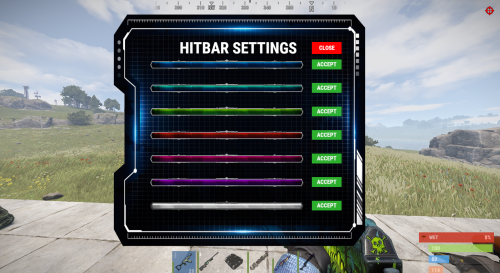 Yes, its a setting for all players.
 -
You can change the bar size and location changing this values in de config: "- UI Anchor Min": "0.356 0.117", "- UI Anchor Max": "0.63 0.158",
-
Ill take a look at it
-
Changed Status from Pending to Work in Progress Changed Fixed In to Next Version
-
Changed Status from Pending to Closed
-
Changed Status from Pending to Fixed Changed Fixed In to 1.2.7
-
Hey! Im aware of this error! Ill get it fixed as soon as im back home. Sorry for the incoveniences.
-
Will take a look at this.
-
New fixed version is now out.
-
Ill take a look at this as soon as im able to.
-
Hey, I think that the reason is that you gave the permission advancedhitbar.vip to that group of players. This permission wont work if your propertly if you arent modifying the player's health with another plugin. Please make sure you only asgined to the players the permissions advancedhitbar.use advancedhitbar.edit
-
Hey @MRC Thats odd, are you using any plugin that changes the players health or the damage?
-

keep getting spam in console whenever someone hits something
ProCelle replied to MatthiasBM's Support Report in Support
Changed Status from Pending to Closed Changed Fixed In to 1.2.5 -
keep getting spam in console whenever someone hits something
ProCelle replied to MatthiasBM's Support Report in Support
Hey matthias, Could you please Dm me a copy of your data file? Thank you -
That is probably because you didnt delete the data file. Unload the plugin, delete the data file and load it again.
-
keep getting spam in console whenever someone hits something
ProCelle replied to MatthiasBM's Support Report in Support
Hey Mathias! Looks like an issue with your data file. Try unloading the plugin, deleting the data and config files and loading it back. Please let me know if this fixes your issue. -
Changed Status from Pending to Closed Changed Fixed In to 1.2.5
-
Fixed!
-
Nevermind, I managed to upload it from this computer. Please confirm me it works as intended. Sorry again for the error.
-
Hey, I think i uploaded the wrong version. tommorrow when I arrive home ill fix it. You can keep using the previous one since it was just a minor update. Im sorry.
-
Changed Status from Pending to Closed Changed Fixed In to 1.2.5
-
Hey! Just uploaded a new version. This version has a new config option to change the hitbar colour. "- Default Bar colour (blue, red, lime, green, pink purple)" = "blue", You may need to delete the old config.
-
 These are the only inputs we can detect for now: BUTTON.FORWARD - W BUTTON.BACKWARD - S BUTTON.LEFT - A BUTTON.RIGHT - D BUTTON.JUMP - SPACE BUTTON.DUCK - CONTROL BUTTON.SPRINT - SHIFT BUTTON.USE - E BUTTON.FIRE_PRIMARY - LEFT MOUSE BUTTON BUTTON.FIRE_SECONDARY - RIGHT MOUSE BUTTON BUTTON.RELOAD - R BUTTON.FIRE_THIRD - MIDDLE MOUSE BUTTON But let me see if i can do a workaround with player binds
 -
hey Paul, Right now its imposible to know if a player has his inventory opened since its client sided. There is no way for servers to know... Im sorry about it.
-
hey @Paul Minnaar, Let me take a look at why its not working.

