
Jump to content

Miho

Creator
  • Posts

    45
  • Joined

  • Last visited

Everything posted by Miho

  1. Miho

    Better Statistics

    If a player's name in the stats contains characters other than English or numbers, such as Japanese, Russian, Korean, or Chinese...and more, the Better stats does not recognize it and displays just '?'.
  2. Miho

    Better Statistics

    It seems like it doesn't recognize names written in languages other than English and numbers. Has this issue been resolved, or is there a plan to resolve it in the future?
  3. I just deployed a server from hosting provider to test it, and it works perfectly, just like in the video It seems that the problem might be specific to you There could be several issues, but the most likely scenario is that another plugin may be affecting it. please test it and let me know. thank you.
  4. As you have probably verified, there is no need to reload the plugin every time you place a new door. only have to reload it once after finishing all the settings There is a high probability that another plugin may be affecting it Would you mind testing it with all other plugins unloaded and only BuildingHealthManager loaded? If it works normally after that, Tell me please
  5. https://streamable.com/bkei6w <- no it should work as shown in the video
  6. Do you have any other plugins loaded? for instance, other building health, door health, etc.
  7. I just tested it again and there are no problems. also, it seems that no one else has reported having this issue. cold you tell me about your config and the permissions you have granted?
  8. Hmm.. if you modified the values through the UI, then the newly placed parts (excluding buildingblock) should have the changed values applied. and after reloading the plugin, all the parts owned by you(both newly placed and previously placed)should have the changed values applied. do you have not only admin permission but also default or vip or vvip permissions? let me know yours config
  9. If you modify through the UI and SAVE, the config values are changed Therefore, existing installed doors or windows are affected by the previous config values, so they don't change immediately The newly installed entity is affected by the changed config values If you reload the plugin, all entities change to Rust's default settings and then change again according to the modified config values, including existing entities. However, Building Blocks do not change even if you install new ones without reloading after modifying the values through the UI. They are affected by the previous values. Let me explain with several examples below: 1. Install foundation (health 10) #1, high door (1000) #1 2. Through the UI, change the foundation to 100->200, save, high door to 3000, save. Foundation #1 and high door #1 are not affected. After saving, if you install new foundation #2 and high door #2, only the high door changes to 3000 3. If you reload the plugin, foundation #1, #2 both change to 20 health, doors #1, 2 both change to 3000 If there are any issues, please let me know. It worked normally when I tested it.
  10. I just tested it, and everything is working as intended. Can you tell me all the conditions you tested? (ex: what permissions were added, and how was the health modified.. etc)
  11. Version 1.0.3

    706 downloads

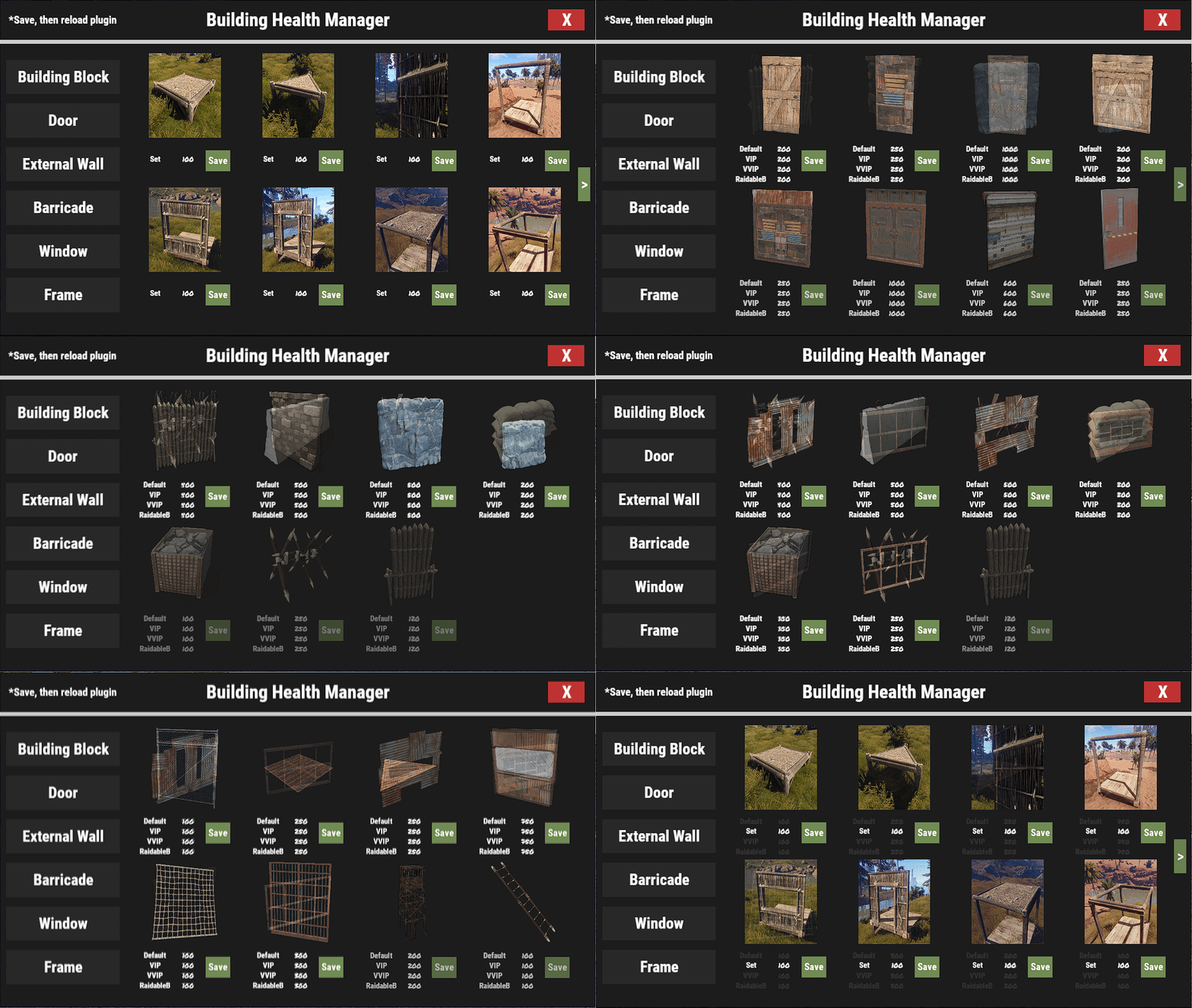
    This plugin is designed for the game Rust and is used for managing the health of constructions. The main objective of the plugin is to allow server administrators to individually adjust the health of constructions such as building blocks, doors, external walls, barricades, windows, and frames. You can very easily configure through the UI. * To fully apply the settings configured through the UI, reload the plugin. The Building Block type is set with a multiplier, 100 is 1 times. All other types can be set with natural numbers. [Features] 1. Building Health Configuration: Server administrators can set the health of each building element. For example, it is possible to increase the health of doors or windows or decrease the health of walls or barricades. 2. Building Element Categorization: Building elements are categorized into "Building Block", "Door", "External Wall", "Barricade", "Window", "Frame", and so on. This allows users to quickly find and change the health of the desired building element. 3. UI Interface: The plugin utilizes a UI interface, allowing users to adjust the health of building elements through the interface. 4. Raidable Bases : Can configure dedicated settings for Raidable Bases [Permissions] buildinghealthmanager.default - Required to use default settings buildinghealthmanager.vip - Required to use vip settings buildinghealthmanager.vvip - Required to use vvip settings buildinghealthmanager.admin - Required to use command [Command] /bhm - Open BuildingHealthManager UI [Config] { "Building Block Health": { "foundation": 100.0, "foundation.triangle": 100.0, "wall": 100.0, "wall.frame": 100.0, "wall.window": 100.0, "wall.doorway": 100.0, "floor": 100.0, "floor.frame": 100.0, "floor.triangle": 100.0, "floor.triangle.frame": 100.0, "roof": 100.0, "roof.triangle": 100.0, "wall.half": 100.0, "wall.low": 100.0, "ramp": 100.0, "block.stair.ushape": 100.0, "block.stair.lshape": 100.0, "foundation.steps": 100.0, "block.stair.spiral.triangle": 100.0, "block.stair.spiral": 100.0 }, "Door Health": { "Default settings": { "door.hinged.wood": 200, "door.hinged.metal": 250, "door.hinged.toptier": 1000, "door.double.hinged.wood": 200, "door.double.hinged.metal": 250, "door.double.hinged.toptier": 1000, "wall.frame.garagedoor": 600, "door.hinged.industrial.d": 250, "gates.external.high.wood": 500, "gates.external.high.stone": 500, "shutter.wood.a": 200, "floor.ladder.hatch": 250, "wall.frame.cell.gate": 300, "floor.triangle.ladder.hatch": 250, "wall.frame.fence.gate": 75, "wall.frame.shopfront": 500 }, "VIP settings": { "door.hinged.wood": 200, "door.hinged.metal": 250, "door.hinged.toptier": 1000, "door.double.hinged.wood": 200, "door.double.hinged.metal": 250, "door.double.hinged.toptier": 1000, "wall.frame.garagedoor": 600, "door.hinged.industrial.d": 250, "gates.external.high.wood": 500, "gates.external.high.stone": 500, "shutter.wood.a": 200, "floor.ladder.hatch": 250, "wall.frame.cell.gate": 300, "floor.triangle.ladder.hatch": 250, "wall.frame.fence.gate": 75, "wall.frame.shopfront": 500 }, "VVIP settings": { "door.hinged.wood": 200, "door.hinged.metal": 250, "door.hinged.toptier": 1000, "door.double.hinged.wood": 200, "door.double.hinged.metal": 250, "door.double.hinged.toptier": 1000, "wall.frame.garagedoor": 600, "door.hinged.industrial.d": 250, "gates.external.high.wood": 500, "gates.external.high.stone": 500, "shutter.wood.a": 200, "floor.ladder.hatch": 250, "wall.frame.cell.gate": 300, "floor.triangle.ladder.hatch": 250, "wall.frame.fence.gate": 75, "wall.frame.shopfront": 500 }, "Raidable Bases settings": { "door.hinged.wood": 200, "door.hinged.metal": 250, "door.hinged.toptier": 1000, "door.double.hinged.wood": 200, "door.double.hinged.metal": 250, "door.double.hinged.toptier": 1000, "wall.frame.garagedoor": 600, "door.hinged.industrial.d": 250, "gates.external.high.wood": 500, "gates.external.high.stone": 500, "shutter.wood.a": 200, "floor.ladder.hatch": 250, "wall.frame.cell.gate": 300, "floor.triangle.ladder.hatch": 250, "wall.frame.fence.gate": 75, "wall.frame.shopfront": 500 } }, "External Wall Health": { "Default settings": { "wall.external.high.wood": 500, "wall.external.high.stone": 500, "wall.external.high.ice": 500, "icewall": 200 }, "VIP settings": { "wall.external.high.wood": 500, "wall.external.high.stone": 500, "wall.external.high.ice": 500, "icewall": 200 }, "VVIP settings": { "wall.external.high.wood": 500, "wall.external.high.stone": 500, "wall.external.high.ice": 500, "icewall": 200 }, "Raidable Bases settings": { "wall.external.high.wood": 500, "wall.external.high.stone": 500, "wall.external.high.ice": 500, "icewall": 200 } }, "Barricade Health": { "Default settings": { "barricade.woodwire": 400, "barricade.concrete": 500, "barricade.metal": 600, "barricade.sandbags": 200, "barricade.stone": 100, "barricade.wood": 250, "barricade.cover.wood": 120 }, "VIP settings": { "barricade.woodwire": 400, "barricade.concrete": 500, "barricade.metal": 600, "barricade.sandbags": 200, "barricade.stone": 100, "barricade.wood": 250, "barricade.cover.wood": 120 }, "VVIP settings": { "barricade.woodwire": 400, "barricade.concrete": 500, "barricade.metal": 600, "barricade.sandbags": 200, "barricade.stone": 100, "barricade.wood": 250, "barricade.cover.wood": 120 }, "Raidable Bases settings": { "barricade.woodwire": 400, "barricade.concrete": 500, "barricade.metal": 600, "barricade.sandbags": 200, "barricade.stone": 100, "barricade.wood": 250, "barricade.cover.wood": 120 } }, "Window Health": { "Default settings": { "shutter.metal.embrasure.b": 500, "wall.window.bars.metal": 500, "shutter.metal.embrasure.a": 500, "wall.window.bars.toptier": 500, "wall.window.glass.reinforced": 350, "wall.window.bars.wood": 250 }, "VIP settings": { "shutter.metal.embrasure.b": 500, "wall.window.bars.metal": 500, "shutter.metal.embrasure.a": 500, "wall.window.bars.toptier": 500, "wall.window.glass.reinforced": 350, "wall.window.bars.wood": 250 }, "VVIP settings": { "shutter.metal.embrasure.b": 500, "wall.window.bars.metal": 500, "shutter.metal.embrasure.a": 500, "wall.window.bars.toptier": 500, "wall.window.glass.reinforced": 350, "wall.window.bars.wood": 250 }, "Raidable Bases settings": { "shutter.metal.embrasure.b": 500, "wall.window.bars.metal": 500, "shutter.metal.embrasure.a": 500, "wall.window.bars.toptier": 500, "wall.window.glass.reinforced": 350, "wall.window.bars.wood": 250 } }, "Frame Health": { "Default settings": { "wall.frame.fence": 100, "floor.grill": 250, "floor.triangle.grill": 250, "wall.frame.shopfront.metal": 750, "wall.frame.netting": 100, "wall.frame.cell": 300, "watchtower.wood": 200, "ladder.wooden.wall": 100 }, "VIP settings": { "wall.frame.fence": 100, "floor.grill": 250, "floor.triangle.grill": 250, "wall.frame.shopfront.metal": 750, "wall.frame.netting": 100, "wall.frame.cell": 300, "watchtower.wood": 200, "ladder.wooden.wall": 100 }, "VVIP settings": { "wall.frame.fence": 100, "floor.grill": 250, "floor.triangle.grill": 250, "wall.frame.shopfront.metal": 750, "wall.frame.netting": 100, "wall.frame.cell": 300, "watchtower.wood": 200, "ladder.wooden.wall": 100 }, "Raidable Bases settings": { "wall.frame.fence": 100, "floor.grill": 250, "floor.triangle.grill": 250, "wall.frame.shopfront.metal": 750, "wall.frame.netting": 100, "wall.frame.cell": 300, "watchtower.wood": 200, "ladder.wooden.wall": 100 } }, "Version": "1.0.0" } [Localization] { "NoPerm": "You don't have permission to use that command", "BuildingBlockSave": "The Setting for {0}'s Health have been saved as {1}", "OtherSave": "The {1} for {0}'s Health have been saved as {2}" }
    Free
  12. I have submitted a plugin that allows you to modify the health of everything you mentioned(+a), and it's currently pending. if the Codefling staff approves it, you will be able to use it.
  13. Miho

    Arkan AutoBan

    Version 1.0.0

    326 downloads

    Arkan AutoBan is a plugin that automatically bans for Arkan violations. In the Config, settings for No Recoil, Aimbot, and In Rock violations can be individually adjusted. All Bans and Timed Bans are recorded in logs. [Config] { "No Recoil Violation": { "AutoBan Enabled": true, "Violation Threshold": 5, "Ban - True, Timed Ban - False": true, "Timed Ban Duration(in seconds) - If TimedBan": 86400 }, "Aimbot Violation": { "AutoBan Enabled": true, "Violation Threshold": 3, "Ban - True, Timed Ban - False": true, "Timed Ban Duration(in seconds) - If TimedBan": 86400 }, "In Rock Violation": { "AutoBan Enabled": true, "Violation Threshold": 2, "Ban - True, Timed Ban - False": true, "Timed Ban Duration(in seconds) - If TimedBan": 86400 }, "Is logging enabled?": true, "Version": "1.0.0" } [Localization] { "Ban": "{0} has been banned by Arkan AutoBan", "TimedBan": "{0} has been timed banned for {1}seconds by Arkan AutoBan", "BanReason": "You have been banned by Arkan AutoBan", "TimedBanReason": "You have been timed banned for {0}seconds by Arkan AutoBan" }
    Free
  14. Miho

    Online Counter

    Version 1.0.0

    335 downloads

    Simple plugin that displays the real-time online user count in the UI. You can reconfigure the UI through the Config. [Config] { "UI Config": { "AnchorMin": "0.18 0", "AnchorMax": "0.28 0.05", "Font Size": 16, "Text Color": "1.0 1.0 1.0 1.0", "Text Count": "Online: " } }
    Free
  15. Do you want additional features in the Rules GUI that Sabby is talking about? or could that plugin be an alternative? most of the features you want can be solved with Rules GUI
  16. What option are you looking for? If it's not complicated, I can make it for free. However, depending on the situation, it may be distributed for free.
  17. I've checked. Thank you for the good information
  18. Miho

    Kill Bonus

    [1] The Lang file has been modified. Therefore, you should delete the existing Lang file and reload the plugin to get it working correctly. [2] $clanmembers only works within 'Clan commands to execute'. If you want to use $clanmembers, you must set it within 'Clan commands to execute'. 'Player commands to execute' is only executed once when a Clan Kill (Xkill or achieved Kill) is accomplished. Let me explain how 'Clan commands to execute' works (apologies if the mechanism seems complex, I will provide several examples to help you understand): 1) "How many ClanKill Clan commands will be executed?(-1 : All)": -1, "Clan commands to execute": [ // The commands to be executed for the clan "giveto $clanmembers scrap 50", "giveto $clanmembers wood 50" If you have three clan members, Command 1 'giveto $clanmembers scrap 50' is executed individually for each of the three members. Following that, Command 2 'giveto $clanmembers wood 50' is also executed individually for each member. Therefore, every clan member receives 50 scraps and 50 wood. 2) "How many ClanKill Clan commands will be executed?(-1 : All)": 2, "Clan commands to execute": [ "giveto $clanmembers scrap 50", "giveto $clanmembers wood 50", "giveto $clanmembers stones 50" Assuming there are two clan members, two out of the three commands are selected. Command 1 is executed for each of the two members. Then, Command 2 is also executed for each of the two members. 3) "How many ClanKill Clan commands will be executed?(-1 : All)": -1, "Clan commands to execute": [ "say Hello", "giveto $clanmembers wood 50", "giveto $player.id wood 50" Assuming there are two clan members, Command 1 'say Hello' is executed twice (Because there are 2members). Then, Command 2 'giveto $clanmembers wood 50' is executed individually for each of the two members. Finally, Command 3 'giveto $player.id wood 50' is executed twice for the clan member who achieved the Clan Kill. Feel free to ask if you have any questions or issues. Thank you.
  19. Miho

    Kill Bonus

    I have added all 3 features you requested. The Config and Lang files have been changed, so please make sure to back them up in advance. If you encounter any problems or have any suggestions, please feel free to let me know at any time. Thank you.
  20. Miho

    Kill Bonus

    I will update it soon. Thank you
  21. Miho

    POPCheck

    Version 1.0.1

    475 downloads

    When a player enters !pop or /pop in the chat, This is a simple plugin that displays the current number of players as a chat message. You can modify the plugin through the config file, which allows you to customize the server name, server name color, message icon, and whether the plugin reacts to all players or individual players [Config] { "Server Message": "Server", "Color": "FF5733", "Steam Avatar User ID": 0, "Public": true }
    Free
  22. Miho

    AnimalLoot

    change 'polarberar' to 'polarbear' will make it work properly
  23. Miho

    AnimalLoot

    Hello, Let me know yours Config?
  24. Miho

    Kill Bonus

    Version 1.1.1

    11 downloads

    Video - Link KillBonus provides a variety of rewards to players each time they kill an enemy player. This can include health recovery, metabolism recovery, ammo reloading, or the execution of pre-defined custom commands. It supports a range of commands. Furthermore, it records the kill counts of both players and clans, allowing the execution of custom commands upon achieving certain kill milestones. The KillBonus plugin is highly useful for various events and offers a high degree of versatility depending on the user's customization. [Features] 1. Dynamic Reward System: It offers a variety of rewards each time a player defeats an enemy, including health recovery, metabolism recovery, ammo reloading, or executing pre-defined custom commands. 2. Kill Count Tracking: The plugin tracks the kill counts of both individual players and clans, thereby providing a comprehensive performance analysis. 3. Custom Command Execution: Upon achieving certain kill milestones, the plugin allows for the execution of custom commands, offering an exciting reward system for players. 4. Player and Clan Kill Data Reset: The plugin supports data reset functionality for both individual players and clans, ensuring the gameplay remains fresh and engaging. 5. Localization: KillBonus offers multi-language support, ensuring seamless integration and interaction with the game, regardless of the player's language. 6. Console and Chat Command: Offers a wide range of commands for customization and game management, accessible through both the game console and chat. 7. Customizable Settings: With the configuration file, you can easily customize the game settings to suit your needs. 8. Advanced Data Management: All player and clan kill data is managed using a dedicated data management system, ensuring accurate tracking and storage. 9. Event Trigger System: This feature enables custom commands to be executed when certain conditions are met, such as after a specific number of kills. 10. Integration: KillBonus has been designed to be compatible with a variety of gaming setups, offering compatibility with other plugins and systems. 11. Remember that the maximum value of the KillBonus plugin lies in its flexibility and adaptability, providing server owners with a tool that can be customized to suit their unique gameplay and reward systems. [Permissions] killbonus.default - Required to use default settings killbonus.vip - Required to use vip settings killbonus.vvip - Required to use vvip settings killbonus.admin - Required to use commands [Config] { "Wipe Data on new map save": true, // Whether to wipe data when a new map is saved "ChatMessage Enabled": true, // Whether chat messaging is enabled "UI Enabled(Required - Notify.cs/notify.see)": false, // Whether the UI is enabled (Notify.cs/notify.see is required for this) "Is logging enabled?": true, // Whether logging is enabled "Player kill settings": { "Are player kill bonus enabled?": true, // Whether bonuses for killing players are enabled // Following settings specify the default recovery amount and limit for health, thirst, hunger and whether auto-reload and ammo consumption are enabled "Default player settings": { "Is HP recovery enabled?": true, "HP recovery amount": 10.0, "Maximum HP for recovery": 100.0, "Is thirst recovery enabled?": true, "Thirst recovery amount": 10.0, "Maximum thirst for recovery": 250.0, "Is hunger recovery enabled?": true, "Hunger recovery amount": 10.0, "Maximum hunger for recovery": 500.0, "Is auto-reload enabled?": true, "Is ammo consumption enabled?": true, "How many custom commands will be executed?(-1 : All)": -1, "Custom commands": [ // The custom commands to be executed "giveto $player.id scrap 100", "giveto $player.id wood 100" ], "Every X kill bonus commands": [ { "Kill count for command trigger": 5, // Execute commands for every X kills achieved "How many Every Xkill Bonus commands will be executed?(-1 : All)": -1, "Commands to execute": [ "giveto $player.id scrap 500", "giveto $player.id wood 500" ] } ] }, // Similar settings for VIP players "VIP player settings": { "Is HP recovery enabled?": true, "HP recovery amount": 20.0, "Maximum HP for recovery": 100.0, "Is thirst recovery enabled?": true, "Thirst recovery amount": 20.0, "Maximum thirst for recovery": 250.0, "Is hunger recovery enabled?": true, "Hunger recovery amount": 20.0, "Maximum hunger for recovery": 500.0, "Is auto-reload enabled?": true, "Is ammo consumption enabled?": true, "How many custom commands will be executed?(-1 : All)": -1, "Custom commands": [ // The custom commands to be executed "giveto $player.id scrap 300", "giveto $player.id wood 300" ], "Every X kill bonus commands": [ { "Kill count for command trigger": 5, "How many Every Xkill Bonus commands will be executed?(-1 : All)": -1, "Commands to execute": [ "giveto $player.id scrap 500", "giveto $player.id wood 500" ] } ] }, // Similar settings for VVIP players "VVIP player settings": { "Is HP recovery enabled?": true, "HP recovery amount": 30.0, "Maximum HP for recovery": 100.0, "Is thirst recovery enabled?": true, "Thirst recovery amount": 30.0, "Maximum thirst for recovery": 250.0, "Is hunger recovery enabled?": true, "Hunger recovery amount": 30.0, "Maximum hunger for recovery": 500.0, "Is auto-reload enabled?": true, "Is ammo consumption enabled?": true, "How many custom commands will be executed?(-1 : All)": -1, "Custom commands": [ // The custom commands to be executed "giveto $player.id scrap 500", "giveto $player.id wood 500" ], "Every X kill bonus commands": [ { "Kill count for command trigger": 5, "How many Every Xkill Bonus commands will be executed?(-1 : All)": -1, "Commands to execute": [ "giveto $player.id scrap 500", "giveto $player.id wood 500" ] } ] }, // Custom commands based on kill count "Custom kill bonus commands": [ { "Kill count for command trigger": 10, // The kill count required to trigger the command "How many Achieved custom commands will be executed?(-1 : All)": -1, "Commands to execute": [ // The commands to be executed "giveto $player.id scrap 500", "giveto $player.id wood 500" ] }, { "Kill count for command trigger": 20, "How many Achieved custom commands will be executed?(-1 : All)": -1, "Commands to execute": [ "giveto $player.id scrap 500", "giveto $player.id wood 500" ] } ] }, "Clan kill settings (Required - Clans)": { "Are clan kill rewards enabled?": false, // Whether rewards for clan kills are enabled "Custom clan kill reward commands": [ // Custom commands for clan kill rewards { "Kill count for command trigger": 10, // The kill count required to trigger the command "How many ClanKill Clan commands will be executed?(-1 : All)": -1, "Clan commands to execute": [ // 'Clan commands to execute' will be executed as many times as there are clan members. "giveto $clanmembers scrap 500", // Here, the variable "$clanmembers" will only be active. "giveto $clanmembers wood 500" ], "How many ClanKill Player commands will be executed?(-1 : All)": -1, "Player commands to execute": [ // The commands to be executed for the player "giveto $player.id scrap 500", "giveto $player.id wood 500" ] }, { "Kill count for command trigger": 20, // The kill count required to trigger the command "How many ClanKill Clan commands will be executed?(-1 : All)": -1, "Clan commands to execute": [ // The commands to be executed for the clan "giveto $clanmembers scrap 500", "giveto $clanmembers wood 500" ], "How many ClanKill Player commands will be executed?(-1 : All)": -1, "Player commands to execute": [ // The commands to be executed for the player "giveto $player.id scrap 500", "giveto $player.id wood 500" ] } ], "Every X kill bonus commands": [ { "Kill count for command trigger": 5, // Execute commands for every X kills achieved "How many ClanEvery X Kill Clan commands will be executed?(-1 : All)": -1, "Clan commands to execute": [ "giveto $clanmembers scrap 500", "giveto $clanmembers wood 500" ], "How many ClanEvery X Kill Player commands will be executed?(-1 : All)": -1, "Player commands to execute": [ "giveto $player.id scrap 500", "giveto $player.id wood 500" ] } ] }, "version": "1.1.1" // The version of this configuration } [Command] For chat or console(not /) commands: /kb addpk <playernameorid> <amount>: Adds kills for a specific player. /kb removepk <playernameorid> <amount>: Removes kills for a specific player. /kb addpa <playernameorid> <achievementname>: Adds an achievement for a specific player. /kb removepa <playernameorid> <achievementname>: Removes an achievement for a specific player. /kb addck <playernameorid> <amount>: Adds kills for the clan. /kb removeck <playernameorid> <amount>: Removes kills for the clan. /kb addca <playernameorid> <achievementname>: Adds an achievement for the clan. /kb removeca <playernameorid> <achievementname>: Removes an achievement for the clan. /kbreset all: Resets all kill data and clan kill data. /kbreset player: Resets only the kill data for players. /kbreset clan: Resets only the clan kill data. [Placeholders] $player.clanname $player.clankilldata $player.clankillachievedata $clanmembers $player.killdata $player.killachievedata $player.id $player.name $player.ip $player.ping $player.position $player.health [Localization] { "KillReward": "{0}<color=red>Kill</color> {1} {2} {3} {4}", "KillRewardWithClan": "{0}<color=red>Kill</color> {1}<color=red>ClanKill</color> {2} {3} {4} {5}", "HPRecovery": "<color=green>HP</color>+{0} ", "ThirstRecovery": "<color=#45BCFF>Hydration</color>+{0} ", "HungerRecovery": "<color=orange>Calories</color>+{0} ", "AmmoRefill": "<color=purple>Ammo</color>+{0} ", "Achieved": "<color=#45BCFF>You achieved</color> {0}<color=red>Kill</color>!", "ClanAchieved": "<color=#45BCFF>Your clan achieved</color> {0}<color=red>Kill</color>!", "anounceAchieved": "<color=green>[{0}]</color> {1}<color=red>Kill</color> Achieved!", "anounceClanAchieved": "<color=green>[{0}]Clan</color> {1}<color=red>Kill</color> Achieved!", "EveryXkill": "<color=#FF009B>Every</color> {0}<color=red>Kill Bonus</color>!", "ClanEveryXkill": "<color=#FF009B>Every</color> {0}<color=red>ClanKill Bonus</color>!", "UsagePlayerAmount": "Usage: /kb addpk or /kb removepk <playerNameOrId> <amount>", "AmountMustBeInteger": "Amount must be an integer.", "PlayerKillsAdded": "Player kills has been added.", "PlayerKillsRemoved": "Player kills has been removed.", "KillDataReset": "Player Kill data has been reset.", "ClanKillDataReset": "Clan kill data has been reset.", "AllDataReset": "All data has been reset.", "PlayerAchievementAdded": "Player achievement has been added.", "PlayerAchievementRemoved": "Player achievement has been removed.", "ClanKillsAdded": "Clan kills have been added.", "ClanKillsRemoved": "Clan kills have been removed.", "ClanAchievementAdded": "Clan achievement has been added.", "ClanAchievementRemoved": "Clan achievement has been removed.", "Amountpositivenumber": "Amount must be an positive number.", "InvalidKbCommand": "Invalid command. Usage: /kb(kb) <command> <target> <amount>", "FailedCommand": "Failed command.", "InvalidResetCommand": "Invalid command. Usage: /kbreset | kbreset <player | clan>", "Noperm": "You don't have permission to do this." } [API] private string GetPlayerKills(string playerNameOrId) // Retrieves the kill count of a specific player. private Dictionary<int, bool> GetPlayerAchievements(string playerNameOrId) // Retrieves the achievement information of a specific player. private string GetClanKills(string clanID) // Retrieves the kill count of a specific clan. private Dictionary<int, bool> GetClanAchievements(string clanID) // Retrieves the achievement information of a specific clan. private bool PlayerHasAchievement(string playerNameOrId, int achievementID) // Checks if a specific player has a particular achievement. private bool ClanHasAchievement(string clanID, int achievementID) // Checks if a specific clan has a particular achievement. private void AddPlayerKills(string playerNameOrId, int amount, BasePlayer playermsg = null, string message = null) // Adds kills to a specific player. private void RemovePlayerKills(string playerNameOrId, int amount, BasePlayer playermsg = null, string message = null) // Removes kills from a specific player. private void AddPlayerAchievement(string playerNameOrId, int achievementID, BasePlayer playermsg = null, string message = null) // Adds an achievement to a specific player. private void RemovePlayerAchievement(string playerNameOrId, int achievementID, BasePlayer playermsg = null, string message = null) // Removes an achievement from a specific player. private void AddClanKills(string clanTag, int amount, BasePlayer playermsg = null, string message = null) // Adds kills to a specific clan. private void RemoveClanKills(string clanTag, int amount, BasePlayer playermsg = null, string message = null) // Removes kills from a specific clan. private void AddClanAchievement(string clanTag, int achievementID, BasePlayer playermsg = null, string message = null) // Adds an achievement to a specific clan. private void RemoveClanAchievement(string clanTag, int achievementID, BasePlayer playermsg = null, string message = null) // Removes an achievement from a specific clan. private void ResetKillData() // Resets all kill data. private void ResetClanKillData() // Resets all clan kill data.
    $6.99
2.3m

Downloads

Total number of downloads.

10.6k

Customers

Total customers served.

153.2k

Files Sold

Total number of files sold.

3.3m

Payments Processed

Total payments processed.

×
×
  • Create New...

Important Information

We have placed cookies on your device to help make this website better. You can adjust your cookie settings, otherwise we'll assume you're okay to continue.