
-
Posts
137 -
Joined
-
Last visited
-
Days Won
1
Content Type
Profiles
Warranty Claims
Downloads
Forums
Store
Services
Downloads Plus Support
DOWNLOADS EXTRA
Reels
Support Center
Everything posted by Pho3niX90
-
 Currently not, however will add it in ASAP.
 -
Everything is bypass able when the right people know how to bypass it. Ergo, no video explaining how it works. It's currently on beta, and that is why it's on sale. The sale ends the 20th. Thus far, the feedback has been amazing, and reviews amazing on another site. Nothing is fullproof, however, this will definitely assist you greatly in finding espers, and when paired with ADR, it will provide substantial evidence as well. I use this on my own servers, with 300 online players, and have caught many espers that wasn't suspicious before.
-
Unfortunately there isn't any videos yet. I will see if I can do one, but it might just give enough information to circumvent the detection if a video is out in the open.
-
Version 1.1.4
398 downloads
This is a simple tool to help you catch ESPer's. Unlike methods in the past requiring cheaters to fall for traps, this one will be watching without having to give them any bait! This plugin is still in "beta" and is offered at a reduced price for a limited time. Since 1.0.12, the embed now includes a radar image to show violations (red line): The above embed shows the culprit, with quick links to Steam, Battlemetrics, and ServerArmour. Along with each violation that caused the trigger, the consist of the violation id, the time it happened, and steamid and distance from the culprit. It is highly recommended to use along with ADR, although not required, but can easily eliminate false positives by having the option to watch the player from the demo. Commands /testesp - this will send a test embed to your configured webhook. Permissions espdetection.ignore Ignores specific players who are granted this permission. Config options explanation General Max distance to check The maximum to check if the player is ESPing. (default 150 outside, 100 inside) Check Interval How often should a player be checked (default 1 second) Ignore Players Idle Ignore players that haven't changed position (default 15 seconds) Only track players with active weapons Track players that have equipped weapons only. (default true) Auto Demo Record (only applicable if Auto Demo Record is installed) Record Length How long should the triggered recording be (default 10 minutes) Discord Webhook Where the logs & ADR recordings should be sent to Webhook Title Title of the embed Violations Probability % Which % probability should trigger a Discord embed and ADR recording. (default 40%) Samples How many samples should be kept in memory, to calculate the probability (default 20) Weapon Specific Configs These change characteristics of weapons Weapon Shortname Max distance to check This overrides the general setting for the weapon only Track if set to false, a player will be ignored if he has this weapon equipped. (default true) Attachment Specific Configs These change characteristics of attachments Attachment Shortname Add distance while aiming As the name suggests, it adds extra distance to the previous configs, useful for when aiming with an 8x or 16x Track if set to false, a player will be ignored if he has this weapon equipped. (default true) NOTE: if you are using ADR, a good command to use when reviewing the demos are `debug.culling 1`$25.00 -
Version 1.0.1
829 downloads
ADR Arkan - Watches all events related to Arkan violations Triggers recordings When a player receives a `No Recoil Violation` violation from Arkan When a player receives an `Aimbot Violation` violation from Arkan When a player receives an `In Rock Violation` violation from Arkan Configuration Set recording length per violation type. Start recording only when X number of violations received per violation type. NOTE: Requires Auto Demo Record and ArkanFree -

Version 1.0.4
652 downloads
ADR Watch – Watches all events related to banned players, to easily catch evaders. Triggers recordings When a player enters a code correctly on a banned player’s locks When a player auths/deauths or clears a banned players TC When a player deauths on a TC NOTE: Requires Auto Demo RecordFree -
Version 1.5.1
489 downloads
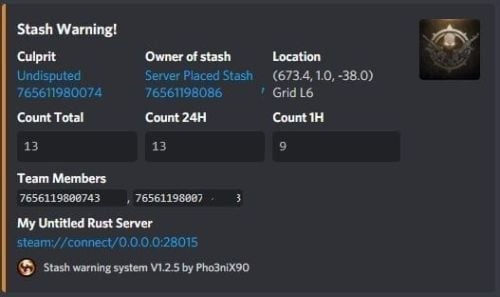
Assists in finding ESPers that unearth stashes, it also allows admins to make placing bait stashes easy and simple, by automatically filling predefined items in random, and disables the ability for admins to accidentally unearth stashes whilst enabled. It will also automatically delete all contents of an admin stash when unearthed, which assists in admin abuse and/or exploitation of hackers. Supports Auto Demo Recorder (ADR) Supports Better Ban System Supports Server Armour Features: Notifies to discord when stashes are found which doesn't belong to players (or clan if using the clan plugin) Records the number of stashes found in a certain, configurable timeframe. Sends discord notifications when the above happens Admins can place "server" stashes, and they will be auto-filled with the /stash command. When a player unearths said stash, the contents will be automatically removed. Stashes can also be autogenerated and placed automatically. And can be replaced as they are found in another random location. It auto bans based on condition. Example: If a player finds 5 stashes that don't belong to them within 1 hour, they are auto-banned with a preset reason. It works with ADR as well and can trigger demo recordings based on conditions It works with ServerArmour to handle bans, else native bans. Battlemetrics will soon be supported. Permissions: stashwarningsystem.admin - allows admins to use the stash placement system. Chat Commands: /stash - Enables manual stash placement tool. Stashes cannot be unearthed when enabled and stashes will be automatically given. /stashshow- Toggles On/Off - Will show admin the location of all plugin related stashes. /stashdestroyall - This will destroy all server stashes create by, or with this plugin. /genstashes- This will force generate all stashes that are missing. /regenstashes- This will remove, and then replace all stashes from this plugin. Config explanations: "API: ADR reason" The reason that will be given to ADR, and is sent to discord along with the recording. "API: ADR recording length in mins" How long the recording should be in minutes. "API: ADR Trigger recording when stashes found/triggered more than" When the recording should trigger, Example: If set to 1, the recording will trigger when the player has triggered/unearthed 2 stashes. "Discord: Color" Color for the embed message, see here https://gist.github.com/thomasbnt/b6f455e2c7d743b796917fa3c205f812 "Discord: Embed Title" The title of the embed inside discord. "Discord: Send Stash Toggle Msgs" If notifications should be sent to discord when an admin toggles the stash command. "Discord: Webhook Server Name" The server where the notification is sent from, useful for when you have multiple servers. "Discord: Webhook URL" https://support.discordapp.com/hc/en-us/articles/228383668-Intro-to-Webhooks "SteamID for in-game chat icon." This will be used to assign against placed stashes for tracking. Do not change this to a user on the server, leave as is if you don't have another steamid. "Embed count buckets in hours" This should be a string, comma-separated. This will be the bucket embeds in discord, to show the count of stashes found for the user, inside the hour brackets. Example: 0, 24, 1 = would give you a count for all stashes, stashes in the last hour, and stashes in the last 24hours. See below "Stash Items" The items that you would like to be automatically filled when a stash is placed. The number would be the max quantity, this will be randomized when placing in a stash to remove predictability. "Stash Item Slots To Fill: Max" The maximum amount of slots to fill "Stash Item Slots To Fill: Min" The minimum amount of slots to fill A random value will be chosen between the above two values. "Auto Ban False Positive Distance" Default: 5 - Stashes found in this distance will be considered false positives. (Useful where multiple stashes are unearthed in one spot.) "Auto Ban False Positive - Include in count?" If the above false positives should be counted in the triggers. This affects auto bans as well. "Ignore Admins" If admins should be ignored when unearthing stashes not belonging to them. "Auto Ban Delay In Min" Delays auto bans by X minutes. "Delete found server stash after X seconds (0 = Disables)" Will automatically delete server stashes that were found, after X seconds.$9.99 -
Version 2.0.2
593 downloads
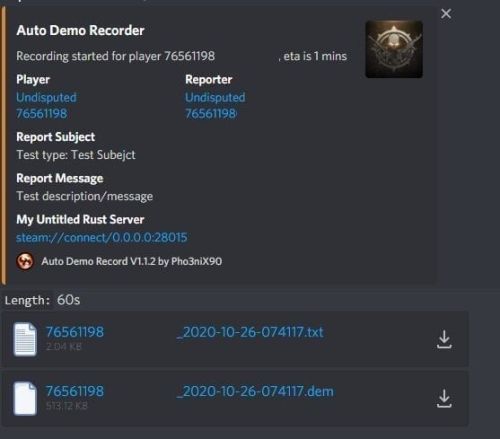
Records players automatically that have been reported X amount of times, with the ability to automatically upload the combat logs & Demo files to a discord webhook. Classic mode (default) `Rolling mode` = **Off** — same trusted behavior as earlier versions. Recording starts when a trigger fires (reports, flyhack, blacklist, API, console). No rolling buffer. v2 rolling incidents (opt-in) Enable **Rolling mode** (`AllPlayers` or `Blacklist`) to keep rotating demo chunks on disk. When a report threshold or API call opens an **incident**, the plugin bundles: - chunks from **before** the report (default 30 minutes), - continued capture **after** the report (default 15 minutes), - a **manifest** with markers and metadata, then uploads to **ServerArmour** (primary) and/or **Discord** (secondary). Existing servers upgrade safely: new config keys default to legacy behavior until you change them. Disk usage whilst recording: +- 1MB per 1 minute. Discord has an 8mb upload limit and 100mb for nitro. Chat Commands: /record - Chat: This will initiate a self-recording. Console Commands autodemorecord.record [steam64id] [minutes] - Console: Usefull to record a player on demand, or a schedule from another plugin. autodemorecord.blacklist add [steam64id] [recordingMinutes] [intervalMinutes] - Console: Add a player to the blacklist, which will record them for [recordingMinutes] every [intervalMinutes] autodemorecord.blacklist remove [steam64id] - Console: Removes a player from the blacklist. Permissions: Permission autodemorecord.record is required for a player to initiate a recording of themselves. Useful for streamers, to provide them with footage at wipe end, or tournaments. The recording length will be "Auto record for X minutes" Config explanations: "Auto record after X reports": Will start recording the player when these many reports have been received. "Only record when reports within X seconds": Only record when the number of reports above, are received in this timeframe. 0 to record always when the above value is reached. "Save/Load reports to datafile on reload": Useful when you aren't using the above config, if you do it might not be necessary to save data overhead. "Auto record for X minutes": the number of minutes the player should be recorded for. "Discord MSG Color": Color for the embed message, see here https://gist.github.com/thomasbnt/b6f455e2c7d743b796917fa3c205f812 "Discord Webhook": You discord webhook all information should be sent to. "Discord: Notify if recording is started": Should a message be sent to the discord webhook when the recording starts? "Discord: Include report with start message?": Should the player's report be added to the recording start message? "Discord: Notify if recording is stopped": Should a message be sent to the discord webhook when the recording ends? "Discord: Include report with end message?": Should the player's report be added to the recording end message? "Upload Combat Log to discord webhook?": Should the player's combat log be upload to the above discord webhook as a txt file? "Upload DEMO file to discord webhook?": Should the player's demo file be uploaded to the above discord webhook? "Split DEMO files for non nitro discord (8mb chunks)?": This will split files and upload multiple files to discord for non-nitro discord servers. If you have nitro with an upload limit of 100mb, then you can turn this off. "Discord Webhook - Self Record" All self-initiated recordings will post to this webhook, if not set it will go to the main one. "Record if FlyHacked in last X seconds" This will initiate a recording when a player rejoins the server after kicked for flyhacking. "Save recording to server?" If set to false, it will not save to the HDD, to save space. Make sure you have a webhook setup, otherwise it will still save as to not lose any demos. API: If you want to trigger a recording from your plugin, you can do the following: AutoDemoRecord.Call("API_StartRecording", BasePlayer player, string Reason, int LengthInMin); All suggestions welcomed!$19.99