

Ajie
-
Posts
67 -
Joined
-
Last visited
Content Type
Profiles
Warranty Claims
Downloads
Forums
Store
Services
Downloads Plus Support
DOWNLOADS EXTRA
Reels
Support Center
Everything posted by Ajie
-
Changed Status from Pending to Fixed
-
I'll fix it right now.
-
The Discord link is no longer functional, and GitHub may not work for everyone. The description has already cautioned: "Please have a hosting service ready for your MP3 files before making a purchase!"
-
Changed Status from Pending to Not a Bug
-
I will add the option of default dark mode in the future, The plugin's default UI open future only supports some keys. If you want to use keys like F4, please guide players to use the console command "bind f4 emenu.open" to bind the key
-
Changed Status from Pending to Closed
-
Changed Status from Pending to Closed Changed Fixed In to 1.0.4
-
Changed Status from Pending to Closed Changed Fixed In to 1.0.4
-
Sorry i'm late, please try the new version
-
 Only play for this player after they join the server
 -
I will consider adding it
-
Please send me your config
-
Changed Status from Pending to Not a Bug
-
Oh, I tested it. The client is blocking commands from the server running these commands. So these commands is not available in this plugin
-
I think the "ent kill" runs on the client Please set "Server Run Command" to false
-
Changed Status from Work in Progress to Closed
-
Fixed
-
Changed Status from Pending to Work in Progress Changed Fixed In to Next Version
-
Thank you!
-
Changed Status from Pending to Closed Changed Fixed In to 1.0.2
-
Please try the new version.
-
Can you send me your config?
-
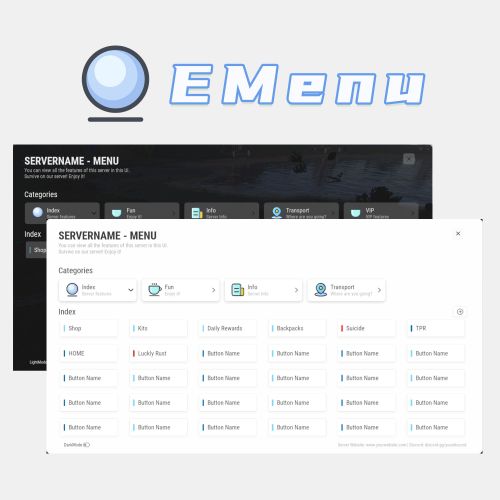
Version 1.0.8
158 downloads
A Beautiful Server Menu UI, allows for unlimited categories and buttons customization. Features Supports Light and Dark Mode. Allows players to input custom parameters. Allows players to input command arguments manually. Supports adding an unlimited of categories and buttons. Categories and buttons can be configured with permissions, ensuring that only players with the permissions can access them. Support console or chat commands. Support for command running on the server. Commands ChatCommands /menu - Open EMenu ConsoleCommands emenu.open - Open EMenu Config { "Title": "SERVERNAME - MENU", "Description": "You can view all the features of this server in this UI.\nSurvive on our server! Enjoy it!", "Bottom Description": "Server Website: www.yourwebsite.com | Discord: discord.gg/yourdisocrd", "Open Commands": [ "/menu", "emenuopen" ], "Quickly open the UI(0=None|1=MiddleMouse|2=CtrlAndMiddle|3=ShiftAndMiddle)": false, "Default UI Mode (true = dark, false = light)": false, "Button Category List": [ { "Category Title": "Index", "Category Description": "Server features", "Category Icon": "https://i.imgur.com/sAeRp8j.png", "Category Permission": "", "Button List": [ { "Button Name": "Shop", "Button Lable Color": "#7AD9FF", "Button Command": "/shop", "Button Permission": "", "Button Description (For Input UI)": "", "Players Input Args": false, "Server Run Command": false, "Default Input Args": "" }, { "Button Name": "Kits", "Button Lable Color": "#7AD9FF", "Button Command": "/kit", "Button Permission": "", "Button Description (For Input UI)": "", "Players Input Args": false, "Server Run Command": false, "Default Input Args": "" }, { "Button Name": "Daily Rewards", "Button Lable Color": "#7AD9FF", "Button Command": "/daily", "Button Permission": "", "Button Description (For Input UI)": "", "Players Input Args": false, "Server Run Command": false, "Default Input Args": "" }, { "Button Name": "Backpacks", "Button Lable Color": "#7AD9FF", "Button Command": "/backpacks", "Button Permission": "", "Button Description (For Input UI)": "", "Players Input Args": false, "Server Run Command": false, "Default Input Args": "" }, { "Button Name": "Suicide", "Button Lable Color": "#ff0000", "Button Command": "kill", "Button Permission": "", "Button Description (For Input UI)": "", "Players Input Args": false, "Server Run Command": false, "Default Input Args": "" } ] }, { "Category Title": "Fun", "Category Description": "Enjoy it!", "Category Icon": "https://i.imgur.com/qmw5cNL.png", "Category Permission": "", "Button List": [ { "Button Name": "Luckly Rust", "Button Lable Color": "#0B72B2", "Button Command": "/lr", "Button Permission": "", "Button Description (For Input UI)": "", "Players Input Args": false, "Server Run Command": false, "Default Input Args": "" } ] }, { "Category Title": "Info", "Category Description": "Server Info", "Category Icon": "https://i.imgur.com/uQKMAT2.png", "Category Permission": "", "Button List": [ { "Button Name": "Info", "Button Lable Color": "#0B72B2", "Button Command": "/info", "Button Permission": "", "Button Description (For Input UI)": "", "Players Input Args": false, "Server Run Command": false, "Default Input Args": "" }, { "Button Name": "WelcomePanel", "Button Lable Color": "#0B72B2", "Button Command": "/welcome", "Button Permission": "", "Button Description (For Input UI)": "", "Players Input Args": false, "Server Run Command": false, "Default Input Args": "" } ] }, { "Category Title": "Transport", "Category Description": "Where are you going?", "Category Icon": "https://i.imgur.com/Wsqh9J6.png", "Category Permission": "", "Button List": [ { "Button Name": "TPR", "Button Lable Color": "#0B72B2", "Button Command": "/tpr %ARGS%", "Button Permission": "", "Button Description (For Input UI)": "Please enter the name of the player", "Players Input Args": true, "Server Run Command": false, "Default Input Args": "" }, { "Button Name": "HOME", "Button Lable Color": "#0B72B2", "Button Command": "/home %ARGS%", "Button Permission": "", "Button Description (For Input UI)": "Please enter the name of the home", "Players Input Args": true, "Server Run Command": false, "Default Input Args": "" } ] }, { "Category Title": "VIP", "Category Description": "VIP features", "Category Icon": "https://i.imgur.com/qmw5cNL.png", "Category Permission": "EMenu.vip", "Button List": [ { "Button Name": "Vip Shop", "Button Lable Color": "#7AD9FF", "Button Command": "/vipshop", "Button Permission": "", "Players Input Args": false, "Server Run Command": false, "Default Input Args": "" }, { "Button Name": "Bank", "Button Lable Color": "#7AD9FF", "Button Command": "/bank", "Button Permission": "", "Players Input Args": false, "Server Run Command": false, "Default Input Args": "" } ] } ] } Title - The title displayed in UI. Description - The description displayed in UI. Bottom Description - The description displayed at the bottom of UI. Open Commands - Command to open UI. Start with / for chat commands Quick Open (Press the middle mouse) - If enabled, players can use the middle mouse button to quickly open the Menu UI. When enabled, a toggle button is displayed in the UI for players to switch on and off this feature. Button Category List: Category Title - Category Title Category Description - Category Description Category Icon - Category icon, Png Url Category Permission - Permissions required to access this category If leave blank, no permission is required. Button List: Button Name - Button Name Button Lable Color - Button Lable Color (HEX) Button Command - Command run by button Start with / to run a chat command, otherwise it is a console command If "Players Input Args" is set to true, you should use "%ARGS%" to represent the arguments input by the players. If "Server Run Command" is set to true, you can use "%STEAMID%", "%PLAYERNAME%", "%PLAYER.POS.X%", "%PLAYER.POS.Y%", and "%PLAYER.POS.Z%" as variables. Button Permission - Permissions required to access this button If leave blank, no permission is required. Players Input Args - set to "true," it allows players to input arguments manually. It will open a UI for players to input arguments. Server Run Command - true = Server, false = Client If the command still starts with /, it will still run as a chat command Default Input Args - Default input arguments.$32.99 -
 Thank you. I'll check it
 -
Version 1.0.0
30 downloads
Please have a hosting service ready for your MP4 files before making a purchase! If your video file link is not working, please try changing to a faster web service. Alternatively, consider reducing the video duration and size!!! Improve your server's atmosphere by greeting players with captivating videos as they join! The Welcome Video feature allows you to craft a visual experience for new players! Chat Commands: /wv - Disable / Enable the Welcome Video. /testwv - Test Welcome Video (Not need to rejoin the server | only admin) . Config: { "Permission Name": "WelcomeVideo.use", "Need Permission": true, "Welcome Video List": [ { "Need Permission (Empty = none)": "", "Video URL": "https://github.com/blgarust/music/raw/main/4_1.mp4", "Welcome Message (Empty = No Message)": "Welcome To Our Server, Now playing video for you~ (You can use command /wv to disable)" }, { "Need Permission (Empty = none)": "WelcomeVideo.vip", "Video URL": "https://yourwebsite.com/video.mp4", "Welcome Message (Empty = No Message)": "Welcome To Our Server, Now playing video for you~ (You can use command /wv to disable)" } ], "Only first-time join the server": false, "Players can disable the WelcomeVideo (/wv)": false } Note: players cannot do anything when the video is played Tips Ensure that your Music URL is a valid mp4 stream link. Provide a hosting space for your .mp4 file (services like GitHub work well for many, but not for everyone). Players cannot close the video UI when playing video. At this time, the player cannot do anything. MP4 files are recommended to have a duration of 30 seconds or less and a size of 5MB or less.$7.99
