





About Super Crafter
Plugin Description:
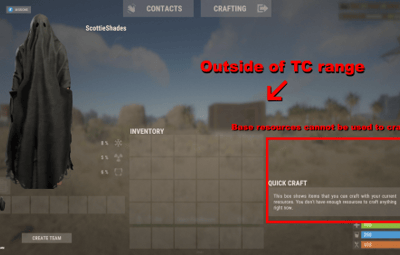
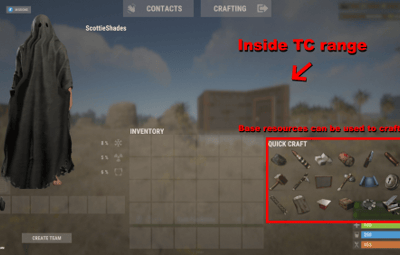
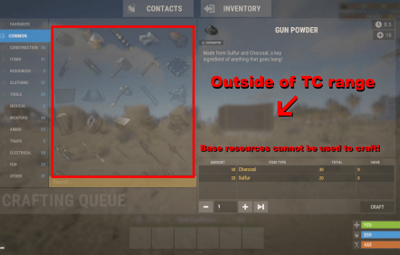
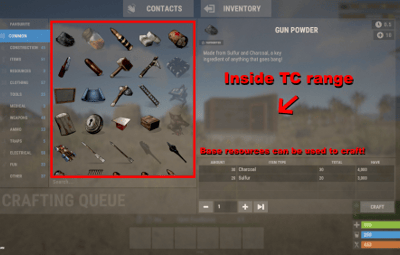
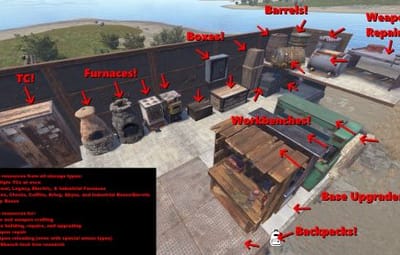
SuperCrafter allows users with permission to craft, repair, build, upgrade, and reload from resources, ammo, and crafting supplies stored at their base. Resources do not need to be in your player's inventory to craft. All supplies are pulled directly from your base supplies. No more needing to search through 100 boxes for crafting materials.
How it works:
If a player is within their TC range, they will automatically have access to their base supplies. By default the SuperCrafting range is set to TC range, however this can be modified with the configuration file. Optionally, Admins can set a per-player SuperCrafter range for VIP players! See below for commands.
How to get it working:
1) If your server is online and running - Upload "ItemRetriever.cs" first. Then upload both "SuperCrafterAPI.cs" and "SuperCrafter.cs" in any order.
(If you messed this up - unload all three plugins, then reload "ItemRetriever.cs" first. Optionally you can perform a server restart.)
2) Use your favorite permissions manager to set permissions for a player or group
3) Enjoy!
Performance:
SuperCrafter works with all base sizes and types. Performance does not change by SuperCrafting range. Safeguards are added to keep players from spam crafting a single item from near infinite base crafting supplies. These safeguards are modifiable in the configuration file.
More Information:
Works with:
* Tool Cupboards
* Storage Boxes (Box, Chest, Coffins, Krieg, Abyss, & Industrial)
* Storage Barrels (Krieg, Abyss, & Industrial)
* Normal, Legacy, & Electric Furnaces (not including External Furnaces)
* Unlocking Workbench Tech Tree (1,2,3)
* Vanilla Rust Backpacks (Small, Medium, Krieg)
* Reloading weapons
* Repairing your base
* Adding new parts to your base
Q&A:
Q: Do players need to learn any chat commands to use this plugin?
A: No. SuperCrafter is designed to play seamlessly like Vanilla Rust. However, there is a chat command to visualize crafting range; but most players don't need to use it.
Q: Can players use this plugin to steal crafting items from other player's bases?
A: A player can only craft from a base if they are authorized on the TC.
Q: Can players use this plugin to duplicate items?
A: No. This is aggressively tracked by many Rust servers. Tested by hundreds of Rust players constantly trying to cheat in items.
Q: What if a player is spam crafting 1-item at a time?
A: The configuration file by default limits the player to 6 items in their crafting queue at once. Change it to fit your server's needs.
Q: How far away can a player craft an item from their base?
A: By default, this is set to the TC's permission range. Change this setting for all players in the configuration file. Admins can change this per-player by using the console commands below.
Q: Could a player craft items from multiple TCs at once?
A: Yes & No. Default: No. Change this setting for all players in the configuration file. Admins can change this per-player by using the console commands below.
Files produced:
config/SuperCrafter.json - Default global settings for all players
data/SuperCrafter/###.json - Individual player settings (Delete all files to reset players to default config file settings)
plugins/SuperCrafter.cs - Code that makes SuperCrafter work
plugins/SuperCrafterAPI.cs - API code that makes SuperCrafter work
Languages supported:
English
German
French
Spanish
Italian
Japanese
Russian
Chinese
Permissions:
SuperCrafter.use - Allows user/group to use this plugin
SuperCrafter.use_tech_tree - Allows user/group to use pull scrap for unlocking the workbench tech tree nodes
SuperCrafter.admin_only - Allows user/group to use plugin console commands
SuperCrafter Configuration File:
{
  "Show debugging messages in console. (Default=false)": false,
  "Range in Rust Meters a player can access TC loot. (Default=18)": 18,
  "Pull crafting resources from FURNACES: (Default=false)": false,
  "Pull crafting resources from TC: (Default=true)": true,
  "Pull crafting resources from BOXES: (Default=true)": true,
  "Pull crafting resources from ONLY closest TC by default for all players: (Default=true)": true
}
SuperCrafterAPI Configuration File:
{
  "Show debugging messages in console. (Default=false)": false,
  "Pulls ammo from EXTERNAL sources (Base/Boat): (Default=true)": true,
  "Repair pulls resources from EXTERNAL sources (Base/Boat): (Default=true)": true,
  "Notify players of repair costs: (Default=true)": true,
  "Informs Server Console and Player when they are Spam Crafting: (Default=false)": true,
  "Limit crafting queue for players: (Default=6, Infinite=0)": 0,
  "Per-player crafting cooldown in seconds: (Default=0.25, Minimum=0.25)": 0.25,
  "NOTE: Minimum crafting cooldown required by your server may differ depending on your server hardware, player population, or base sizes. If you experience item duplication or resources being refunded incorrectly from craft canceling; increase the value. The default value should be good for 99% of servers.": ""
}
Console Commands:
Console Commands: [Usable only by Administrator]

---
Syntax:
SuperCrafter.SetPlayerCraftingRange [Player Display Name / PlayerID] [Range]

Description:
Sets a specific player's crafting range to a specific range. The player's crafting range will no longer change with configuration file crafting range changes.

This command will create a save file in '/data/SuperCrafter/[USER_ID].json'. This file does not automatically wipe with server wipe and will need to be manually deleted, or deleted with one of the commands below.

Example:
SuperCrafter.SetPlayerCraftingRange Vergbergler 30.0
---

---
Syntax:
SuperCrafter.ToggleClosestTCOnly [Player Display Name / PlayerID]

Description:
Enables/Disables a specific player's ability to craft from multiple TC's range, or from the closest single TC range.

This command will create a save file in '/data/SuperCrafter/[USER_ID].json'. This file does not automatically wipe with server wipe and will need to be manually deleted, or deleted with one of the commands below.

Example:
SuperCrafter.ToggleClosestTCOnly Vergbergler
---

---
Syntax:
SuperCrafter.DeletePlayerCraftingRange [Player Display Name / PlayerID]

Description:
Removes a custom crafting range set by the 'SuperCrafter.SetPlayerCraftingRange' command. Returns the value to the configuration file's default crafting range.

The player's crafting range will be set to the configuration file crafting range. This will modify the player's save file in '/data/SuperCrafter/[USER_ID].json'.

Example:
SuperCrafter.DeletePlayerCraftingRange Vergbergler
---

---
Syntax:
SuperCrafter.WipeAllPlayerCraftingRange

Description:
Deletes all per-player configuration settings. Each player's settings will be set to the configuration file values.

This will delete all files in '/data/SuperCrafter/[USER_ID].json'.

Example:
SuperCrafter.WipeAllPlayerCraftingRange
---
Chat Commands:
Chat Commands: [Usable by all players]

---
Syntax:
SuperCrafter.ShowCraftingRange [Optional Duration]

Description:
Shows a 3D outline of the SuperCrafter crafting range for a period of time. Only visible to the player that uses the command. Default duration is 30 seconds if one is not provided. Range will not update in real time if crafting range is changed in the configuration file, or by using the 'SuperCrafter.SetPlayerCraftingRange' command. After changing the crafting range, re-use this command to see the updated range.

Example #1:
SuperCrafter.ShowCraftingRange 45

Example #2:
SuperCrafter.ShowCraftingRange
---
