.thumb.png.4e98ae710e5cbd49292252861c5078f5.png)
About PlaceryExtended
PlaceryExtended — Precision Deployable Placement for Creative Rust Builds
PlaceryExtended is a highly configurable Rust plugin that gives players the power to place any deployable on walls, ceilings, and non-standard terrain, enabling creative base design and advanced PvE/PvP mechanics. It provides alignment control, cooldown restrictions, NoEscape integration, blacklist management, and more.
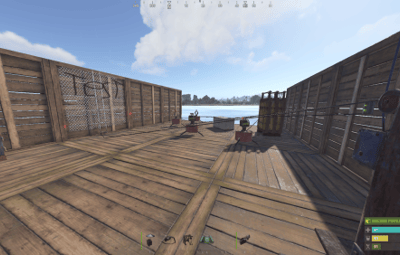
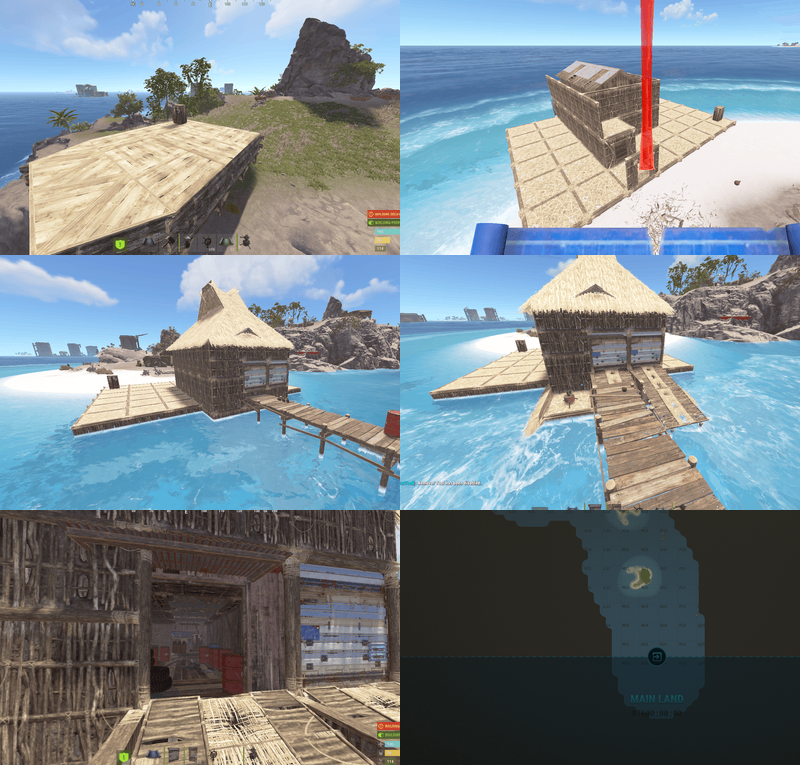
 UPDATED TO WORK WITH PLAYER BOATS
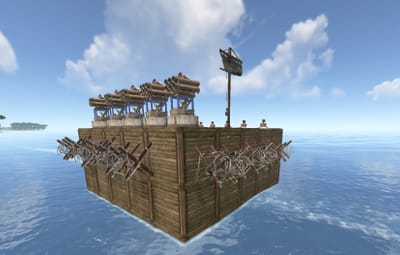
 UPDATED SO CANNONS CAN BE PLACED ON PLAYERBASES AND MOUNTED WITH CUSTOM MOUNT LOGIC!
UPDATED SO DEPLOYABLES CAN BE PLACED ON TERRAIN NOW - NEW CONFIG ADDED FOR THIS
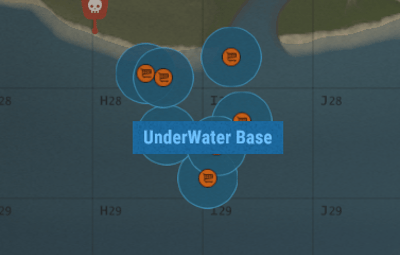
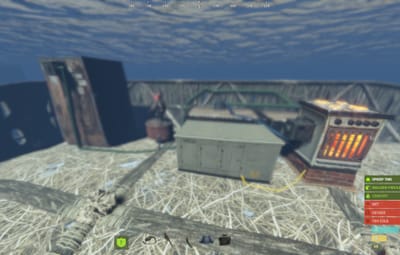
UPDATED SO UNDERWATER BASES IS POSSIBLE (ELECTRICAL DEPLOYABLES WONT WORK BUT FURNACES WILL WORK) - IF YOU DONT WANT THIS JUST KEEP TOOLCUPBOARDS BLACKLISTED
UPDATED WITH NEW ROTATEMODE FUNCTION HOLD DEPLOYABLE AND CLICK R TO USE THE NEW ROTATE MODE FOR PLACED DEPLOYABLES WITH PLACERYEXTENDED
UPDATED WITH NEW UNDERWATER IO TOOL SYSTEM! ALLOWS FULL UNDER WATER ELETRICITY - INDUSTRIAL - FLUIDIC -
Work In Progress
- Ability To Place Doors On Floor.Frame
- Correct Stacking Of Custom Deployables
Key Features
- Deployable Placement on Walls and Ceilings
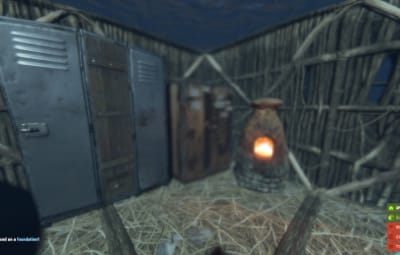
- Supports placing turrets, chairs, lockers, doors, seeds, lights, and more on any surface.
- Automatically aligns deployables using custom angle logic.
- Mountable Chair Support
- Players can mount chairs placed on walls or ceilings.
- Skins Support
- Items placed with skins retain their skin ID on spawn.
- Storage Adapter and Industrial Compatibility
- Supports industrial systems when placing furnaces, lockers, and other compatible deployables.
- Permission-Based Use
- Players need placeryextended.use to access features.
- Admin-only options available to bypass rules.
- Placement Toggle
- /toggleplacery allows players to turn plugin functionality on/off personally.
- Dynamic Blacklist
- Items can be blocked via config or admin commands.
- Combat/Raid/Escape Blocking
- Integrated with NoEscape plugin to restrict usage.
- Configurable Cooldowns and Radius
- Prevents spam or exploitative rapid placement.
- Language File Support
- Customize all messages through a language file.
How to Use Mounted Chairs & Sofa & ComputerStation
- Place the Entity using right-click via PlaceryExtended.
- Make sure it faces outwards and is not obstructed.
- Walk up and press E — the player will mount correctly. Press E again to dismount.
How It Works
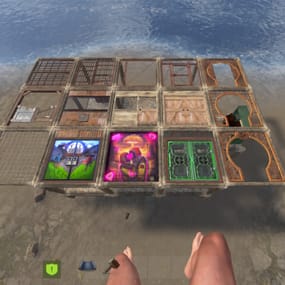
- Placery Extended introduces a special right-click placement process, allowing players to place deployables in areas that are normally restricted, such as walls, roofs, and other unconventional surfaces.
- To place items using Placery Extended, players must right-click (or hold it) during placement.
- Left-click continues to follow Rust's normal placement logic.
- This ensures that PlaceryExtended enhances gameplay without overriding default behavior.
- Requires The Players To Have A TC Placed Down To Place Deployable
- Admins With Permissions Can Place Deployables On Players Bases Since No TC Is Required - Perfect For Admin Trolling If Thats The Case
Configuration
{
  "General Settings": {
    "Require Command To Activate PlaceryExtended": false,
    "Allow Building On Islands": false,
    "Allow Door Placement": true,
    "Use Custom Mount Logic": false
  },
  "Chat Settings": {
    "Use Prefix": true,
    "Prefix": "<color=#89CFF0>[Placery Extended]</color>",
    "Channel": 0,
    "Icon Steam Id": 76561198888888888
  },
  "Placement Settings": {
    "Radius": 4.0,
    "Cooldown Seconds": 2.0
  },
  "Wire / Pipe / Hose Tool Settings": {
    "Enabled": true,
    "Selection Range": 5.0,
    "Max Connection Length": 30.0,
    "Max Route Nodes": 16,
    "Route Marker Duration": 2.0,
    "Route Marker Color": "#00FFFF",
    "Allow Sprint + Right Click Edit Existing Connection": true,
    "Show Help On Equip": true,
    "Help Duration Seconds": 10.0
  },
  "Restriction Settings": {
    "Block While Combat Blocked": false,
    "Block While Escape Blocked": false,
    "Block While Raid Blocked": false
  },
  "Placement Rules": {
    "Terrain": {
      "Enabled": true,
      "Require Context Authorization": true,
      "Allow Initial Tool Cupboard Placement": true,
      "Whitelist Enable": false,
      "Whitelist": [],
      "Blacklist Enable": true,
      "Blacklist": [
        "autoturret",
        "samsite"
      ],
      "Allowed Parent Shortnames Enable": false,
      "Allowed Parent Shortnames": [],
      "Allowed Surface Prefabs Enable": false,
      "Allowed Surface Prefabs": [],
      "Allowed Parent Deployables Enable": false,
      "Allowed Parent Deployables": []
    },
    "Player Built Bases": {
      "Enabled": true,
      "Require Context Authorization": true,
      "Allow Initial Tool Cupboard Placement": false,
      "Whitelist Enable": false,
      "Whitelist": [],
      "Blacklist Enable": true,
      "Blacklist": [
        "wall.external",
        "wall.frame",
        "wall.window",
        "ladder.wooden.wall",
        "chineselantern",
        "chineselanternwhite",
        "xmas.lightstring",
        "xmas.lightstring.advanced",
        "ceilinglight",
        "gunrack_stand",
        "xylophone",
        "piano",
        "pinata",
        "discoball",
        "microphonestand",
        "sled",
        "sled.xmas",
        "cupboard.tool",
        "cupboard.tool.shockbyte",
        "cupboard.tool.retro",
        "elevator",
        "generator.wind.scrap",
        "lock.code",
        "lock.key",
        "door.closer",
        "hopper"
      ],
      "Allowed Parent Shortnames Enable": true,
      "Allowed Parent Shortnames": [
        "floor",
        "wall",
        "foundation",
        "ceiling",
        "stair",
        "shelves",
        "roof",
        "floor.triangle",
        "floor.triangle.frame",
        "floor.frame",
        "wall.half",
        "wall.low",
        "roof.triangle",
        "wall.doorway"
      ],
      "Allowed Surface Prefabs Enable": false,
      "Allowed Surface Prefabs": [],
      "Allowed Parent Deployables Enable": true,
      "Allowed Parent Deployables": [
        "box.wooden.large"
      ]
    },
    "Player Boats": {
      "Enabled": true,
      "Require Context Authorization": true,
      "Allow Initial Tool Cupboard Placement": false,
      "Whitelist Enable": false,
      "Whitelist": [
        "lantern"
      ],
      "Blacklist Enable": true,
      "Blacklist": [
        "autoturret",
        "samsite"
      ],
      "Allowed Parent Shortnames Enable": false,
      "Allowed Parent Shortnames": [],
      "Allowed Surface Prefabs Enable": true,
      "Allowed Surface Prefabs": [
        "assets/prefabs/building boat/floor/floor.prefab",
        "assets/prefabs/building boat/floor/floor.wood.prefab",
        "assets/prefabs/building boat/floor.frame/floor.frame.prefab",
        "assets/prefabs/building boat/floor.frame/floor.frame.wood.prefab",
        "assets/prefabs/building boat/floor.frame.triangle/floor.frame.triangle.wood.prefab",
        "assets/prefabs/building boat/floor.frame.triangle/floor.triangle.frame.prefab",
        "assets/prefabs/building boat/floor.triangle/floor.triangle.prefab",
        "assets/prefabs/building boat/floor.triangle/floor.triangle.wood.prefab",
        "assets/prefabs/building boat/hull.corner/hull_corner.prefab",
        "assets/prefabs/building boat/hull.corner/hull_corner.wood.prefab",
        "assets/prefabs/building boat/hull.square/hull_square.prefab",
        "assets/prefabs/building boat/hull.square/hull_square.wood.prefab",
        "assets/prefabs/building boat/hull.triangle/hull.triangle.prefab",
        "assets/prefabs/building boat/hull.triangle/hull.triangle.wood.prefab",
        "assets/prefabs/building boat/ladder/ladder.wooden.boat.item.prefab",
        "assets/prefabs/building boat/ladder/ladder.wooden.boat.prefab",
        "assets/prefabs/building boat/ladder/ladder.wood.prefab",
        "assets/prefabs/building boat/stair/stair.prefab",
        "assets/prefabs/building boat/stair/stair.wood.prefab",
        "assets/prefabs/building boat/pillar/pillar.wood.prefab",
        "assets/prefabs/building boat/wall/wall.prefab",
        "assets/prefabs/building boat/wall/wall.wood.prefab",
        "assets/prefabs/building boat/wall/wall.wood.full.prefab",
        "assets/prefabs/building boat/wall/wall.wood.corner.l.prefab",
        "assets/prefabs/building boat/wall/wall.wood.corner.r.prefab",
        "assets/prefabs/building boat/wall.low/wall.low.prefab",
        "assets/prefabs/building boat/wall.low/wall.low.wood.prefab",
        "assets/prefabs/building boat/wall.low.barrier/wall.low.barrier.prefab",
        "assets/prefabs/building boat/wall.low.barrier/wall.low.barrier.wood.prefab",
        "assets/prefabs/building boat/wall.low.barrier/wall.low.barrier.alt.wood.prefab",
        "assets/prefabs/building boat/wall.low.canon/wall.low.cannon.prefab",
        "assets/prefabs/building boat/wall.low.canon/wall.low.canon.wood.prefab",
        "assets/prefabs/building boat/wall.window/wall.window.prefab",
        "assets/prefabs/building boat/wall.window/wall.window.wood.prefab",
        "assets/prefabs/building boat/wall.window/wall.window.alt.wood.prefab",
        "assets/prefabs/building boat/wall.doorway/wall.doorway.prefab",
        "assets/prefabs/building boat/wall.doorway/wall.doorway.wood.prefab"
      ],
      "Allowed Parent Deployables Enable": false,
      "Allowed Parent Deployables": []
    },
    "Underwater": {
      "Enabled": true,
      "Require Context Authorization": true,
      "Allow Initial Tool Cupboard Placement": true,
      "Whitelist Enable": false,
      "Whitelist": [],
      "Blacklist Enable": true,
      "Blacklist": [
        "autoturret",
        "samsite"
      ],
      "Allowed Parent Shortnames Enable": true,
      "Allowed Parent Shortnames": [
        "floor",
        "wall",
        "foundation",
        "ceiling",
        "stair",
        "shelves",
        "roof",
        "floor.triangle",
        "floor.triangle.frame",
        "floor.frame",
        "wall.half",
        "wall.low",
        "roof.triangle",
        "wall.doorway"
      ],
      "Allowed Surface Prefabs Enable": false,
      "Allowed Surface Prefabs": [],
      "Allowed Parent Deployables Enable": false,
      "Allowed Parent Deployables": []
    }
  },
  "PVP Extras": {
    "Underwater Tool Cupboard Marker Settings": {
      "Enabled": true,
      "Marker Text": "UnderWater Base",
      "Show Radius Marker": true,
      "Marker Radius (0.05 - 1.0)": 0.25,
      "Marker Alpha (0 - 1)": 0.85,
      "Marker Colour 1 (hex)": "#050505",
      "Marker Colour 2 (hex)": "#4FC3F7"
    }
  },
  "Debug Settings": {
    "Enabled": true
  }
}
Extended Placement List
Copy Paste Belov This Line And Replace It With The Placement In Your Config
"Placement": [
"floor",
"wall",
"foundation",
"ceiling",
"stair",
"shelve",
"roof",
"floor.triangle",
"floor.triangle.frame",
"floor.frame",
"wall.half",
"wall.low",
"roof.triangle",
"wall.frame",
"wall.frame.garagedoor"
],
Commands:
Player Commands
- /toggleplacery – Toggle plugin functionality on/off
- /placeryhelp – Show available Placery commands
Admin Commands
- /addblacklist <shortname> – Add item to blacklist
- /removeblacklist <shortname> – Remove item from blacklist
- /getblacklist – View all blacklisted items
- /clearblacklist – Wipe blacklist
- /reloadplacery – Reload plugin config on the fly
Compatible Deployables (Examples)
- Furniture: Chairs, beds, lockers
- Doors: Garage, double/hinged (if enabled)
- Electronics: Smart switches, ceiling lights
- Farming: Seeds on walls and ceilings
- Storage: Coffins, boxes, lockers
- Defensive: Turrets, barricades, mines
- Basicly Any Deployable/Item In The Game Gets Turned Into A Deployable That Can Be Placed With PlaceryExtended
Ideal For
- Creative Servers: Unlock full freedom in placement.
- PvP/Arena Maps: Place traps and decor smartly.
- Roleplay Builds: Enhanced immersion with unrestricted design.
Compatibility
- NoEscape – Supported natively for blocking during combat.
- UberTool – May cause conflicts; disable if needed.
- Requires uMod/Oxide.
- Will Continuesly Be Updated To Support Useage While Using Other Custom Plugins
Installation
- Drop the .cs file into your oxide/plugins folder.
- Restart or reload the plugin.
- Edit the config in oxide/config/PlaceryExtended.json.
 Media
Media
Enjoy the creative freedom of building your base YOUR way with PlaceryExtended!
API DEV HOOKS:
Called before PlaceryExtended creates and places a deployable.
object CanPlaceryExtendedPlace(
    BasePlayer player,
    Item item,
    BaseEntity parent,
    uint prefabId,
    string prefabPath,
    Vector3 position,
    Vector3 normal
)

Called after PlaceryExtended successfully creates, spawns, and deploys an entity.
void OnPlaceryExtendedPlaced(
    BasePlayer player,
    Item item,
    BaseEntity entity,
    BaseEntity parent,
    uint prefabId,
    string prefabPath
)
Join My Discord For Update
Plugins By Duff - https://discord.gg/2KBPH7hXb7