Jump to content
Message added by The_Kiiiing,

Join my discord: https://discord.gg/mqbB5cTSfc

6 Screenshots

  • 361k
  • 22.3k
  • 550.7 kB
  • Update details
    v2.2.20
    Released
    Download size 550.7 kB
    Total versions 81
    Typical update pace About every 13 days
    Freshness Updated 2 days ago

This area is for discussion and questions. Please use the support area for reporting issues or getting help.

Recommended Comments


The_Kiiiing

Posted

8 hours ago, TheRiddledNote said:

hey king, I tried it, it worked at first I believe as I saw no more conflict but it reverted and now the conflict is still there. I have stacksize controller dsiabled from loottable gui as well. 

Did you try to enable the flag DisableStackingHooks? It completely disables all stacking related hooks (see description under flags)

Noel2997

Posted (edited)

@The_Kiiiing

Hello, I would like to move my server. Which files should I copy to preserve settings like drop rates?

If I copy the /opt/rust_server/oxide folder, will the data be transferred?

Edited by Noel2997
The_Kiiiing

Posted

7 hours ago, Noel2997 said:

@The_Kiiiing

Hello, I would like to move my server. Which files should I copy to preserve settings like drop rates?

If I copy the /opt/rust_server/oxide folder, will the data be transferred?

All the loot data is stored in the folder oxide/data/Loottable

ChristopherS

Posted (edited)

EDIT: Even after setting "Custom loot configuration" to enabled, I'm still not getting these additions.

I've just installed this plugin so I'm most likely doing something wrong.

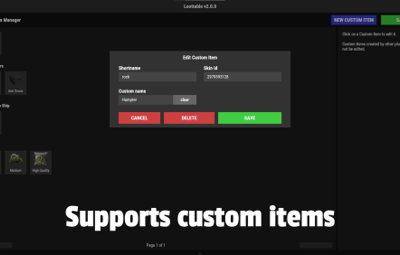
Basically what I'm wanting to do is have the ability to add custom items into vanilla things like supply drops and locked crates.

In the loot table editor I've:
 - Set my custom item (the correct skin is showing), with a 100% spawn chance for 1 item and a 5% chance for another item,
 - Set the loot type option to "addition".

Unfortunately all that's happening is the vanilla spawn and nothing more. Does anyone know where I'm going wrong here?

Thanks!image.thumb.png.981fc02c30ec69a8e6bcd92b4ac07901.png
image.thumb.png.2589cc327b365bb4db6eb284e18cbc9b.png

Edited by ChristopherS
ChristopherS

Posted (edited)

Deleted: Codefling wouldn't post so I hit submit multiple times. 
Sorry.

Edited by ChristopherS
ChristopherS

Posted (edited)

Deleted: Codefling wouldn't post so I hit submit multiple times. 
Sorry.

Edited by ChristopherS
ChristopherS

Posted (edited)

Deleted: Codefling wouldn't post so I hit submit multiple times. 
Sorry.

Edited by ChristopherS
Noel2997

Posted

@The_Kiiiing
Is it possible to change the loot table for NPCs that spawn on the roads?

The_Kiiiing

Posted

9 hours ago, ChristopherS said:

EDIT: Even after setting "Custom loot configuration" to enabled, I'm still not getting these additions.

I've just installed this plugin so I'm most likely doing something wrong.

Basically what I'm wanting to do is have the ability to add custom items into vanilla things like supply drops and locked crates.

In the loot table editor I've:
 - Set my custom item (the correct skin is showing), with a 100% spawn chance for 1 item and a 5% chance for another item,
 - Set the loot type option to "addition".

Unfortunately all that's happening is the vanilla spawn and nothing more. Does anyone know where I'm going wrong here?

Thanks!image.thumb.png.981fc02c30ec69a8e6bcd92b4ac07901.png
image.thumb.png.2589cc327b365bb4db6eb284e18cbc9b.png

You have to enable your configuration with the botton on the top left

The_Kiiiing

Posted

7 hours ago, Noel2997 said:

@The_Kiiiing
Is it possible to change the loot table for NPCs that spawn on the roads?

Yes, every npc can be configured separately

ChristopherS

Posted (edited)

3 hours ago, The_Kiiiing said:

You have to enable your configuration with the botton on the top left

If you mean the "Custom loot configuration" button, I've tried that. The previous menu shows "Vanilla & Additions", but there's no additions in the crate.

EDIT: So supply signals work fine, locked crates do not. I use Automated Events for my Chinook locked crates and not the vanilla event. Would this be the reason as to why locked crates aren't working? 

Edited by ChristopherS
The_Kiiiing

Posted

3 hours ago, ChristopherS said:

If you mean the "Custom loot configuration" button, I've tried that. The previous menu shows "Vanilla & Additions", but there's no additions in the crate.

EDIT: So supply signals work fine, locked crates do not. I use Automated Events for my Chinook locked crates and not the vanilla event. Would this be the reason as to why locked crates aren't working? 

Can you try spawning a locked crate and check the loot there?

ChristopherS

Posted

I use Automated Events for all in-game events rather than have the vanilla ones run.

After some testing I've found that:
 - The cargo plane and supply signals are fine. 
 - Spawned in hackable crates are okay, but the automated events chinook are hit or miss. Some locked crates they drop give the additions, while some do not.
(I've not had a chance to test heli/oil/bradley crates yet (I use plugins that control them and spawn in extra crates too)).

I've double checked the config and I do have an item set with a 100% chance so would expect to see this. 

I'm going to get my kids sorted, and tonight when they're in bed I'll test this much more thoroughly. 

iMonkey

Posted

sorry if this has been answered before, any chance we can get control over deployable quarries like from the survey charges?

ChristopherS

Posted

On 7/17/2023 at 4:10 PM, The_Kiiiing said:

Can you try spawning a locked crate and check the loot there?

Sorry on the delay getting back to you, life decided to throw a few lemons.

So spawning in 8 locked crates and 1 that was dropped with Automated Events, they are hit or miss with a 50% (exactly) success rate.

The main page of the GUI says "Vanilla + Additions", and at least 1 item inside the crate is for certain set to a 100% chance.

With me wanting to keep the actual loot table of these vanilla, I did not click the generate loot table thinking that it wasn't needed. 
I'm not sure what I've done wrong for this to happen.image.thumb.png.18abdca7a76d301e16f225b9fbceedaf.pngimage.thumb.png.8c05dd171f816fce01b37ea28351a665.png

Zynthic

Posted

Hello developer, Would it be possible to add the ability to change the item for clones? So i'm able to have a custom inventory icon for my clone. Thanks

Zynthic

Posted

On 8/2/2023 at 12:17 AM, Zynthic said:

Hello developer, Would it be possible to add the ability to change the item for clones? So i'm able to have a custom inventory icon for my clone. Thanks

And also the ability to change what items the player receives when they gather from a planter box? That would be awesome.

Sapnu

Posted

am i being blind or isnt there an option to alter the loot for cream/yellow looking barrels ? all im seeing options for is the red and blue 

david potts

Posted

I see you can set a particular skin on loot items but could you enable random skins on loot? maybe a checkbox next to the skin ID saying random?

TheRiddledNote

Posted (edited)

ignore, it fixed itself lmao. I had to reload twice.

Edited by TheRiddledNote
The_Kiiiing

Posted

On 8/9/2023 at 2:18 PM, houdini said:

am i being blind or isnt there an option to alter the loot for cream/yellow looking barrels ? all im seeing options for is the red and blue 

There is only one config for barrels that get applied to both blue and tan barrels

The_Kiiiing

Posted

On 8/9/2023 at 11:36 PM, david potts said:

I see you can set a particular skin on loot items but could you enable random skins on loot? maybe a checkbox next to the skin ID saying random?

Random skins are not suppported at the moment, I might add it in a future update

  • Love 1
atmos

Posted

Hi, i just bought the plugin and i was wondering can i use lootify to make a customloot table then send it to the plugin or it's all in the GUI 


thanks

The_Kiiiing

Posted

5 minutes ago, atmos said:

Hi, i just bought the plugin and i was wondering can i use lootify to make a customloot table then send it to the plugin or it's all in the GUI 


thanks

Loot tables can be configured in the GUI

Waddie

Posted

3 hours ago, atmos said:

Hi, i just bought the plugin and i was wondering can i use lootify to make a customloot table then send it to the plugin or it's all in the GUI 


thanks

the loot table gui is so easy to use. i would just go with that tbh 

Create an account or sign in to comment

You need to be a member in order to leave a comment

Create an account

Sign up for a new account in our community. It's easy!

Register a new account

Sign in

Already have an account? Sign in here.

Sign In Now
  • Like 16
  • Love 5

User Feedback

About Us

Codefling is the largest marketplace for plugins, maps, tools, and more, making it easy for customers to discover new content and for creators to monetize their work.

Downloads
3m
Total downloads
Customers
12k
Customers served
Files Sold
170.6k
Total sales
Payments
3.7m
Processed total
×
×
  • Create New...

Important Information

We have placed cookies on your device to help make this website better. You can adjust your cookie settings, otherwise we'll assume you're okay to continue.